

How to Turn Off Automatic High Beams on a Toyota Camry

Contents
- 1 Key Takeaways
- 2 📑 Table of Contents
- 3 Understanding Your Camry’s Auto High Beam System
- 4 The Primary Method: Using the Turn Signal Stalk
- 5 Disabling via the Multi-Information Display (MID) or Settings Menu
- 6 Model Year Variations and What to Expect
- 7 Troubleshooting: What If It Won’t Turn Off?
- 8 Safety Considerations and Best Practices
- 9 Conclusion: Taking Control of Your Light
- 10 Frequently Asked Questions




Turning off the Automatic High Beam system in your Toyota Camry is a straightforward process you can control from the steering wheel or the vehicle’s settings menu. The primary method involves a simple push or pull of the turn signal stalk, while newer models offer an electronic disable option through the multi-information display. Understanding how to disable this feature gives you manual control over your headlights, which can be useful in specific driving conditions like fog, heavy rain, or when following another vehicle closely.
Key Takeaways
- The system is designed for convenience, but manual override is always available. Toyota’s Auto High Beam (AHB) technology is a driver-assist feature meant to improve nighttime visibility, but you are always in ultimate control of your vehicle’s lighting.
- Disabling is typically done via the turn signal stalk. For most Camry model years, a quick push or pull of the stalk away from you will turn off the high beams and deactivate the automatic function until the next ignition cycle.
- Newer models (2020+) allow permanent disablement through the settings menu. You can often turn off the Auto High Beam function entirely via the multi-information display, preventing it from re-engaging automatically.
- Safety and legality are paramount. Remember that high beams can blind other drivers. You must manually switch to low beams when approaching oncoming traffic or following a vehicle, regardless of the AHB system’s status.
- The process varies slightly by model year and trim. While the core principle is the same, the exact location of buttons and menu options can differ between older and newer Camry generations.
- Disabling is temporary unless you use the vehicle settings. The stalk method usually resets when you turn the car off and on again. For a longer-term solution, use the in-dash settings on compatible models.
- Other Toyota safety systems are similarly customizable. If you’re looking to adjust other driver-assist features, you can learn how to turn off Lane Assist on a Toyota Camry or manage RCD (Rear Cross-Traffic Alert) settings through similar menu structures.
📑 Table of Contents
- Understanding Your Camry’s Auto High Beam System
- The Primary Method: Using the Turn Signal Stalk
- Disabling via the Multi-Information Display (MID) or Settings Menu
- Model Year Variations and What to Expect
- Troubleshooting: What If It Won’t Turn Off?
- Safety Considerations and Best Practices
- Conclusion: Taking Control of Your Light
Understanding Your Camry’s Auto High Beam System
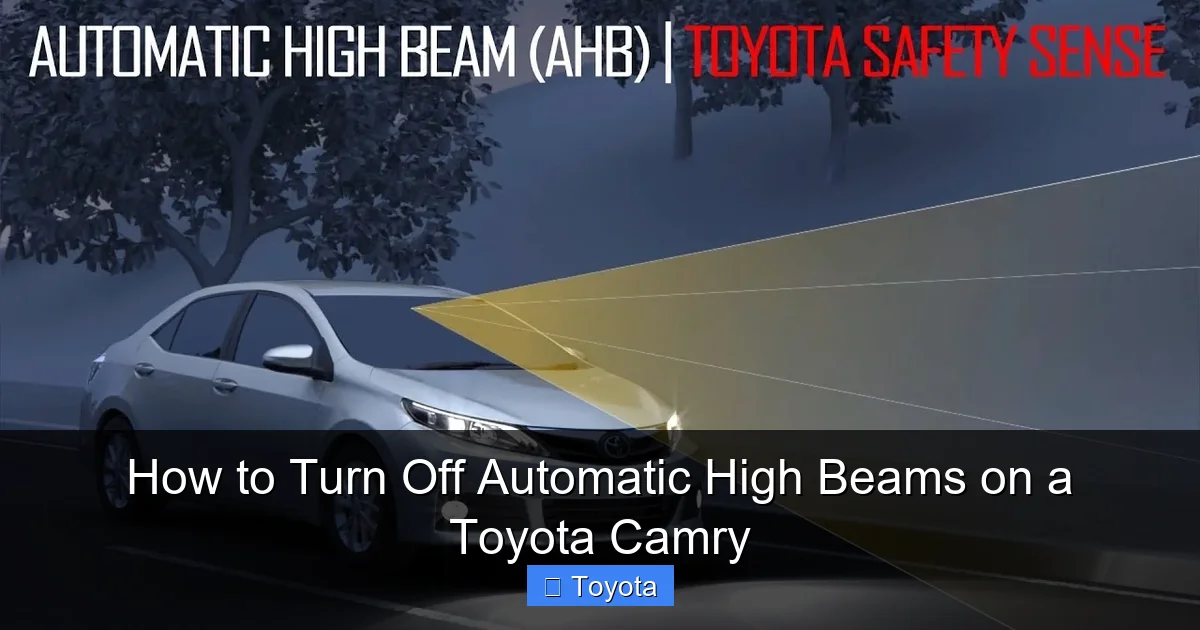
Before we dive into the “how,” let’s quickly cover the “what” and “why.” The Automatic High Beam system in your Toyota Camry is a clever piece of technology designed to take a bit of workload off your shoulders during nighttime driving. It uses a camera sensor, typically located near the rearview mirror, to monitor oncoming traffic and vehicles ahead. When the road is clear, it will automatically switch your headlights to high beam to maximize your viewing distance. The moment it detects the headlights or taillights of another vehicle, it gracefully dips back to low beams to avoid dazzling other drivers.
This is a fantastic safety feature for long, dark country roads. However, there are absolutely situations where you, as the driver, want and need immediate, predictable control. Maybe you’re driving through a thick fog where high beams actually create a “white wall” effect and reduce visibility. Perhaps you’re on a well-lit city street where high beams are unnecessary and intrusive. Or, you might simply prefer the old-school habit of controlling your lights yourself. Whatever your reason, knowing how to turn off the automatic function and take the wheel—literally—is an important part of understanding your vehicle.
How the System Knows When to Switch
The system’s “brain” is constantly analyzing data from the forward-facing camera. It’s programmed to recognize the specific light patterns of headlights and taillights. It also considers your vehicle’s speed; the system typically won’t engage at very low speeds, like when you’re in a parking lot. Environmental factors like heavy rain, snow, or a dirty windshield can sometimes confuse the sensor, causing it to malfunction or be overly cautious. This is a prime scenario where you’d want to switch to manual control.
It’s also worth noting that this system is often integrated with other Toyota Safety Sense (TSS) features. For instance, if you have Pre-Collision System with Pedestrian Detection, the camera that feeds the auto high beams is often the same one used for that system. So, if your auto high beams aren’t working, it might be linked to a broader camera issue. But that’s a diagnostic for another article.
The Primary Method: Using the Turn Signal Stalk
This is the fastest, most universal method and works on virtually every Camry model year equipped with Auto High Beams. The control is built directly into the turn signal and wiper lever (stalk) on the left side of your steering column. You don’t need to navigate any menus; it’s a physical, tactile control meant for instant access.

Visual guide about How to Turn Off Automatic High Beams on a Toyota Camry
Image source: tohighlander.com
Here is the step-by-step process:
- Ensure your headlights are in the AUTO position. First, confirm your main headlight switch (the rotary knob on the stalk itself or a separate dashboard switch, depending on your year) is set to AUTO. The Auto High Beam system will not function if your lights are manually set to ON (low beams always on) or OFF.
- Activate the Auto High Beam function (if not already on). With your lights on AUTO, start driving at night. When you approach a dark, open road, push the stalk away from you (toward the windshield) to activate the high beams. You should see a small blue icon resembling a headlight with lines radiating from it illuminate on your instrument cluster or Heads-Up Display (if equipped). This indicates Auto High Beam is active and the system is now in control.
- Manually override and turn off the system. To disable the automatic function and force the lights back to low beams, simply pull the stalk toward you (to the flash-to-pass position) and release it. You will hear a distinct click, and the high beams will turn off. The blue Auto High Beam icon on your dash will also go out. This action tells the car, “I’m taking over now.” The system will remain off until you manually reactivate it by pushing the stalk away again or, in most cases, until you turn the car off and restart it.
Pro Tip: The “pull toward you” motion is the same one you’d use to briefly flash your high beams at another driver to signal them to go ahead. Using it to disable Auto High Beam is a perfectly normal and intended use of that control. It’s designed to be an immediate, instinctive action.
Disabling via the Multi-Information Display (MID) or Settings Menu
For Camry owners with model years roughly from 2018 onward (especially the XLE, XSE, and Limited trims), Toyota provided a more permanent software-based option. This allows you to turn off the Auto High Beam feature entirely from the vehicle’s settings, so it won’t automatically engage even if you push the stalk.
Visual guide about How to Turn Off Automatic High Beams on a Toyota Camry
Image source: m.media-amazon.com
Here’s how to find and use this setting. The exact menu names can vary slightly, but the path is generally the same:
- Start the car. Make sure the ignition is in the ON position (you don’t necessarily need to start the engine, but the dash should be powered on).
- Locate the display controls. You’ll use the buttons on the steering wheel to navigate. Look for a button with a “Menu” or “Info” icon (often looks like a list or a sheet of paper) or a dedicated arrow/okay button cluster on the left spoke of the steering wheel.
- Navigate to the Settings menu. Press the menu/info button to bring up the Multi-Information Display on your instrument cluster. Use the arrow buttons (up/down/left/right) to scroll through options like Trip Information, Vehicle Settings, etc. You’re looking for “Vehicle Settings” or “Settings”.
- Find the Lighting or Headlight settings. Once inside the Vehicle Settings menu, scroll to find a sub-menu for “Lighting” or “Headlights.” The Auto High Beam setting is usually nested in here.
- Disable the Auto High Beam function. You should see an option listed as “Auto High Beam,” “Automatic High Beam,” or “AHB.” Select it and change the status from ON to OFF.
- Exit the menu. Your setting is typically saved automatically. You can now exit the menu by pressing the back button or waiting for the display to time out.
With this setting turned off, pushing the stalk away will now give you a temporary manual high beam (until you pull the stalk back or turn the car off), but it will not activate the automatic sensing and dipping function. To re-enable the full automatic system, simply navigate back to that menu and switch it back ON. This method is particularly useful if you find the system engaging at unwanted times and don’t want to manually override it on every drive.
Model Year Variations and What to Expect
While the principle is consistent, the exact user experience can differ between the eighth-generation (2012-2017) and ninth-generation (2018-present) Camry. Here’s a quick breakdown:
Visual guide about How to Turn Off Automatic High Beams on a Toyota Camry
Image source: i.ytimg.com
Eighth-Generation Camry (2012-2017)
On these models, the Auto High Beam system is almost exclusively controlled via the stalk. There is no option to disable it from the vehicle settings menu in the MID. The system will automatically engage when conditions are met and you’ve pushed the stalk to the “on” position. Your only method of turning it off is the manual pull-of-the-stalk override. This action also resets the system’s state, so you’ll need to push the stalk again to reactivate auto high beams on your next night drive.
Ninth-Generation Camry (2018-Present)
These models, especially those with the larger 7-inch or 8-inch digital instrument cluster or the optional 10-inch Head-Up Display, offer the in-menu disable option. The stalk method for immediate override still works identically. The display will show clearer icons and text confirming the status of “Auto High Beam.” Some higher trims might even have a dedicated physical button on the steering wheel labeled for headlight functions, but the stalk remains the primary control.
A note on trims: The availability of the settings-menu disable function often correlates with the trim level’s technology package. Base models might still rely solely on the stalk method. If you can’t find the setting in your menu, your Camry likely doesn’t have that software option, and the stalk is your only control method.
Troubleshooting: What If It Won’t Turn Off?
If you’ve followed the steps above and the high beams either won’t activate automatically or won’t turn off, there are a few common culprits.
The Stalk or Switch Might Be Faulty
The physical mechanism in the turn signal stalk can wear out over time, especially on high-mileage vehicles. If you pull the stalk and nothing happens—no click, no change in beams—the internal switch for the high beams may have failed. This usually requires replacing the entire turn signal switch assembly, which is a more involved repair.
A Dirty or Obstructed Windshield/Camera
The camera sensor is usually located behind the rearview mirror, near the top of the windshield. If this area is dirty, covered by a large dashboard item, or if the windshield has a crack or significant sticker in that spot, the system cannot “see” properly. It might default to keeping high beams off or might malfunction erratically. A good cleaning of the interior windshield around the mirror often resolves this.
The System is Temporarily Disabled
The Auto High Beam system can automatically disable itself if it detects a fault. This could be due to a temporary issue like driving through a blinding downpour, a dirty camera lens, or extreme glare from streetlights. In this case, the system will usually turn off and may display a warning message (like “Check Auto High Beam” or a similar indicator) on your dash. Often, restarting the car (turning it off and back on) will reset the system once the sensor’s view is clear again.
Other Related Issues
Because the camera is shared with other systems like the Pre-Collision System, a problem with that broader suite of safety features could cause the Auto High Beam to be disabled. If you see other warning lights like the PCS (Pre-Collision System) warning light or a general “Safety Sense” warning, the issue is likely more complex and requires diagnostic scanning by a professional.
Safety Considerations and Best Practices
This is the most critical section. Disabling an automatic system should never lead to complacency. Here’s what you must keep in mind:
- You are legally responsible for your headlight use. Traffic laws in all states require you to dim your high beams when approaching an oncoming vehicle (typically within 500 feet) or when following another vehicle (typically within 200-300 feet). The AHB system is designed to help you comply, but if you disable it, you must manually switch to low beams in these situations. Failing to do so is illegal and can cause a serious accident.
- High beams are for dark, unlit roads. Their purpose is to extend your sight distance. Using them in city traffic, on well-lit highways, or in fog/rain/snow is not only ineffective but can reflect light back into your own eyes, making it harder to see. It also blinds other drivers.
- Re-enable the system when appropriate. There’s no reason to leave the Auto High Beam disabled permanently unless you have a specific, recurring issue. For long, dark stretches of highway, it’s a fantastic helper. Make it a habit to check your stalk position and dash icon when you start driving at night to ensure the system is in the state you want.
- Maintain your windshield and camera lens. A clean windshield is critical for the system to work. Regularly clean the inside of the windshield around the rearview mirror area. Avoid placing large, opaque objects on the dashboard that could obstruct the camera’s view.
Ultimately, technology like Auto High Beam is a tool. Knowing how to use it—and how to turn it off—makes you a more competent and safe driver. It puts you back in the driver’s seat, which is where you always want to be.
Conclusion: Taking Control of Your Light
Your Toyota Camry’s Automatic High Beam system is a brilliant fusion of convenience and safety technology. However, its true value lies in your ability to override it. As we’ve detailed, taking control is simple: a quick pull of the turn signal stalk for an immediate, temporary override, or a few button presses in the vehicle settings menu for a longer-term disable (on applicable models).
Remember the core reasons you might need this control—adverse weather, heavy traffic, or personal preference—and always pair your light control with sound judgment and legal compliance. The goal of any driver-assist feature is to augment your skills, not replace your attention. By understanding how to turn off your Camry’s auto high beams, you ensure the technology serves you, not the other way around. You’ve now mastered another facet of your vehicle’s operation, making your nighttime driving safer and more tailored to your needs.
Frequently Asked Questions
Will turning off Auto High Beam affect my daytime running lights or low beams?
No. Disabling the Auto High Beam system only affects the automatic control of your high beams. Your low beams and daytime running lights (DRLs) will continue to function normally according to your headlight switch position and ambient light conditions.
Is it bad for the system if I constantly turn it off manually?
No. The system is designed for frequent manual override. The stalk mechanism is built to withstand thousands of uses. Constantly pulling the stalk to disable the auto function is a normal and intended use case and will not cause any harm to the system.
Can I permanently disable Auto High Beam so it never comes on, even if I push the stalk forward?
On newer Camry models (typically 2018+) with the settings menu, you can turn the Auto High Beam function OFF in the vehicle settings. With this setting disabled, pushing the stalk forward will only give you a temporary manual high beam (like the old-fashioned way) that will go off when you pull the stalk back or turn off the car. The automatic sensing function will be disabled. On older models without this menu option, the system will always re-activate the next time you push the stalk forward after starting the car.
My Auto High Beams won’t turn on at all. What’s wrong?
First, ensure your headlight switch is set to AUTO and that your exterior lights are on (either automatically or manually). Check that the area in front of the windshield camera (behind the rearview mirror) is clean and unobstructed. If it’s clean and the system still doesn’t work, there may be a fault with the camera sensor or a related system like the Pre-Collision System. A diagnostic scan at a dealership or auto shop may be needed.
Does turning off Auto High Beam save my battery or improve fuel economy?
The energy savings are so minuscule they are completely negligible. The high-beam bulbs themselves use the same amount of power whether they are turned on automatically or manually. The system’s computer uses a tiny amount of additional power, but it would take years of driving to measure any difference in fuel economy. The reason to disable it is for driver preference and specific conditions, not efficiency.
If I disable it through the menu, do I have to do it every time I start the car?
No. The setting you change in the Multi-Information Display (Vehicle Settings > Lighting) is stored in the car’s memory. Once you turn the Auto High Beam function OFF in the menu, it will remain off until you manually go back into the menu and turn it ON again, even if you turn the car off and on multiple times.







