
How to Reset the Radio on a Dodge Durango

Resetting the radio on a Dodge Durango is a simple process that can solve common audio problems like frozen screens, unresponsive buttons, or lost presets. Whether you’re driving a 2011 model or a 2023 Durango, this guide walks you through every method—from soft resets to full factory restores—so you can get your sound system back on track fast.
If you’ve ever been cruising down the highway, jamming to your favorite playlist, only to have your Dodge Durango’s radio suddenly freeze, go silent, or start acting up, you’re not alone. It’s frustrating—especially when you’re miles from home and just want your music back. The good news? Most radio issues in a Dodge Durango can be fixed with a simple reset. Whether you’re dealing with a blank screen, unresponsive buttons, distorted sound, or lost station presets, knowing how to reset the radio on a Dodge Durango can save you time, stress, and a trip to the dealership.
The Dodge Durango has evolved significantly over the years, and so has its audio system. From basic AM/FM radios in early models to the advanced Uconnect infotainment systems in newer versions, the way you reset the radio depends on your vehicle’s year and trim level. But don’t worry—this guide covers all the bases. Whether you drive a 2011 Durango with physical knobs or a 2023 model with a large touchscreen, we’ll walk you through every method step by step. You’ll learn how to perform a soft reset, a hard reset, and even how to pull a fuse if all else fails. Plus, we’ll share tips to prevent future problems and keep your Durango’s sound system running smoothly.
Key Takeaways
- Soft reset fixes minor glitches: A quick power cycle can resolve temporary radio freezes or audio dropouts without losing your settings.
- Hard reset restores factory defaults: This method clears all presets and settings but often resolves persistent software or hardware issues.
- Model year matters: Older Durangos (pre-2013) use analog controls, while newer models feature Uconnect touchscreens with digital menus.
- Fuse pull is a reliable backup: If the radio won’t turn off, removing the radio fuse for 30 seconds forces a hard reset.
- Uconnect updates prevent future issues: Keeping your system updated ensures compatibility and reduces the need for resets.
- Backup your presets first: Before a hard reset, manually note your favorite stations to avoid re-entering them later.
- Professional help may be needed: If resets don’t work, the issue could be hardware-related and require a technician.
📑 Table of Contents
Why You Might Need to Reset Your Durango’s Radio
There are several reasons why you might need to reset the radio on your Dodge Durango. Sometimes, the issue is minor—like a temporary glitch after a software update or a sudden power loss. Other times, it’s more serious, such as a frozen screen or corrupted settings. Understanding what’s causing the problem can help you choose the right reset method.
One of the most common triggers is a power interruption. If your Durango’s battery was recently disconnected or died, the radio may not boot up correctly. This can cause the display to go black, buttons to stop responding, or the system to loop during startup. Similarly, if you’ve installed a new battery or had electrical work done, the radio might need a reset to reconnect properly.
Another frequent cause is software bugs. The Uconnect system, while advanced, isn’t immune to glitches. Over time, background processes can pile up, memory can get cluttered, or updates can fail mid-installation—all leading to performance issues. A reset clears the system’s temporary memory and gives it a fresh start.
You might also need a reset if you’ve recently changed settings or connected a new device. For example, pairing a new phone via Bluetooth can sometimes confuse the system, especially if the previous device wasn’t properly unpaired. Or, if you’ve adjusted audio settings like equalizer presets or volume limits, the radio might behave unexpectedly until it’s reset.
In rare cases, hardware issues—like a failing radio module or damaged wiring—can mimic software problems. But before you assume the worst, a reset is always worth trying. It’s quick, free, and often solves the issue without any tools or technical know-how.
Understanding Your Durango’s Radio System
Visual guide about How to Reset the Radio on a Dodge Durango
Image source: 2carpros.com
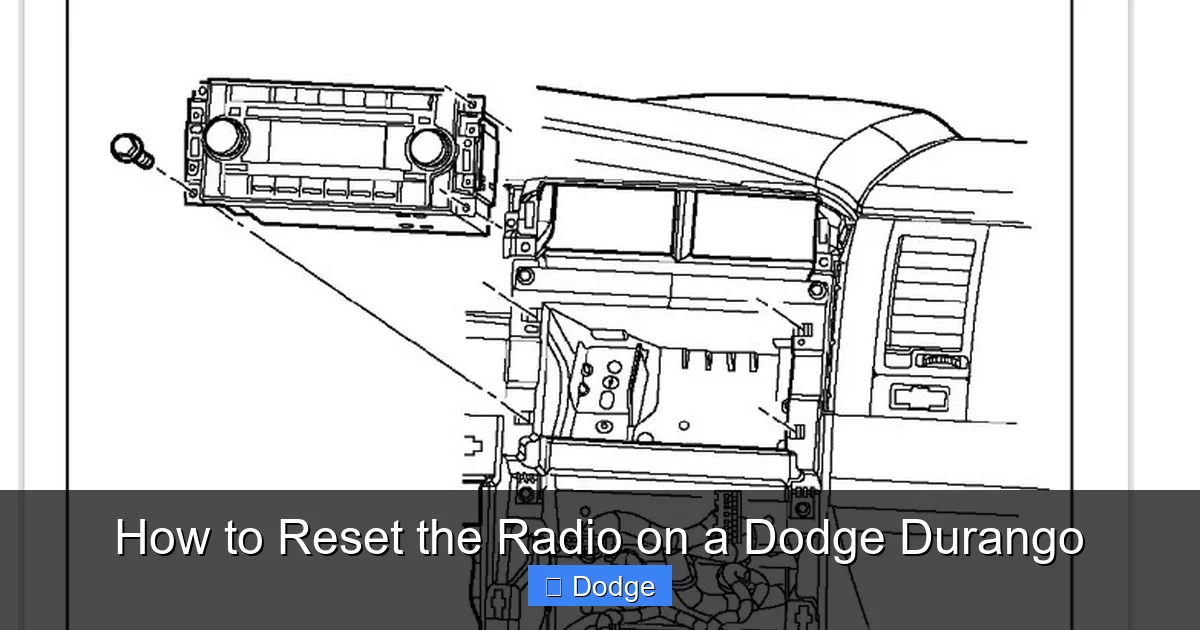
Before you reset your radio, it helps to know what kind of system you’re working with. Dodge has used several different audio setups in the Durango over the years, and the reset process varies depending on the model year and trim level.
Pre-2013 Durangos: Analog and Basic Digital Radios
Older Durangos, especially those from 2011 to 2013, typically came with basic AM/FM radios. These systems often featured physical buttons, knobs, and small LCD screens. Some higher trims included CD players, auxiliary inputs, or even early versions of Uconnect with limited touchscreen functionality.
These radios are simpler in design, which means they’re less prone to complex software issues. However, they can still freeze or lose settings after a power loss. The good news? Resetting them is usually straightforward—often involving a simple power cycle or fuse pull.
2014–2019 Durangos: Uconnect 5.0 and 8.4 Systems
Starting in 2014, Dodge began equipping the Durango with the Uconnect infotainment system. The most common versions are Uconnect 5.0 (5-inch screen) and Uconnect 8.4 (8.4-inch touchscreen). These systems offer Bluetooth, navigation, smartphone integration (Apple CarPlay and Android Auto), and advanced audio controls.
These radios are more powerful but also more complex. They run on embedded software that can occasionally crash or become unresponsive. Because they store user preferences, station presets, and connected device data, a reset may be needed to clear corrupted settings.
2020–2024 Durangos: Uconnect 5 and Updated Interfaces
The latest Durango models feature Uconnect 5, a faster, more responsive system with improved graphics and wireless Apple CarPlay/Android Auto. These systems are built on newer hardware and software, making them more stable—but not immune to issues.
One key difference with Uconnect 5 is the menu structure. Settings are more deeply integrated, and some reset options are tucked away in submenus. Additionally, these systems often require a specific sequence to perform a hard reset, so it’s important to follow the steps carefully.
Aftermarket vs. Factory Radios
It’s also worth noting that some Durango owners have replaced their factory radio with an aftermarket unit. While these can offer better sound or modern features, they may not respond to the same reset methods. If you’ve installed an aftermarket radio, consult the manufacturer’s manual for reset instructions.
For factory radios, however, the methods in this guide will apply. Just make sure you know your model year and Uconnect version before proceeding.
How to Perform a Soft Reset on Your Durango’s Radio
Visual guide about How to Reset the Radio on a Dodge Durango
Image source: i.imgur.com
A soft reset is the gentlest way to refresh your radio’s system. It’s like restarting your phone—it clears temporary glitches without deleting your saved settings. This method works on all Durango models and is the first thing you should try when your radio acts up.
Step-by-Step Soft Reset (All Models)
1. **Turn off the vehicle.** Make sure the ignition is completely off. If you’re in accessory mode (key turned to ACC), the radio may still be drawing power.
2. **Wait 30 seconds.** This allows the system to fully power down. Some electronics need a brief cooldown period to reset properly.
3. **Turn the ignition back on.** Start the engine or turn the key to the “ON” position (without starting the engine if you prefer).
4. **Wait for the radio to boot up.** On older models, this may take just a few seconds. On Uconnect systems, it can take up to a minute—especially if it’s performing a startup check.
5. **Test the radio.** Try changing stations, adjusting the volume, or connecting a Bluetooth device to see if the issue is resolved.
This method works because it forces the radio’s microprocessor to reboot. It’s particularly effective for temporary freezes, audio dropouts, or unresponsive touchscreens.
When to Use a Soft Reset
Use a soft reset when:
– The radio screen is frozen but still powered.
– Audio cuts in and out intermittently.
– Buttons or touch controls are slow to respond.
– The system seems “sluggish” after a long drive.
Soft resets are non-destructive, so you won’t lose your station presets, Bluetooth pairings, or custom settings. That makes them ideal for everyday troubleshooting.
Pro Tip: Try This First
If your Durango has a Uconnect system, you can also try a “soft reboot” through the menu:
– Go to **Settings** > **System** > **Reset Options** > **Restart System**.
– Confirm the restart.
This is essentially the same as a power cycle but initiated from within the software. It’s a great option if your radio is responsive enough to navigate the menu.
How to Perform a Hard Reset (Factory Reset)
If a soft reset doesn’t work, it’s time to try a hard reset—also known as a factory reset. This method wipes all user data, including station presets, Bluetooth pairings, and custom settings. It’s more thorough and often resolves persistent issues, but it should only be used when necessary.
Hard Reset for Uconnect 5.0 and 8.4 (2014–2019)
For Durangos with Uconnect 5.0 or 8.4 systems, follow these steps:
1. **Turn on the ignition** (do not start the engine).
2. **Press and hold the Volume knob and the Tune knob simultaneously.** On most models, these are the two large knobs on the left side of the radio.
3. **Hold both knobs for 10–15 seconds.** You’ll see the screen go black, then the Uconnect logo will appear.
4. **Release the knobs** when the system restarts.
5. **Wait for the system to fully boot.** This may take 2–3 minutes.
6. **Reconfigure your settings.** You’ll need to re-pair Bluetooth devices, re-enter station presets, and adjust audio settings.
This method forces the system to reload its factory software, clearing any corrupted data or conflicting settings.
Hard Reset for Uconnect 5 (2020–2024)
Newer Durangos with Uconnect 5 use a slightly different process:
1. **Turn on the ignition.**
2. **Press and hold the Volume Down button and the Power button (usually on the steering wheel or center stack).**
3. **Hold for 10–15 seconds** until the screen turns off and the Uconnect logo appears.
4. **Release the buttons** and wait for the system to restart.
5. **Reconfigure your preferences** once the system is back online.
Note: On some 2023–2024 models, the reset may require accessing the menu:
– Go to **Settings** > **System** > **Reset Options** > **Factory Reset**.
– Enter the security code (usually 1234 or found in your owner’s manual).
– Confirm the reset.
Hard Reset for Pre-2013 Durangos
For older models without Uconnect, a hard reset typically involves removing the radio fuse:
1. **Turn off the vehicle.**
2. **Locate the fuse box.** In most Durangos, it’s under the dashboard on the driver’s side or in the engine compartment.
3. **Find the radio fuse.** Refer to your owner’s manual or the fuse box diagram. It’s usually labeled “RADIO” or “AUDIO.”
4. **Pull the fuse** using a fuse puller or needle-nose pliers.
5. **Wait 30 seconds.**
6. **Reinsert the fuse.**
7. **Turn on the ignition** and test the radio.
This method cuts power to the radio’s memory, forcing it to reset to factory defaults.
What a Hard Reset Fixes
A hard reset can resolve:
– Persistent freezing or crashing.
– Corrupted software after an update.
– Bluetooth pairing errors.
– Audio distortion or no sound.
– Settings that won’t save.
Just remember: you’ll lose all custom settings, so it’s a good idea to jot down your favorite stations and Bluetooth devices beforehand.
Alternative Reset Methods
Sometimes, the standard reset methods don’t work—especially if the radio is completely unresponsive. In those cases, alternative methods can help.
Battery Disconnection Method
If your radio won’t turn off or respond to any buttons, disconnecting the car battery can force a full system reset:
1. **Turn off the vehicle and remove the key.**
2. **Disconnect the negative terminal** of the battery using a wrench.
3. **Wait 5–10 minutes.** This ensures all capacitors in the system discharge.
4. **Reconnect the battery.**
5. **Turn on the ignition** and check the radio.
This method resets not just the radio but the entire vehicle’s electronics. It’s effective but should be used cautiously—especially if your Durango has advanced safety or security systems that may need reinitialization.
Using the OBD-II Port (Advanced)
Some technicians use diagnostic tools connected to the OBD-II port to reset the radio. This is typically done at a dealership or repair shop and requires specialized software. While effective, it’s not practical for most owners.
When to Call a Professional
If none of the reset methods work, the issue may be hardware-related. Possible causes include:
– A failing radio module.
– Damaged wiring or connectors.
– A faulty antenna or amplifier.
In these cases, it’s best to visit a Dodge dealership or certified technician. They can run diagnostics and replace components if needed.
Tips to Prevent Future Radio Issues
Once your radio is working again, take steps to avoid future problems:
Keep Your Uconnect System Updated
Dodge regularly releases software updates for Uconnect systems. These updates fix bugs, improve performance, and add new features. To check for updates:
– Go to **Settings** > **System** > **Software Update**.
– Follow the prompts to download and install.
You can also visit the official Uconnect website and enter your VIN to see if updates are available.
Avoid Sudden Power Loss
Don’t disconnect the battery or turn off the ignition while the radio is updating or saving settings. This can corrupt the software. If you must disconnect the battery, wait at least 10 minutes after turning off the vehicle.
Use Quality Accessories
Cheap USB cables, phone mounts, or aftermarket adapters can interfere with the radio’s operation. Stick to OEM or high-quality third-party accessories.
Clean the Touchscreen Regularly
Dust and fingerprints can make touchscreens less responsive. Use a microfiber cloth and screen cleaner designed for electronics.
Reset After Major Changes
After installing a new battery, updating software, or connecting a new device, perform a soft reset to ensure everything syncs properly.
Conclusion
Resetting the radio on a Dodge Durango is a straightforward process that can solve a wide range of audio and infotainment issues. Whether you drive an older model with basic controls or a newer Durango with Uconnect 5, knowing how to perform a soft reset, hard reset, or fuse pull can save you time and frustration. Start with the gentlest method and work your way up—most problems can be fixed without professional help.
Remember to back up your presets, keep your system updated, and avoid sudden power interruptions. And if all else fails, don’t hesitate to consult a technician. With the right approach, your Durango’s radio will stay reliable, responsive, and ready for every road trip.
Frequently Asked Questions
How do I reset the radio on a 2015 Dodge Durango?
For a 2015 Durango with Uconnect, press and hold the Volume and Tune knobs for 10–15 seconds until the screen restarts. This performs a hard reset and restores factory settings.
Will resetting the radio delete my Bluetooth pairings?
Yes, a hard reset will erase all Bluetooth pairings, station presets, and custom settings. A soft reset does not delete any data.
Can I reset the radio without turning on the engine?
Yes, you can perform most resets with the ignition in the “ON” position (key turned but engine off). Just make sure the vehicle is in park and the parking brake is engaged.
Why does my Durango’s radio keep freezing?
Frequent freezing may be due to software bugs, outdated firmware, or a failing radio module. Try a hard reset first, then check for Uconnect updates.
How long does it take for the radio to reset?
A soft reset takes about 1–2 minutes. A hard reset may take 3–5 minutes, especially on Uconnect systems that perform a full reboot.
What if my radio still doesn’t work after a reset?
If the radio remains unresponsive, the issue may be hardware-related. Visit a Dodge dealership or certified technician for diagnosis and repair.