How to Reset Brake Light on Ford F-150

Contents
- 1 Key Takeaways
- 2 📑 Table of Contents
- 3 Why Your Ford F-150’s Brake Light Matters
- 4 Decoding the Dashboard: What the Brake Light Actually Means
- 5 Safety First: Pre-Reset Inspection Checklist
- 6 How to Reset the Brake Light: Step-by-Step Methods
- 7 Common Causes That Trigger the Brake Light (And How to Fix Them)
- 8 When to Absolutely Call a Professional Mechanic
- 9 Conclusion: Safety Over Convenience
- 10 Frequently Asked Questions




Resetting the brake light on your Ford F-150 is a straightforward process, but it’s critical to understand that the light is a warning, not a reminder. You must first diagnose and fix the underlying issue—such as worn brake pads, low fluid, or a faulty sensor—before the reset will be permanent. Common reset methods include disconnecting the battery, using the brake pedal technique, or employing an OBD-II scanner. Never ignore a persistent brake light, as it indicates a potential safety hazard with your braking system.
Key Takeaways
- Safety First: The brake light indicates a serious system issue. Always inspect and repair the cause (e.g., pads, fluid, sensors) before attempting any reset.
- Reset is Temporary: If the root problem isn’t fixed, the light will return, often after a few drive cycles or immediately.
- Multiple Methods Exist: Resets can be done via battery disconnect, brake pedal procedure, or with an OBD-II scanner—the latter is the most reliable for modern F-150s.
- Model Year Matters: Procedures can vary between generations (e.g., 2009-2014 vs. 2015-2020). Always consult your owner’s manual for model-specific instructions.
- Know When to Seek Help: If the light persists after a proper reset, or if you’re uncomfortable with the diagnosis, consult a certified mechanic immediately.
- ABS vs. Brake Light: A separate ABS light indicates issues with the anti-lock system. While related, their reset procedures and underlying causes can differ.
- Tool Requirement: For most post-2010 F-150s, an OBD-II scanner is necessary for a complete reset. Basic pedal or battery methods may not work on newer models.
📑 Table of Contents
- Why Your Ford F-150’s Brake Light Matters
- Decoding the Dashboard: What the Brake Light Actually Means
- Safety First: Pre-Reset Inspection Checklist
- How to Reset the Brake Light: Step-by-Step Methods
- Common Causes That Trigger the Brake Light (And How to Fix Them)
- When to Absolutely Call a Professional Mechanic
- Conclusion: Safety Over Convenience
Why Your Ford F-150’s Brake Light Matters
That little red exclamation mark or “BRAKE” text glowing on your Ford F-150’s dashboard isn’t just a nuisance—it’s your truck’s way of shouting for help. Unlike a simple oil change reminder, the brake warning light signals a potentially serious issue with your vehicle’s most critical safety system: the brakes. Many owners make the mistake of thinking it’s just a “service reminder” and try to reset it without addressing the cause, only to see it return days later. This guide will walk you through everything you need to know, from understanding what the light means to performing the correct reset procedure safely and effectively. Remember, resetting the light is the final step, not the first. Your priority is always diagnosis and repair.
The Ford F-150, America’s best-selling truck, has evolved significantly over its generations. A 2010 model’s brake system is vastly different from a 2023’s, which features advanced electronic brake-force distribution and integrated stability control. This evolution means the reset procedure isn’t one-size-fits-all. We’ll break it down by system and model era so you can approach your specific truck with confidence. Whether you’re a seasoned DIYer or a first-time truck owner, understanding this process saves you time, money, and, most importantly, keeps you safe on the road.
Decoding the Dashboard: What the Brake Light Actually Means
Before you touch a tool, you must understand what you’re dealing with. The F-150’s dashboard can illuminate several brake-related warnings. Confusing them leads to incorrect resets and unresolved dangers.
Visual guide about How to Reset Brake Light on Ford F-150
Image source: m.media-amazon.com
The Primary Brake System Warning Light
This is the classic red circle with an exclamation mark or the word “BRAKE.” It illuminates for several reasons: critically low brake fluid in the master cylinder reservoir, a significant drop in hydraulic pressure (often from a leak), worn brake pads that have triggered the wear sensor, or a failure in the brake system’s electronic control module. On many F-150s, this light will also come on if the parking brake is engaged—so always check that first! It’s a general catch-all for serious hydraulic or electronic faults.
The ABS Warning Light
Separate from the primary brake light, the ABS (Anti-lock Braking System) light is usually yellow/amber and spells out “ABS.” It indicates a fault in the wheel speed sensors, the ABS pump, or its wiring. You will still have conventional braking power, but you lose the anti-lock and traction control functions. Resetting the ABS light requires clearing the specific trouble code from the ABS control module, which almost always needs an OBD-II scanner with ABS capability.
The Parking Brake Indicator
Often the same icon as the primary brake light, this specifically tells you the electronic parking brake is engaged or has a fault. On models with a foot pedal or lever, it’s a simple reminder. On models with an electronic switch, a fault here might require a scanner to clear.
Key Insight: If multiple brake-related lights are on simultaneously (e.g., BRAKE and ABS), it points to a more complex, possibly network-related issue that professional diagnostics should handle. Don’t just reset and hope for the best.
Safety First: Pre-Reset Inspection Checklist
Skipping this step is the #1 reason reset procedures fail. The truck’s computer is designed to illuminate the light for a reason. Resetting it without fixing the cause is like taking your temperature, feeling better, and then ignoring the infection. Here is your mandatory pre-reset checklist.
Visual guide about How to Reset Brake Light on Ford F-150
Image source: i.ytimg.com
- Check Brake Fluid Level: Open the hood and locate the master cylinder reservoir (usually on the driver’s side firewall). It has a translucent tank with “MIN” and “MAX” lines. If the fluid is low, you have a leak or worn pads. Topping it up is a temporary fix; you must find the source. Never open the reservoir cap unless you’re prepared to clean spills immediately, as brake fluid is corrosive to paint.
- Inspect for Leaks: Look under the truck for fresh fluid near the wheels, along the brake lines, or around the master cylinder. A puddle or dampness is a clear sign of a leak that requires immediate repair.
- Check Brake Pad Wear: If your F-150 has wear sensors (most do), a squealing or grinding noise accompanied by the light means the pads are worn to the metal. Visually inspect through the wheel spokes if possible. Replacing pads is a common DIY job, but if you’re unsure, get them checked.
- Test the Parking Brake: Engage and disengage it several times. Ensure it fully releases. A stuck or partially engaged parking brake will trigger the warning.
- Scan for Trouble Codes: This is the most important step. Use an OBD-II scanner that reads brake/ABS codes. A code like “C0265” (for a Ford) might point to a specific wheel speed sensor issue. Without this data, you’re guessing. Even a basic code reader will tell you if the issue is persistent or historical.
Critical Rule: If you discover a leak, severely worn pads, or any component that feels spongy or fails during a careful test in a safe area, do not drive the truck. Have it towed to a shop. Driving with compromised brakes is extremely dangerous.
How to Reset the Brake Light: Step-by-Step Methods
Once you’ve diagnosed and, most importantly, repaired the issue, you can proceed to reset the light. The method depends heavily on your F-150’s model year and trim.
Visual guide about How to Reset Brake Light on Ford F-150
Image source: i0.wp.com
Method 1: The Battery Disconnect (The “Hard Reset”)
This method works on older F-150s (typically pre-2010) and can clear simple, non-persistent codes from the Body Control Module (BCM). It’s less effective on modern trucks with complex network systems.
- Safety: Ensure the truck is off, keys out of the ignition, and parked in a well-ventilated area. Have your radio code handy if applicable, as disconnecting the battery may reset the audio system.
- Disconnect Negative Terminal: Using a 10mm wrench, loosen and remove the negative (black, “-“) battery cable from the terminal. Tuck it away so it can’t accidentally touch the terminal.
- Wait: Let the truck sit for 15-20 minutes. This allows all residual capacitors in the vehicle’s modules to discharge fully, clearing temporary memory.
- Reconnect: Secure the negative cable tightly.
- Check: Start the truck. The brake light may illuminate for a few seconds as the system performs a self-check, then should go out if the repair was successful and no new fault is detected.
Tip: After this reset, drive the truck normally for 10-15 minutes. The light should stay off. If it returns, the issue wasn’t fully fixed or a persistent code exists.
Method 2: The Brake Pedal Procedure (For Some Older Models)
Some Ford models have a hidden reset sequence using the brake pedal. This is not universal but is worth trying on certain 2004-2008 F-150s.
- Turn the ignition to the “ON” position (dashboard lights on, engine off).
- Press and hold the brake pedal firmly for 30 seconds.
- While still holding the pedal, turn the ignition to “OFF.”
- Release the pedal, wait 10 seconds, then restart the truck.
- Check if the light has cleared.
Note: This method often only resets the “BRAKE” lamp for a parking brake reminder and will not clear ABS or system fault codes. If your light is on due to a sensor or fluid issue, this will likely fail.
Method 3: Using an OBD-II Scanner (The Professional & Most Reliable Method)
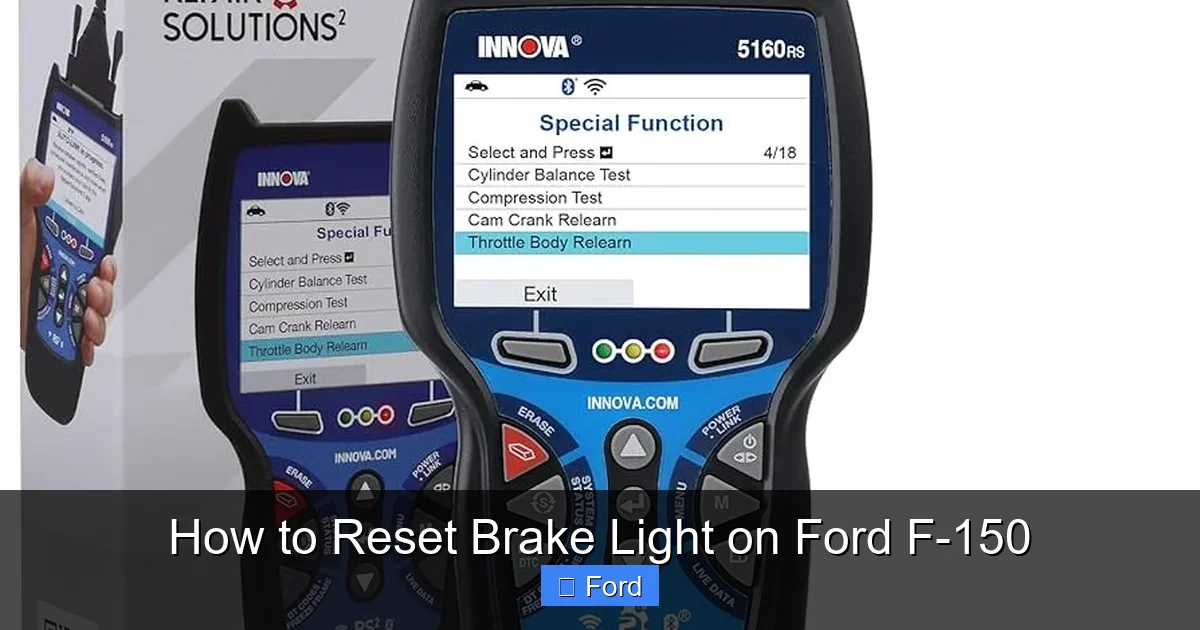
For any F-150 from 2010 onward, and especially for 2015+ models with advanced safety systems, an OBD-II scanner is essential. Basic “code readers” sold at auto parts stores often cannot access the brake or ABS modules. You need a scanner with “ABS/SRS” or “Brake System” capability.
- Connect Scanner: Plug the scanner’s cable into the OBD-II port, located under the dashboard on the driver’s side, just above the pedals.
- Turn On Ignition: Turn the key to the “ON” position (do not start engine).
- Select Vehicle & System: Navigate the scanner menu. Select “Ford” as the make, your specific F-150 model year, and then choose “ABS” or “Brake System” from the module list.
- Read Codes: First, read and document any stored codes. If the code is “P0500” or a Ford-specific code like “C0035,” note it. Clear the codes only after you’ve completed the physical repair.
- Clear Codes: Use the “Clear Codes” or “Erase Faults” function. The scanner will communicate with the module and reset the warning.
- Verify: The light should extinguish immediately. Start the engine and ensure it remains off. Some scanners have a “Live Data” function—you can monitor brake switch status or wheel speed sensor data to confirm normal operation.
Pro Tip: If you don’t own a capable scanner, many local auto parts stores offer free code reading. However, they often cannot clear ABS/brake codes. For a one-time job, investing in a mid-range scanner like an Autel or Launch tool (or even a high-end Bluetooth scanner) is worthwhile for future use on other systems. For instance, a good scanner can also help you reset a check engine light on a Dodge Durango or other vehicles, making it a versatile tool.
Method 4: Through the Vehicle Information Menu (2015+ F-150s)
Some newer F-150s with the SYNC 3 infotainment system allow for basic service light resets through the vehicle settings menu, but this is rare for the brake system. It’s more common for oil life or tire pressure resets. However, it’s worth checking:
- Go to Settings on your touchscreen.
- Navigate to Vehicle or Driver Assist.
- Look for an option like “Reset Brake Warning” or “Service Brakes”.
- Follow the on-screen prompts.
If this option is greyed out or absent, your truck requires a scanner for the brake system. Don’t waste time hunting for a menu that doesn’t exist. The brake system is too critical for a simple menu reset.
Common Causes That Trigger the Brake Light (And How to Fix Them)
Knowing why the light came on prevents a quick return. Here are the most frequent culprits on Ford F-150s.
Worn Front or Rear Brake Pads
F-150s, especially heavier models, can wear pads quickly. Most have a wear sensor—a small metal tab that contacts the rotor when pads are thin, completing a circuit and turning on the light. Fix: Replace the pads (and rotors if damaged) on the axle where the sensor triggered. The sensor itself is usually replaced with the pad kit.
Low Brake Fluid
Fluid can drop from normal pad wear (as the caliper pistons extend) or a leak. Fix: If due to pads, refill after replacement. If due to a leak, locate and repair it (common spots: rubber brake line hoses, caliper seals, master cylinder). Then bleed the brake system to remove air.
Faulty Wheel Speed Sensor (Often Triggers ABS Light Too)
These sensors monitor wheel rotation for ABS and stability control. They are exposed to road debris, salt, and heat. A broken wire or failed sensor triggers both lights. Fix: Replace the faulty sensor. This often requires removing the wheel and brake caliper. Clean the mounting area to prevent debris from damaging the new sensor.
Failing Brake Light Switch
This switch, above the brake pedal, tells the computer you’re braking. If it fails, the brake light may stay on, or the cruise control may disengage. Fix: Replace the switch. It’s a cheap and easy DIY—usually just unplug the old one and clip in the new.
Parking Brake Not Fully Releasing
On electronic parking brakes (common on newer trims), a motor or switch failure can leave the brake partially engaged. Fix: May require a scanner to cycle the parking brake calipers or manual adjustment. This is a professional job in many cases.
When to Absolutely Call a Professional Mechanic
Your comfort level is key. Here are clear signs to stop and call for help:
- The brake pedal feels soft, spongy, or sinks to the floor. This indicates a severe hydraulic leak or air in the lines. Do not drive.
- You hear loud grinding or squealing from the wheels. This means metal-on-metal contact. Continuing to drive will destroy rotors and calipers.
- The light comes back immediately after reset, even after repair. This suggests the repair was incomplete, the wrong part was used, or there’s a wiring/network issue.
- Multiple systems are failing: If you notice steering issues, traction control disengaging, or other erratic behavior alongside the brake light, the problem may be in the shared sensor network or control module.
- You cannot retrieve or clear codes with your scanner. This often means a deeper module communication failure.
A certified Ford technician has access to proprietary diagnostic software (like Ford IDS) that can run advanced tests on the brake control module, calibrate sensors after replacement, and access wiring diagrams you won’t find online. For complex electronic systems, this expertise is invaluable. It’s also worth noting that procedures for other vehicles can differ; for example, resetting a tire pressure light on a Subaru Outback is often a simple button press, while a brake system reset is almost always more involved.
Conclusion: Safety Over Convenience
Resetting the brake light on your Ford F-150 is the final, celebratory step after a proper repair. It’s the system’s way of saying, “All clear.” But that “all clear” is earned. By following this guide—diagnosing first, repairing thoroughly, and then resetting correctly—you ensure your truck’s most vital safety system is truly ready for the road. Remember the core principle: the light is a symptom, not the disease. Treating the symptom alone guarantees it will return, potentially at the worst possible moment.
Your F-150 is a workhorse built for capability. Keeping its braking system in peak condition is non-negotiable. Invest in a good OBD-II scanner if you plan to DIY, learn to inspect your brakes during oil changes, and never hesitate to seek professional help when the situation exceeds your tools or knowledge. A safe truck is a reliable truck. Now that you’ve reset that light, you can get back to hauling, towing, and adventuring with the confidence that your brakes will be there when you need them most.
Frequently Asked Questions
Can I just disconnect the battery to reset the brake light without fixing anything?
You can, but it’s ineffective and dangerous. The light will return almost immediately if the underlying problem (like worn pads or low fluid) isn’t resolved. The system continuously monitors parameters; a faulty condition will trigger the light again as soon as the truck completes its start-up check.
How long does it take to reset the brake light after the repair is done?
The actual reset via scanner takes less than a minute. However, the entire process—diagnosis, repair, and reset—can range from 30 minutes for a simple pad replacement or switch fix to several hours for a complex leak or sensor replacement. Always factor in diagnosis time.
Do I need a special scanner for a 2020 Ford F-150?
Yes, absolutely. A basic OBD-II code reader that only reads engine codes (P-codes) will not access the ABS or Brake System Control Module. You need a scanner that explicitly lists “ABS,” “SRS,” or “Brake System” in its capabilities. Professional-grade or advanced DIY scanners like those from Autel, Launch, or Innova are required.
Why did my brake light come on after I just had my brakes serviced?
This is common. Possible reasons include: the brake fluid was not properly topped off after pad replacement (causing a low fluid level warning), the wear sensor was not replaced with the pads, a sensor was unplugged or damaged during the job, or the system needs a scan tool to clear the code after the repair. Return to the shop that performed the work and have them scan and clear the code.
Will the brake light reset itself after I fix the problem?
No. Unlike some maintenance reminders, the brake warning light is a hard fault indicator. The system will not automatically turn it off after a repair. The fault code must be manually cleared using a diagnostic scan tool. The light may go out temporarily if you disconnect the battery, but it will return on the next drive cycle if the fault persists.
Is it safe to drive my F-150 to the shop if the brake light is on?
It depends. First, perform the pre-reset inspection. If the brake pedal feels firm, there’s no visible leak, and the fluid level is adequate, you can likely drive cautiously a short distance to a trusted mechanic. However, if the pedal is soft/spongy, fluid is very low, or you hear grinding noises, do not drive. Have it towed. A brake failure while driving is catastrophic.