

How to Program a Toyota Garage Door Opener

Contents
- 1 Key Takeaways
- 2 📑 Table of Contents
- 3 What Is a Toyota Garage Door Opener?
- 4 Is Your Garage Door Opener Compatible?
- 5 Tools and Materials You’ll Need
- 6 Step-by-Step Guide to Programming Your Toyota Garage Door Opener
- 7 Troubleshooting Common Issues
- 8 Tips for Maintaining Your Toyota Garage Door Opener
- 9 Conclusion
- 10 Frequently Asked Questions

Car Ambient Light Kit

Octane Booster

Car Dent Repair Kit

Car Cup Holder Expander
Programming a Toyota garage door opener is easier than you think. Whether you’re setting it up for the first time or adding a new door, this guide walks you through every step with clear instructions and helpful tips. Get your Toyota Homelink system working smoothly in no time.
If you’ve ever pulled up to your driveway, fumbled for your garage remote, and wished you could just press a button inside your car—you’re not alone. That’s exactly why Toyota includes the Homelink system in most of its vehicles. It’s a built-in garage door opener that lets you open and close your garage door without ever touching a separate remote. No more digging through the glove box or worrying about losing your clicker. Just press a button on your sun visor or rearview mirror, and—voilà—your garage door swings open.
But here’s the thing: setting it up isn’t always as simple as pressing a button. While Toyota’s Homelink system is designed to be user-friendly, the programming process can trip up even the most tech-savvy drivers. Maybe you’ve tried it before and it didn’t work. Or maybe you’re setting it up for the first time and just need a clear, step-by-step guide. Either way, you’re in the right place. This article will walk you through everything you need to know about how to program a Toyota garage door opener—from checking compatibility to troubleshooting common issues.
We’ll cover all Toyota models, including Camry, Corolla, RAV4, Highlander, Tacoma, and more. Whether you drive a 2010 sedan or a 2024 hybrid SUV, the process is similar. And don’t worry—we’ll keep it simple. No confusing jargon, no overly technical terms. Just practical, easy-to-follow instructions that anyone can understand. By the end of this guide, you’ll be able to program your Toyota garage door opener like a pro—and enjoy the convenience of hands-free access every time you come home.
Key Takeaways
- Check compatibility first: Not all garage door openers work with Toyota’s Homelink system. Make sure your opener uses rolling code or fixed code technology and operates on 315 MHz or 390 MHz frequencies.
- Use the Homelink buttons in your Toyota: Most Toyota vehicles come with three programmable Homelink buttons, usually located on the sun visor or rearview mirror. These control your garage door, gate, or even lights.
- Clear old programming before starting: Always erase any previous settings from the Homelink system before programming a new device to avoid interference or errors.
- Follow the correct sequence: Programming requires pressing both the Homelink button and the garage door remote in a specific order. Timing is key—don’t rush the steps.
- Test and troubleshoot if needed: After programming, test the connection. If it doesn’t work, try re-syncing, checking battery levels, or consulting your vehicle’s manual.
- Keep your remote handy: You’ll need your original garage door remote during setup. If you’ve lost it, you may need to reprogram the opener itself or contact the manufacturer.
- Update firmware if available: Some newer Toyota models support Homelink updates. Check with your dealer or Toyota’s website to ensure your system has the latest software.
📑 Table of Contents
What Is a Toyota Garage Door Opener?
Before we dive into the programming steps, let’s clarify what we mean by a “Toyota garage door opener.” Technically, Toyota doesn’t manufacture garage door openers. Instead, it includes a universal remote system called Homelink in most of its vehicles. This system allows you to control compatible garage doors, gates, and even home lighting systems—all from inside your car.
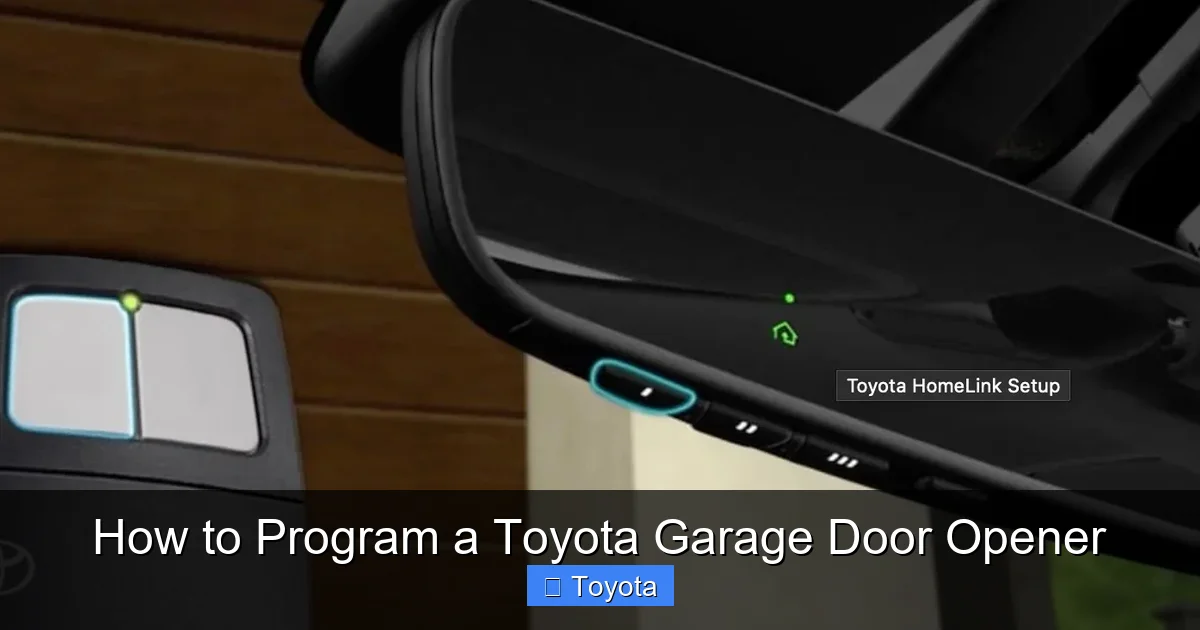
The Homelink system consists of three programmable buttons, usually located on the driver’s side sun visor or integrated into the rearview mirror. These buttons can be synced to your existing garage door opener, eliminating the need for a separate remote. Once programmed, pressing the assigned Homelink button sends a signal to your garage door opener, triggering it to open or close.
Homelink has been around since the 1990s and is now standard in nearly all Toyota models. It works with most major garage door opener brands, including Chamberlain, LiftMaster, Genie, Craftsman, and Linear. However, compatibility depends on the type of signal your opener uses—more on that in a moment.
One of the biggest advantages of Homelink is convenience. Imagine pulling into your driveway on a rainy night. Instead of fumbling for a remote or getting out of the car, you simply press a button on your visor. The garage door opens, you drive in, and press the button again to close it—all without leaving the comfort of your seat.
Another benefit is security. Homelink uses rolling code technology (also called hopping code), which changes the signal each time you use it. This prevents hackers from capturing and replaying your signal, a common issue with older fixed-code remotes. So not only is Homelink convenient, it’s also safer.
Is Your Garage Door Opener Compatible?
Visual guide about How to Program a Toyota Garage Door Opener
Image source: garagedoorpedia.com
Not every garage door opener works with Toyota’s Homelink system. Before you start programming, it’s essential to check compatibility. Trying to sync an incompatible opener will only lead to frustration.
Most modern garage door openers are compatible, but there are a few key factors to consider:
Frequency and Signal Type
Homelink operates on specific radio frequencies—typically 315 MHz or 390 MHz. These are the same frequencies used by most garage door openers manufactured in the last 20 years. If your opener is older or uses a different frequency (like 300 MHz or 433 MHz), it may not work with Homelink.
To check the frequency, look at the label on your garage door opener motor unit. It’s usually located near the ceiling of your garage. The label will list the frequency, such as “315 MHz” or “390 MHz.” If you can’t find it, check the manual or contact the manufacturer.
Rolling Code vs. Fixed Code
There are two types of signals used by garage door openers: rolling code and fixed code.
Fixed code systems send the same signal every time. They’re older and less secure, but many Homelink systems can still work with them—especially if you follow the correct programming steps.
Rolling code systems, on the other hand, generate a new code each time you press the button. This is more secure and is used by most modern openers. Homelink fully supports rolling code technology, but the programming process is slightly different.
If your opener uses rolling code, you’ll need to put it into “learn” or “program” mode before syncing with Homelink. This usually involves pressing a button on the motor unit. We’ll cover this in detail later.
Brand Compatibility
Homelink works with most major brands, including:
– Chamberlain
– LiftMaster
– Genie
– Craftsman
– Linear
– Stanley
– Overhead Door
If your opener is from one of these brands and was made in the last 20 years, chances are it’s compatible. However, some very old models (pre-1990s) may not work. If you’re unsure, check the manufacturer’s website or call customer support.
Testing Compatibility
If you’re still not sure, here’s a quick test: try programming it. If the Homelink system accepts the signal and the door responds, you’re good to go. If not, you may need a universal remote or a Homelink-compatible repeater.
Another option is to use a Homelink compatibility checker. Some Toyota dealerships and garage door companies offer these tools online. Simply enter your opener’s brand, model, and year, and it will tell you if it’s compatible.
Tools and Materials You’ll Need

Visual guide about How to Program a Toyota Garage Door Opener
Image source: vehq.com
Programming your Toyota garage door opener doesn’t require fancy tools or technical skills. But having the right items on hand will make the process smoother.
Here’s what you’ll need:
Your Toyota Vehicle
Obviously, you’ll need access to your car. Make sure it’s parked within 3–5 feet of the garage door opener motor unit. This ensures a strong signal during programming.
Original Garage Door Remote
You’ll need the physical remote that came with your garage door opener. This is essential for the initial sync. If you’ve lost it, check if you have a backup or contact the manufacturer for a replacement.
Access to the Garage Door Opener Motor
You’ll need to reach the motor unit, usually mounted on the ceiling of your garage. A stepladder may be helpful if it’s high up.
Batteries (Optional)
If your garage door remote is old, the battery might be weak. Replace it with a fresh one before starting. A weak signal can cause programming to fail.
Owner’s Manual (Optional but Helpful)
Your Toyota owner’s manual contains specific instructions for your model. It’s a good idea to have it nearby, especially if you run into issues.
Patience and Focus
Programming requires precise timing. Rushing through the steps can lead to errors. Take your time, follow the instructions carefully, and don’t get discouraged if it doesn’t work the first time.
Step-by-Step Guide to Programming Your Toyota Garage Door Opener

Visual guide about How to Program a Toyota Garage Door Opener
Image source: i.ytimg.com
Now that you’ve confirmed compatibility and gathered your tools, it’s time to program your Toyota garage door opener. The process varies slightly depending on whether your opener uses fixed code or rolling code. We’ll cover both methods.
Step 1: Clear Existing Homelink Programming
Before adding a new device, it’s best to erase any old settings. This prevents interference and ensures a clean start.
1. Turn on your vehicle’s ignition (you don’t need to start the engine).
2. Press and hold the two outer Homelink buttons (Button 1 and Button 3) for about 20 seconds.
3. The indicator light will flash slowly at first, then rapidly. When it flashes rapidly, release the buttons.
4. The system is now cleared and ready for new programming.
Note: Some newer Toyota models may require you to press the buttons for up to 30 seconds. Check your owner’s manual for exact timing.
Step 2: Choose a Homelink Button
Decide which of the three Homelink buttons you want to use for your garage door. Most people use Button 1, but you can choose any.
Step 3: Program for Fixed Code Openers
If your garage door opener uses a fixed code (common in older models), follow these steps:
1. Hold your garage door remote close to the Homelink button you want to program.
2. Press and hold both the Homelink button and the remote button at the same time.
3. Hold them for about 20–30 seconds, or until the Homelink indicator light changes from slow to rapid flashing.
4. Release both buttons.
5. Test the Homelink button. If the garage door opens, programming is complete.
Tip: If the light doesn’t flash rapidly, try again. Make sure you’re holding both buttons down firmly and consistently.
Step 4: Program for Rolling Code Openers
Most modern openers use rolling code technology. This requires an extra step: putting the opener into “learn” mode.
1. Locate the “Learn” or “Program” button on your garage door opener motor unit. It’s usually colored (yellow, red, orange, or purple) and may be under a light lens.
2. Press and release the “Learn” button. The indicator light on the motor will turn on or blink, indicating it’s ready to receive a signal.
3. Within 30 seconds, go back to your car and press the Homelink button you want to program. Hold it for 2–3 seconds, then release.
4. Press the Homelink button again and hold for 2–3 seconds.
5. Repeat this press-and-hold sequence a third time.
6. The garage door should move, indicating successful programming.
Note: Some openers require you to press the Homelink button three times in quick succession. Others may only need two presses. If it doesn’t work, try adjusting the number of presses.
Step 5: Test the System
After programming, test the Homelink button:
– Press it once. The garage door should open.
– Press it again. The door should close.
– If it doesn’t respond, repeat the programming steps.
Step 6: Adjust Range if Needed
Sometimes the signal isn’t strong enough. If the door only opens when you’re very close, try moving your car closer to the garage during programming. You can also check for interference from Wi-Fi routers, LED lights, or metal objects.
Troubleshooting Common Issues
Even with careful steps, things can go wrong. Here are some common problems and how to fix them.
Homelink Button Doesn’t Work After Programming
– Double-check that you followed the correct steps for your opener type (fixed vs. rolling code).
– Make sure the garage door opener is in “learn” mode during rolling code programming.
– Replace the battery in your garage door remote.
– Try reprogramming from scratch, including clearing the Homelink system.
Indicator Light Doesn’t Flash
– Ensure your vehicle’s ignition is on.
– Check that the Homelink buttons aren’t damaged.
– Try a different Homelink button.
Door Only Opens Partway
This isn’t a Homelink issue—it’s likely a problem with the garage door opener itself. Check the safety sensors, tracks, and motor. Clean any debris and ensure the sensors are aligned.
Interference from Other Devices
Wi-Fi routers, cordless phones, and LED lights can interfere with the signal. Try turning off nearby electronics during programming. If the problem persists, consider using a signal repeater.
Homelink System Not Responding
– Reset the Homelink system by holding the two outer buttons for 30 seconds.
– Check your vehicle’s fuse box. A blown fuse could disable Homelink.
– Consult your Toyota dealer if the system still doesn’t work.
Tips for Maintaining Your Toyota Garage Door Opener
Once your Homelink system is working, a little maintenance goes a long way.
Keep the Buttons Clean
Dust and grime can build up on the Homelink buttons. Wipe them gently with a damp cloth every few months.
Update Your System
Some newer Toyota models support Homelink firmware updates. Check with your dealer or Toyota’s website to see if an update is available.
Replace Batteries Regularly
If you use a backup remote, replace its battery once a year. A weak signal can affect programming.
Test Monthly
Press your Homelink button once a month to ensure it’s still working. This helps catch issues early.
Secure Your System
Avoid sharing your Homelink programming with others. If you sell your car, clear the Homelink settings to protect your home’s security.
Conclusion
Programming a Toyota garage door opener might seem intimidating at first, but it’s actually a straightforward process once you know the steps. By checking compatibility, following the correct sequence, and troubleshooting when needed, you can enjoy the convenience of hands-free garage access in just a few minutes.
Whether you drive a Camry, RAV4, or Tacoma, the Homelink system is designed to make your life easier. No more fumbling for remotes, no more getting caught in the rain. Just press a button, and your garage door opens like magic.
Remember: patience is key. If it doesn’t work the first time, don’t give up. Try again, double-check your steps, and consult your owner’s manual if needed. And if all else fails, your local Toyota dealer or garage door technician can help.
So go ahead—program that Toyota garage door opener today. Your future self will thank you every time you pull into the driveway.
Frequently Asked Questions
Can I program my Toyota garage door opener without the original remote?
Unfortunately, you typically need the original remote to program Homelink. If you’ve lost it, contact the garage door opener manufacturer for a replacement or consider using a universal remote that’s compatible with Homelink.
How many devices can I program with Homelink?
Most Toyota vehicles have three Homelink buttons, so you can program up to three devices—such as a garage door, gate, and exterior lights.
Will programming Homelink affect my garage door opener’s warranty?
No, programming Homelink does not void your garage door opener’s warranty. It’s a standard feature supported by most manufacturers.
Can I use Homelink with a smart garage door opener?
Yes, as long as the smart opener uses a compatible frequency and signal type. Some smart openers also allow control via smartphone apps, which can work alongside Homelink.
Why does my Homelink button only work sometimes?
This could be due to a weak signal, low remote battery, or interference. Try reprogramming the button and moving your car closer to the garage during setup.
Do I need to reprogram Homelink if I move to a new house?
Yes, you’ll need to program Homelink for your new garage door opener. The process is the same—just follow the steps outlined in this guide.







