
How to Make Car Decals with Cricut to Sell

Making car decals with Cricut to sell is a fun, profitable side hustle. With the right tools, materials, and design skills, you can create custom vinyl decals that drivers love. This guide walks you through every step—from design to delivery—so you can start selling with confidence.
So, you’ve got a Cricut machine and a creative spark—now you’re wondering, “Can I really make car decals with Cricut to sell?” The answer is a resounding yes! Not only is it possible, but it’s also one of the most popular and profitable craft businesses out there. Car decals are in high demand—from funny bumper stickers to custom family name decals, sports team logos, and even business branding. People love personalizing their vehicles, and that’s where you come in.
The best part? You don’t need a huge upfront investment or a commercial printing setup. With just a Cricut machine, some vinyl, and a little know-how, you can start creating high-quality, durable decals that customers will love. Whether you’re looking for a side income or dreaming of turning your craft into a full-time business, making car decals with Cricut is a smart, scalable option. Plus, it’s fun! There’s something incredibly satisfying about seeing your designs on someone’s car driving down the road.
In this guide, we’ll walk you through everything you need to know—from choosing the right materials to designing, cutting, weeding, applying transfer tape, and finally, selling your creations. We’ll share practical tips, common mistakes to avoid, and real-world examples to help you succeed. By the end, you’ll have a clear roadmap to launch your car decal business with confidence.
Key Takeaways
- Choose the right Cricut machine: The Cricut Maker or Explore series work best for cutting vinyl for car decals.
- Use high-quality vinyl: Outdoor-rated vinyl like Oracal 651 ensures durability and weather resistance.
- Design with precision: Use Cricut Design Space to create clean, scalable designs with proper spacing and cut lines.
- Master the weeding process: Removing excess vinyl carefully ensures professional-looking decals.
- Apply transfer tape correctly: This step is crucial for smooth application and customer satisfaction.
- Start small and test: Begin with simple designs and gather feedback before scaling up.
- Sell on multiple platforms: Use Etsy, Amazon Handmade, and social media to reach more customers.
📑 Table of Contents
Why Sell Car Decals Made with Cricut?
Car decals are more than just decorative—they’re a form of self-expression. Whether it’s a witty quote, a family nickname, or support for a favorite cause, people use decals to tell their story. This emotional connection makes them highly marketable. And because they’re relatively low-cost and easy to apply, customers often buy multiple designs.
Using a Cricut machine gives you a major advantage. It allows for precision cutting, consistent results, and the ability to produce small batches or even one-off custom orders. Unlike screen printing or large-format printing, Cricut is perfect for small businesses. You can test designs quickly, adjust based on feedback, and scale up as demand grows.
Another benefit? Low overhead. You don’t need a storefront or expensive equipment. A Cricut machine, a computer, and a small workspace are enough to get started. Plus, vinyl and transfer tape are affordable, especially when bought in bulk. With proper planning, your profit margins can be quite healthy—especially if you focus on niche markets like pet lovers, military families, or local sports teams.
Market Demand and Trends
The demand for custom car decals continues to grow. According to market research, the global automotive aftermarket—including accessories like decals—is expected to exceed $500 billion by 2030. While that includes parts and electronics, decorative items like decals are a fast-growing segment, especially among younger drivers and small business owners who use vehicles for branding.
Trends to watch include:
– Minimalist designs with clean lines and bold fonts
– Eco-friendly messages and sustainability themes
– Local pride (city names, state flags, hometown slogans)
– Humor and pop culture references (memes, TV shows, movies)
– Custom family decals (names, birth years, “Baby on Board” styles)
By staying aware of these trends, you can create designs that resonate with current audiences. You can also offer seasonal collections—like holiday-themed decals or summer vacation slogans—to keep your shop fresh and engaging.
Profit Potential
Let’s talk numbers. A typical car decal sells for $5 to $15, depending on size and complexity. Your material cost per decal (vinyl, transfer tape, backing) is usually under $1. If you sell 20 decals a week at $10 each, that’s $200 in revenue and roughly $180 in profit after materials. Scale that up to 50 or 100 decals per week, and you’re looking at a solid side income—or even a full-time business.
Many successful Cricut entrepreneurs start on Etsy and grow into their own branded websites. Some even partner with local businesses to create custom decals for their fleets. The key is consistency, quality, and smart marketing.
Choosing the Right Cricut Machine and Materials

Visual guide about How to Make Car Decals with Cricut to Sell
Image source: thecountrychiccottage.net
Not all Cricut machines are created equal when it comes to making car decals. While the Cricut Joy is great for small projects, it’s not ideal for larger decals. For professional results, you’ll want a machine that can handle 12-inch wide vinyl and offers precise cutting.
Best Cricut Machines for Car Decals
The **Cricut Maker** is the top choice for serious decal makers. It has a stronger motor, adaptive tool system, and can cut a wider range of materials—including thicker vinyl and even leather. Its rotary blade and knife blade options give you flexibility, though for standard vinyl decals, the fine-point blade is perfect.
The **Cricut Explore 3** is a close second. It’s more affordable than the Maker and still cuts up to 12 inches wide. It’s fast, reliable, and works seamlessly with Cricut Design Space. If you’re on a budget but want professional results, the Explore 3 is a great pick.
Avoid the Cricut Joy for car decals unless you’re only making tiny designs. Its 2.5-inch cutting width is too limiting for most vehicle applications.
Essential Materials and Tools
To make durable, high-quality car decals, you’ll need more than just a machine. Here’s your essential toolkit:
– **Vinyl**: Use **Oracal 651** (permanent outdoor vinyl) for most decals. It’s weather-resistant, UV-stable, and lasts 5–7 years. For removable decals, try Oracal 641.
– **Transfer Tape**: Choose a medium-tack tape for most projects. Low-tack is better for delicate designs; high-tack for textured surfaces.
– **Weeding Tools**: A weeding hook and tweezers help remove small pieces of vinyl cleanly.
– **Application Squeegee**: A small plastic scraper helps smooth out bubbles during application.
– **Cutting Mat**: A standard 12×12-inch mat works for most decals. Use a light-grip mat for thinner vinyl.
– **Lint Roller or Rubbing Alcohol**: Clean the surface before applying decals to ensure adhesion.
Pro tip: Buy vinyl in bulk (5-yard rolls) to save money. Oracal offers great value, and many sellers on Amazon or specialty craft sites offer discounts for larger quantities.
Optional Upgrades
As your business grows, consider these upgrades:
– **Cricut EasyPress Mini**: Great for heat-transfer vinyl (HTV) if you expand into apparel.
– **Roller Tool**: Helps apply even pressure when transferring decals.
– **Light Pad**: Makes weeding intricate designs easier by backlighting the vinyl.
– **Storage System**: Keep vinyl organized by color and type to save time.
Investing in quality tools upfront saves frustration and improves your final product—something customers will notice and appreciate.
Designing Car Decals in Cricut Design Space

Visual guide about How to Make Car Decals with Cricut to Sell
Image source: i.pinimg.com
Great design is the heart of a successful decal. Whether you’re creating text, graphics, or a combination, your design must be clean, legible, and cut-ready. Cricut Design Space is your go-to tool for this—it’s free, user-friendly, and packed with features.
Getting Started in Design Space
When you open Cricut Design Space, start a new project. Choose “Custom” and set your canvas size to 12×12 inches—the standard for most decals. You can adjust later, but this gives you a full workspace.
To add text, click the “Text” button and type your message. Choose a bold, sans-serif font for readability from a distance. Avoid overly decorative fonts unless they’re part of a themed design (like a retro vibe).
For images, use the “Images” tab to browse Cricut’s library. Many are free with a Cricut Access subscription ($10/month), which is worth it if you plan to sell regularly. You can also upload your own SVG files if you design in Illustrator or Canva.
Design Tips for Car Decals
– **Keep it simple**: Overly complex designs are hard to weed and apply. Stick to 2–3 colors max.
– **Use proper spacing**: Leave at least 1/8 inch between letters and elements to prevent tearing.
– **Avoid tiny details**: Lines thinner than 1/16 inch may not cut cleanly or weed easily.
– **Mirror your design**: Always flip your design horizontally before cutting. Vinyl is applied adhesive-side down, so mirroring ensures it reads correctly.
– **Test small first**: Cut a small version of your design to check for issues before making a full batch.
Example: If you’re making a “Proud Dog Mom” decal, use a bold font for the text and a simple paw print graphic. Keep the paw print large enough to weed easily—say, 1 inch in diameter.
Using Layers and Colors
Cricut Design Space lets you layer colors, which is great for multi-colored decals. For example, you could have black text with a red heart. To do this:
1. Add your text and shape.
2. Select both and click “Attach” so they cut together.
3. Use the “Contour” tool to hide cut lines you don’t want (like internal lines in letters).
Remember: Each color requires a separate piece of vinyl and transfer tape application. Keep multi-color designs to a minimum unless you’re charging a premium.
Downloading and Uploading Designs
If you find a design you love online (from sites like Creative Fabrica or Etsy), make sure it’s licensed for commercial use. Many designers sell SVG files specifically for resale. Always check the license terms.
To upload an SVG:
1. Click “Upload” in Design Space.
2. Select “Upload Image” and choose your file.
3. Insert it into your project and resize as needed.
This is a great way to expand your catalog without designing everything from scratch.
Cutting, Weeding, and Applying Transfer Tape
Visual guide about How to Make Car Decals with Cricut to Sell
Image source: i.pinimg.com
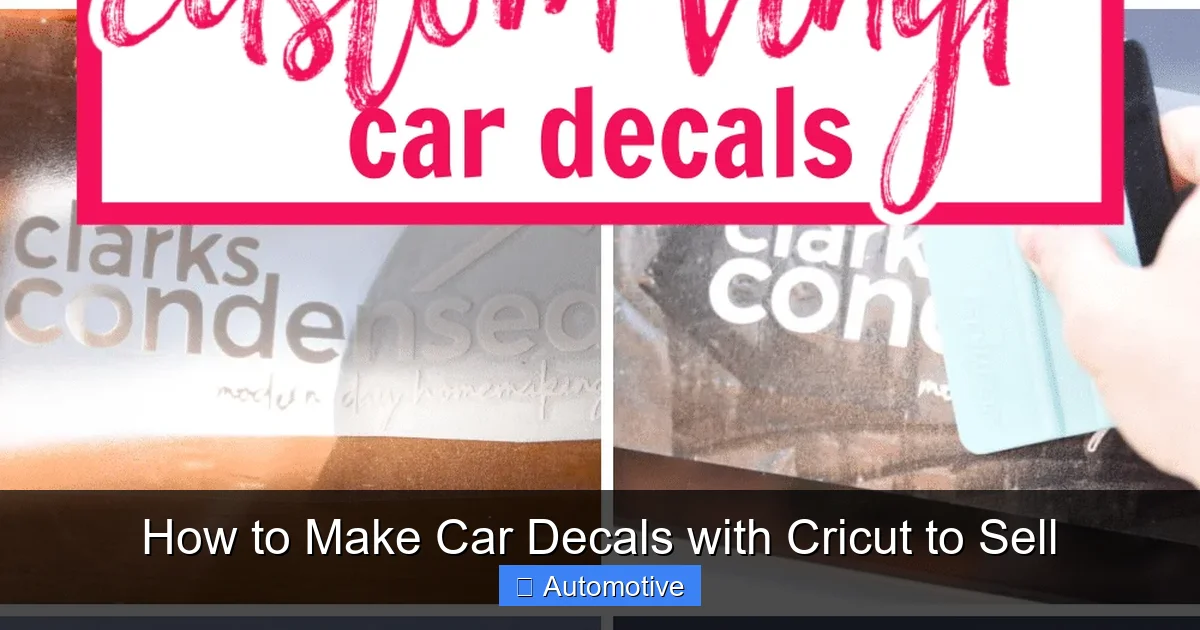
Now comes the fun part—turning your design into a real decal. This process has three key steps: cutting, weeding, and applying transfer tape. Do it right, and your decals will look professional. Do it wrong, and you’ll end up with frustration and wasted materials.
Step 1: Cutting the Vinyl
1. Load your vinyl onto the cutting mat, shiny side down (adhesive side up).
2. In Design Space, click “Make It.” The software will guide you through loading the mat and selecting the material.
3. Choose “Vinyl” as your material setting. The Cricut will adjust pressure automatically.
4. Press the flashing C button to start cutting.
Tip: Always do a test cut on a scrap piece first, especially if you’re using a new brand of vinyl. Some are thinner or thicker than others.
Step 2: Weeding the Design
Weeding is the process of removing the excess vinyl around and inside your design. Use a weeding tool to lift and pull away the unwanted pieces.
– Start with the large outer areas.
– Move to small inner pieces (like the centers of “O” or “A”).
– Be gentle—don’t tear the design or lift the backing paper.
Pro tip: Use a light pad or hold the mat up to a window. The backlighting makes it easier to see tiny pieces.
If you’re weeding a complex design, take your time. Rushing leads to mistakes. Keep a trash bin nearby to avoid clutter.
Step 3: Applying Transfer Tape
Transfer tape is what allows you to move your decal from the backing paper to the car. Here’s how to do it right:
1. Cut a piece of transfer tape slightly larger than your design.
2. Peel off the backing and place the sticky side down over your weeded decal.
3. Use a squeegee or credit card to burnish (press firmly) the tape onto the vinyl. Go over it several times to ensure full adhesion.
4. Slowly peel the transfer tape back at a 180-degree angle. The vinyl should come up with it.
If parts of the design don’t lift, press them down again and burnish more. Don’t pull too fast—this can cause tearing.
Now your decal is ready to apply! Include simple instructions with each order, like:
– Clean the surface with rubbing alcohol.
– Position the decal and smooth out bubbles.
– Peel off the transfer tape slowly.
Selling Your Car Decals: Platforms and Marketing
Making great decals is only half the battle—you also need to sell them. The good news? There are more ways than ever to reach customers online.
Best Platforms to Sell
– **Etsy**: The top marketplace for handmade and custom items. Set up a shop, upload high-quality photos, and use keywords like “custom car decal” or “Cricut vinyl decal.”
– **Amazon Handmade**: Great for reaching a massive audience. Requires more setup but offers high visibility.
– **eBay**: Good for auctions or fixed-price listings. Less craft-focused but still viable.
– **Your Own Website**: Use Shopify or WooCommerce to build a branded store. More work, but you keep all profits and control your brand.
– **Social Media**: Instagram, Facebook, and TikTok are powerful tools. Post videos of your process, customer photos, and new designs.
Tip: Start with Etsy. It’s beginner-friendly and has built-in traffic. Once you gain reviews and confidence, expand to other platforms.
Pricing Your Decals
Price based on size, complexity, and time:
– Small decal (under 4 inches): $5–$7
– Medium (4–6 inches): $8–$12
– Large (6+ inches) or multi-color: $13–$15
Offer bundles (e.g., 3 for $20) to increase average order value. Always include shipping in your price or offer free shipping at a certain threshold.
Marketing Tips
– **Use high-quality photos**: Show your decals on a car, in natural light, and up close.
– **Write clear titles and descriptions**: Include keywords like “custom car decal,” “Cricut vinyl,” and “weatherproof.”
– **Encourage reviews**: Happy customers = more sales. Include a thank-you note with each order.
– **Run promotions**: Offer 10% off first orders or seasonal discounts.
– **Collaborate**: Partner with local businesses or influencers to feature your decals.
Scaling Your Car Decal Business
Once you’re making consistent sales, it’s time to scale. Here’s how:
– **Automate packaging**: Use poly mailers and printed labels to save time.
– **Outsource weeding**: If you’re overwhelmed, hire a virtual assistant for simple tasks.
– **Expand your product line**: Offer window decals, laptop stickers, or HTV shirts.
– **Build an email list**: Collect emails at checkout and send newsletters with new designs.
– **Track your numbers**: Use a simple spreadsheet to monitor sales, costs, and profits.
Remember: Quality and consistency matter most. A few five-star reviews can boost your shop more than a hundred low-effort listings.
Common Mistakes to Avoid
Even experienced makers make errors. Here’s what to watch out for:
– **Using indoor vinyl**: It will fade or peel in sunlight. Always use outdoor-rated vinyl.
– **Skipping the test cut**: This leads to wasted materials and frustration.
– **Poor weeding**: Rushing causes torn designs and unhappy customers.
– **Overcomplicating designs**: Simple sells better than complex.
– **Ignoring customer service**: Respond to messages quickly and resolve issues politely.
Conclusion
Making car decals with Cricut to sell is a rewarding, profitable venture that combines creativity with entrepreneurship. With the right machine, materials, and mindset, you can turn your Cricut into a money-making machine. Start small, focus on quality, and listen to your customers. Before you know it, you’ll have a thriving business—and maybe even see your designs on cars all over town.
The journey from hobbyist to seller doesn’t have to be overwhelming. Take it one decal at a time. Celebrate your wins, learn from your mistakes, and keep creating. The road to success is paved with vinyl, creativity, and a little bit of hustle.
Frequently Asked Questions
What Cricut machine is best for making car decals?
The Cricut Maker or Explore 3 are ideal for car decals because they cut 12-inch wide vinyl with precision. Avoid the Cricut Joy for larger designs.
Can I use regular vinyl for car decals?
No. Use outdoor-rated vinyl like Oracal 651. Regular indoor vinyl will fade, crack, or peel when exposed to sun and weather.
Do I need a commercial license to sell Cricut decals?
You don’t need a license to sell decals made with your Cricut, but you must follow Cricut’s commercial use policy. Avoid using copyrighted images or fonts without permission.
How long do Cricut car decals last?
High-quality vinyl decals can last 5–7 years outdoors if applied correctly. Avoid automatic car washes with brushes to extend lifespan.
Can I sell designs I upload to Cricut Design Space?
Only if the design is your original work or properly licensed for commercial use. Never sell designs you don’t have rights to.
How do I remove bubbles when applying decals?
Use a squeegee to smooth out bubbles during application. If bubbles form after, gently poke them with a needle and press flat.