
How Do You Turn Off the Maintenance Light on a 2015 Toyota Camry

The maintenance light on your 2015 Toyota Camry is not a cause for panic—it’s simply your vehicle’s way of reminding you that it’s time for routine service, typically an oil change. Resetting this light is a straightforward process you can complete in under a minute using only your ignition key and the odometer button. However, it’s crucial to only reset the light after the required maintenance has been performed; otherwise, you risk engine damage. This guide walks you through the exact steps, explains what the light really means, and highlights common pitfalls to avoid. Remember, the light will illuminate again after approximately 5,000 miles, signaling it’s time for another service.
That little wrench icon glowing on your dashboard can be a real nuisance, can’t it? You know your 2015 Toyota Camry is a reliable workhorse, but that steady maintenance light seems to follow you everywhere. Before you start searching for a hidden switch or calling your dealer in a panic, take a deep breath. Turning off the maintenance light on a 2015 Toyota Camry is one of the simplest DIY tasks you can do in your driveway. It takes less than 60 seconds and requires no tools—just a bit of know-how. This guide will walk you through every single step, explain exactly what that light means, and make sure you’re doing it the right way. Let’s get that annoying light off your dash and back to the business of driving.
Key Takeaways
- The maintenance light indicates scheduled service is due, not an immediate problem. It’s a reminder based on mileage or time intervals set by Toyota.
- Always perform the required maintenance (like an oil change) before resetting the light. Resetting without servicing defeats the purpose and can harm your engine.
- The reset process uses the odometer button and ignition, taking less than a minute. No special tools are needed, just your key and a clear dashboard.
- The light resets the maintenance interval counter, not the actual mileage. Your odometer reading remains untouched; only the service reminder timer is cleared.
- The process is similar across most Toyota models, but consult your owner’s manual. While this guide is for a 2015 Camry, the steps are nearly identical for many Toyotas.
- If the light reappears quickly after resetting, it may indicate a sensor issue. A persistent light after a proper reset warrants a diagnostic check by a professional.
- Regular maintenance according to the schedule extends your Camry’s lifespan. The light is a helpful tool, but sticking to Toyota’s recommended service intervals is key to reliability.
📑 Table of Contents
- Understanding Your Camry’s Maintenance Light: It’s Not an Emergency
- Before You Begin: The Golden Rule of Resetting
- Step-by-Step: How to Turn Off the Maintenance Light on a 2015 Toyota Camry
- After the Reset: Confirmation and What to Expect Next
- Common Troubleshooting: What If the Light Won’t Turn Off?
- The Bigger Picture: Why This Simple Reset Matters for Your Camry’s Health
- Conclusion: A Simple Task with a Big Impact
Understanding Your Camry’s Maintenance Light: It’s Not an Emergency
First things first, let’s demystify what this light actually is. It’s easy to confuse the maintenance light (often a wrench icon or the words “MAINTENANCE REQUIRED”) with the dreaded check engine light (which is usually an engine-shaped icon). They are completely different. The check engine light signals a potential problem with your engine or emissions system that needs immediate diagnosis. The maintenance light, on the other hand, is a friendly—if persistent—reminder from your car’s computer. It’s based on a pre-programmed mileage or time interval set by Toyota. For your 2015 Camry, it typically illuminates every 5,000 miles to remind you it’s time for routine service, most commonly an oil change and tire rotation.
Think of it as your car’s way of tapping you on the shoulder and saying, “Hey, remember me? I need some love!” It’s a proactive feature designed to keep your Camry running smoothly for the long haul. Ignoring it for a short while won’t cause immediate damage, but consistently delaying the recommended service will lead to accelerated wear and tear. The light is part of Toyota’s famous reliability system. In fact, the process to turn it off is so standardized that you can find similar instructions for everything from a Toyota Corolla to a Toyota Tundra. The core principle is the same: it’s a timer, not a sensor of current engine health.
The “MAINTENANCE REQUIRED” vs. “Check Engine” Light: A Critical Distinction
This confusion is the most common mistake owners make. The check engine light (MIL—Malfunction Indicator Lamp) is triggered by one of dozens of onboard diagnostic (OBD) sensors detecting a problem outside of normal parameters. It could be anything from a loose gas cap to a failing catalytic converter. The maintenance required light is purely mileage/time-based. It does not “read” your engine’s condition. It simply counts down from the last reset. If your check engine light is on, you must diagnose that issue first. Resetting the maintenance light will do nothing for a check engine light. They are separate systems on your dashboard, each with its own important purpose.
Before You Begin: The Golden Rule of Resetting
Here is the most important paragraph in this entire guide: You should only reset the maintenance light after the required maintenance has been fully completed. This is non-negotiable. The light is a reminder for a reason. If you simply turn it off without changing the oil, rotating the tires, or inspecting the brakes, you are effectively telling your car’s computer to stop reminding you about a service that is still overdue. This creates a dangerous situation where you might forget about a critical oil change, leading to premature engine wear or even catastrophic failure. The reset is the final, ceremonial step that says, “Service is complete.”
Visual guide about How Do You Turn Off the Maintenance Light on a 2015 Toyota Camry
Image source: diycarexpert.com
So, before you touch that odometer button, ask yourself: has it been about 5,000 miles since my last oil change? Have I had my tires rotated? Have I gotten the multi-point inspection done? If the answer is no, schedule that service first. Use this reset as your reward for being a responsible Camry owner. Once the work is done at your trusted mechanic or even if you did it yourself in the garage, then you can proceed with the reset procedure. This practice ensures your maintenance log (and your car’s internal timer) accurately reflects the vehicle’s actual service history.
What Service Does the Light Typically Indicate?
For the 2015 Camry, the standard maintenance schedule (found in your owner’s manual) calls for service every 5,000 miles or 6 months, whichever comes first. This “A” service typically includes:
- Oil and filter change
- Tire rotation and pressure check
- Multi-point visual inspection (brakes, fluids, belts, hoses, etc.)
- Windshield wiper blade inspection
At certain intervals (like 30,000 or 60,000 miles), more extensive “B” services are required, which add cabin air filter replacement, fuel system inspection, and more. The maintenance light doesn’t differentiate between an “A” and a “B” service; it just knows the interval is up. Therefore, when it comes on, you should consult your service schedule to see exactly what is due for your specific mileage. Resetting the light clears the interval counter, starting the clock (or odometer) anew for the next 5,000 miles.
Step-by-Step: How to Turn Off the Maintenance Light on a 2015 Toyota Camry
Alright, the oil is fresh, the tires are rotated, and your invoice is in hand. Now, let’s make that wrench icon disappear. The method for the 2015 Camry is the classic Toyota procedure that has been used for years. It involves using the trip/odometer reset button on your dashboard in conjunction with your ignition switch. There is no “menu” on the infotainment screen for this on the 2015 model. It’s a purely manual, physical-button process. Here is exactly how to do it, broken down into simple steps.
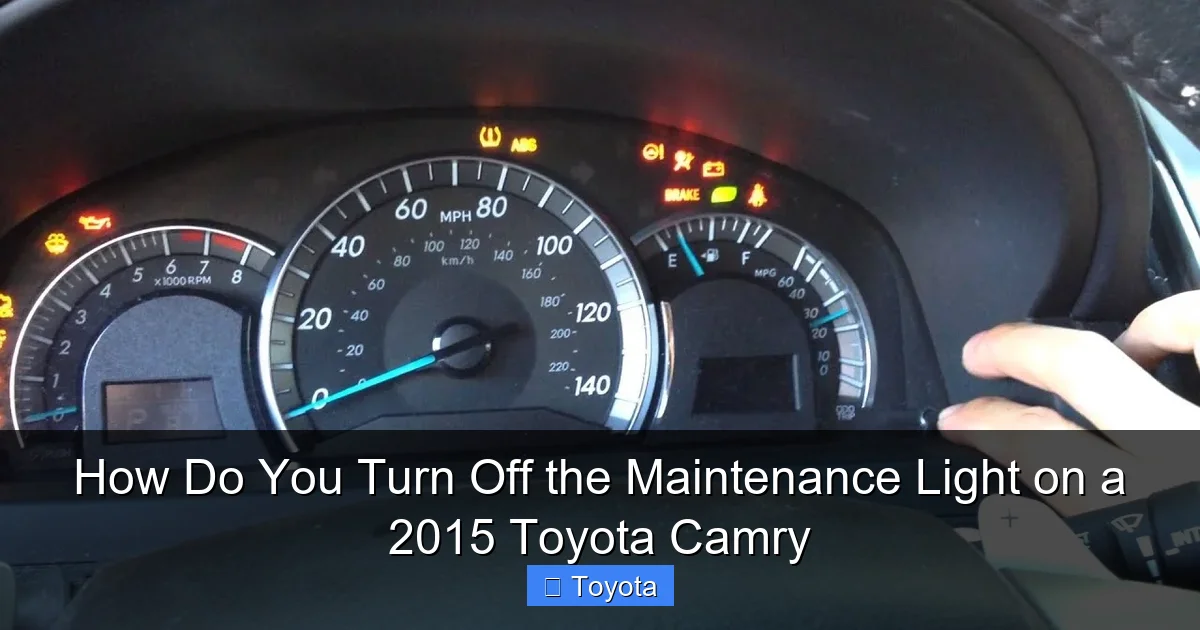
Visual guide about How Do You Turn Off the Maintenance Light on a 2015 Toyota Camry
Image source: i.ytimg.com
Step 1: Position Yourself and Prepare the Vehicle
Sit in the driver’s seat and make sure you can easily reach the trip/odometer reset button. This is the small black button usually located on the instrument panel, near the speedometer and tachometer. On the 2015 Camry, it’s typically on the right-hand side of the gauge cluster, labeled with a left/right arrow or “ODO/TRIP.” Ensure your car is parked safely with the parking brake set. The engine should be off. You do not need to have the key in the “ON” position yet. Just have your key fob with you or the physical key ready.
Step 2: Access the “Trip A” or “ODO” Display
This is a crucial preparatory step that many people miss. You need to start with your odometer display showing the total mileage (ODO) or the Trip A reading—not the Trip B reading or any other menu. To do this, turn your ignition key to the “ON” position (the position right before starting the engine, where all dashboard lights come on). Do not start the engine. Now, press the trip/odometer reset button repeatedly until the display cycles to show either the total odometer reading or “Trip A.” If it shows “Trip B,” press the button once more to toggle to “Trip A.” You must start the reset procedure from one of these two displays.
Step 3: Initiate the Reset Sequence
This is the core of the procedure. With the ignition still in the “ON” position and the display showing “ODO” or “Trip A,” you will now press and hold the trip/odometer reset button. While you are holding that button down, you need to turn the ignition key to the “OFF” position. It’s important to keep holding the button. The dash lights may go out as you turn the key off, but you must maintain pressure on the button for about 5-10 seconds.
Step 4: Complete the Reset and Verify
After holding the button for several seconds with the key “OFF,” you can now release the button. Now, turn the ignition key back to the “ON” position (the same position as in Step 2). Watch the odometer display closely. If you performed the steps correctly, the maintenance light should be off, and you might see the odometer display blink a few times or show a series of dashes (—-) for a second before returning to the normal mileage reading. This blinking is your confirmation that the maintenance interval counter has been reset to zero. If the light is still on, or if the display didn’t blink, you likely didn’t hold the button long enough in the “OFF” position. Turn the ignition off, wait a few seconds, and try the sequence again, holding the button a bit longer (aim for 10-15 seconds).
What If My 2015 Camry Has a Different Button Layout?
While the vast majority of 2015 Camrys use the method described above, there is a tiny chance your specific trim (like a base model vs. a SE) might have a slightly different gauge cluster. The principle remains identical: you need to access the ODO/Trip A display and use the reset button while cycling the ignition. If you are having no luck, your absolute best resource is the physical owner’s manual that came with your car. It will have the exact, model-specific procedure, often with a diagram. You can also find digital copies online. For owners of other Toyota models, the process can vary slightly. For example, resetting the maintenance light on a 2017 Toyota Highlander follows a nearly identical pattern, but the button location might differ slightly. Always refer to your specific manual first.
After the Reset: Confirmation and What to Expect Next
Once you’ve successfully completed the reset and the wrench icon is gone, take a moment to start your engine. Let it run for a few seconds and then turn it off and back on again. This ensures the reset was saved in the car’s memory system. The light should remain off. Now, your car’s internal computer has started a fresh 5,000-mile (or 6-month) countdown. You can also take this opportunity to reset your trip meter if you use it to track mileage for the next service interval. Simply press and hold the reset button when the trip meter is displayed to zero it out.

Visual guide about How Do You Turn Off the Maintenance Light on a 2015 Toyota Camry
Image source: vehiclebright.com
Going forward, you can drive with peace of mind. The light will stay off until you accumulate the set mileage or time. It’s a good habit to note your current odometer reading in a service log or on your phone after each reset. That way, you have a personal record and can estimate when the next light will appear (Current Odometer + 5,000 miles). When it does come back on, you’ll know it’s time to schedule your next appointment. This cycle is the essence of the Toyota maintenance reminder system—a simple, effective way to stay on top of your vehicle’s needs.
Common Troubleshooting: What If the Light Won’t Turn Off?
You followed the steps perfectly, but that stubborn wrench is still glaring at you. Don’t worry, this usually has a simple explanation. First, repeat the procedure carefully. The most common error is not holding the reset button long enough while the key is in the “OFF” position. Make sure you’re starting from the correct “ODO” or “Trip A” display. Try it again, holding the button for a solid 15 seconds with the key off before releasing and turning it back on.
If it still won’t reset, consider these possibilities:
- Low Battery Voltage: A weak car battery can sometimes interfere with the electronic reset process. If your battery is old or the car has been sitting, try jump-starting it or charging the battery first, then attempt the reset again.
- Faulty Reset Button: The physical button can wear out or become sticky. If pressing it feels unresponsive or doesn’t toggle the display properly, it may need to be replaced by a technician.
- Underlying Electrical Issue: Rarely, there could be a problem with the instrument cluster itself or the Body Control Module (BCM) that manages the light. If you’ve confirmed the service was done and the reset still fails after multiple attempts, it’s time to visit a mechanic or a Toyota dealership. They can use a professional scan tool to command the reset and check for any stored fault codes in the system.
- You Have a Different Light: Double-check that you are dealing with the maintenance required light and not a different warning light like the “ABS” light, “VSC TRAC” light, or tire pressure monitoring system (TPMS) light. Each has its own reset procedure. The maintenance light is usually a yellow or amber wrench.
In the vast majority of cases, persistence and correct button timing will solve the problem. If not, professional help is the safest route to ensure your car’s systems are functioning correctly.
The Bigger Picture: Why This Simple Reset Matters for Your Camry’s Health
Resetting the light is just the final step in a much more important process: adhering to your Toyota’s maintenance schedule. That schedule is engineered by some of the brightest minds in automotive engineering. They know exactly how often your engine oil breaks down, when your cabin air filter gets clogged, and how frequently your brakes wear down based on extensive testing. The maintenance light is the messenger for that schedule. By resetting it only after completing the work, you create a closed loop of accountability. Your car’s computer is now synced with your service history.
Think of your 2015 Camry as an athlete. Even the most conditioned athlete needs regular check-ups, oil changes (in a metaphorical sense!), and part replacements to perform at their peak and avoid injury. Skipping an oil change might not cause an immediate breakdown, but it leads to sludge buildup, increased friction, and ultimately, a shorter engine life. The maintenance light is your coach tapping you on the shoulder. Heeding that reminder and then properly resetting it is a small act of care that pays massive dividends in the form of reliability, fuel efficiency, and a higher resale value when the time comes. A well-maintained Camry with a complete service record, including timely resets, can easily surpass 300,000 miles. It’s that simple.
Conclusion: A Simple Task with a Big Impact
So, there you have it. Turning off the maintenance light on your 2015 Toyota Camry is a quick, no-fuss procedure that empowers you as a vehicle owner. It’s not a secret code or a mechanic-only task. It’s a straightforward sequence: ensure service is done, turn the key to “ON,” press and hold the odometer button, turn the key “OFF” while holding, release, and turn the key back “ON.” A quick blink of the odometer and the light is gone. You’ve just completed the loop on your car’s service reminder.
Remember the golden rule: never reset the light without first performing the underlying maintenance. Use this guide as your reference, and don’t hesitate to consult your owner’s manual for your specific model. By understanding what the light means and how to properly reset it, you’re taking a proactive step toward preserving the legendary reliability of your Toyota Camry. Now, go enjoy that clean, clear dashboard—and keep up the great maintenance habits!
Frequently Asked Questions
Can I drive my Camry with the maintenance light on?
Yes, you can drive it for a short period (a few hundred miles). The light is a reminder, not an immediate danger signal like an oil pressure warning. However, you should schedule the required service (usually an oil change) as soon as possible to avoid excessive engine wear.
How many miles can I drive after the maintenance light comes on?
The light is designed to illuminate approximately 5,000 miles after your last reset. You have a reasonable buffer, but it’s best not to exceed 1,000-1,500 miles past the reminder to stay within Toyota’s recommended service intervals for optimal engine health.
Is the maintenance light the same as the check engine light?
No. The maintenance light (wrench icon) is a mileage-based service reminder. The check engine light (engine icon) indicates a potential problem with the engine or emissions system detected by the car’s computer. They have completely different meanings and reset procedures.
What if the maintenance light won’t reset after I’ve done the service?
First, repeat the reset procedure carefully, ensuring you start from the “ODO” or “Trip A” display and hold the button long enough while turning the key off. If it still fails, a weak battery, a faulty button, or an electrical issue could be the cause. A professional scan tool can force a reset and diagnose any underlying problem.
Do I need an oil change every time the maintenance light comes on?
For the 2015 Camry under normal driving conditions, yes, the light is primarily tied to the 5,000-mile oil change interval. However, the full service may also include tire rotation and a multi-point inspection. Always check your owner’s manual for the exact “A” service requirements at your current mileage.
Will the maintenance light turn off by itself after I get an oil change?
No. The light is a manual reset system. Even after you or a mechanic changes the oil, the light will remain on until someone intentionally performs the reset procedure using the odometer button and ignition key. The new service interval doesn’t start until you reset it.