Hook Up Battery Charger to Car
Hooking up a battery charger to your car is a simple yet essential skill every driver should know. Whether you’re dealing with a dead battery or maintaining charge during long storage, using a battery charger correctly ensures your vehicle starts reliably and extends battery life.
In This Article
- 1 Key Takeaways
- 2 📑 Table of Contents
- 3 Why You Should Know How to Hook Up a Battery Charger to Your Car
- 4 Understanding Car Batteries and Charging Basics
- 5 Step-by-Step Guide: How to Hook Up a Battery Charger to Your Car
- 6 Safety Tips and Common Mistakes to Avoid
- 7 When to Charge vs. When to Replace
- 8 Maintenance Tips to Extend Battery Life
- 9 Conclusion
- 10 Frequently Asked Questions
- 10.1 Can I leave a battery charger connected overnight?
- 10.2 Is it safe to charge a car battery while it’s still in the vehicle?
- 10.3 What’s the difference between a trickle charger and a smart charger?
- 10.4 Can I charge a completely dead battery?
- 10.5 Do I need to disconnect the battery to charge it?
- 10.6 How long does it take to charge a car battery?
Key Takeaways
- Safety first: Always wear safety gear like gloves and goggles, and work in a well-ventilated area to avoid sparks or gas buildup.
- Identify battery terminals: Red is positive (+), black is negative (−); connecting incorrectly can damage electronics or cause injury.
- Choose the right charger: Match the charger type (trickle, smart, or fast) to your battery and situation for best results.
- Follow the correct sequence: Connect clamps in the order: positive to positive, negative to negative (or ground), and reverse when disconnecting.
- Monitor charging progress: Use built-in indicators or a multimeter to avoid overcharging, which can shorten battery life.
- Maintain regularly: Charge your battery every few months if the car sits unused to prevent sulfation and deep discharge.
- Know when to seek help: If the battery swells, leaks, or won’t hold a charge, it may need replacement—don’t force charging.
📑 Table of Contents
- Why You Should Know How to Hook Up a Battery Charger to Your Car
- Understanding Car Batteries and Charging Basics
- Step-by-Step Guide: How to Hook Up a Battery Charger to Your Car
- Safety Tips and Common Mistakes to Avoid
- When to Charge vs. When to Replace
- Maintenance Tips to Extend Battery Life
- Conclusion
Why You Should Know How to Hook Up a Battery Charger to Your Car
Imagine this: It’s a cold winter morning, you’re running late for work, and your car won’t start. The dashboard lights flicker weakly, and the engine just clicks—no turnover. Sound familiar? A dead battery is one of the most common car problems, especially in extreme temperatures or after long periods of inactivity. While jump-starting with cables and another vehicle can get you going in a pinch, the best long-term solution is learning how to properly hook up a battery charger to your car.
A battery charger does more than just revive a dead battery—it helps maintain optimal charge levels, extends battery life, and prevents unexpected breakdowns. Unlike jump-starts, which deliver a quick burst of power, chargers replenish the battery slowly and safely, reducing stress on internal components. Whether you’re storing your car for the winter, dealing with an aging battery, or simply want to be prepared, knowing how to connect a charger correctly is a valuable skill. Plus, it saves you time, money, and the hassle of calling roadside assistance.
Understanding Car Batteries and Charging Basics
Before you hook up a battery charger to your car, it helps to understand how car batteries work and what charging actually does. Most vehicles use a 12-volt lead-acid battery, which stores electrical energy through a chemical reaction between lead plates and sulfuric acid electrolyte. Over time, this reaction slows down—especially in cold weather or when the battery isn’t used regularly—leading to reduced performance or complete failure.
Visual guide about Hook Up Battery Charger to Car
Image source: wikihow.com
How Car Batteries Lose Charge
Batteries don’t just die overnight. Several factors contribute to gradual discharge:
- Parasitic drain: Modern cars have electronics like clocks, alarms, and onboard computers that draw small amounts of power even when the engine is off.
- Short driving trips: Frequent short drives don’t give the alternator enough time to fully recharge the battery.
- Extreme temperatures: Cold weather thickens engine oil and reduces chemical activity in the battery, while heat accelerates internal corrosion.
- Aging batteries: Most car batteries last 3–5 years. As they age, their ability to hold a charge diminishes.
Types of Battery Chargers
Not all chargers are created equal. Choosing the right one depends on your needs, battery type, and how quickly you need a charge. Here are the most common types:
- Trickle chargers: Deliver a low, steady current over many hours. Ideal for long-term maintenance and storage. Great for classic cars or seasonal vehicles.
- Smart chargers (automatic): Use microprocessors to monitor voltage and adjust charging rate. They can detect when the battery is full and switch to maintenance mode, preventing overcharging.
- Fast chargers (boost or high-amp): Provide a rapid charge in 1–4 hours. Useful in emergencies but can generate heat and stress the battery if used frequently.
- Solar chargers: Use solar panels to slowly charge the battery. Best for eco-conscious users or remote locations without power access.
For most drivers, a smart charger is the best all-around choice. It’s safe, efficient, and requires minimal supervision. Always check your battery’s specifications (voltage, amp-hour rating) and match them to the charger’s output.
Step-by-Step Guide: How to Hook Up a Battery Charger to Your Car
Now that you understand the basics, let’s walk through the process of safely connecting a battery charger to your car. Whether you’re using a trickle charger, smart charger, or fast charger, the steps are similar. Follow these instructions carefully to avoid damage or injury.
Visual guide about Hook Up Battery Charger to Car
Image source: wikihow.com
Step 1: Prepare Your Workspace
Safety is the top priority. Before touching any wires or clamps, make sure you’re working in a safe environment:
- Park your car on a flat, dry surface away from traffic.
- Turn off the engine and remove the keys.
- Engage the parking brake to prevent rolling.
- Work in a well-ventilated area—batteries can emit flammable hydrogen gas.
- Wear safety gloves and goggles to protect against acid and sparks.
Step 2: Locate the Battery
Most car batteries are under the hood, but some are in the trunk, under the rear seat, or even in the wheel well. Check your owner’s manual if you’re unsure. Once located, remove any plastic covers or shields protecting the battery terminals.
Step 3: Identify the Terminals
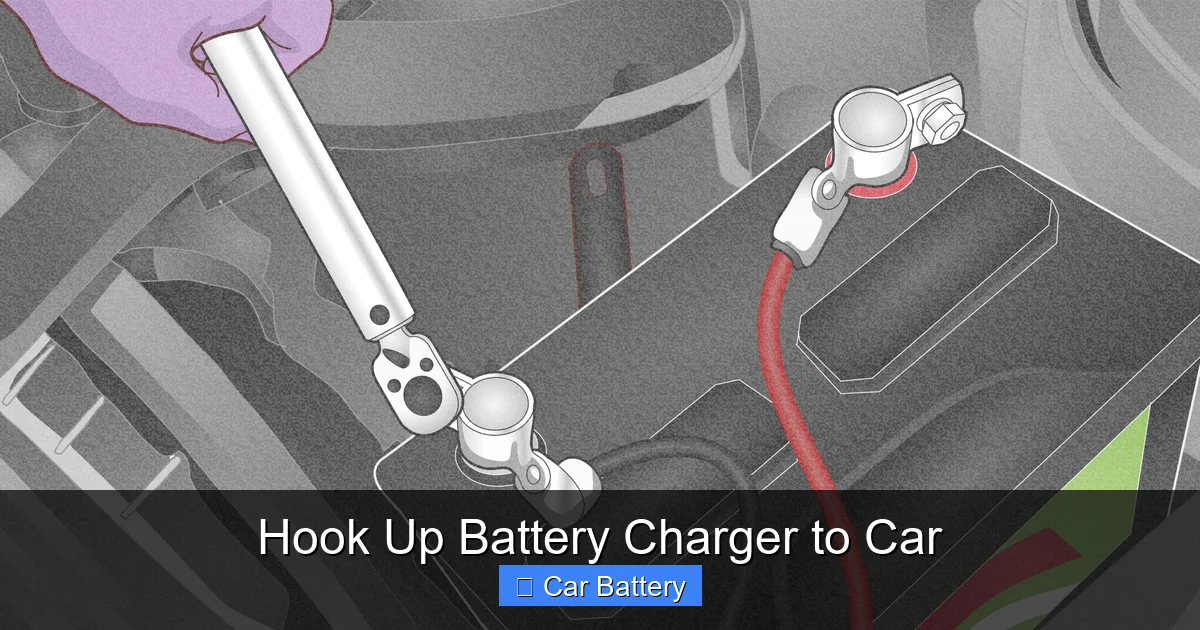
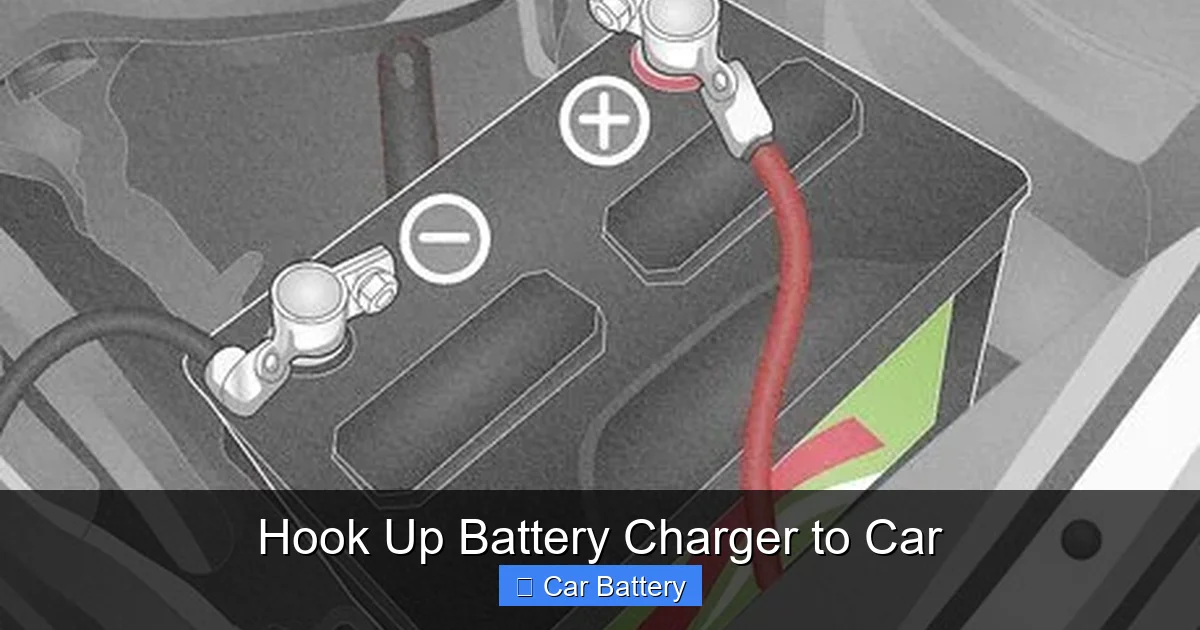
Look for the positive (+) and negative (−) terminals. The positive terminal is usually marked with a red cover or a “+” symbol and may have a red cable connected to it. The negative terminal is typically black or marked with a “−” and connects to the car’s chassis (ground).
Step 4: Connect the Charger Clamps
Follow this sequence to avoid sparks near the battery:
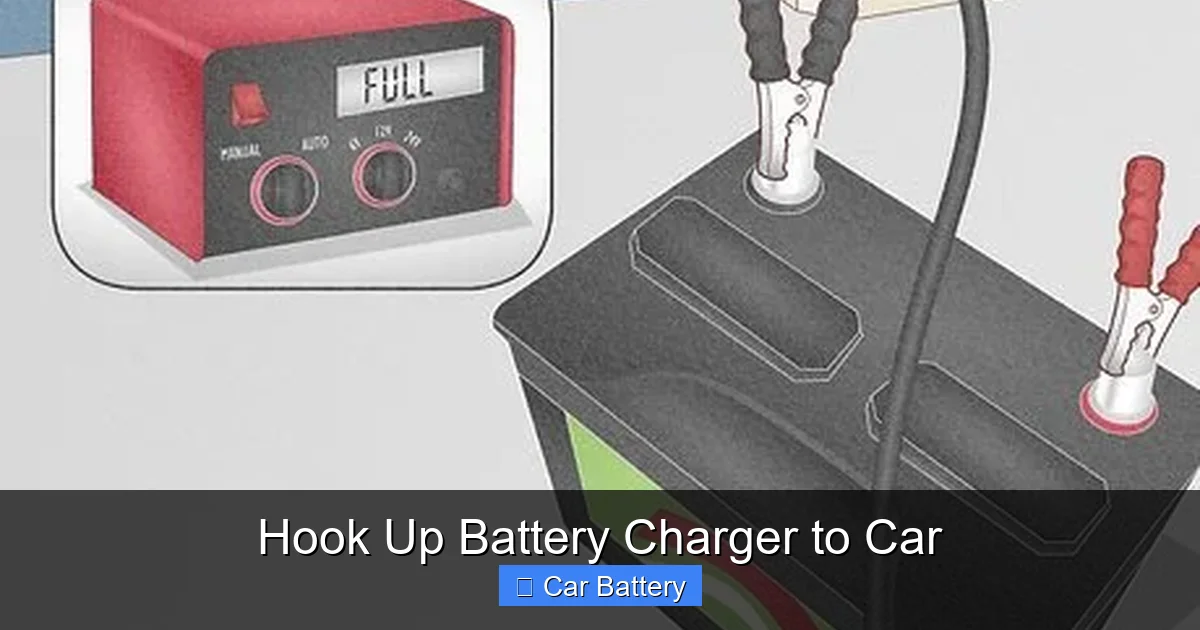
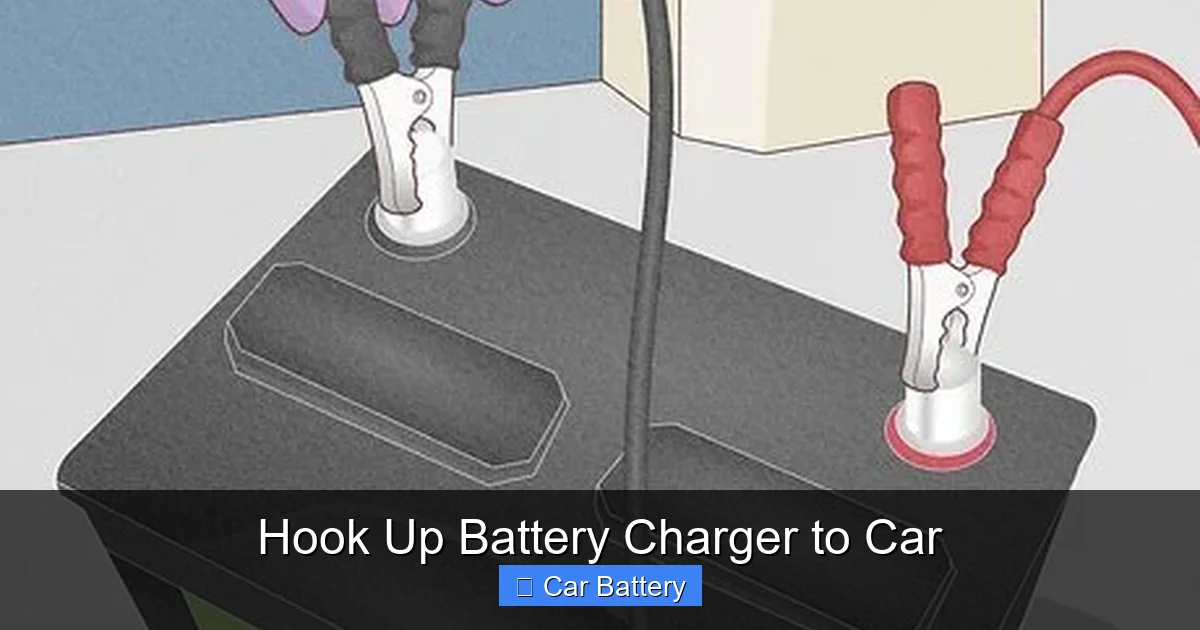
- Connect the red (positive) clamp to the positive terminal of the battery.
- Connect the black (negative) clamp to the negative terminal. If the terminal is corroded or hard to reach, you can attach the black clamp to a clean, unpainted metal part of the engine block or chassis (this is called grounding).
Important: Never connect the negative clamp directly to the negative terminal if you’re using a grounding point. Always connect positive first, then negative.
Step 5: Set the Charger
Plug in the charger and select the appropriate settings:
- Choose the correct voltage (usually 12V for cars).
- Select the charging rate (e.g., 2A for maintenance, 10A for faster charging).
- If using a smart charger, it may auto-detect settings—just press start.
Step 6: Start Charging
Turn on the charger. Most models will show a light or display indicating charging status. A green light usually means charging is in progress; red or amber may indicate an issue (like a bad connection or deeply discharged battery).
Step 7: Monitor the Process
Check the charger periodically. Smart chargers will automatically shut off or switch to maintenance mode when the battery is full. For manual chargers, use a multimeter to check voltage:
- 12.6V or higher = fully charged
- 12.4V = about 75% charged
- Below 12.0V = needs more time
Step 8: Disconnect the Charger
When charging is complete, reverse the connection order:
- Unplug the charger from the wall.
- Remove the black (negative) clamp first.
- Remove the red (positive) clamp.
- Replace any battery covers.
Never disconnect the clamps while the charger is still plugged in—this can cause dangerous sparks.
Safety Tips and Common Mistakes to Avoid
Even experienced drivers can make mistakes when hooking up a battery charger. A small error can lead to sparks, battery damage, or even injury. Here’s how to stay safe and avoid common pitfalls.
Visual guide about Hook Up Battery Charger to Car
Image source: wikihow.com
Wear Protective Gear
Always wear rubber gloves and safety goggles. Battery acid is corrosive and can cause burns. If acid gets on your skin, rinse immediately with water. Keep a baking soda solution nearby to neutralize spills.
Avoid Sparks Near the Battery
Hydrogen gas can build up around the battery, especially during charging. A single spark can ignite it. To prevent this:
- Connect clamps away from the battery, then move them into place.
- Never smoke or use open flames near the battery.
- Ensure all connections are secure before plugging in the charger.
Don’t Overcharge the Battery
Overcharging can cause the battery to overheat, leak, or even explode. Smart chargers reduce this risk, but if you’re using a manual trickle charger, don’t leave it connected for days. Most batteries take 4–12 hours to charge, depending on capacity and charger output.
Check for Damage First
Before charging, inspect the battery for cracks, swelling, or leaks. If the case is bulging or you smell a rotten egg odor (sulfur), the battery may be damaged internally. Do not charge it—replace it instead.
Use the Right Charger for Your Battery
Using a charger with too high an amp rating can damage older or smaller batteries. For example, a 20A charger on a weak battery can cause overheating. Stick to 2A–10A for most standard car batteries unless you’re in a hurry.
Don’t Charge a Frozen Battery
If the battery feels cold or icy, do not charge it. Charging a frozen battery can cause it to rupture. Let it warm to room temperature first, then check for damage before proceeding.
When to Charge vs. When to Replace
Not every dead battery needs a charger—sometimes, replacement is the better option. Here’s how to tell the difference.
Signs Your Battery Needs Charging
- Engine cranks slowly but eventually starts.
- Headlights dim when idling but brighten when revving.
- Car has been sitting unused for weeks or months.
- You recently used accessories (radio, lights) with the engine off.
Signs Your Battery Needs Replacement
- It’s more than 4–5 years old.
- The battery won’t hold a charge after multiple attempts.
- You notice corrosion (white or blue powder) on terminals.
- The battery case is swollen, cracked, or leaking.
- The car frequently needs jump-starts.
If your battery fails a load test (available at auto parts stores), it’s likely time for a new one. Charging a failing battery is a temporary fix at best.
Maintenance Tips to Extend Battery Life
Prevention is better than cure. Regular maintenance can help you avoid the need to hook up a battery charger to your car in the first place.
Keep Terminals Clean
Corrosion on terminals increases resistance and reduces charging efficiency. Clean them every 6 months with a mixture of baking soda and water, a wire brush, and a rag. Apply a thin layer of petroleum jelly or terminal protector to prevent future buildup.
Drive Regularly
If you don’t drive often, start your car and let it run for 20–30 minutes every week. This allows the alternator to recharge the battery. For long-term storage, use a trickle charger or disconnect the battery.
Check Charging System
A faulty alternator or voltage regulator can prevent proper charging. If your battery keeps dying despite charging, have your charging system inspected by a mechanic.
Use a Battery Maintainer
For seasonal vehicles (like motorcycles or classic cars), a battery maintainer (a type of smart trickle charger) keeps the battery at optimal charge without overcharging. Just plug it in when storing.
Conclusion
Learning how to hook up a battery charger to your car is a simple but powerful skill that can save you from frustration, costly repairs, and roadside emergencies. With the right charger, a few safety precautions, and a basic understanding of your battery’s needs, you can keep your vehicle reliable year-round. Whether you’re reviving a dead battery or maintaining charge during storage, the process is straightforward when done correctly.
Remember: safety first, follow the correct connection sequence, and choose the right charger for your situation. Regular maintenance goes a long way in preventing battery issues, but when they do arise, you’ll be ready. So next time your car won’t start, don’t panic—grab your charger, follow these steps, and get back on the road with confidence.
Frequently Asked Questions
Can I leave a battery charger connected overnight?
Yes, if you’re using a smart charger. These automatically switch to maintenance mode when the battery is full. However, avoid leaving manual trickle chargers connected for more than 24 hours to prevent overcharging.
Is it safe to charge a car battery while it’s still in the vehicle?
Yes, as long as you follow safety procedures. Make sure the engine is off, the area is ventilated, and you connect the clamps correctly. Never charge a damaged or leaking battery.
What’s the difference between a trickle charger and a smart charger?
A trickle charger delivers a constant low current and requires manual monitoring. A smart charger adjusts the charge rate automatically and can detect when the battery is full, making it safer and more convenient.
Can I charge a completely dead battery?
It depends. If the battery voltage is below 10.5V, it may be deeply discharged and require a slow, low-amp charge to recover. Some smart chargers have a “recondition” mode for this. If it won’t accept a charge, it may be beyond repair.
Do I need to disconnect the battery to charge it?
No, you can charge it while it’s still connected to the car. However, disconnecting it reduces the risk of electrical surges affecting your vehicle’s electronics, especially with older models.
How long does it take to charge a car battery?
It varies by charger type and battery condition. A 2A trickle charger may take 12–24 hours, while a 10A fast charger can do it in 4–6 hours. Smart chargers often complete the job faster and more efficiently.