
Does the Dodge Charger Have Apple Carplay?

The Dodge Charger offers Apple CarPlay across most modern trims and model years, starting from 2018 onward. This seamless integration lets drivers use iPhone features like navigation, music, and messaging safely through the car’s infotainment system.
If you’re a proud Dodge Charger owner—or considering becoming one—you’ve probably asked yourself: *Does the Dodge Charger have Apple CarPlay?* You’re not alone. In today’s connected world, smartphone integration isn’t just a nice-to-have; it’s essential. Whether you’re navigating rush-hour traffic, queuing up your favorite playlist, or answering a hands-free call, having your iPhone work seamlessly with your car makes all the difference.
The good news? Yes, the Dodge Charger does offer Apple CarPlay—on most modern models. But like any tech feature, it’s not available across every single trim or year. Understanding which Chargers come equipped with CarPlay, how to use it, and what to expect can help you make the most of your driving experience. In this guide, we’ll walk you through everything you need to know about Apple CarPlay in the Dodge Charger, from availability and setup to tips for getting the most out of it.
So buckle up. Whether you’re driving a 2018 Charger SXT or a brand-new 2024 Charger SRT Hellcat, we’ve got you covered.
Key Takeaways
- Apple CarPlay is available on most Dodge Charger models from 2018 to present. It comes standard or as an option depending on the trim level and infotainment package.
- Uconnect 4 and Uconnect 5 systems support Apple CarPlay. These are the primary infotainment platforms used in Chargers equipped with the feature.
- Wired connection is required for Apple CarPlay in all Charger models. Wireless CarPlay is not currently supported in any Dodge Charger.
- Higher trims like R/T, Scat Pack, and SRT models include CarPlay by default. Base SXT and GT trims may require an optional technology package.
- Apple CarPlay enhances safety and convenience while driving. It allows voice control via Siri and integrates with Apple Maps, Spotify, WhatsApp, and more.
- Software updates may improve compatibility and performance. Keeping your Uconnect system updated ensures the best CarPlay experience.
- Android Auto is also supported alongside Apple CarPlay. This makes the Charger a great choice for mixed-device households.
📑 Table of Contents
- Apple CarPlay in the Dodge Charger: What You Need to Know
- Which Dodge Charger Models Include Apple CarPlay?
- How to Set Up Apple CarPlay in Your Dodge Charger
- Features and Apps Supported by Apple CarPlay in the Charger
- Wired vs. Wireless: Why the Charger Doesn’t Have Wireless CarPlay
- Tips for Getting the Most Out of Apple CarPlay in Your Charger
- Conclusion
Apple CarPlay in the Dodge Charger: What You Need to Know
Apple CarPlay has become one of the most sought-after features in modern vehicles. It brings the familiar interface of your iPhone directly to your car’s touchscreen, allowing you to access apps, make calls, send messages, and navigate—all while keeping your eyes on the road and hands on the wheel. For Dodge Charger drivers, this means a smarter, safer, and more enjoyable ride.
Starting with the 2018 model year, Dodge began including Apple CarPlay as a standard or available feature on most Charger trims. This integration is part of the Uconnect infotainment system, which has evolved significantly over the years. The Uconnect 4 and newer Uconnect 5 systems are the ones that support Apple CarPlay, and they’re found in Chargers from 2018 through the current 2024 models.
But here’s the catch: not every Charger comes with CarPlay out of the box. It often depends on the trim level and whether you’ve opted for certain technology packages. For example, base models like the SXT or GT may require an upgrade to the Uconnect 4 system with an 8.4-inch touchscreen to unlock CarPlay functionality. Meanwhile, higher-performance trims like the R/T, Scat Pack, and SRT variants typically include it as standard equipment.
One thing to keep in mind is that Apple CarPlay in the Dodge Charger is currently a wired experience. That means you’ll need to plug your iPhone into the USB port using a Lightning cable (or USB-C for newer iPhones) to activate it. Unfortunately, wireless Apple CarPlay isn’t available in any Charger model as of 2024. While this might be a slight inconvenience for some, the wired connection ensures a stable, lag-free experience with minimal interruptions.
Which Dodge Charger Models Include Apple CarPlay?
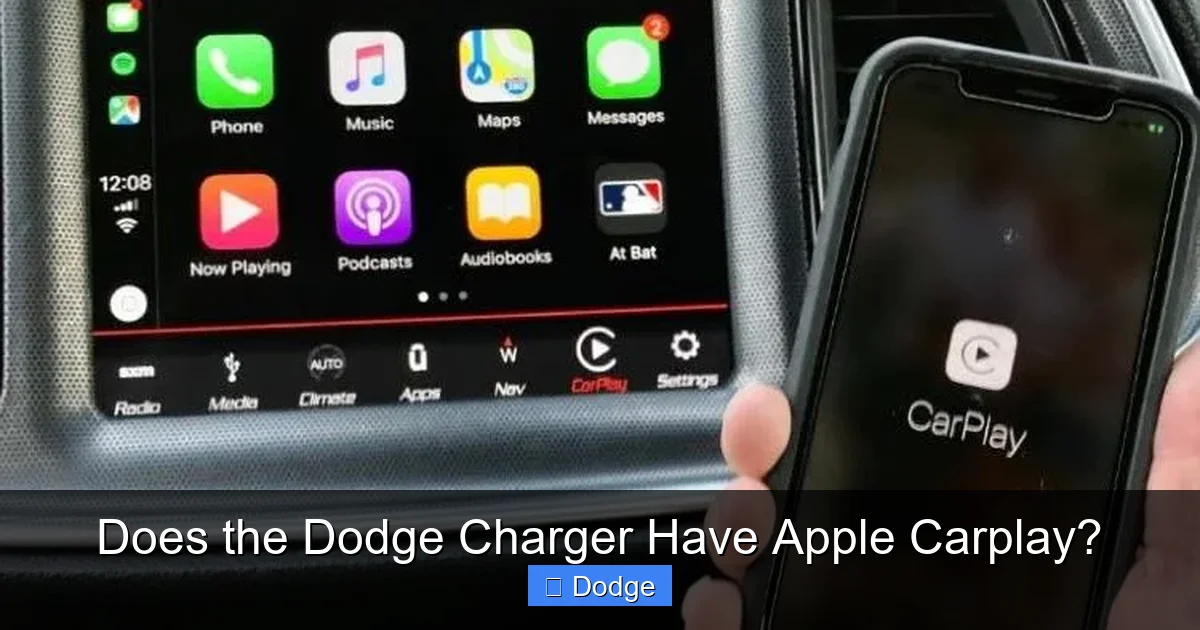
Visual guide about Does the Dodge Charger Have Apple Carplay?
Image source: cdn.shopify.com
Now that we’ve established that Apple CarPlay is indeed available in the Dodge Charger, let’s break down exactly which models and trims you can expect it on. The availability has changed slightly over the years, so it’s important to know what to look for—especially if you’re shopping for a used Charger.
2018–2020 Dodge Charger
The 2018 model year marked the debut of Apple CarPlay in the Dodge Charger lineup. It was introduced as part of the Uconnect 4 system, which features an 8.4-inch touchscreen. On these models, CarPlay was available on most trims, but not always standard. For instance:
– The base SXT trim required the optional “Uconnect 4 with 8.4-inch Display” package to get CarPlay.
– The GT, R/T, and Scat Pack trims typically included it as standard.
– The high-performance SRT models also came with CarPlay built-in.
If you’re looking at a used 2018–2020 Charger, check the center console for the 8.4-inch screen. If it’s there, CarPlay is likely supported—just make sure the system hasn’t been downgraded or replaced.
2021–2023 Dodge Charger
From 2021 onward, Dodge made Apple CarPlay more widely available. The Uconnect 4 system remained the standard, but many trims began including CarPlay even in their base configurations. The 2021 refresh also brought subtle improvements to the interface, making it faster and more responsive.
– The SXT and GT trims often included CarPlay with the optional technology package.
– R/T, Scat Pack, and SRT models continued to offer it as standard.
– The 2022 and 2023 models maintained this trend, with CarPlay becoming almost ubiquitous across the lineup.
2024 Dodge Charger
The 2024 Dodge Charger continues the tradition of Apple CarPlay support. With the introduction of the new Charger lineup (including the electric Charger Daytona), CarPlay remains a key feature for iPhone users. However, it’s important to note that the new Chargers use updated infotainment systems, and compatibility may vary slightly between gas and electric variants.
For the 2024 gas-powered Chargers, Apple CarPlay is available on all trims equipped with the Uconnect 5 system and an 8.4-inch or 10.1-inch touchscreen. The electric Charger Daytona models also support CarPlay, though some early reviews suggest minor software quirks that may be resolved with future updates.
How to Set Up Apple CarPlay in Your Dodge Charger
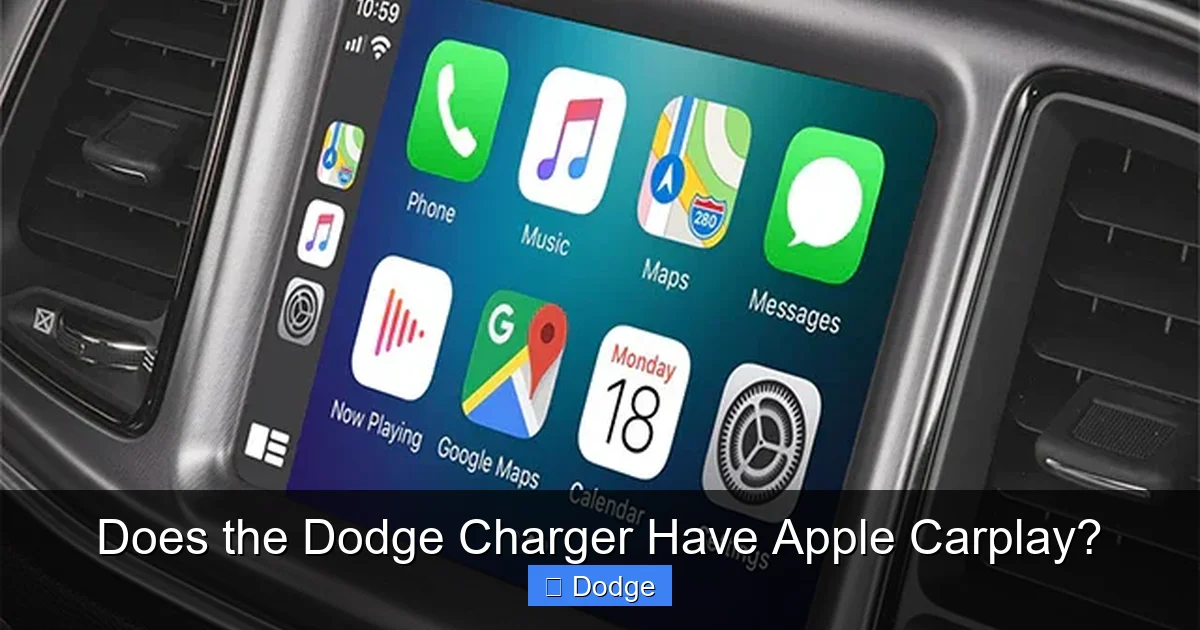
Visual guide about Does the Dodge Charger Have Apple Carplay?
Image source: thecarplayer.com
Setting up Apple CarPlay in your Dodge Charger is straightforward—once you know the steps. Here’s a simple guide to get you connected and cruising with your iPhone in no time.
Step 1: Check Your iPhone Compatibility
First, make sure your iPhone is compatible with Apple CarPlay. You’ll need an iPhone 5 or newer running iOS 7.1 or later. For the best experience, we recommend using iOS 13 or higher, as it includes improved Siri integration and app support.
Step 2: Use the Right Cable
Since CarPlay in the Charger is wired, you’ll need a high-quality Lightning-to-USB cable (or USB-C if you have an iPhone 15 or newer). Avoid cheap, off-brand cables—they can cause connection issues or fail to charge your phone properly.
Step 3: Plug Into the Correct USB Port
Locate the USB port in your Charger. It’s usually in the center console, near the gear shifter. Some models have multiple USB ports, but only one supports data transfer for CarPlay—typically labeled with a phone icon. Plug your iPhone into that port.
Step 4: Follow the On-Screen Prompts
Once connected, your Charger’s infotainment screen should display a prompt asking if you want to enable CarPlay. Tap “Allow” on your iPhone when it asks for permission. The CarPlay interface should then appear on the Uconnect screen.
Step 5: Customize Your Experience
You can rearrange apps on the CarPlay home screen by pressing and holding an app icon. You can also enable Siri voice commands by holding the voice button on your steering wheel or saying “Hey Siri.”
Troubleshooting Tips
If CarPlay isn’t working:
– Restart your iPhone and the Uconnect system (turn the car off and on).
– Try a different USB cable or port.
– Check for Uconnect software updates via the settings menu.
– Ensure CarPlay is enabled in your iPhone’s Settings > General > CarPlay.
Features and Apps Supported by Apple CarPlay in the Charger
Visual guide about Does the Dodge Charger Have Apple Carplay?
Image source: connectedcarsolutions.com.au
Once you’ve got Apple CarPlay up and running in your Dodge Charger, you’ll unlock a world of functionality. CarPlay isn’t just about playing music—it’s a full digital assistant that integrates seamlessly with your daily routine.
Navigation and Maps
Apple Maps is one of the most popular features in CarPlay. It provides turn-by-turn directions, real-time traffic updates, and estimated arrival times. You can search for destinations using Siri or the touchscreen, and it even suggests nearby gas stations, restaurants, and parking.
For example, if you’re driving your Charger Scat Pack to a concert downtown, just say, “Hey Siri, navigate to the arena,” and CarPlay will plot the fastest route—avoiding traffic if possible.
Music and Audio Apps
CarPlay supports a wide range of music and podcast apps, including:
– Apple Music
– Spotify
– Pandora
– Amazon Music
– Audible
You can browse playlists, search for songs, or ask Siri to “play my workout mix.” The audio plays through the Charger’s premium sound system—whether it’s the standard setup or the available 9-speaker Alpine or 19-speaker Harman Kardon systems.
Messaging and Calls
With CarPlay, you can send and receive text messages using Siri. Just say, “Hey Siri, text Mom I’m on my way,” and it will dictate your message and send it. Incoming messages appear on the screen, and you can reply hands-free.
Phone calls are also easy—just tap the phone icon or use voice commands to dial a contact. The Charger’s built-in microphone ensures clear audio on both ends.
Third-Party App Support
Beyond Apple’s native apps, CarPlay supports many third-party apps, including:
– WhatsApp (for messaging)
– Waze (for alternative navigation)
– Overcast (for podcasts)
– Google Calendar (for scheduling)
However, not all apps are CarPlay-compatible. Developers must enable support, so if your favorite app isn’t showing up, check for updates or contact the developer.
Siri Integration
Siri is the heart of the CarPlay experience. You can use it to:
– Set reminders
– Check the weather
– Control smart home devices (like turning on your lights when you get home)
– Get sports scores or news updates
Just say “Hey Siri” or press the voice button on your steering wheel to activate it.
Wired vs. Wireless: Why the Charger Doesn’t Have Wireless CarPlay
One common question among Charger owners is: *Why doesn’t the Dodge Charger support wireless Apple CarPlay?* After all, many newer vehicles—like the Tesla Model 3, Honda Accord, and even some Jeep models—offer wireless connectivity.
The short answer is that Dodge has not yet implemented wireless CarPlay in the Charger lineup. As of 2024, all Charger models require a wired connection via USB.
Reasons for the Wired-Only Setup
There are a few reasons why Dodge has stuck with wired CarPlay:
– **Reliability**: Wired connections are more stable and less prone to interference or dropouts.
– **Charging**: Plugging in your phone ensures it stays charged during long drives.
– **Cost and Complexity**: Adding wireless CarPlay requires additional hardware (like a Wi-Fi module and Bluetooth enhancements), which can increase manufacturing costs.
While wireless CarPlay is more convenient—no cables to fumble with—it can sometimes suffer from lag or connection issues, especially in areas with poor signal.
Will Wireless CarPlay Come to the Charger?
It’s possible, but not guaranteed. With the launch of the 2024 Charger and the shift toward electrification, Dodge may introduce wireless CarPlay in future updates. However, there’s no official announcement yet.
For now, if you want wireless smartphone integration, you’ll need to rely on Bluetooth for calls and music—but that won’t give you the full CarPlay experience.
Tips for Getting the Most Out of Apple CarPlay in Your Charger
Now that you’re up and running with CarPlay, here are some practical tips to enhance your experience:
1. Keep Your Uconnect System Updated
Dodge periodically releases software updates for the Uconnect system. These can improve CarPlay performance, fix bugs, and add new features. To check for updates:
– Go to Settings > System > Software Update.
– Connect to Wi-Fi and follow the prompts.
2. Use Siri for Hands-Free Control
Instead of tapping the screen while driving, use Siri for everything—navigation, music, messages. It’s safer and faster.
3. Organize Your CarPlay Home Screen
Arrange your most-used apps (like Maps, Music, and Phone) on the first screen for quick access.
4. Enable Do Not Disturb While Driving
In your iPhone settings, turn on “Do Not Disturb While Driving” to minimize distractions. CarPlay will still work, but notifications will be silenced.
5. Use a Phone Mount as a Backup
Even with CarPlay, sometimes you might want to see your phone’s screen. A dashboard or vent mount can be handy for checking apps not supported in CarPlay.
6. Pair Multiple Devices
If you share your Charger with someone who uses Android, no problem—Android Auto is also supported. Just plug in the respective phone, and the system will switch automatically.
Conclusion
So, does the Dodge Charger have Apple CarPlay? Absolutely—on most models from 2018 to 2024. Whether you’re driving a base SXT or a fire-breathing SRT Hellcat, there’s a good chance your Charger can connect to your iPhone and deliver a smarter, safer driving experience.
While it’s currently a wired-only feature, the integration is seamless, reliable, and packed with useful apps. From navigation and music to messaging and voice control, Apple CarPlay transforms your Charger’s infotainment system into a true extension of your digital life.
If you’re shopping for a Charger, look for models with the Uconnect 4 or Uconnect 5 system and an 8.4-inch or larger touchscreen. Higher trims almost always include CarPlay, but even base models can be upgraded with the right package.
And while wireless CarPlay isn’t here yet, the wired setup works flawlessly—and keeps your phone charged on long road trips. With regular software updates and smart usage, Apple CarPlay will continue to enhance your time behind the wheel.
So go ahead—plug in, power up, and enjoy the ride. Your Dodge Charger and your iPhone were made for each other.
Frequently Asked Questions
Does the 2017 Dodge Charger have Apple CarPlay?
No, the 2017 Dodge Charger does not support Apple CarPlay. The feature was introduced in the 2018 model year with the updated Uconnect 4 system.
Can I add Apple CarPlay to an older Dodge Charger?
It’s technically possible with aftermarket upgrades, but not officially supported by Dodge. Retrofitting requires a new head unit and may void your warranty.
Is Apple CarPlay free in the Dodge Charger?
Yes, Apple CarPlay is free to use. There’s no subscription fee, but you need a compatible iPhone and a USB cable to connect.
Does the Dodge Charger support Android Auto?
Yes, Android Auto is also supported on most Charger models with Uconnect 4 or 5. It works alongside Apple CarPlay, depending on which phone you plug in.
Why won’t Apple CarPlay connect in my Charger?
Common causes include a faulty USB cable, outdated software, or using the wrong USB port. Try restarting your phone and car, and check for Uconnect updates.
Will the 2024 Dodge Charger have wireless Apple CarPlay?
As of now, no. The 2024 Charger still requires a wired connection for Apple CarPlay. Dodge has not announced plans for wireless support.