
How to Activate I-stop on Mazda

Activating Mazda’s i-Stop system is typically a simple button press, but understanding its prerequisites and nuances is key to using it effectively. This system automatically shuts off your engine at stops to save fuel, but it won’t engage if conditions aren’t ideal. You must ensure your battery is sufficiently charged, the engine is warmed up, and the climate control settings are within specified parameters. If the system fails to activate, a quick check of these common conditions usually resolves the issue. For persistent problems, a professional diagnostic may be needed to check the i-Stop system’s dedicated components.
So, you’re driving your Mazda—maybe a sleek 2026 CX-5 or the sporty new MX-5—and you notice that little circular “A” icon on your dash. You’ve heard about Mazda’s smart i-Stop technology, the system designed to save you fuel by automatically turning off your engine at red lights and in traffic. But for the life of you, you can’t seem to get it to work. You press the button, the light comes on, but the engine keeps running at that stoplight. Frustrating, right?
First, take a breath. You’re not doing anything wrong. The i-Stop system is a clever piece of engineering, but it’s also a cautious one. It has a list of rules it follows to protect your battery, ensure your comfort, and guarantee a smooth, instant restart when you need to move again. Activating i-Stop isn’t just about flipping a switch; it’s about creating the perfect set of circumstances for the system to feel confident it can do its job. In this complete guide, we’ll walk through everything you need to know, from the literal button-press to understanding the complex dance of sensors and systems happening under the hood. By the end, you’ll be an i-Stop expert, ready to maximize your Mazda’s efficiency.
Key Takeaways
- The i-Stop activation button is typically located on the center console or dashboard, often marked with a circular “A” icon inside a car symbol. Pressing this button toggles the system on or off, and its status is confirmed by an indicator light on your instrument cluster.
- i-Stop will only activate when specific conditions are met: the engine must be fully warmed up, the battery must have adequate charge (usually above 70-80%), the driver’s seatbelt must be fastened, and the transmission must be in Drive (or Neutral for manual transmissions).
- System deactivation occurs automatically if: the battery charge drops too low, the cabin temperature deviates from your set climate control goal, or you open the driver’s door. The system will then need to re-evaluate conditions to reactivate.
- A common reason for i-Stop not working is a weak or failing 12V battery. The system requires a robust battery to restart the engine quickly and reliably. If your battery is over 3-4 years old, consider having it tested.
- You can temporarily disable i-Stop for specific driving situations (like heavy stop-and-go traffic or steep inclines) by pressing the i-Stop button. The system will remain off until you manually reactivate it or restart the car.
- The i-Stop system is separate from your main start-stop system and has its own control module and sensors. Issues with these dedicated components, like the i-Stop battery sensor or the engine restart actuator, will trigger a warning light and require professional service.
- Regular maintenance, especially of the battery and electrical system, is crucial for reliable i-Stop operation. Corroded battery terminals or a failing alternator can prevent the system from functioning as designed.
📑 Table of Contents
- Understanding the i-Stop System: More Than Just a Button
- Step-by-Step: How to Activate i-Stop on Your Mazda
- Common Reasons i-Stop Won’t Activate (And How to Fix Them)
- i-Stop vs. i-Eloop: Understanding Mazda’s Efficiency Duo
- Maximizing Your i-Stop Benefits: Pro Tips for 2026 Mazda Owners
- Conclusion: Driving Smarter with i-Stop
Understanding the i-Stop System: More Than Just a Button
Before we dive into the “how,” let’s quickly understand the “what” and “why.” Mazda’s i-Stop (Intelligent Stop) system is an advanced start-stop technology. Unlike older, crude systems that could be jarring, i-Stop is designed for seamless operation. When you come to a complete stop, say at a traffic light, and keep your foot on the brake pedal, the system will automatically shut off the gasoline engine. The car’s electrical systems—lights, radio, climate control—keep running using power from a specially designed, high-capacity 12V battery. The moment you take your foot off the brake or press the accelerator, the engine restarts instantly and smoothly.
The primary goal is fuel economy and reduced emissions, especially in urban driving where idling is common. In 2026 models, Mazda has refined this system further, with faster restart times and even smarter battery management. But this intelligence comes with a set of guardrails. The car’s computer, or Body Control Module (BCM), constantly monitors dozens of parameters. It won’t shut off the engine if it thinks doing so might leave you stranded with a dead battery or make you uncomfortably hot or cold. So, your first step in activation is understanding what the car is looking for.
The Prerequisites: Why i-Stop Might Not Engage
You can press the i-Stop button until you’re blue in the face, but if the car’s internal checklist isn’t complete, the system will stay dormant. Here are the most common conditions that must be true for activation:
- Engine Warmth: The engine must reach its normal operating temperature. A cold engine needs its fuel mixture to be richer for stability, and the system won’t interrupt this process. You’ll typically need to drive for 5-10 minutes after a cold start before i-Stop becomes available.
- Battery State of Charge (SOC): This is the #1 culprit. The dedicated i-Stop battery must have a high enough charge (usually above 70-80%) to power accessories and restart the engine. If your battery is weak, old, or you’ve been making many short trips that don’t fully recharge it, i-Stop will stay off. The system prioritizes ensuring you can start the car again over saving a few seconds of fuel.
- Climate Control Load: If you have the air conditioning or heater on a very high setting, the electrical draw might be too much for the battery to handle while the engine is off. The system will keep the engine running to power the compressor or heater blower. Try moderating your cabin temperature settings to allow i-Stop to engage.
- Driver Presence & Gear Selection: Your seatbelt must be fastened. The transmission must be in Drive (for automatics) or Neutral (for manuals). If you shift to Reverse or Park, i-Stop deactivates immediately, as expected.
- Steering Wheel Angle: On some models, if you have the steering wheel turned sharply (like during a tight parking maneuver), i-Stop may not activate to prevent a situation where you need immediate power for steering.
When all these boxes are checked, you’ll see the green i-Stop indicator light illuminate on your instrument cluster when you come to a stop with your foot on the brake. The engine will then shut off. The light will usually change color (to amber or extinguish) when you release the brake or press the gas.
Step-by-Step: How to Activate i-Stop on Your Mazda
Now, let’s get practical. The physical act of turning the system on is straightforward, but we’ll pair it with the mental checklist of conditions.
Visual guide about How to Activate I-stop on Mazda
Image source: mazdainfo.com
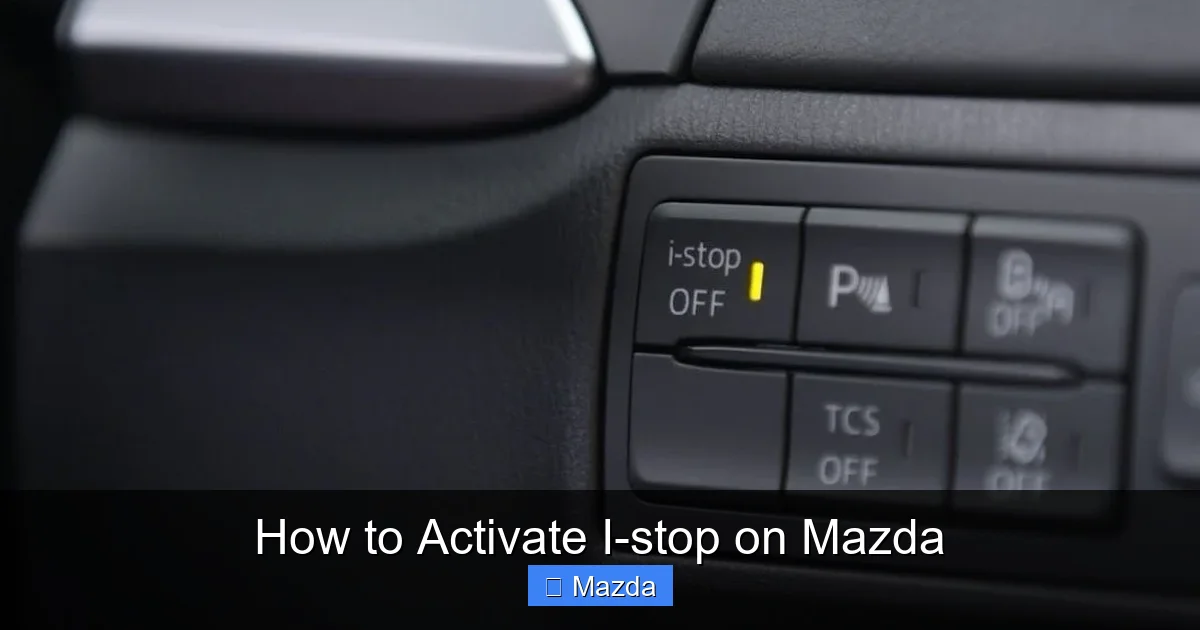
Step 1: Locate the i-Stop Button
The button is consistently placed on the center console, within easy reach of the driver’s right hand (for left-hand drive markets). Look for a button with a symbol that resembles a car with a circular “A” inside it, or sometimes just the letter “A” in a circle. It may be near your drive mode select button or your electronic parking brake. In some 2026 models with a minimalist interior, it might be integrated into a touchscreen menu, but a physical button is still standard for primary operation. Press this button once.
Step 2: Check the Dashboard Indicator
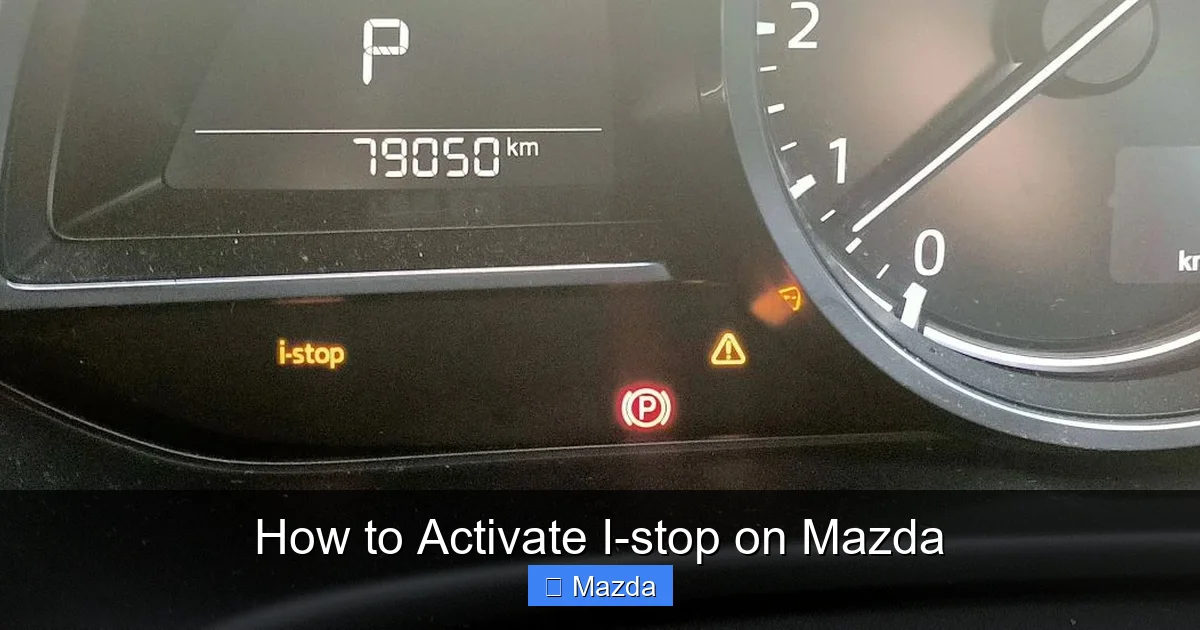
After pressing the button, look at your instrument cluster. You should see a small i-Stop indicator light. Its behavior tells you the system’s status:
- Green Light (Solid): The system is ON and ready to activate when conditions are met at a stop.
- Green Light (Blinking): The system is ON but currently active—the engine is off.
- Amber/Yellow Light (Solid or Blinking): The system is ON but has been deactivated due to a fault or unmet condition (e.g., low battery, AC on high). The car’s computer has decided not to shut off the engine.
- No Light: The system is OFF. You either pressed the button to turn it off, or the system defaulted to off after a fault that required a reset.
Step 3: Create the Right Driving Conditions
This is the most important part. To see i-Stop in action:
- Ensure your engine is warm. Drive normally for at least 10 minutes after a cold start.
- Check your battery health. If your car is hard to start or the battery is original and over 4 years old, get it tested. A weak battery is the silent killer of i-Stop functionality.
- Adjust your climate control. Set the fan speed to Auto or a medium setting. Avoid max AC or max heat if you want i-Stop to work.
- Fasten your seatbelt.
- Drive into an area with predictable stops—city traffic, a long red light, a bank drive-thru line.
- Come to a complete stop, keeping your foot firmly on the brake pedal. Do not press the parking brake.
- Wait about 1-2 seconds. If conditions are perfect, you’ll feel and hear the engine shut down. The idle will cease, and you might notice the climate control fan speed drop slightly as it switches to battery power.
To restart, simply take your foot off the brake pedal and press the accelerator. The engine will fire up instantly. Alternatively, if you’re at a stop and need to move soon, a light press on the gas is all it takes.
Common Reasons i-Stop Won’t Activate (And How to Fix Them)
So you followed the steps, but the engine keeps idling. Don’t panic. Diagnose this systematically. Start with the simplest, most common issues first.
Visual guide about How to Activate I-stop on Mazda
Image source: towingcap.com
Issue 1: The Battery is Weak or Not Charging
Symptom: i-Stop light is amber, or the system never turns green after a drive. The car may also have a general battery warning light.
Diagnosis & Fix: This is the prime suspect. Use a multimeter to check your battery voltage with the engine off. A healthy, charged 12V battery should read ~12.6V. If it’s below 12.4V, it’s undercharged. Start the car and check voltage at the battery terminals again; it should be ~13.7-14.7V, indicating the alternator is charging. If voltage is low with the engine running, your alternator may be failing. Solution: Have the battery and charging system tested at any auto parts store (often free). Replace the battery if it’s old or failing. For a 2026 Mazda, ensure you get a battery with the correct specifications (AGM type is often required for vehicles with start-stop systems). If you’ve recently replaced the battery, it might need to be registered with the car’s system via a diagnostic tool—some modern vehicles track battery age and health.
Issue 2: The System Has Been Temporarily Disabled
Symptom: You know you pressed the button, but the light won’t come on green, even after a long drive.
Diagnosis & Fix: The i-Stop system has an auto-disable feature. If it deactivates itself due to a low battery or high climate load, it may stay off until you manually reset it. Solution: Turn the i-Stop button OFF (if the light is on, press it once to turn it off). Then, turn the entire car OFF. Wait 30 seconds. Restart the car. Now, press the i-Stop button ON again. This full power cycle often resets the system’s logic and allows it to re-engage if conditions are now good. If it immediately goes amber again, the underlying condition (like a weak battery) still exists.
Issue 3: Extreme Climate Control Demand
Symptom: i-Stop works fine on a cool day with the fan on low, but never works on a hot afternoon with AC on max.
Diagnosis & Fix: This is by design. The system calculates the battery’s ability to sustain the electrical load. Max AC puts a huge drain on the battery. Solution: Adjust your expectations. Use the “Auto” setting on your climate control. The system will cycle the compressor clutch more efficiently and may allow i-Stop to engage. Pre-cool the car while driving before you get to your stop. If you must have max AC, understand that i-Stop will be unavailable—this is a trade-off for comfort.
Issue 4: A Faulty i-Stop Component
Symptom: The i-Stop light is constantly amber, even after battery replacement and system reset. You might also see other warning lights like the battery light or a check engine light.
Diagnosis & Fix: This indicates a fault in the dedicated i-Stop system. Components include the i-Stop control module, the battery sensor, the engine restart actuator (often part of the starter motor assembly), and various wiring harnesses. Solution: This requires a professional mechanic with a diagnostic scan tool that can access the Mazda-specific Body Control Module (BCM) codes. They will read the fault code (e.g., “B2997 – i-Stop Battery Sensor Circuit Malfunction”) and repair the specific failed part. Do not ignore a persistent amber light; while the car is driveable, you are losing a key efficiency feature and may be putting extra strain on the starter motor.
i-Stop vs. i-Eloop: Understanding Mazda’s Efficiency Duo
Many drivers confuse Mazda’s i-Stop with its i-Eloop (Intelligent Energy Loop) regenerative braking system. They work together but are distinct technologies. Understanding this helps you troubleshoot.
Visual guide about How to Activate I-stop on Mazda
Image source: mountgravattmazda.com.au
- i-Eloop: This is the energy *capture* system. When you brake or coast, a special regenerative alternator disengages from the engine (reducing parasitic drag) and generates electricity. This electricity, instead of being wasted as heat, is stored in a high-capacity capacitor (not the main battery). This stored energy is then used to power the car’s electrical systems (radio, lights, etc.), allowing the engine to run without the drag of a conventional alternator, thereby improving efficiency.
- i-Stop: This is the engine *shut-off* system. It uses the energy stored by i-Eloop (in the capacitor and a robust 12V battery) to keep the lights and AC running while the engine is off, and to power the restart process.
In short: i-Eloop charges the “bank,” and i-Stop makes a “withdrawal” from that bank to turn the engine off. A fault in i-Eloop (like a bad capacitor or regenerative alternator) will directly cause i-Stop to fail because there won’t be enough stored energy. This is why a professional diagnostic is so important—they can see if the energy loop is functioning.
Maximizing Your i-Stop Benefits: Pro Tips for 2026 Mazda Owners
Once you have i-Stop working reliably, you can tweak your driving to maximize its fuel-saving potential.
Drive Predictably in Traffic
i-Stop loves predictable, gentle stops. If you’re constantly braking hard at the last second, the system may not have time to analyze and execute the shutdown before you’re moving again. Anticipate traffic flow. See the light turning amber ahead? Begin slowing down smoothly and early. This gives the system the time it needs to decide, “Yes, conditions are good, engine off now.” Aggressive, rapid acceleration after a stop also uses more fuel; gentle pressure on the gas pedal is all you need for the seamless restart.
Mind the Climate, Especially in Extreme Weather
In scorching summers or frigid winters, your priority will likely be comfort over fuel savings. The system knows this. In extreme cold, the engine needs to stay running to warm up the cabin and the engine coolant itself. In extreme heat, the AC compressor needs engine power. Use the “Auto” climate mode and set a reasonable temperature (e.g., 72°F in summer, 68°F in winter). The system will manage the compressor clutch efficiently and is more likely to permit i-Stop operation between its cooling cycles.
Know When to Manually Override
The manual override button is your friend. Don’t fight the system. If you’re in a stop-and-go traffic jam where you’re moving 10 feet every 30 seconds, constantly stopping and restarting is inefficient and annoying. Press the i-Stop button to turn it OFF for that drive. The system will stay off until you manually turn it back on or restart the car. Similarly, if you’re on a very steep hill and stopped facing uphill, you might want the engine ready for a quick getaway—disable i-Stop. Use it as a tool for your specific driving context.
Maintenance is Non-Negotiable
Treat your 12V battery and electrical system with care. For a 2026 Mazda, this is more critical than ever. Ensure battery terminals are clean and tight. If you add aftermarket electrical accessories (like a powerful stereo or dash cam), have them professionally installed with proper fusing to avoid draining the battery or creating electrical noise that confuses the i-Stop sensors. When the time comes, replace the battery with a high-quality, manufacturer-specification unit. A cheap battery will fail quickly under the demands of i-Stop and i-Eloop.
Conclusion: Driving Smarter with i-Stop
Activating and enjoying Mazda’s i-Stop system is less about a secret trick and more about understanding a partnership between you and your car’s computer. You provide the stable driving conditions, the warm engine, and the charged battery. In return, the car provides automatic engine shutdowns that can add up to meaningful fuel and emissions savings over time. If your i-Stop isn’t working, don’t assume a defect immediately. Start with the battery—it solves most problems. Then, consider your climate control settings and perform the simple reset cycle. If those steps fail, it’s a sign that a deeper, component-level issue exists, and a visit to a trusted technician with Mazda-specific diagnostic tools is the smart next step. By mastering your i-Stop system, you’re not just following a procedure; you’re actively participating in Mazda’s vision of efficient, intelligent driving. You’re turning every red light and traffic snarl into a moment of quiet, fuel-saving rest. Now, go enjoy that smooth, silent stop!
Frequently Asked Questions
Why is my i-Stop light amber and the engine never shuts off?
An amber i-Stop light means the system is ON but has been deactivated by the car’s computer. The most common reason is a low battery charge. Other causes include the engine not being warm, the climate control being on a very high setting, or a fault in an i-Stop component. Start by checking your battery health and ensuring the engine is fully warmed up.
Can I permanently disable i-Stop if I don’t like it?
Yes. You can turn it off by pressing the i-Stop button. The system will stay off until you manually turn it back on with that same button. However, you must turn it off each time you start the car; it does not have a permanent memory setting to stay off. If you want it off for a specific drive, just press the button once after starting the car.
Does using the heater or air conditioning prevent i-Stop from working?
Yes, but it depends on the setting. Using max AC or max heat will almost always prevent i-Stop from engaging because the electrical load is too high for the battery to handle while the engine is off. Using the “Auto” climate mode with a moderate temperature setting gives the system the best chance to work, as it manages the compressor and blower motor more efficiently.
My battery is new, but i-Stop still doesn’t work. What could be wrong?
If you have a new, fully charged battery and i-Stop still won’t activate, the issue likely lies elsewhere. First, ensure the engine is completely warmed up. Second, check your climate control settings. Third, try the reset procedure: turn i-Stop OFF, turn the car OFF, wait 30 seconds, restart the car, and turn i-Stop ON. If it still fails, there may be a fault in the i-Stop control module, the i-Stop battery sensor, or the regenerative charging system (i-Eloop), which requires a professional diagnostic scan.
Is it bad for the starter motor to restart the engine so frequently?
No. Mazda’s i-Stop system uses a specially designed, heavy-duty starter motor (often integrated into the engine’s flywheel assembly) that is built to handle hundreds of thousands of restart cycles over the vehicle’s lifetime. It is more robust than a conventional starter. The system is engineered for this exact purpose, so normal operation does not cause excessive wear.
How can I tell if my i-Stop system is actually saving me fuel?
The best way is to track your fuel economy over time. Reset your trip meter or average MPG readout. Drive a consistent route with plenty of stop-and-go traffic for a few tanks of fuel with i-Stop ON. Then, drive the same route with i-Stop OFF (by pressing the button). You should see a measurable, though not enormous, improvement in miles per gallon—typically in the range of 3-8% in heavy urban conditions, depending on your driving style. The savings are greatest in bumper-to-bumper traffic.
