
How to Reset the Water-in-fuel Light on a Dodge

Resetting the water-in-fuel light on your Dodge isn’t complicated—but it’s important to do it safely and correctly. This guide walks you through the causes, symptoms, and exact steps to clear the warning light on popular Dodge models like the Ram 2500/3500, Durango, and others.
Key Takeaways
- Never ignore the water-in-fuel light: It signals moisture in your diesel fuel system, which can damage injectors and the fuel pump if left unaddressed.
- Drain the water separator first: Always remove accumulated water from the fuel filter before attempting to reset the light.
- Use the ignition cycle method for most models: Turning the key on and off in a specific sequence often resets the light without tools.
- Scan tools may be needed for newer Dodges: Vehicles with advanced electronics (2015+) might require an OBD2 scanner to clear the code.
- Prevent future issues with quality fuel: Use diesel fuel additives and buy from reputable stations to minimize water contamination.
- Check your owner’s manual: Dodge provides model-specific reset procedures—always verify steps for your exact year and trim.
- Seek professional help if unsure: If the light returns immediately or you’re uncomfortable performing maintenance, visit a certified Dodge technician.
📑 Table of Contents
Understanding the Water-in-Fuel Light: What It Means and Why It Matters
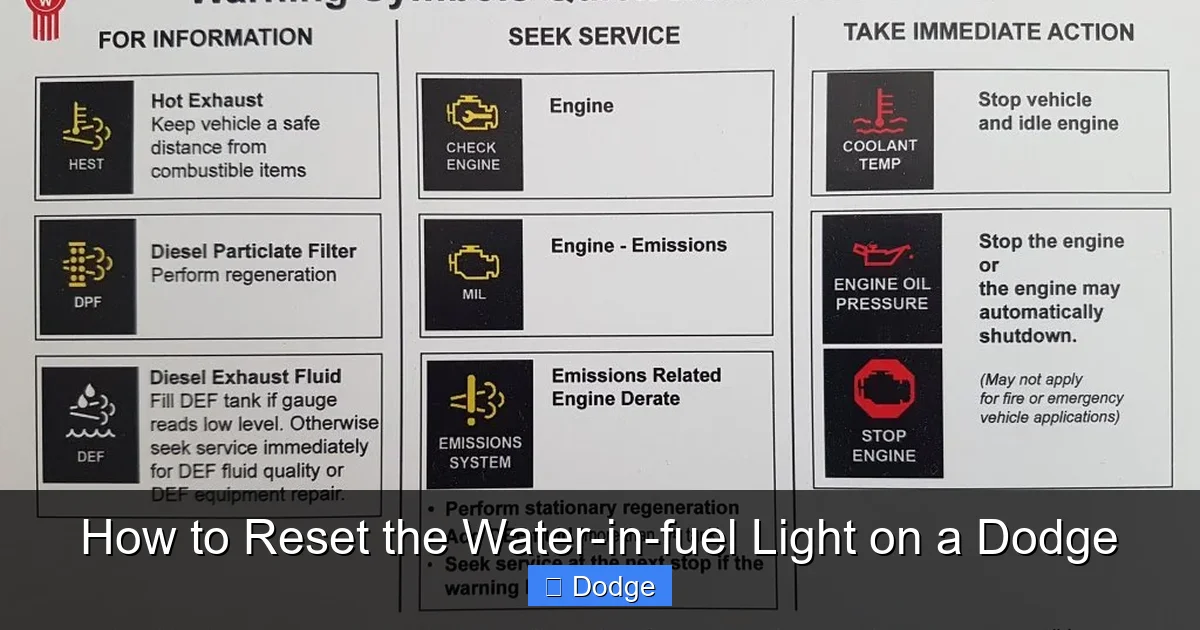
If you drive a diesel-powered Dodge—like a Ram 2500, Ram 3500, or even a diesel Durango—you’ve probably seen that little yellow or amber light on your dashboard that looks like a droplet with a fuel symbol. That’s the water-in-fuel (WIF) warning light, and while it might seem minor, it’s actually a critical alert that shouldn’t be ignored.
This light comes on when your vehicle’s fuel system detects moisture in the diesel fuel. Diesel engines are especially sensitive to water contamination because water doesn’t compress like air, and it can cause serious damage to high-pressure fuel injectors, the fuel pump, and other precision components. Even small amounts of water can lead to corrosion, reduced lubrication, and eventually, costly repairs.
Modern Dodge diesel trucks and SUVs are equipped with a water separator and fuel filter assembly that’s designed to catch and hold water before it reaches the engine. This system includes a sensor that monitors the level of water in the separator. Once the water reaches a certain threshold, the sensor triggers the warning light on your dashboard. The good news? This system gives you a chance to fix the problem before major damage occurs.
But here’s the catch: simply turning off the light without addressing the root cause—like draining the water—won’t solve anything. In fact, it could make things worse. The light is there to protect your engine, so treating it seriously is the first step toward long-term reliability.
Why Water Gets Into Diesel Fuel
You might be wondering: how does water even get into diesel fuel in the first place? It’s not something you typically think about when filling up at the pump. But water contamination is more common than you’d expect, and it can happen in several ways.
One of the most common sources is condensation. Diesel fuel is stored in underground tanks at gas stations, and temperature changes throughout the day can cause moisture to form inside those tanks. Over time, this water settles at the bottom. If a station hasn’t properly maintained its storage tanks or if the fuel is dispensed quickly (especially during a fill-up after a delivery truck has stirred up the contents), water can end up in your vehicle’s fuel tank.
Another source is poor fuel quality. Not all diesel fuel is created equal. Some stations may sell fuel that hasn’t been properly treated or filtered, increasing the risk of contamination. Additionally, if you store diesel in a portable container that isn’t sealed properly, moisture from the air can seep in over time.
Lastly, your own vehicle’s fuel system can contribute. If the fuel cap isn’t sealed tightly, or if there’s a leak in the fuel lines or tank, humidity from the air can enter and condense inside the tank, especially in colder climates.
Understanding these causes helps you take preventive steps—like using fuel additives, choosing reputable fuel stations, and inspecting your fuel system regularly—to reduce the chances of seeing that dreaded water-in-fuel light.
Signs Your Dodge Has Water in the Fuel System
Visual guide about How to Reset the Water-in-fuel Light on a Dodge
Image source: pbs.twimg.com
The water-in-fuel light is the most obvious sign, but it’s not the only one. Sometimes, the light may come on intermittently or only under certain conditions, like after a long drive or in cold weather. Other times, you might notice performance issues that hint at water contamination—even if the light hasn’t come on yet.
One of the earliest signs is rough idling. If your Dodge diesel is running unevenly at idle—shaking, sputtering, or feeling like it’s about to stall—it could be due to water in the fuel. Water doesn’t burn like diesel, so when it reaches the combustion chamber, it disrupts the smooth operation of the engine.
You might also notice a loss of power or hesitation during acceleration. This happens because the engine’s computer detects abnormal combustion and may reduce fuel delivery to protect the engine. In severe cases, the engine might even stall completely, especially under load or at low speeds.
Another clue is white or gray smoke from the exhaust. While some smoke is normal for diesel engines, excessive smoke—especially if it’s thick and persistent—can indicate incomplete combustion, which water contamination can cause.
If you hear unusual knocking or pinging sounds from the engine, that’s another red flag. Water in the fuel can lead to uneven combustion pressures, which stress engine components and can cause damage over time.
Finally, keep an eye on your fuel economy. If you notice you’re filling up more often than usual without a clear reason, water contamination could be reducing your engine’s efficiency.
If you experience any of these symptoms—especially alongside the water-in-fuel light—it’s time to take action. Ignoring the problem won’t make it go away; it will only increase the risk of expensive repairs down the road.
Step-by-Step Guide to Resetting the Water-in-Fuel Light on a Dodge
Visual guide about How to Reset the Water-in-fuel Light on a Dodge
Image source: vehiclechef.com
Now that you understand why the light comes on and what it means, let’s get to the main event: how to reset it. The process varies slightly depending on your Dodge model and year, but the general steps are similar across most diesel-powered vehicles.
Before you even think about resetting the light, the most important step is to drain the water from the fuel filter. Resetting the light without removing the water is like turning off a smoke alarm while the house is still on fire—it doesn’t solve the problem.
Step 1: Locate the Water Separator and Fuel Filter
On most Dodge diesel trucks and SUVs, the water separator and fuel filter are combined into one unit, typically mounted on the driver’s side of the engine bay. It’s a cylindrical canister with a drain valve at the bottom and a sensor wire connected to it.
In the Ram 2500 and 3500 (2003–2018), for example, you’ll find it near the firewall, often labeled with a yellow or orange cap. On newer models like the 2019+ Ram 2500 with the 6.7L Cummins, the filter housing is more integrated but still accessible.
If you’re unsure where it is, consult your owner’s manual or look for a component with a clear bowl or sight glass at the bottom—this is where the water collects.
Step 2: Prepare to Drain the Water
Before opening the drain valve, place a container underneath to catch the fuel and water mixture. A clean oil drain pan or a large bottle works well. You’ll also want to wear gloves and safety glasses, as diesel fuel can irritate the skin and eyes.
Make sure the engine is cool and the vehicle is parked on level ground. Never drain the filter while the engine is running or hot, as this can cause fuel spray or burns.
Step 3: Drain the Water
Locate the drain valve at the bottom of the filter housing. It’s usually a small plastic or metal screw or knob. Turn it counterclockwise to open it. You’ll see a mixture of diesel and water begin to flow out.
Watch the fluid carefully. Water is heavier than diesel, so it will settle at the bottom and come out first. You’ll notice a clear or slightly cloudy layer separating from the darker diesel fuel. Continue draining until only clean diesel comes out—this usually takes 30 seconds to a minute.
Once the water is drained, close the valve by turning it clockwise. Make sure it’s tight, but don’t over-tighten, as plastic valves can crack.
Step 4: Prime the Fuel System (If Necessary)
After draining, some Dodge models require you to prime the fuel system to remove air pockets. This is especially true for older Rams with mechanical lift pumps.
To prime, turn the ignition key to the “ON” position (but don’t start the engine) and wait about 10–15 seconds. You should hear the electric fuel pump run for a few seconds. Repeat this 2–3 times to help push fuel through the system.
On newer models with electronic fuel systems, this step may not be necessary, as the system self-primes.
Step 5: Reset the Water-in-Fuel Light
Now for the reset. The method depends on your Dodge model:
For most 2003–2018 Ram 2500/3500 and diesel Durango models:
– Turn the ignition to the “ON” position (engine off).
– Wait for the water-in-fuel light to illuminate.
– Turn the ignition back to “OFF.”
– Repeat this cycle 3–5 times, waiting about 10 seconds between each cycle.
– After the final cycle, start the engine. The light should be off.
For 2019+ Ram 2500/3500 and newer Dodge models with advanced electronics:
– The ignition cycle method may not work.
– You may need an OBD2 scanner capable of clearing body control module (BCM) or fuel system codes.
– Connect the scanner, navigate to the “Clear Codes” or “Reset WIF Sensor” option, and follow the prompts.
If the light remains on after these steps, there may be a faulty sensor, wiring issue, or residual water in the system. In that case, it’s best to consult a professional.
Preventing Water-in-Fuel Issues in the Future
Resetting the light is one thing—preventing it from coming back is another. The best way to avoid water-in-fuel problems is through proactive maintenance and smart fuel habits.
Use Diesel Fuel Additives
One of the easiest and most effective prevention methods is using a high-quality diesel fuel additive. These products are designed to absorb small amounts of water, prevent microbial growth (diesel bug), and improve fuel lubricity.
Look for additives that specifically mention “water dispersion” or “demulsifiers.” Brands like Stanadyne, Power Service, and Howes are trusted by diesel owners. Add the recommended amount to your fuel tank every few fill-ups, especially during humid or cold weather.
Buy Fuel from Reputable Stations
Not all gas stations maintain their fuel storage tanks equally. Choose stations that have high turnover—meaning fuel is pumped frequently, reducing the chance of water buildup. Truck stops and highway stations are often good choices because they serve many diesel vehicles daily.
Avoid filling up immediately after a fuel delivery truck has left. The agitation can stir up water and sediment at the bottom of the storage tank.
Inspect and Maintain Your Fuel System
Regularly check your fuel filter for signs of water or debris. Most manufacturers recommend replacing the fuel filter every 15,000 to 30,000 miles, but if you frequently see water, you may need to drain it more often.
Also, inspect the fuel cap and tank seals for cracks or wear. A compromised seal can allow moisture to enter the tank over time.
Store Fuel Properly (If Applicable)
If you use portable diesel containers for equipment or backup fuel, make sure they’re clean, sealed tightly, and stored in a cool, dry place. Use fuel stabilizers if the diesel will sit for more than a few months.
Monitor Dashboard Warnings
Finally, pay attention to your dashboard. If the water-in-fuel light comes on, address it immediately. Don’t assume it’s a glitch—early action can save you thousands in repairs.
When to Seek Professional Help
While resetting the water-in-fuel light is something many Dodge owners can do themselves, there are times when it’s best to leave it to the experts.
If the light comes back on immediately after resetting, even after draining the filter, there could be a deeper issue. Possible causes include:
– A faulty water-in-fuel sensor
– A damaged or leaking fuel filter housing
– Internal fuel system contamination
– Electrical problems with the sensor wiring
In these cases, a certified Dodge technician can perform a diagnostic scan to pinpoint the issue. They may also inspect the fuel tank, lines, and injectors for signs of water damage.
Additionally, if you’re uncomfortable performing maintenance on your fuel system—or if your vehicle is still under warranty—it’s wise to visit a dealership or trusted diesel specialist. They have the tools and expertise to handle the job safely and correctly.
Conclusion: Stay Ahead of the Light
The water-in-fuel light on your Dodge isn’t something to panic about—but it is something to take seriously. By understanding what it means, how to reset it, and how to prevent future issues, you can keep your diesel engine running smoothly for years to come.
Remember: always drain the water first, reset the light using the correct method for your model, and take steps to avoid contamination in the future. With a little attention and regular maintenance, you’ll rarely see that light—and when you do, you’ll know exactly what to do.
Your Dodge is built for tough jobs and long hauls. Don’t let something as simple as water in the fuel system slow you down. Stay informed, stay proactive, and keep rolling.
Frequently Asked Questions
Can I drive my Dodge with the water-in-fuel light on?
It’s not recommended. While short distances may be safe, prolonged driving with water in the fuel can damage injectors and the fuel pump. Drain the water and reset the light as soon as possible.
How often should I drain the water separator on my Dodge diesel?
Check it every 1,000–3,000 miles or whenever the light comes on. In humid climates or during winter, more frequent checks are wise.
Will adding diesel additive prevent the water-in-fuel light from coming on?
Yes, additives that disperse water can help prevent the light by keeping moisture suspended in the fuel instead of settling in the separator. Use them regularly for best results.
Can a bad fuel filter cause the water-in-fuel light to stay on?
Yes. A clogged or damaged filter can prevent proper water separation, causing the sensor to remain triggered even after draining. Replace the filter if it’s old or contaminated.
Do I need a special tool to reset the water-in-fuel light on newer Dodges?
For 2019+ models, an OBD2 scanner with body control module access may be required. Basic code readers might not work—check your scanner’s capabilities first.
What happens if I ignore the water-in-fuel light?
Ignoring it can lead to corrosion, injector failure, fuel pump damage, and expensive repairs. In severe cases, the engine may seize or fail to start.
