
How to Reset the Oil Change Light on a Dodge Journey

Resetting the oil change light on your Dodge Journey is simple and takes just minutes. This guide walks you through the process for all model years, ensuring your dashboard stays accurate and your vehicle runs smoothly.
Key Takeaways
- Know Your Model Year: The reset procedure varies slightly between 2009–2015 and 2016–2020 Dodge Journey models. Always check your owner’s manual for specifics.
- Use the Ignition Key Method: Most Dodge Journey models use a key-based reset method involving turning the ignition on and off while pressing the gas pedal.
- Don’t Skip the Oil Change: Resetting the light doesn’t replace the need for an actual oil change. Always service your engine oil before resetting the indicator.
- Dashboard Warnings Matter: If the oil light stays on after resetting, it could signal low oil level or pressure—check your oil immediately.
- Keep Records: Note the date and mileage when you reset the light to track future maintenance intervals accurately.
- Use Quality Oil: Always use manufacturer-recommended oil (typically 5W-20 or 5W-30) to ensure optimal engine performance and longevity.
- When in Doubt, Consult a Pro: If the light won’t reset or you’re unsure about the process, visit a certified Dodge technician for assistance.
📑 Table of Contents
- Why the Oil Change Light Matters on Your Dodge Journey
- Understanding the Dodge Journey Oil Life Monitoring System
- Step-by-Step Guide to Reset the Oil Change Light on a Dodge Journey
- Best Practices for Oil Changes and Maintenance on the Dodge Journey
- Frequently Asked Questions About the Dodge Journey Oil Change Light
- Conclusion: Keep Your Dodge Journey Running Strong
Why the Oil Change Light Matters on Your Dodge Journey
Your Dodge Journey is more than just a reliable SUV—it’s a workhorse designed for families, road trips, and daily commutes. But like any vehicle, it needs regular maintenance to keep running smoothly. One of the most important reminders your Journey gives you is the oil change light. This small dashboard indicator plays a big role in protecting your engine from wear, overheating, and costly repairs.
Engine oil lubricates moving parts, reduces friction, and helps regulate temperature. Over time, oil breaks down and collects contaminants, losing its effectiveness. That’s why automakers like Dodge equip vehicles with oil life monitoring systems. These systems track driving habits, mileage, engine temperature, and other factors to estimate when your oil needs changing. When it’s time, the oil change light—often labeled “Change Oil” or “Oil”—illuminates on your dashboard.
Ignoring this light can lead to poor engine performance, reduced fuel efficiency, and even engine damage. But once you’ve changed the oil, you need to reset the light so your Journey knows the service is complete. That’s where many owners get stuck. Unlike older cars with simple mileage-based reminders, modern Dodge Journeys use electronic systems that require a specific reset procedure.
Don’t worry—you don’t need to be a mechanic to do this. With the right steps, you can reset the oil change light in under five minutes. This guide will walk you through the process for every Dodge Journey model year, explain why it’s important, and offer tips to keep your SUV in top shape.
Understanding the Dodge Journey Oil Life Monitoring System
The Dodge Journey uses an advanced oil life monitoring system (OLMS) that calculates oil degradation based on real-world driving conditions. Unlike older systems that reset every 3,000 or 5,000 miles, this smart system adapts to your driving style. It considers factors like short trips, stop-and-go traffic, towing, and extreme temperatures—all of which can shorten oil life.
Visual guide about How to Reset the Oil Change Light on a Dodge Journey
Image source: enginepartsdiagram.com
When the system determines that the oil has reached the end of its useful life, it triggers the oil change light. This usually happens between 3,000 and 7,500 miles, depending on how you drive. The light isn’t just a suggestion—it’s a warning that your engine is at risk if the oil isn’t replaced soon.
After you change the oil, the system needs to be reset so it can start tracking the new oil’s life. If you don’t reset it, the light will stay on, and the system will continue counting down from the old oil’s lifespan. This can lead to confusion and missed maintenance intervals.
Resetting the light is a simple process, but it’s not always intuitive. Some models use a button combination, while others require a specific sequence with the ignition and gas pedal. The method depends on your Journey’s model year and trim level. Let’s break it down by generation.
How the Oil Life System Works
The oil life monitoring system in the Dodge Journey uses a combination of engine runtime, mileage, and sensor data to estimate oil condition. It doesn’t measure oil quality directly but uses algorithms to predict when degradation is likely. For example, frequent cold starts and short drives reduce oil life faster than highway driving.
Once the system reaches 0% oil life, the “Change Oil” message appears on the instrument cluster. Some models also display a wrench icon or a flashing oil light. This is your cue to schedule an oil change as soon as possible.
After the oil is changed, the system must be reset manually. This tells the vehicle that fresh oil is in the engine and the countdown should begin again. Without a reset, the system will still think the oil is old, and the light will remain on.
Why You Shouldn’t Ignore the Oil Change Light
While it might be tempting to delay an oil change—especially if you’re busy or on a budget—ignoring the oil change light can have serious consequences. Dirty or degraded oil loses its ability to lubricate engine components, leading to increased friction and heat.
Over time, this can cause premature wear on pistons, bearings, and camshafts. In extreme cases, it can lead to engine seizure or failure. Replacing an engine is far more expensive than a routine oil change, so it’s always better to stay on top of maintenance.
Additionally, driving with old oil can reduce fuel efficiency and increase emissions. Your Journey may also fail an emissions test if the engine isn’t running efficiently. Regular oil changes keep your vehicle compliant and performing at its best.
Step-by-Step Guide to Reset the Oil Change Light on a Dodge Journey
Now that you understand why the oil change light is important, let’s get into the practical part: how to reset it. The process varies slightly depending on your Dodge Journey’s model year, but the core steps are similar. Below, we’ll cover the most common methods used from 2009 to 2020.
Visual guide about How to Reset the Oil Change Light on a Dodge Journey
Image source: theweekendmechanic.com
Before you begin, make sure you’ve actually changed the oil. Resetting the light without servicing the engine defeats the purpose and could lead to damage. Use the recommended oil type—typically 5W-20 or 5W-30, depending on your engine and climate. Always replace the oil filter as well.
Once the oil is changed, follow the steps below based on your model year. If you’re unsure, check your owner’s manual or look up your vehicle identification number (VIN) online to confirm the correct procedure.
For 2009–2015 Dodge Journey Models
The 2009 to 2015 Dodge Journey models use a key-based reset method that involves the ignition and gas pedal. This is one of the most common procedures and works for most trims, including the SE, SXT, and R/T.
Here’s how to do it:
- Turn the ignition key to the “ON” position (but do not start the engine). You should see the dashboard lights illuminate.
- Press and hold the gas pedal all the way to the floor.
- While holding the gas pedal, turn the ignition key to the “OFF” position.
- Release the gas pedal.
- Turn the ignition back to the “ON” position (again, without starting the engine).
- Watch the oil change light. It should flash or blink, indicating the reset is in progress.
- After a few seconds, the light should turn off. If it does, the reset is complete.
- Start the engine to confirm the light stays off.
This method works because the vehicle’s computer detects the pedal press and ignition cycle as a reset command. It’s a simple but effective way to clear the oil life monitor.
Pro Tip: If the light doesn’t turn off, repeat the process. Make sure you’re holding the gas pedal all the way down and turning the key at the right time. Some owners find it helpful to have a friend watch the dashboard while they perform the steps.
For 2016–2020 Dodge Journey Models
Starting in 2016, Dodge updated the Journey’s dashboard and infotainment system, which changed the oil reset procedure slightly. These models often use a button-based method through the instrument cluster or Uconnect system.
Here’s the standard reset process for 2016–2020 models:
- Turn the ignition to the “ON” position (do not start the engine).
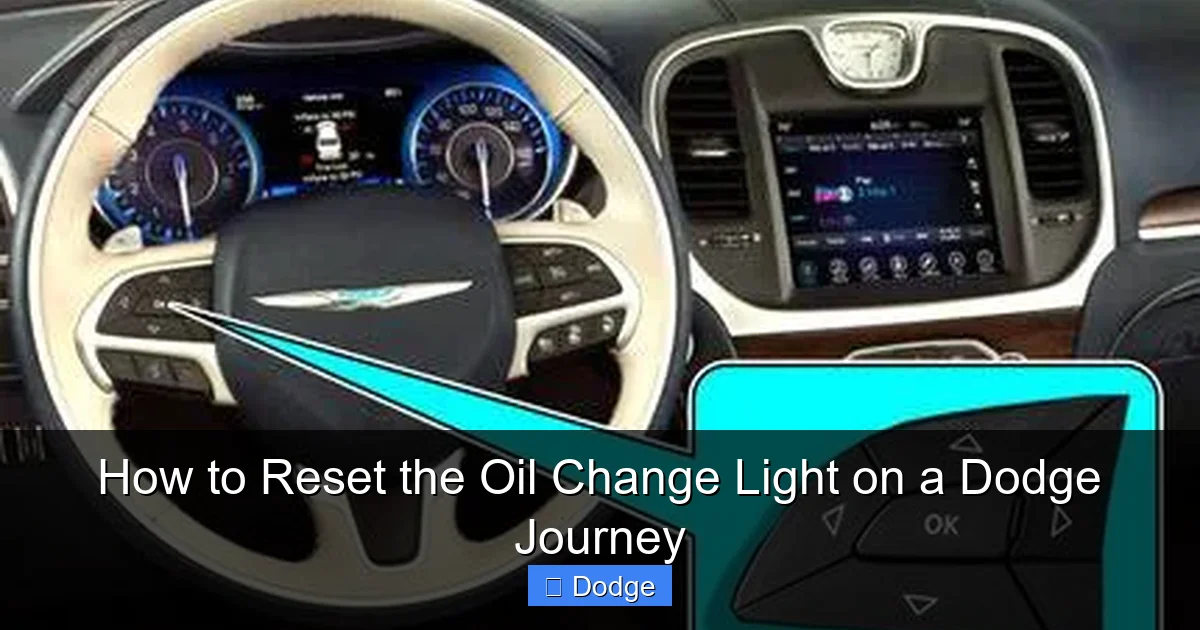
- Press the “Menu” button on the steering wheel or instrument cluster.
- Navigate to the “Vehicle Info” or “Settings” menu using the arrow buttons.
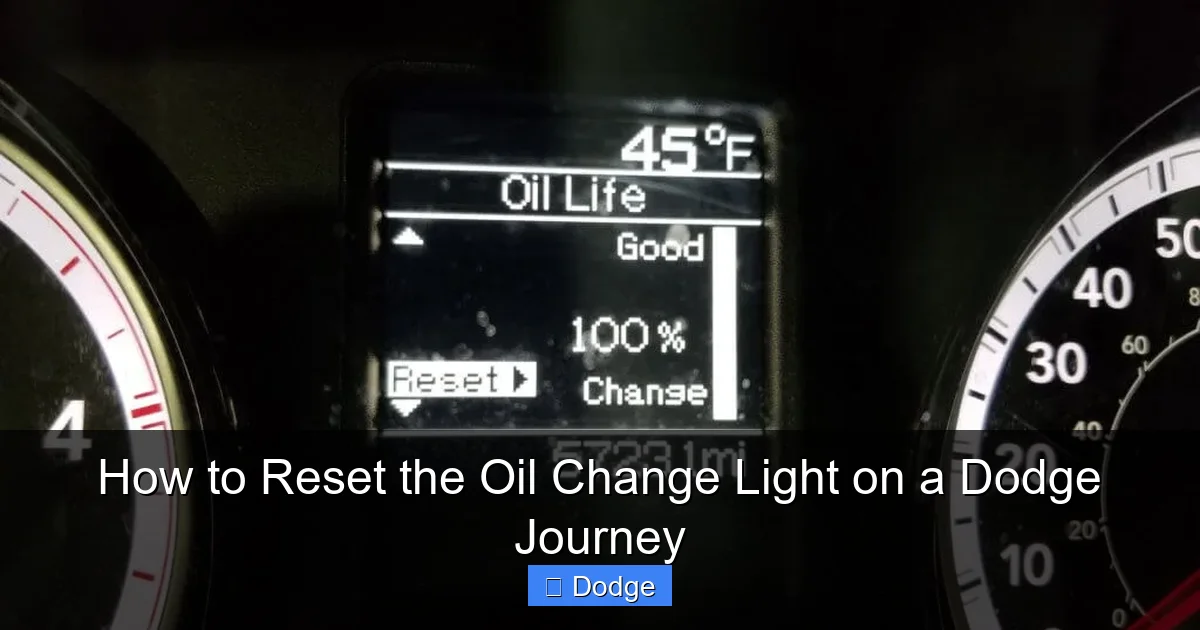
- Select “Oil Life” or “Maintenance.”
- Press and hold the “OK” or “Select” button for 5–10 seconds.
- The oil life percentage should reset to 100%, and the “Change Oil” light should turn off.
- Turn off the ignition and restart the engine to confirm the reset.
Some 2016–2020 models may also support the gas pedal method, but the button-based approach is more reliable. If you’re having trouble finding the menu, consult your owner’s manual or look for a “Maintenance” tab in the Uconnect system.
Note: If your Journey has a touchscreen Uconnect system, you may be able to reset the oil light through the “Settings” > “Vehicle” > “Maintenance” menu. This is especially common in higher trims like the GT or Limited.
Troubleshooting Common Reset Issues
Sometimes, the oil change light won’t reset even after following the correct steps. This can be frustrating, but it’s usually due to a simple mistake or a system glitch. Here are some common issues and how to fix them:
- Ignition Not in the Right Position: Make sure the ignition is in “ON” (not “ACC” or “START”) when performing the reset. The engine should not be running.
- Gas Pedal Not Fully Depressed: On older models, the pedal must be pressed all the way down. If it’s only partially pressed, the system won’t recognize the command.
- Timing Is Off: The sequence of turning the key and pressing the pedal must be done in the correct order. Practice the steps slowly at first.
- Battery Was Disconnected: If the battery was recently disconnected or replaced, the system may need to be reset using a scan tool. This is rare but possible.
- Faulty Sensor or Wiring: In rare cases, a malfunctioning oil pressure sensor or wiring issue can prevent the light from resetting. If the problem persists, have a mechanic inspect the system.
If you’ve tried the reset multiple times and the light still won’t turn off, it’s best to visit a Dodge dealership or certified technician. They can use a diagnostic tool to reset the system and check for any underlying issues.
Best Practices for Oil Changes and Maintenance on the Dodge Journey
Resetting the oil change light is just one part of maintaining your Dodge Journey. To keep your SUV running smoothly for years to come, follow these best practices for oil changes and overall maintenance.
Visual guide about How to Reset the Oil Change Light on a Dodge Journey
Image source: tamautorumors.com
First, always use the correct oil type. Most Dodge Journey models with the 2.4L or 3.6L engine require 5W-20 or 5W-30 synthetic blend or full synthetic oil. Check your owner’s manual for the exact specification. Using the wrong oil can affect performance and void your warranty.
Second, change the oil filter every time. The filter traps dirt and debris, and a clogged filter can reduce oil flow. Always replace it with a high-quality OEM or equivalent filter.
Third, stick to a regular maintenance schedule. Even with the oil life monitor, it’s wise to change the oil at least once a year or every 7,500 miles, whichever comes first. If you drive in severe conditions—like extreme heat, cold, or dusty environments—you may need to change it more often.
Fourth, keep a maintenance log. Note the date, mileage, and type of oil used each time you service your Journey. This helps you track intervals and can be useful when selling the vehicle.
Finally, don’t ignore other dashboard warnings. The oil change light is important, but so are the check engine light, tire pressure monitor, and brake warning light. Address any issues promptly to avoid bigger problems down the road.
DIY vs. Professional Oil Changes
Many Dodge Journey owners choose to change their own oil to save money. If you’re comfortable working on cars, this can be a great option. You’ll need basic tools like a wrench, oil filter wrench, drain pan, and funnel. Make sure to dispose of used oil responsibly—most auto parts stores accept it for recycling.
However, if you’re not confident in your mechanical skills, it’s better to visit a professional. Certified technicians have the tools and expertise to do the job quickly and correctly. They can also inspect other components like belts, hoses, and fluids during the service.
Some dealerships and service centers offer oil change packages that include a multi-point inspection. These can be a good value, especially if you’re due for other maintenance.
Frequently Asked Questions About the Dodge Journey Oil Change Light
Even with a detailed guide, you might still have questions about resetting the oil change light on your Dodge Journey. Here are some of the most common concerns and their answers.
Can I reset the oil change light without changing the oil?
Technically, yes—but you shouldn’t. Resetting the light without changing the oil leaves your engine unprotected. The light is there for a reason: to remind you that the oil is no longer effective. Always service the engine before resetting the indicator.
Why won’t my oil change light turn off after an oil change?
This usually means the reset procedure wasn’t completed correctly. Double-check the steps for your model year and try again. If it still won’t reset, there may be a sensor issue or the system may need a professional reset.
How often should I change the oil in my Dodge Journey?
Most experts recommend changing the oil every 5,000 to 7,500 miles, or once a year. However, the oil life monitor provides a more accurate estimate based on your driving habits. Follow its guidance for best results.
Can I use any type of oil in my Dodge Journey?
No. Always use the oil type specified in your owner’s manual. Most models require 5W-20 or 5W-30. Using the wrong viscosity can affect engine performance and fuel economy.
Is it safe to drive with the oil change light on?
You can drive for a short distance, but don’t delay the oil change. Once the light comes on, the oil is no longer providing adequate protection. Prolonged driving can lead to engine damage.
Will resetting the oil light affect my warranty?
No, as long as you’ve performed the oil change correctly. In fact, keeping up with maintenance helps protect your warranty. Just make sure to keep records of all services.
Conclusion: Keep Your Dodge Journey Running Strong
Resetting the oil change light on your Dodge Journey is a simple but essential task. It ensures your vehicle’s maintenance system stays accurate and helps you avoid costly engine repairs. Whether you drive a 2009 model or a 2020, the process is straightforward once you know the right steps.
Remember, the oil change light is more than just a dashboard reminder—it’s a vital part of your Journey’s health monitoring system. By changing the oil on time and resetting the light correctly, you’re taking a proactive step toward long-term reliability.
Don’t let a little light intimidate you. With this guide, you’re equipped to handle the reset like a pro. And if you ever run into trouble, don’t hesitate to consult your owner’s manual or visit a trusted mechanic. Your Dodge Journey deserves the best care—and so do you.
Frequently Asked Questions
Can I reset the oil change light without changing the oil?
Technically, yes—but you shouldn’t. Resetting the light without changing the oil leaves your engine unprotected. The light is there for a reason: to remind you that the oil is no longer effective. Always service the engine before resetting the indicator.
Why won’t my oil change light turn off after an oil change?
This usually means the reset procedure wasn’t completed correctly. Double-check the steps for your model year and try again. If it still won’t reset, there may be a sensor issue or the system may need a professional reset.
How often should I change the oil in my Dodge Journey?
Most experts recommend changing the oil every 5,000 to 7,500 miles, or once a year. However, the oil life monitor provides a more accurate estimate based on your driving habits. Follow its guidance for best results.
Can I use any type of oil in my Dodge Journey?
No. Always use the oil type specified in your owner’s manual. Most models require 5W-20 or 5W-30. Using the wrong viscosity can affect engine performance and fuel economy.
Is it safe to drive with the oil change light on?
You can drive for a short distance, but don’t delay the oil change. Once the light comes on, the oil is no longer providing adequate protection. Prolonged driving can lead to engine damage.
Will resetting the oil light affect my warranty?
No, as long as you’ve performed the oil change correctly. In fact, keeping up with maintenance helps protect your warranty. Just make sure to keep records of all services.


