
How to Change Tire Pressure Units on Subaru Outback

Changing the tire pressure units on your Subaru Outback is simple and can be done directly through the vehicle’s infotainment system or instrument cluster menu. Whether you prefer PSI, kPa, or bar, this guide walks you through the process for various model years, ensuring accurate readings and better tire maintenance.
Key Takeaways
- Access the settings menu: Use the steering wheel controls or touchscreen to navigate to the vehicle settings.
- Locate the tire pressure display: Find the TPMS (Tire Pressure Monitoring System) option in the menu.
- Select your preferred unit: Choose between PSI, kPa, or bar depending on your region or preference.
- Save and confirm changes: Ensure the new unit is applied by checking the display after exiting the menu.
- Check compatibility by model year: Older models may require different steps than newer infotainment systems.
- Use proper tools if needed: Some models allow unit changes only via diagnostic tools or dealership software.
- Maintain accurate tire pressure: Regularly check and adjust tire pressure using the correct unit for safety and fuel efficiency.
📑 Table of Contents
- Why Tire Pressure Units Matter in Your Subaru Outback
- Understanding Tire Pressure Units: PSI, kPa, and Bar
- How to Change Tire Pressure Units on Newer Subaru Outback Models (2015–2024)
- Changing Tire Pressure Units on Older Subaru Outback Models (2008–2014)
- Troubleshooting Common Issues When Changing Units
- Why Regular Tire Pressure Checks Are Essential
- Conclusion: Take Control of Your Tire Pressure Settings
Why Tire Pressure Units Matter in Your Subaru Outback
When it comes to maintaining your Subaru Outback, few things are as important as proper tire pressure. Not only does it affect your vehicle’s handling, fuel efficiency, and tire lifespan, but it also plays a critical role in safety—especially during long drives or adverse weather conditions. But did you know that the unit in which your tire pressure is displayed can vary depending on where you live or your personal preference?
In the United States, tire pressure is typically measured in pounds per square inch (PSI). However, in many other parts of the world—like Europe, Canada, and Australia—kilopascals (kPa) or bars are the standard units. If you’ve recently moved, traveled, or purchased a used Subaru Outback from another country, you might find that your tire pressure monitoring system (TPMS) is displaying readings in a unit that’s unfamiliar or inconvenient for you.
Changing the tire pressure units on your Subaru Outback isn’t just about convenience—it’s about clarity and accuracy. Misreading tire pressure due to unit confusion can lead to underinflated or overinflated tires, which increases the risk of blowouts, reduces traction, and wears down your tires prematurely. By setting your TPMS to display the unit you’re most comfortable with, you ensure that you’re always getting reliable, easy-to-understand information.
The good news? Subaru has designed its vehicles, including the Outback, with user-friendly interfaces that allow drivers to customize many settings—including tire pressure units. Whether you drive a 2010 model with a basic instrument cluster or a 2023 Outback with the latest STARLINK infotainment system, the process is straightforward once you know where to look.
In this guide, we’ll walk you through every step of changing the tire pressure units on your Subaru Outback. We’ll cover multiple model years, explain the differences in interface design, and offer tips to help you avoid common pitfalls. By the end, you’ll be able to confidently switch between PSI, kPa, and bar—no matter which Subaru Outback you drive.
Understanding Tire Pressure Units: PSI, kPa, and Bar
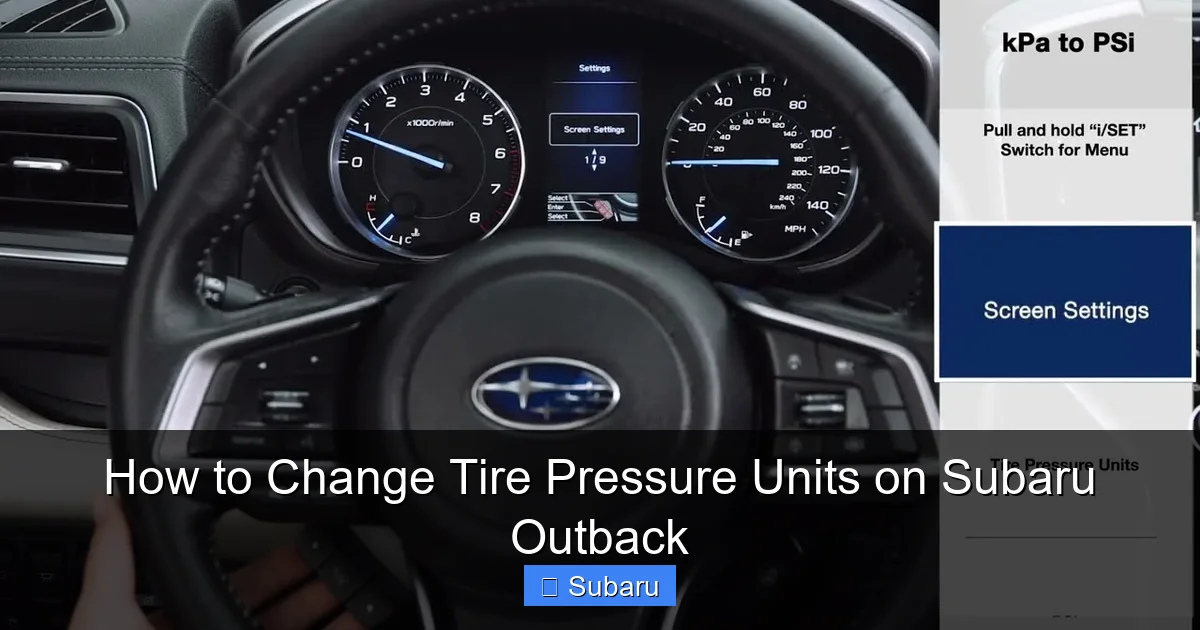
Visual guide about How to Change Tire Pressure Units on Subaru Outback
Image source: i.ytimg.com
Before diving into the how-to steps, it’s helpful to understand what these units actually mean and why they matter. Tire pressure is a measure of the force exerted by the air inside your tires against the tire walls. The higher the pressure, the more rigid the tire becomes. But too much or too little pressure can cause problems.
Let’s break down the three most common units:
PSI (Pounds per Square Inch)
This is the most widely used unit in the United States. It measures how many pounds of force are applied per square inch of tire surface. For example, a typical Subaru Outback might have a recommended tire pressure of 32–35 PSI when cold. PSI is intuitive for most American drivers because it’s used on tire gauges, air pumps at gas stations, and in owner’s manuals.
kPa (Kilopascals)
Kilopascals are part of the metric system and are commonly used in Canada, Europe, and other countries that follow SI units. One PSI is approximately equal to 6.895 kPa. So, 32 PSI would be roughly 220 kPa. While kPa readings may look larger, they’re just a different way of expressing the same pressure. Some drivers prefer kPa because it aligns with other metric measurements they use daily.
Bar
The bar is another metric unit, often used in automotive and industrial applications. One bar is roughly equal to 14.5 PSI or 100 kPa. It’s a convenient middle ground between PSI and kPa and is sometimes preferred for its simplicity. For instance, 2.2 bar is close to 32 PSI—a common tire pressure setting.
Why does this matter for your Subaru Outback? Because the TPMS in your vehicle can display any of these units, depending on how it’s configured. If you’re used to checking your tires with a PSI gauge but your dashboard shows kPa, you might misread the pressure and overinflate or underinflate your tires. That’s why knowing how to change the unit is so valuable.
It’s also worth noting that the recommended tire pressure for your Outback—found on the driver’s side door jamb sticker—is usually listed in both PSI and kPa. This dual labeling helps drivers in different regions understand the correct settings. But if your TPMS is showing a different unit than what’s on the sticker, it can cause confusion.
For example, let’s say your door jamb says 32 PSI (220 kPa), but your dashboard displays 2.1 bar. That’s actually very close—2.1 bar equals about 30.5 PSI or 210 kPa—so your tires are slightly underinflated. Without understanding the conversion, you might think everything is fine.
By changing the display unit to match your preference, you eliminate this confusion and make tire maintenance easier and safer.
How to Change Tire Pressure Units on Newer Subaru Outback Models (2015–2024)
Visual guide about How to Change Tire Pressure Units on Subaru Outback
Image source: i.ytimg.com
If you drive a newer Subaru Outback—particularly models from 2015 onward—you’re likely equipped with the STARLINK infotainment system and a digital instrument cluster. These systems offer intuitive menus that allow you to customize various vehicle settings, including tire pressure units.
Here’s a step-by-step guide for changing the tire pressure units on these models:
Step 1: Turn on the Ignition
You don’t need to start the engine, but the vehicle’s electrical system must be active. Turn the key to the “ON” position or press the start button without pressing the brake pedal. This powers up the dashboard and infotainment screen.
Step 2: Access the Main Menu
On the steering wheel, locate the “Menu” or “Info” button (usually on the left side). Press it to open the main display menu on the instrument cluster or center screen.
Step 3: Navigate to Vehicle Settings
Use the arrow keys or touchscreen (depending on your model) to scroll through the menu options. Look for “Settings,” “Vehicle,” or “Car Settings.” Tap or select it to enter the settings menu.
Step 4: Find the TPMS or Tire Pressure Option
Within the settings menu, look for an option labeled “Tire Pressure,” “TPMS,” or “Tire Monitor.” This may be under a submenu like “Safety” or “Maintenance.” Select it to access tire pressure settings.
Step 5: Change the Unit
Once in the TPMS menu, you should see an option like “Pressure Unit” or “Display Unit.” Tap it, and a list of available units will appear—typically PSI, kPa, and bar. Use the arrows or touchscreen to select your preferred unit.
Step 6: Confirm and Exit
After selecting your unit, press “OK” or “Confirm” to save the change. Exit the menu by pressing the “Back” button or “Home” button. The new unit should now appear on your TPMS display.
For example, if you were previously seeing 220 kPa and you switch to PSI, the display should now show approximately 32 PSI (assuming the actual pressure hasn’t changed).
Tips for Success
– If you don’t see the TPMS option, check if your model requires the vehicle to be in “Maintenance Mode” or if the feature is only available when the car is stationary.
– Some 2020+ Outbacks with the 11.6-inch touchscreen may have the TPMS settings buried under “Vehicle” > “Safety” > “Tire Pressure.”
– Always double-check the change by observing the TPMS display after driving a short distance. The unit should remain consistent.
This process works for most Outbacks from 2015 to 2024, including the 2023 and 2024 models with updated software. The key is knowing where to look in the menu—and being patient if the layout varies slightly between model years.
Changing Tire Pressure Units on Older Subaru Outback Models (2008–2014)
Older Subaru Outback models—those from 2008 to 2014—don’t have the same advanced infotainment systems as newer vehicles. Instead, they rely on a simpler instrument cluster with physical buttons and a smaller LCD display. While this means fewer customization options, changing the tire pressure unit is still possible on many of these models.
Here’s how to do it:
Step 1: Turn the Ignition to “ON”
As with newer models, you need power to the dashboard. Turn the key to the “ON” position without starting the engine.
Step 2: Locate the “Info” or “Trip” Button
On the instrument cluster, look for a small button labeled “Info,” “Trip,” or “Display.” This button cycles through different dashboard screens, including fuel economy, trip distance, and—on some models—tire pressure.
Step 3: Cycle to the Tire Pressure Display
Press the “Info” button repeatedly until you see the tire pressure screen. This may show four tire icons with numerical values next to them. The unit (PSI, kPa, or bar) should be displayed in small text below or beside the numbers.
Step 4: Enter Settings Mode (If Available)
On some 2010–2014 Outbacks, you can enter a settings mode by holding the “Info” button for 3–5 seconds while on the tire pressure screen. A menu may appear with options like “Unit” or “Pressure Unit.”
If this option appears, use the “Info” button to scroll through the available units and select your preference. Press and hold again to confirm.
Step 5: No Settings Mode? Check the Owner’s Manual
Unfortunately, not all older Outbacks allow unit changes through the dashboard. In these cases, the unit may be fixed based on the vehicle’s original market (e.g., U.S. models default to PSI, Canadian models to kPa).
If you can’t change the unit manually, you have two options:
1. Use a conversion chart or app to translate readings.
2. Visit a Subaru dealership or use an OBD2 scanner with Subaru-specific software to reprogram the unit.
For example, a 2012 Outback sold in Canada might display kPa by default and not offer a way to switch to PSI through the dashboard. In this case, a technician with the right tools can often change the setting via the vehicle’s computer.
Practical Example
Let’s say you have a 2011 Subaru Outback and your TPMS shows 210 kPa. You prefer PSI, so you use a conversion: 210 kPa ÷ 6.895 ≈ 30.5 PSI. That’s slightly below the recommended 32 PSI, so you add a bit of air. But if you could change the display to PSI, you’d see “30.5” directly—making it easier to adjust.
While older models are less flexible, understanding your options helps you stay in control of your tire maintenance.
Troubleshooting Common Issues When Changing Units
Even with clear instructions, you might run into a few hiccups when trying to change the tire pressure units on your Subaru Outback. Here are some common issues and how to solve them:
The TPMS Menu Isn’t Visible
If you can’t find the tire pressure settings, double-check that your model supports unit changes. Some base trims or older vehicles may not offer this feature. Also, ensure the vehicle is in “ON” mode—not just accessory mode—as some menus only appear with full power.
The Unit Reverts After Restarting
This usually means the change wasn’t saved properly. Make sure you press “Confirm” or “OK” after selecting the new unit. On some models, you may need to drive a short distance (1–2 miles) for the change to register permanently.
Only One Unit Is Available
If you only see PSI or kPa as an option, your vehicle may be region-locked. For example, U.S.-spec Outbacks often default to PSI and don’t offer kPa. In this case, a dealership or technician with diagnostic tools may be able to unlock additional units.
Touchscreen Is Unresponsive
If you’re using a newer Outback with a touchscreen and it’s not responding, try restarting the system. Turn the car off, wait 30 seconds, then turn it back on. If the issue persists, check for software updates at a Subaru service center.
TPMS Light Stays On After Changing Units
Changing the unit doesn’t affect actual tire pressure—only how it’s displayed. If the TPMS warning light remains on, one or more tires may be underinflated. Check each tire with a manual gauge and inflate as needed.
No Physical Buttons on Older Models
Some early 2000s Outbacks have very basic clusters with no “Info” button. In these cases, unit changes are typically not possible without professional tools. Consider using a portable tire pressure monitor that displays your preferred unit.
Remember: patience is key. Subaru’s menu systems can vary slightly between model years and trims. If you’re stuck, consult your owner’s manual or contact a Subaru dealer for model-specific guidance.
Why Regular Tire Pressure Checks Are Essential
Changing the tire pressure unit is just one part of proper tire maintenance. The bigger picture is ensuring your tires are always inflated to the correct level—no matter which unit you use.
Underinflated tires increase rolling resistance, which reduces fuel efficiency and causes uneven wear. Overinflated tires reduce traction and can lead to blowouts, especially on hot roads. Both scenarios are dangerous and costly.
The Subaru Outback, with its standard all-wheel drive and rugged design, is built for adventure. Whether you’re driving through snow, rain, or rough terrain, proper tire pressure ensures optimal grip and stability.
Check your tire pressure at least once a month and before long trips. Use a reliable gauge—digital gauges are more accurate than analog ones—and always measure when the tires are cold (i.e., the car hasn’t been driven for at least 3 hours).
And don’t forget the spare tire! Many drivers overlook it, but a flat spare can leave you stranded.
By combining accurate unit display with regular checks, you keep your Outback safe, efficient, and ready for whatever the road throws at you.
Conclusion: Take Control of Your Tire Pressure Settings
Changing the tire pressure units on your Subaru Outback is a small but meaningful step toward better vehicle maintenance. Whether you prefer PSI, kPa, or bar, having the right unit displayed on your dashboard makes it easier to monitor and adjust your tires accurately.
From the intuitive menus of newer STARLINK-equipped models to the simpler button-based systems of older Outbacks, Subaru has made it possible—though not always obvious—to customize this setting. With the steps outlined in this guide, you can confidently switch units and eliminate confusion.
Remember, the goal isn’t just to change the number on the screen—it’s to ensure your tires are always at the correct pressure for safety, performance, and longevity. Take a few minutes to adjust your settings, and make tire checks a regular part of your routine.
Your Subaru Outback is built to go the distance. With the right care—and the right units—you’ll enjoy every mile.
Frequently Asked Questions
Can I change the tire pressure unit on a 2009 Subaru Outback?
Yes, but it depends on the trim and region. Some 2009 models allow unit changes via the “Info” button, while others may require a dealership tool. Check your owner’s manual or consult a Subaru technician.
Why does my TPMS only show PSI?
U.S.-spec Subaru Outbacks are often programmed to display PSI by default and may not offer other units. Canadian or European models are more likely to show kPa or bar.
Will changing the unit affect my actual tire pressure?
No. Changing the display unit only affects how the pressure is shown—not the actual air pressure in your tires. Always use a gauge to verify real pressure.
How often should I check my tire pressure?
Check your tire pressure at least once a month and before long trips. Tires can lose pressure over time due to temperature changes and natural air leakage.
Can I use a smartphone app to monitor tire pressure?
Yes, some Bluetooth tire pressure sensors sync with apps to display real-time readings in your preferred unit. These are especially helpful if your Outback doesn’t allow unit changes.
What if my TPMS light won’t turn off after changing units?
The TPMS light indicates low pressure, not a unit issue. Check each tire with a gauge and inflate to the recommended level (found on the door jamb sticker).
