
What Is Asl in a Toyota Radio?

ASL in a Toyota radio stands for Automatic Sound Leveling, a smart feature that adjusts volume based on vehicle speed and road noise. It ensures consistent audio quality whether you’re idling at a stoplight or cruising on the highway.
Key Takeaways
- ASL stands for Automatic Sound Leveling: It automatically adjusts your radio volume to match driving conditions and ambient noise.
- Improves listening experience: Keeps music, podcasts, and calls at a comfortable level without constant manual adjustments.
- Works with vehicle speed: The system increases volume at higher speeds and lowers it in quiet environments like parking lots.
- Found in most modern Toyotas: Available in models like Camry, Corolla, RAV4, and Highlander with advanced audio systems.
- Can be turned on or off: Drivers can enable or disable ASL through the audio or settings menu depending on preference.
- Enhances safety and comfort: Reduces distractions by maintaining optimal audio levels without driver intervention.
- Part of Toyota’s audio innovation: Reflects Toyota’s focus on integrating smart technology for a better in-car experience.
📑 Table of Contents
What Is ASL in a Toyota Radio?
If you’ve ever driven a Toyota with a factory-installed radio or infotainment system, you might have noticed a setting labeled “ASL.” At first glance, it might seem like just another acronym in a sea of automotive tech terms. But ASL—short for Automatic Sound Leveling—is actually a clever feature designed to make your time behind the wheel more enjoyable, safe, and stress-free.
Imagine this: You’re listening to your favorite playlist at a comfortable volume while parked. As you pull out of your driveway and pick up speed on the highway, road noise increases—wind, tires on pavement, engine hum. Without ASL, you’d have to constantly reach over and turn up the volume to hear your music clearly. Then, when you slow down or stop at a red light, the music suddenly feels too loud. It’s annoying, distracting, and can even be a safety hazard if you’re fiddling with controls while driving.
That’s where ASL comes in. This intelligent system automatically adjusts the volume of your Toyota’s audio system based on your vehicle’s speed and the surrounding noise levels. It uses input from the car’s sensors—like speedometers and microphones—to detect how loud it is inside the cabin. Then, it fine-tunes the audio output so your music, podcasts, or phone calls stay at a consistent, pleasant level no matter how fast you’re going.
In simple terms, ASL is like having a personal audio assistant in your car. It listens to the environment and makes real-time adjustments so you don’t have to. Whether you’re crawling through city traffic or flying down the freeway, ASL ensures your audio experience stays smooth and immersive.
How Does ASL Work in Toyota Vehicles?
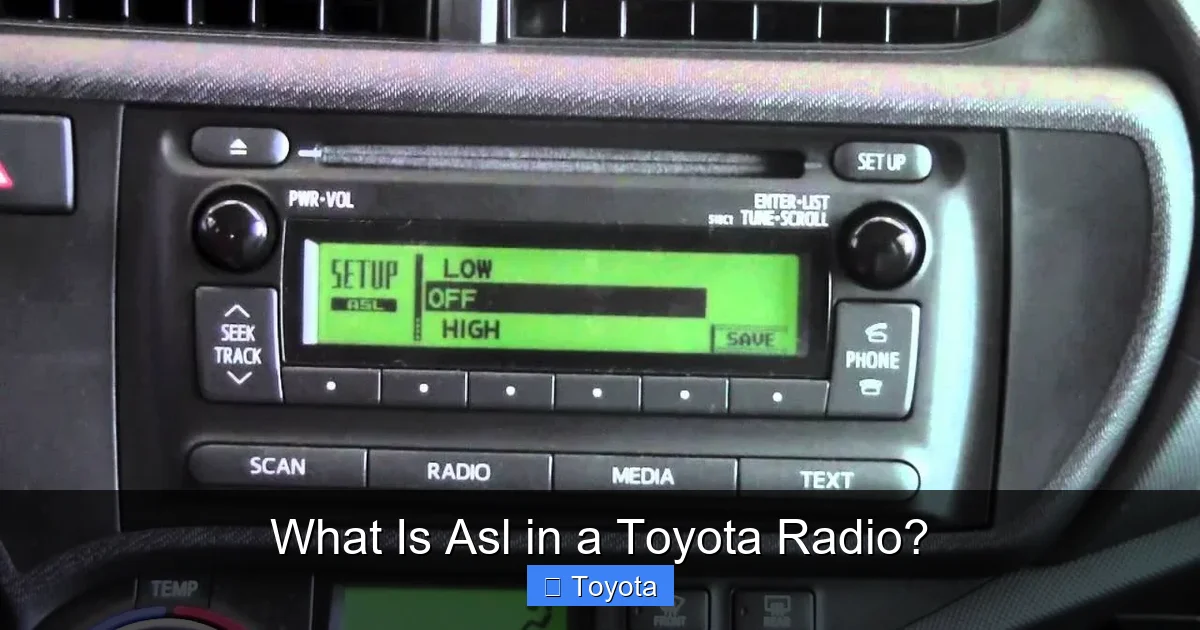
Visual guide about What Is Asl in a Toyota Radio?
Image source: thecarhow.com
Now that we know what ASL stands for, let’s dive into how it actually works under the hood—or rather, under the dashboard. The magic of ASL lies in its integration with your Toyota’s onboard systems. It’s not just a simple volume knob that turns up when you speed up. Instead, it’s a sophisticated feature that relies on multiple data points to deliver a seamless audio experience.
Speed-Based Volume Adjustment
The primary input for ASL is your vehicle’s speed. Toyota’s system is connected to the car’s speed sensor, which continuously monitors how fast you’re moving. As your speed increases, so does the amount of noise inside the cabin. At 30 mph, you might hear a gentle hum from the tires. At 70 mph on the highway, that hum becomes a roar.
ASL responds by gradually increasing the volume of your audio system. This isn’t a sudden jump—it’s a smooth, incremental rise that matches the growing noise level. The faster you go, the louder the system gets, but only enough to maintain clarity. When you slow down—say, exiting the highway or stopping at a traffic light—the volume automatically decreases. This prevents your music from blasting unexpectedly when you come to a halt.
Noise Detection and Microphone Input
In some newer Toyota models, ASL goes a step further by incorporating cabin microphones. These tiny sensors listen to the ambient noise inside the car—wind, road vibrations, even conversation—and feed that information back to the audio system. This allows ASL to make even more precise adjustments.
For example, if you’re driving with the windows down on a windy day, the microphone detects the extra noise and tells the system to boost the volume slightly. Conversely, if you’re in a quiet neighborhood with the windows up, ASL lowers the volume to avoid overwhelming you. This level of responsiveness makes the feature feel almost intuitive, as if the car knows exactly what you need.
Integration with Audio Sources
One of the best things about ASL is that it works across all audio sources. Whether you’re streaming music via Bluetooth, listening to satellite radio, playing a CD, or taking a hands-free phone call, ASL adjusts the volume accordingly. This consistency is key—you don’t have to worry about different volume levels for different inputs. The system treats everything the same way, ensuring a uniform listening experience.
It’s also worth noting that ASL operates independently of other audio settings like bass, treble, or balance. You can still customize your sound profile to your liking, and ASL will work on top of those preferences. It’s not overriding your choices—it’s enhancing them.
Why Is ASL Important for Toyota Drivers?
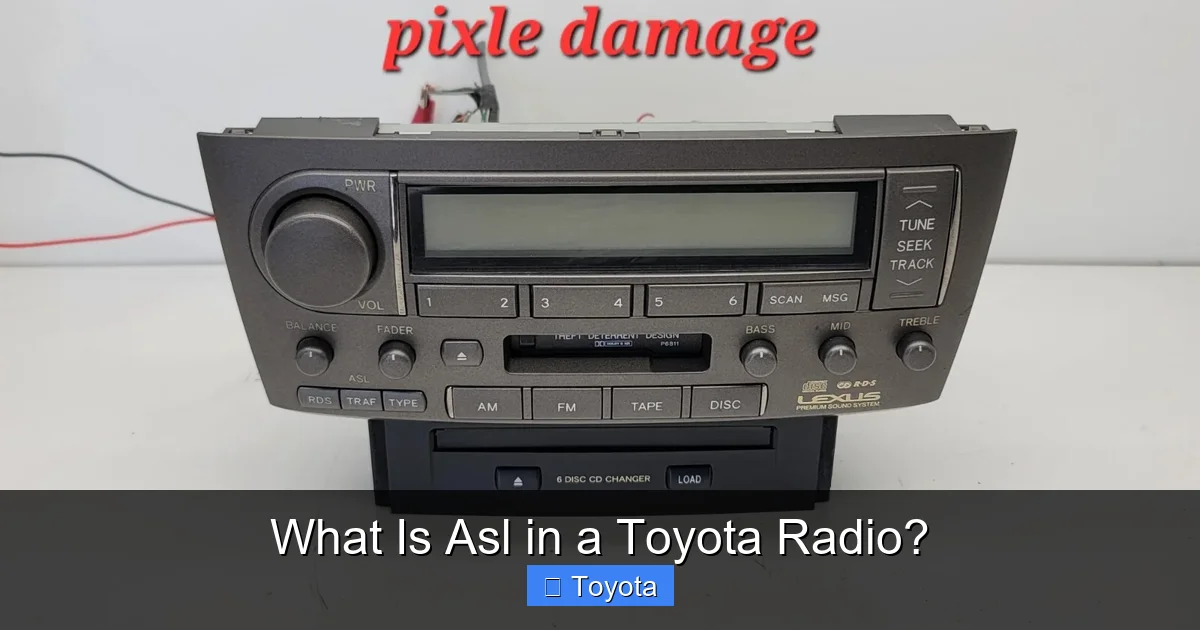
Visual guide about What Is Asl in a Toyota Radio?
Image source: i.ebayimg.com
You might be thinking, “Sure, ASL sounds nice, but is it really that important?” The answer is a resounding yes—especially if you spend a lot of time in your car. Let’s explore why this feature matters and how it benefits Toyota drivers in real-world situations.
Enhanced Safety and Reduced Distractions
One of the biggest advantages of ASL is that it reduces the need for manual volume adjustments. Fiddling with the radio while driving is a common cause of distracted driving. Even a quick reach to turn up the volume can take your eyes off the road for a split second—enough time to miss a stop sign or a pedestrian.
With ASL, you can set your preferred volume once and let the system handle the rest. This means fewer distractions and more focus on driving. It’s a small change, but it can make a big difference in safety, especially on long trips or in heavy traffic.
Consistent Audio Quality in All Conditions
Driving conditions vary wildly throughout the day. You might start your commute in a quiet suburban area, then hit a noisy highway, and finally park in a busy city garage. Without ASL, your audio experience would be inconsistent—too quiet in some moments, too loud in others.
ASL eliminates this frustration by maintaining a steady, comfortable volume level. Whether you’re listening to a podcast, a news broadcast, or your favorite rock playlist, the sound stays clear and balanced. This consistency is especially helpful for passengers, who don’t have to ask you to “turn it up” or “turn it down” every few minutes.
Better Enjoyment of Media and Calls
Let’s be honest—part of the joy of driving is enjoying your favorite media. Whether it’s a gripping audiobook, a high-energy workout playlist, or a hands-free call with a friend, you want to hear it clearly. ASL ensures that your audio isn’t drowned out by road noise or suddenly too loud when you slow down.
This is particularly useful for phone calls. If you’re using Toyota’s hands-free system, ASL helps keep the caller’s voice at a comfortable level. You won’t have to strain to hear them on the highway, nor will their voice blast through the speakers when you pull into your driveway.
Adapts to Different Driving Styles
Not all drivers have the same habits. Some prefer a quiet cabin with soft background music, while others love cranking up the volume for a full-on concert experience. ASL respects these preferences by working within your chosen volume range.
For instance, if you typically listen at a moderate level, ASL will make subtle adjustments to keep it that way. If you’re someone who likes it loud, the system will boost the volume more aggressively at higher speeds—but still smoothly and predictably. It’s flexible enough to suit a wide range of listening styles.
Which Toyota Models Feature ASL?
Visual guide about What Is Asl in a Toyota Radio?
Image source: i0.wp.com
ASL isn’t just a gimmick—it’s a standard or available feature in many modern Toyota vehicles. While the exact availability may vary by trim level and model year, you’ll find ASL in a wide range of popular Toyota cars, SUVs, and trucks.
Popular Models with ASL
Some of the most common Toyota models that include ASL are:
– Toyota Camry: From the base LE to the premium XSE, most Camry trims come equipped with ASL, especially those with the Entune or Toyota Audio Multimedia system.
– Toyota Corolla: Both the sedan and hatchback versions often feature ASL, particularly in higher trims like the SE and XSE.
– Toyota RAV4: As one of Toyota’s best-selling SUVs, the RAV4 includes ASL across most trims, enhancing the driving experience for commuters and adventurers alike.
– Toyota Highlander: Families love the Highlander for its space and comfort, and ASL adds to that by keeping audio consistent for all passengers.
– Toyota Tacoma and Tundra: Even Toyota’s trucks benefit from ASL, which helps drivers hear their audio clearly over engine and wind noise.
How to Check If Your Toyota Has ASL
If you’re not sure whether your Toyota has ASL, there are a few ways to find out. First, check your owner’s manual. Look for sections on audio settings or sound controls—ASL is usually mentioned there. You can also explore your infotainment system’s menu. On most models, you’ll find ASL under Settings > Audio > Sound Settings or a similar path.
Another clue is the presence of advanced audio features like noise compensation or speed-sensitive volume. These are often synonyms for ASL or closely related functions. If your Toyota has a premium audio system—like JBL or Toyota Audio Multimedia—it’s very likely to include ASL.
Aftermarket Radios and ASL Compatibility
If you’ve upgraded to an aftermarket radio, you might be wondering if ASL still works. The answer depends on the unit and your vehicle’s wiring. Some aftermarket systems can integrate with Toyota’s speed signal and retain ASL functionality, but it’s not guaranteed.
If ASL is important to you, look for radios that support speed-sensitive volume control or offer their own version of automatic leveling. Many modern aftermarket units have similar features, though they may not be branded as “ASL.”
How to Enable or Disable ASL in Your Toyota
One of the great things about ASL is that it’s customizable. Toyota understands that not every driver wants the same audio experience, so they’ve made it easy to turn the feature on or off. Here’s how you can manage ASL settings in most Toyota models.
Step-by-Step Guide to Adjusting ASL
1. Turn on your vehicle and make sure the audio system is active.
2. Access the main menu on your infotainment screen. This is usually done by pressing the “Menu” or “Settings” button.
3. Navigate to Audio Settings. Look for options like “Sound,” “Audio,” or “Speaker Settings.”
4. Find the ASL option. It may be labeled as “ASL,” “Automatic Sound Leveling,” “Speed Volume,” or “Noise Compensation.”
5. Toggle it on or off. Use the touchscreen or physical buttons to enable or disable the feature.
6. Test it out. Drive at different speeds to see how the volume changes (or doesn’t change) based on your setting.
Tips for Using ASL Effectively
– Start with ASL enabled. Give it a try on your next drive. You might be surprised how much you appreciate the consistent volume.
– Adjust your base volume. Set your preferred volume level when parked. ASL will use this as a starting point for adjustments.
– Experiment with sensitivity. Some systems allow you to adjust how aggressive ASL is. If it’s too sensitive, you can tone it down.
– Turn it off for quiet drives. If you’re on a peaceful country road with little noise, you might prefer to disable ASL and enjoy the natural quiet.
Common Issues and Troubleshooting
While ASL is generally reliable, you might occasionally run into issues. For example, the volume might not adjust as expected, or the feature might seem unresponsive. Here are a few troubleshooting tips:
– Check for software updates. Toyota occasionally releases updates for the infotainment system that can improve ASL performance.
– Ensure sensors are clean. If your car uses cabin microphones, make sure they’re not blocked by dust or debris.
– Reset the audio system. Turning the car off and on again can sometimes resolve glitches.
– Consult your dealer. If ASL isn’t working at all, there may be a deeper issue with the audio system or sensors.
ASL vs. Other Audio Features: What’s the Difference?
ASL is just one of many audio features in modern Toyota vehicles. To fully appreciate what it does, it helps to understand how it compares to other common settings like bass, treble, balance, and fade.
ASL vs. Manual Volume Control
The most obvious comparison is between ASL and manual volume adjustment. With manual control, you’re responsible for turning the volume up or down based on noise levels. This works fine in theory, but in practice, it’s easy to forget or get distracted.
ASL automates this process, making it hands-free and consistent. It’s not about replacing your control—it’s about enhancing it.
ASL vs. Equalizer Settings
Equalizer (EQ) settings let you adjust the balance of low, mid, and high frequencies. For example, you might boost the bass for hip-hop or increase the treble for classical music. These settings affect the tone of the sound, not the volume.
ASL, on the other hand, focuses solely on volume levels. It doesn’t change the sound quality—it just makes sure you can hear it clearly. You can use ASL and EQ together for the best of both worlds.
ASL vs. Noise Cancellation
Some luxury vehicles feature active noise cancellation, which uses microphones and speakers to cancel out unwanted sounds. This is different from ASL, which doesn’t eliminate noise—it compensates for it by adjusting volume.
While noise cancellation creates a quieter cabin, ASL ensures your audio remains audible. They can work together, but they serve different purposes.
The Future of ASL and Toyota Audio Technology
As cars become more connected and intelligent, features like ASL are likely to evolve. Toyota is already investing in advanced audio systems that integrate with navigation, voice assistants, and even biometric sensors.
Imagine a future where ASL not only adjusts volume based on speed and noise but also considers your heart rate, stress level, or even the time of day. For example, the system might lower the volume during a late-night drive to promote relaxation or increase it during a morning commute to help you wake up.
We might also see ASL become more personalized. Using machine learning, your Toyota could learn your listening habits and tailor ASL adjustments to your preferences. If you always turn up the volume when driving on highways, the system could anticipate that and make the change automatically.
Another possibility is integration with smart home devices. Your car could sync with your home audio system, so your playlist continues seamlessly from your living room to your driveway—with ASL ensuring the volume is just right when you start driving.
While these advancements are still on the horizon, the foundation is already in place. ASL is a prime example of how small, thoughtful features can significantly improve the driving experience. It’s not flashy or high-tech in the way a self-driving car might be, but it’s practical, useful, and deeply integrated into daily life.
Conclusion
So, what is ASL in a Toyota radio? It’s more than just an acronym—it’s a smart, user-friendly feature that makes every drive better. By automatically adjusting volume based on speed and noise, ASL keeps your audio experience consistent, safe, and enjoyable.
Whether you’re commuting to work, taking a road trip, or just running errands around town, ASL ensures you can hear your music, podcasts, and calls clearly—without constantly reaching for the volume knob. It’s a small detail that reflects Toyota’s commitment to comfort, safety, and innovation.
If you drive a modern Toyota, chances are you already have ASL in your vehicle. Take a moment to explore your audio settings and see how it works. You might find that this simple feature becomes one of your favorite parts of driving.
And if you’re shopping for a new Toyota, keep ASL in mind. It’s a subtle but significant advantage that enhances the overall ownership experience. After all, the best car technologies are the ones you don’t have to think about—they just work, quietly and efficiently, to make your life a little easier.
Frequently Asked Questions
What does ASL stand for in a Toyota radio?
ASL stands for Automatic Sound Leveling. It’s a feature that automatically adjusts the radio’s volume based on your vehicle’s speed and ambient noise levels to maintain consistent audio clarity.
Is ASL available on all Toyota models?
ASL is available on most modern Toyota models, including the Camry, Corolla, RAV4, and Highlander, especially in higher trims with advanced audio systems. Check your owner’s manual or audio settings to confirm.
Can I turn off ASL if I don’t like it?
Yes, ASL can be disabled through your Toyota’s audio or settings menu. Simply navigate to the sound settings and toggle the ASL option off if you prefer manual volume control.
Does ASL work with Bluetooth and phone calls?
Yes, ASL adjusts the volume for all audio sources, including Bluetooth music streaming, satellite radio, CDs, and hands-free phone calls, ensuring consistent sound across all inputs.
How does ASL improve driving safety?
ASL reduces the need to manually adjust volume while driving, minimizing distractions and helping you keep your eyes on the road. This contributes to safer driving, especially on highways or in noisy environments.
Will ASL work if I install an aftermarket radio?
It depends on the aftermarket unit and your vehicle’s wiring. Some radios support speed-sensitive volume control, but full ASL functionality may not be retained unless the system integrates with Toyota’s sensors.
