
How to Reset the Maintenance Light on a 2021 Toyota Rav4

Resetting the maintenance light on your 2021 Toyota RAV4 is quick, easy, and can be done at home without special tools. This guide walks you through the exact steps to clear the reminder and keep your SUV running smoothly.
Owning a 2021 Toyota RAV4 means enjoying one of the most reliable, fuel-efficient, and versatile compact SUVs on the market. Whether you’re commuting to work, taking weekend road trips, or hauling gear for outdoor adventures, your RAV4 is built to handle it all. But like any well-engineered vehicle, it comes equipped with smart提醒 systems designed to keep you informed about its health—most notably, the maintenance reminder light.
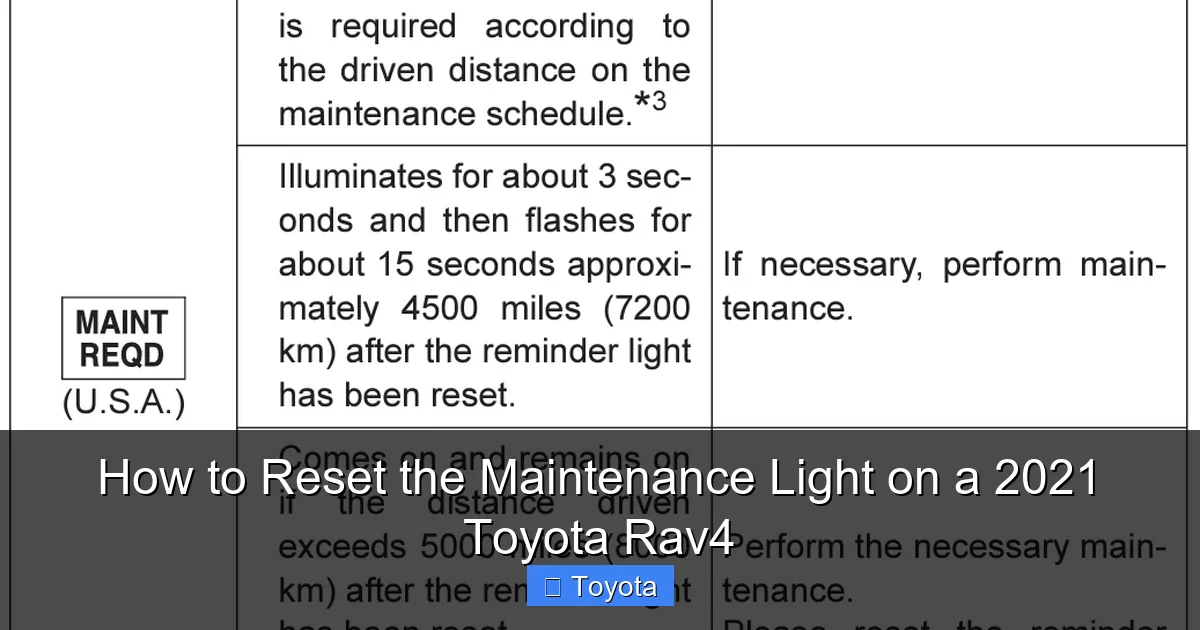
You’ve probably seen it: a small wrench icon or “MAINT REQD” message that pops up on your dashboard. It’s not a warning of immediate danger, but rather a friendly nudge from your RAV4 saying, “Hey, it’s time for some routine care.” This could mean an oil change, tire rotation, brake inspection, or other scheduled service. Once you’ve completed that service—whether at a dealership, independent shop, or even in your own garage—you’ll want to reset that light so it doesn’t keep bothering you unnecessarily.
The good news? You don’t need to visit a mechanic or spend money on a diagnostic tool. Resetting the maintenance light on your 2021 Toyota RAV4 is a simple DIY task that takes less than two minutes. With just a few button presses on your instrument panel, you can clear the reminder and get back to driving with peace of mind. In this guide, we’ll walk you through every step, explain why the system works the way it does, and share pro tips to avoid common mistakes.
Key Takeaways
- Know when to reset: Only reset the maintenance light after completing the required service, such as an oil change or tire rotation.
- Use the right method: The 2021 RAV4 uses a button-based reset procedure through the instrument cluster—no OBD2 scanner needed.
- Turn the ignition on, not the engine: You’ll need to power up the electrical system without starting the engine to access the reset menu.
- Follow the sequence carefully: Missing a step or pressing buttons too quickly can interrupt the reset process.
- Confirm the reset: Always check that the maintenance light is off after completing the steps to ensure success.
- Keep records: Log your service dates and mileage to stay on top of future maintenance needs.
- When in doubt, consult the manual: Your owner’s manual has model-specific instructions and troubleshooting tips.
📑 Table of Contents
Understanding the 2021 Toyota RAV4 Maintenance Light
Before diving into the reset process, it’s helpful to understand what the maintenance light actually means—and why it appears in the first place.
The “MAINT REQD” or wrench icon on your 2021 RAV4 isn’t a check engine light. It’s part of Toyota’s Maintenance Reminder System, a proactive feature designed to help owners stay on top of routine service intervals. Unlike older vehicles that relied solely on mileage or time, modern Toyotas use a combination of driving conditions, engine runtime, mileage, and even oil quality sensors (in some models) to determine when service is due.
This system is calibrated based on Toyota’s recommended maintenance schedule, which typically suggests an oil change every 10,000 miles under normal driving conditions—or more frequently if you drive in severe conditions like frequent short trips, extreme temperatures, towing, or stop-and-go traffic. The RAV4’s computer tracks these factors and triggers the maintenance light accordingly.
It’s important to note that this light is not indicating a mechanical problem. Your engine isn’t about to fail, and your brakes aren’t about to give out. Instead, it’s a reminder that preventive care is due. Ignoring it won’t immediately harm your vehicle, but skipping routine maintenance can lead to reduced performance, lower fuel economy, and potentially costly repairs down the road.
What Triggers the Maintenance Light?
Several factors can cause the maintenance light to illuminate on your 2021 RAV4:
– **Scheduled mileage interval:** Most commonly, the light appears around 5,000 to 10,000 miles since the last reset, depending on your driving habits.
– **Time-based reminders:** Even if you haven’t driven much, the system may trigger the light after a certain number of months (usually 6–12) to ensure fluids and components are checked regularly.
– **Severe driving conditions:** If your RAV4’s computer detects patterns consistent with harsh driving (like frequent idling, heavy loads, or dusty environments), it may shorten the service interval and turn on the light sooner.
– **Manual reset not performed:** If you’ve already serviced your vehicle but didn’t reset the light, it will continue to display until you do.
Understanding these triggers helps you respond appropriately. For example, if the light comes on after just 3,000 miles, it might be a sign that your driving conditions are more demanding than average—and that you should consider more frequent oil changes.
Why You Should Reset the Light After Service
Resetting the maintenance light isn’t just about aesthetics—it’s about accuracy. If you leave the light on after completing service, you won’t know when the next interval is due. The system won’t “reset itself” based on actual service; it only resets when you manually clear it.
By resetting the light, you’re telling the vehicle’s computer: “Service has been completed. Start counting from zero.” This ensures that the next reminder appears at the correct time, helping you maintain your RAV4’s longevity and performance.
Additionally, if you ever sell your vehicle, having a properly reset maintenance light shows potential buyers that the car has been well cared for and that service records are up to date.
Tools and Preparation Needed
Visual guide about How to Reset the Maintenance Light on a 2021 Toyota Rav4
Image source: oilreset.com
One of the best things about resetting the maintenance light on a 2021 RAV4 is that you don’t need any special tools or equipment. Everything you need is already built into your vehicle.
What You’ll Need
– **Your 2021 Toyota RAV4** (obviously!)
– **Ignition key or key fob** (to turn the vehicle on)
– **A few minutes of uninterrupted time**
That’s it. No OBD2 scanner, no laptop, no trip to the dealership. The entire process uses the buttons on your instrument cluster and the vehicle’s onboard menu system.
Pre-Reset Checklist
Before starting the reset process, make sure:
– **The required maintenance has been completed.** Double-check that your oil has been changed, filters replaced, tires rotated, or whatever service was due. Resetting the light without performing the service defeats the purpose and could lead to missed maintenance.
– **The vehicle is parked and in “Park” mode.** For safety, always perform this procedure with the car stationary and the transmission in Park.
– **The ignition is off before you begin.** Start with the key out or the engine off.
– **You’re familiar with your dashboard layout.** Take a quick look at the instrument cluster so you know where the trip meter button and display are located.
Taking these small steps ensures a smooth, frustration-free reset experience.
Step-by-Step Guide to Resetting the Maintenance Light
Visual guide about How to Reset the Maintenance Light on a 2021 Toyota Rav4
Image source: oilreset.com
Now for the main event: the actual reset procedure. Follow these steps exactly as written, and you’ll have that pesky light turned off in under two minutes.
Step 1: Turn the Ignition to “ON” (Do Not Start the Engine)
Insert your key into the ignition or press the “Start/Stop” button (if your RAV4 has keyless ignition) **without pressing the brake pedal**. This will power up the electrical systems—including the dashboard and instrument cluster—but won’t start the engine.
You’ll see all the warning lights briefly illuminate as part of the system check. Wait until they turn off, except for any that normally stay on (like the parking brake light if it’s engaged).
Step 2: Navigate to the Trip Meter Display
Look at your instrument cluster. You’ll see a small button on the right side of the steering column, usually labeled “TRIP” or marked with a “+” and “–” symbol. This button cycles through different display modes on the screen.
Press the “TRIP” button repeatedly until the display shows “Trip A” or “Trip B.” It doesn’t matter which one—just make sure you’re viewing a trip meter screen.
Step 3: Turn the Ignition Off
Once the trip meter is displayed, turn the ignition back to the “OFF” position. Remove the key or press the “Start/Stop” button again (without pressing the brake) to power down the vehicle.
Step 4: Press and Hold the Trip Button
Now, press and hold the “TRIP” button. While holding it down, turn the ignition back to the “ON” position (again, do not start the engine).
Keep holding the button. You’ll notice the trip meter display start to change. It may show dashes, zeros, or begin counting up.
Step 5: Watch for the Reset Sequence
Continue holding the “TRIP” button. After a few seconds, the trip meter should reset to “000000” and then begin counting up slowly (e.g., 000001, 000002, etc.). This indicates that the system is in reset mode.
Once the display starts counting, you can release the “TRIP” button.
Step 6: Confirm the Reset
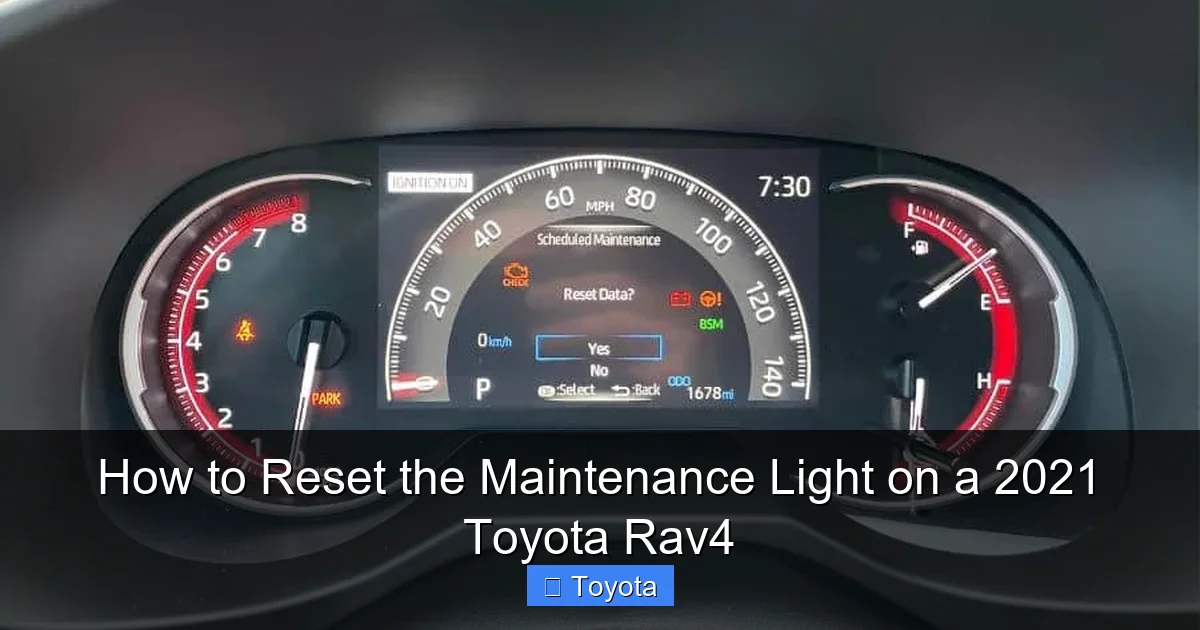
Turn the ignition off completely. Wait about 10 seconds, then turn it back to “ON.” Check the dashboard: the “MAINT REQD” light should be gone.
If the light is still on, repeat the process from the beginning. Sometimes it takes a second try, especially if the button was released too early or the ignition wasn’t turned on correctly.
Pro Tips for Success
– **Be patient.** The counting sequence can take 5–10 seconds. Don’t release the button too soon.
– **Avoid pressing other buttons.** Stick to the “TRIP” button only. Accidentally pressing the odometer or info button can interrupt the process.
– **Try “Trip B” if “Trip A” doesn’t work.** Some owners report better success using the secondary trip meter.
– **Ensure the vehicle is fully off before starting.** A half-powered state can confuse the system.
Troubleshooting Common Issues
Visual guide about How to Reset the Maintenance Light on a 2021 Toyota Rav4
Image source: rav4hub.com
Even with clear instructions, sometimes the reset doesn’t work on the first try. Here’s how to handle the most common problems.
The Light Won’t Turn Off After Reset
If the maintenance light remains on after following the steps:
– **Double-check the sequence.** Did you turn the ignition on without starting the engine? Did you hold the button long enough?
– **Try the process again.** Sometimes a second attempt works perfectly.
– **Ensure the trip meter was displayed.** If you were viewing fuel economy or range instead of trip distance, the reset won’t activate.
– **Wait a few minutes.** In rare cases, the system needs time to process the reset. Turn the car off, wait 5 minutes, then try again.
The Display Doesn’t Count Up
If the trip meter resets to zero but doesn’t start counting:
– You may have released the button too early. Hold it until you see the numbers increase.
– The ignition may not have been turned on properly. Make sure all dashboard lights come on.
– Try using the other trip meter (A vs. B).
Battery or Electrical Issues
If your RAV4 has recently had a dead battery or electrical work, the system may need to relearn certain parameters. In such cases, the reset might not work immediately. Drive the vehicle for a few days under normal conditions, then try the reset again.
When to Seek Professional Help
If you’ve tried the reset multiple times and the light persists, there could be an underlying issue:
– A faulty sensor or wiring problem.
– The maintenance wasn’t actually completed (e.g., oil not changed).
– A software glitch requiring a dealership reset.
In these rare cases, visiting a Toyota service center may be necessary. They can use diagnostic tools to clear the light and check for any hidden issues.
Maintaining Your RAV4 Beyond the Light
Resetting the maintenance light is just one part of keeping your 2021 RAV4 in top shape. To get the most out of your SUV, follow these best practices:
Follow the Scheduled Maintenance Plan
Toyota provides a detailed maintenance schedule in your owner’s manual. Stick to it. Regular oil changes, tire rotations, brake inspections, and fluid top-offs keep your RAV4 running smoothly for years.
Keep a Service Log
Use a notebook, app, or digital spreadsheet to record every service: date, mileage, what was done, and who performed it. This helps you track intervals and provides proof of care if you sell the vehicle.
Pay Attention to Driving Conditions
If you frequently drive in harsh conditions—like extreme heat, cold, dust, or stop-and-go traffic—consider shortening your service intervals. Your RAV4’s computer may already be doing this, but it’s good to stay proactive.
Use Quality Parts and Fluids
Always use Toyota-recommended oil (typically 0W-20 synthetic), filters, and fluids. Cheap alternatives can reduce performance and trigger early maintenance alerts.
Don’t Ignore Other Warning Lights
While the maintenance light is routine, other dashboard warnings—like the check engine light, ABS light, or tire pressure warning—should be addressed immediately.
Conclusion
Resetting the maintenance light on your 2021 Toyota RAV4 is a simple, empowering task that puts you in control of your vehicle’s care. With just a few button presses, you can clear the reminder, confirm that service has been completed, and ensure your SUV stays on track for years of reliable performance.
Remember: the light is there to help you, not hassle you. By understanding how it works and responding promptly, you’re investing in your RAV4’s longevity, safety, and resale value. And the best part? You don’t need a mechanic, special tools, or technical expertise to do it.
So the next time that little wrench icon appears, don’t stress. Grab your keys, follow the steps in this guide, and reset that light like a pro. Your RAV4—and your peace of mind—will thank you.
Frequently Asked Questions
Can I reset the maintenance light without doing the service?
No, you should never reset the maintenance light without completing the required service. The light is a reminder for necessary maintenance like oil changes or tire rotations. Skipping service can lead to engine wear, reduced fuel efficiency, and costly repairs.
Will resetting the maintenance light affect my warranty?
No, resetting the light yourself does not affect your Toyota warranty. As long as you perform or have performed the required maintenance according to the schedule, you’re in compliance. Just keep your service records as proof.
How often does the maintenance light come on?
The light typically appears every 5,000 to 10,000 miles, depending on your driving conditions. Severe driving (like frequent short trips or towing) may trigger it sooner, while highway driving may delay it closer to 10,000 miles.
What if I don’t have a “TRIP” button on my RAV4?
All 2021 Toyota RAV4 models come equipped with a trip meter button on the right side of the steering column. If you can’t find it, consult your owner’s manual or look for a button labeled “DISP” or with “+” and “–” symbols.
Can I use an OBD2 scanner to reset the light?
While some advanced OBD2 scanners can reset maintenance lights, it’s unnecessary for the 2021 RAV4. The built-in button method is faster, free, and doesn’t require extra equipment.
What if the light comes back on immediately after reset?
If the light returns right away, it may indicate a sensor issue or that the system didn’t register the reset properly. Try the reset process again. If it persists, have a technician check for electrical or software problems.
