
Can I Register My Car Online?

Yes, you can register your car online in most U.S. states—saving time and avoiding long DMV lines. The process is simple, secure, and often faster than in-person visits, but requirements vary by state. With the right documents and a few minutes, you can complete your vehicle registration from home.
Key Takeaways
- Most states offer online car registration: Over 40 states allow residents to register vehicles online through official DMV or motor vehicle department websites.
- You’ll need key documents: Proof of ownership, insurance, ID, and sometimes a vehicle inspection report are typically required.
- Fees can be paid electronically: Credit cards, debit cards, or electronic checks are accepted in most online systems.
- Renewals are often easier online: Many states prioritize online renewals, with reminders sent via email or mail.
- New purchases may require in-person visits: First-time registrations for brand-new cars sometimes need a physical visit, especially if titling is involved.
- Out-of-state vehicles have extra steps: If you’re moving or buying from another state, additional paperwork like VIN verification may be needed.
- Check your state’s official site: Always use your state’s official DMV website to avoid scams and ensure secure processing.
📑 Table of Contents
Can I Register My Car Online?
So, you’ve just bought a car—congratulations! Whether it’s a shiny new sedan, a trusty used SUV, or a classic ride you’ve been dreaming of, the next step is getting it legally on the road. And that means registering it. But here’s the good news: **you might not have to stand in line at the DMV anymore**. In fact, in most states across the U.S., you can register your car online—right from your couch, kitchen table, or even your phone.
Gone are the days when car registration meant taking a half-day off work, printing forms, and waiting in a crowded office. Thanks to digital transformation in government services, many Department of Motor Vehicles (DMV) offices now offer secure, user-friendly online portals. These systems let you complete your registration in minutes, often with instant confirmation and digital receipts. Whether you’re registering a new car, renewing an expired tag, or transferring a vehicle from another state, the online option is not only possible—it’s often the smartest choice.
But before you click “submit,” it’s important to know what’s involved. While the process is generally straightforward, each state has its own rules, requirements, and limitations. Some states allow full online registration for almost all vehicles, while others restrict it to renewals or specific situations. Understanding your state’s policies, gathering the right documents, and knowing what to expect can save you time, stress, and multiple trips to the DMV.
How Online Car Registration Works
Visual guide about Can I Register My Car Online?
Image source: i.redd.it
So, how does online car registration actually work? Think of it like booking a flight or ordering groceries—just with a few more legal hoops. The process typically starts by visiting your state’s official DMV or motor vehicle department website. From there, you’ll navigate to the vehicle registration section and choose the type of registration you need: new, renewal, transfer, or replacement.
Once you’re in the system, you’ll be guided through a series of steps. First, you’ll enter your vehicle information—things like the make, model, year, VIN (Vehicle Identification Number), and license plate number (if you’re renewing). Then, you’ll provide personal details such as your name, address, and driver’s license number. Next comes the documentation upload. Most systems allow you to scan or take photos of required papers and submit them digitally.
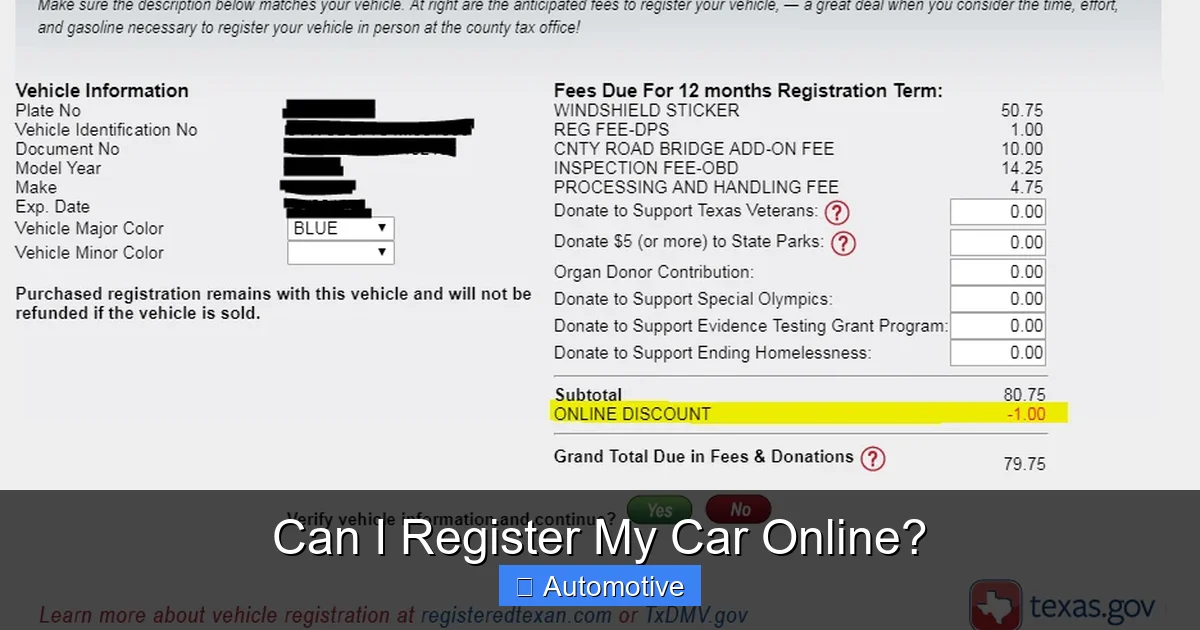
After that, you’ll pay the registration fee using a credit or debit card. Some states also accept electronic checks or bank transfers. Once payment is processed, you’ll receive a confirmation email or digital receipt. In many cases, your new registration certificate and license plate sticker (or temporary tag) will be mailed to you within a few business days. Some states even offer digital registration cards you can store on your phone.
One of the biggest advantages of online registration is speed. While in-person visits can take hours, online processing often takes just 10 to 15 minutes—if you have everything ready. Plus, you avoid the stress of long lines, limited hours, and potential paperwork errors that can delay your registration.
Step-by-Step Guide to Registering Your Car Online
Let’s walk through a typical online registration process using a real-world example. Say you live in Texas and just bought a used Honda Civic from a private seller. Here’s how you’d register it online:
1. **Visit the Texas DMV website** – Go to the official Texas Department of Motor Vehicles site (txdmv.gov). Avoid third-party sites that charge extra fees.
2. **Create or log in to your account** – If you’ve used the system before, log in. If not, create a free account using your driver’s license number and personal info.
3. **Select “Register a Vehicle”** – Choose the option for a used vehicle registration. You’ll be asked whether it’s a new purchase, transfer, or renewal.
4. **Enter vehicle details** – Input the VIN, make, model, year, and odometer reading. The system may auto-populate some fields.
5. **Upload required documents** – You’ll need to upload:
– A completed Form 130-U (Application for Texas Title and/or Registration)
– Proof of insurance (Texas requires liability coverage)
– A valid photo ID (driver’s license or state ID)
– The signed title from the seller
– A vehicle inspection report (if required—Texas requires safety and emissions inspections in certain counties)
6. **Pay the fees** – Registration fees in Texas vary by vehicle type and weight, but expect to pay around $50–$100, plus any local taxes or inspection fees.
7. **Submit and confirm** – Review your information, submit the application, and pay. You’ll get a confirmation number and email.
8. **Wait for your documents** – Your registration certificate and new license plate sticker will arrive by mail in 7–10 business days. In the meantime, you can print a temporary registration to keep in your car.
This same general process applies in most states, though the forms, fees, and required documents will differ. The key is to follow your state’s specific instructions carefully.
What You Need to Register Your Car Online
Visual guide about Can I Register My Car Online?
Image source: i.ytimg.com
Before you start the online registration process, it’s crucial to gather all the necessary documents and information. Missing even one item can delay your application or cause it to be rejected. While requirements vary slightly by state, here’s a checklist of what you’ll typically need:
– **Proof of ownership** – This is usually the vehicle’s title, signed over to you by the seller. If the car is financed, the lienholder may need to be listed.
– **Valid driver’s license or state ID** – You must be legally allowed to drive in your state.
– **Proof of insurance** – Most states require at least minimum liability coverage. Your insurance company can provide a digital or printed proof of insurance (often called a “pink slip”).
– **Vehicle Identification Number (VIN)** – Found on the dashboard, driver’s side door jamb, or registration documents.
– **Odometer reading** – Required for vehicles under 10 years old in most states to prevent odometer fraud.
– **Vehicle inspection report** – Some states require a recent safety or emissions inspection before registration. Check your state’s rules.
– **Payment method** – Credit or debit card for registration fees, taxes, and any penalties.
Special Cases and Exceptions
Not every vehicle registration can be completed online. Here are a few situations where you might still need to visit the DMV in person:
– **Brand-new vehicles** – If you’re buying a car directly from a dealership, they often handle the registration for you. However, if you’re registering a new car yourself (e.g., importing it), you may need to appear in person for titling.
– **Out-of-state vehicles** – If you’re moving to a new state or buying a car from another state, you may need to complete a VIN verification or emissions test in person.
– **Salvage or rebuilt titles** – Vehicles that have been declared totaled and then repaired often require additional inspections and paperwork.
– **Commercial vehicles** – Trucks, vans, or vehicles used for business may have different registration rules and fees.
– **Military personnel** – Active-duty service members may have special registration options, including online renewals even when stationed out of state.
Always check your state’s DMV website for the most accurate and up-to-date information.
State-by-State Online Registration Availability
Visual guide about Can I Register My Car Online?
Image source: images.ctfassets.net
One of the most common questions people ask is: “Does my state allow online car registration?” The short answer is: **yes, most do**. As of 2024, over 40 states offer some form of online vehicle registration, with varying levels of functionality.
Here’s a quick rundown of how online registration works in a few major states:
– **California**: The California DMV allows online renewals for most vehicles. First-time registrations and title transfers may require in-person visits or mail-in forms.
– **Florida**: Florida residents can register or renew vehicles online through the Florida Highway Safety and Motor Vehicles (FLHSMV) website. New residents have 10 days to register their vehicles.
– **New York**: The NY DMV offers online registration for renewals and some new registrations. However, certain vehicles, like those with liens or out-of-state titles, may need in-person processing.
– **Illinois**: The Illinois Secretary of State allows online renewals for most passenger vehicles. New registrations and title transfers require visiting a facility.
– **Arizona**: Arizona’s MVDnow portal lets you register vehicles online, including new purchases, as long as you have all required documents and no liens.
Even in states that offer online registration, there may be limitations. For example, some states don’t allow online registration for vehicles over a certain age or weight. Others restrict it to residents with clean driving records or no outstanding fines.
How to Find Your State’s Online Registration Portal
To find your state’s official online registration system, follow these steps:
1. **Search for “[Your State] DMV online registration”** – Use a search engine and include your state name (e.g., “Texas DMV online registration”).
2. **Look for the official government website** – Make sure the URL ends in .gov. Avoid sites that charge extra fees or look unofficial.
3. **Check the vehicle services section** – Most DMV sites have a clear menu for “Vehicle Registration,” “Renewals,” or “Online Services.”
4. **Create an account if needed** – Some states require you to set up a free account with your driver’s license and personal info.
5. **Follow the prompts** – The system will guide you through the process step by step.
Pro tip: Bookmark your state’s DMV website so you can easily access it for future renewals or updates.
Benefits of Registering Your Car Online
So why go online when you could just drive to the DMV? The benefits are clear—and compelling.
First and foremost, **it saves time**. Instead of spending hours in line, you can complete your registration in under 20 minutes from home. No need to take time off work, find childcare, or deal with traffic.
Second, **it’s convenient**. You can register your car anytime—day or night—as long as you have internet access. Many DMV websites are mobile-friendly, so you can even do it from your phone.
Third, **it reduces errors**. Online systems often include built-in checks that alert you if you’ve missed a field or uploaded the wrong document. This minimizes the risk of your application being rejected.
Fourth, **it’s eco-friendly**. Going digital means less paper, fewer printed forms, and fewer car trips to the DMV—good for the planet and your gas tank.
Finally, **it’s secure**. Official DMV websites use encryption and secure login systems to protect your personal information. Just make sure you’re on the real site and not a phishing scam.
Common Mistakes to Avoid
Even with the best intentions, people sometimes run into issues when registering their car online. Here are a few common mistakes and how to avoid them:
– **Using the wrong website** – Always use your state’s official DMV site. Third-party sites may charge extra or sell your data.
– **Uploading blurry documents** – Make sure photos or scans are clear and legible. Blurry titles or IDs can cause delays.
– **Forgetting to update your address** – If you’ve moved, update your address with the DMV before registering. Otherwise, your documents will be sent to the wrong place.
– **Ignoring inspection requirements** – Some states require a recent inspection before registration. Check your state’s rules to avoid surprises.
– **Paying the wrong fee** – Fees vary by vehicle type, weight, and location. Use the DMV’s fee calculator to get an accurate estimate.
What to Do After You Register Online
Once your online registration is complete, there are a few important next steps:
1. **Print your temporary registration** – Most states provide a printable temporary tag or registration card. Keep it in your car until your official documents arrive.
2. **Check your mailbox** – Your registration certificate and new license plate sticker (if applicable) will be mailed to you. This usually takes 7–14 days.
3. **Update your insurance** – Notify your insurance company that your vehicle is now registered. They may need to update your policy.
4. **Keep records** – Save your confirmation email, receipt, and registration documents in a safe place—digitally or physically.
5. **Set a renewal reminder** – Most registrations are valid for 1–2 years. Use a calendar alert or sign up for email reminders from your DMV to avoid late fees.
Conclusion
So, can you register your car online? In most cases, the answer is a resounding **yes**. With the rise of digital government services, online car registration has become faster, easier, and more accessible than ever. Whether you’re renewing an expired tag, registering a used car, or transferring a vehicle from another state, the online option can save you time, hassle, and a trip to the DMV.
Of course, it’s not always a one-size-fits-all solution. Some situations—like new car purchases, salvage titles, or out-of-state vehicles—may still require in-person visits. But for the majority of drivers, online registration is a reliable, secure, and efficient way to get your car legally on the road.
The key to a smooth experience is preparation. Gather your documents, double-check your state’s requirements, and use only official DMV websites. With a little planning, you can complete your car registration in minutes—no lines, no stress, no wasted time.
So the next time you’re wondering, “Can I register my car online?”—the answer is likely yes. And now, you know exactly how to do it.
Frequently Asked Questions
Can I register my car online if I just moved to a new state?
Yes, most states allow new residents to register their vehicles online, but you may need to provide additional documents like a VIN verification or proof of residency. Check your new state’s DMV website for specific requirements.
Do I need a vehicle inspection to register my car online?
It depends on your state. Some states, like Texas and California, require a recent safety or emissions inspection before registration. Others, like Florida, do not. Always verify your state’s rules before starting the process.
Can I register a car online if it’s financed?
Yes, but the lienholder (usually a bank or credit union) may need to be listed on the title and registration. Some states allow online registration with liens, while others require in-person processing.
How long does it take to get my registration after applying online?
Most states mail your registration certificate and license plate sticker within 7–14 business days. You’ll receive a temporary registration to use in the meantime.
What if I don’t have a printer to print my temporary registration?
Some states offer digital temporary registrations you can save on your phone. If not, you can write down your confirmation number and keep it in your car until your documents arrive.
Is online car registration secure?
Yes, as long as you use your state’s official DMV website. These sites use encryption and secure login systems to protect your personal and financial information. Avoid third-party sites that charge extra fees.
