
How to Change the Clock on a Lexus Rx 350

Changing the clock on your Lexus RX 350 is easier than you think—whether you have a newer touchscreen model or an older analog system. This guide walks you through every method, from basic button controls to advanced infotainment settings, so you’ll never be late again.
If you’ve ever pulled up to a meeting only to realize your Lexus RX 350’s clock is off by 20 minutes, you’re not alone. It’s a surprisingly common frustration—especially after daylight saving time shifts, long trips across time zones, or a dead battery that resets the system. But here’s the good news: changing the clock on your Lexus RX 350 is simpler than most drivers expect. Whether you’re driving a rugged 2007 model with analog dials or a sleek 2023 with a full-color touchscreen, this guide will walk you through every step with clarity and confidence.
The Lexus RX 350 has evolved significantly over the years, and so have its clock-setting methods. Early models relied on physical buttons and menu systems buried in the audio unit, while newer versions integrate smart features like GPS time synchronization and smartphone connectivity. That means there’s no one-size-fits-all solution—but don’t worry. We’ve broken it down by generation, so you can find the right method fast. Plus, we’ll share pro tips to keep your clock accurate year-round, so you’ll never miss a school pickup or doctor’s appointment again.
Key Takeaways
- Know your model year: Clock-setting methods vary between 2007–2015 and 2016–2024 Lexus RX 350 models due to infotainment upgrades.
- Use the steering wheel or center console controls: Most pre-2016 models rely on physical buttons near the instrument cluster or audio system.
- Access the menu via the touchscreen (2016+): Newer RX 350s use the Lexus Enform system—navigate through Settings > Clock to adjust time and format.
- Enable automatic time sync (if available): Some models sync with GPS or connected smartphones for hassle-free updates.
- Reset after battery replacement: Always check and reset the clock if your car battery has been disconnected or replaced.
- Double-check daylight saving time settings: Ensure your clock adjusts correctly during seasonal changes to avoid confusion.
- Consult your owner’s manual: When in doubt, the official manual provides model-specific instructions and troubleshooting tips.
📑 Table of Contents
- Why Your Lexus RX 350 Clock Might Be Wrong
- How to Change the Clock on a 2007–2015 Lexus RX 350
- How to Change the Clock on a 2016–2024 Lexus RX 350
- Manual vs. Automatic Clock Settings: Which Is Better?
- Common Mistakes to Avoid When Changing the Clock
- How to Keep Your Clock Accurate Year-Round
- When to Visit a Lexus Dealer
- Conclusion
Why Your Lexus RX 350 Clock Might Be Wrong
Before diving into how to fix it, let’s talk about why your clock might be off in the first place. Understanding the root cause can help prevent future issues and save you time down the road.
Battery Disconnection or Replacement
One of the most common reasons your clock resets is a dead or disconnected battery. When the 12-volt battery loses power—whether due to age, extreme cold, or accidental disconnection during maintenance—the car’s internal memory resets. That includes the clock, radio presets, and even seat positions on some models. If you’ve recently had your battery replaced or your car was jump-started, it’s no surprise the time is wrong.
Daylight Saving Time Changes
Twice a year, most of the U.S. “springs forward” and “falls back,” shifting the clock by one hour. While some newer Lexus models automatically adjust for daylight saving time, many older RX 350s do not. If you haven’t manually updated the clock, you could be an hour off—and that’s a recipe for missed appointments.
Crossing Time Zones
Driving from California to Nevada? Or from New York to Pennsylvania? Time zones matter. If you’ve taken a long road trip and your clock hasn’t updated, it’s likely because your RX 350 isn’t set to auto-sync with GPS time. This is especially common in older models without built-in navigation.
Infotainment System Glitches
Like any electronic system, the Lexus Enform or earlier audio systems can occasionally freeze or malfunction. A software hiccup might cause the clock to freeze, skip, or display incorrect time. In rare cases, a firmware update from Lexus may be needed—but usually, a simple reset does the trick.
Manual Time Entry Errors
Let’s be honest—sometimes we just make mistakes. Maybe you accidentally set the clock to 12-hour format when you meant 24-hour, or you typed “3:75” instead of “4:15.” These small errors happen, but they’re easy to fix once you know where to look.
How to Change the Clock on a 2007–2015 Lexus RX 350

Visual guide about How to Change the Clock on a Lexus Rx 350
Image source: i2.wp.com
If you’re driving a first- or second-generation RX 350 (2007–2015), your clock is likely controlled through the audio system or instrument cluster. These models don’t have touchscreens, so you’ll use physical buttons and menu navigation. Don’t worry—it’s still straightforward.
Step-by-Step Guide for 2007–2015 Models
- Turn on the ignition: You don’t need to start the engine, but the car must be in “Accessory” or “On” mode. Press the “Start” button once (without pressing the brake) or turn the key to the second position.
- Locate the “Menu” or “Setup” button: This is usually on the center console near the audio controls. It may be labeled “Menu,” “Setup,” or have a gear icon.
- Press and hold the “Menu” button: Hold it for about 3–5 seconds until the display changes. On some models, you’ll see a setup menu appear on the screen.
- Navigate to “Clock Adjust” or “Time Setting”: Use the “Tune” or “Seek” buttons (the ones you use to change radio stations) to scroll through the menu options. Look for “Clock,” “Time,” or “Date/Time.”
- Select “Clock Adjust”: Press the “Enter” or “OK” button (often the center of the tune knob) to enter the clock setting mode.
- Adjust the hours and minutes: Use the tune buttons to increase or decrease the time. Some models let you toggle between hours and minutes by pressing “Enter” again.
- Confirm your setting: Once the correct time is displayed, press “Enter” or “OK” to save. The screen should return to normal mode.
- Turn off the ignition: Your new time is now set and will remain even if the car is off.
Pro Tips for Older Models
- Use the steering wheel controls (if equipped): Some 2013–2015 RX 350s have audio and menu buttons on the steering wheel. Try pressing the “Menu” or “Info” button to access clock settings faster.
- Check the instrument cluster: On some trims, the clock is displayed in the gauge cluster. If you don’t see a menu option, look for a small button near the speedometer labeled “Trip” or “Reset.” Holding it might access time settings.
- Reset after battery work: Always double-check the clock after any electrical work. It’s one of the first things to reset.
How to Change the Clock on a 2016–2024 Lexus RX 350

Visual guide about How to Change the Clock on a Lexus Rx 350
Image source: i2.wp.com
Starting in 2016, Lexus introduced the Enform infotainment system with a full-color touchscreen. This made clock adjustments much more intuitive—but also moved the controls to a different location. If you have a 2016 or newer RX 350, here’s how to set the time.
Using the Touchscreen (2016–2024 Models)
- Turn on the car: Press the “Start” button to activate the infotainment system. The screen should light up within a few seconds.
- Tap the “Menu” icon: This is usually a grid of dots or a hamburger menu (three lines) in the top-left or top-right corner of the screen.
- Select “Settings”: Scroll through the menu and tap “Settings.” This opens a list of system options.
- Choose “Clock” or “Date/Time”: Tap on the clock option. You’ll see fields for time, date, time zone, and format (12-hour vs. 24-hour).
- Adjust the time: Tap the hour or minute field. Use the on-screen keypad or +/- buttons to set the correct time.
- Set the time zone (optional): If you’ve traveled, make sure the correct time zone is selected. This helps with automatic daylight saving adjustments.
- Choose your format: Select “12-hour” or “24-hour” based on your preference. Most U.S. drivers use 12-hour.
- Save and exit: Tap “OK” or “Save.” The clock will update immediately.
Enabling Automatic Time Sync (2018+ Models)
If your RX 350 has GPS navigation or smartphone integration (like Apple CarPlay or Android Auto), you may be able to enable automatic time synchronization. This feature uses GPS signals or your phone’s network time to keep the clock accurate.
- Go to Settings > Clock > Automatic Time Adjustment: Toggle this option “On.”
- Ensure GPS is active: If you’re in an area with poor signal (like a parking garage), the system may not sync. Drive outside for a few minutes to reconnect.
- Check smartphone connection: If your phone is connected via Bluetooth or USB, the car may pull time from your device. Make sure your phone’s time is correct.
Troubleshooting Touchscreen Issues
Sometimes the screen freezes or doesn’t respond. Here’s how to fix it:
- Restart the system: Turn the car off, wait 30 seconds, then restart. This often resets the infotainment system.
- Perform a soft reset: On some models, press and hold the “Volume” and “Power” buttons for 10 seconds to reboot the screen.
- Update software: Visit a Lexus dealer or check online for firmware updates. Outdated software can cause glitches.
Manual vs. Automatic Clock Settings: Which Is Better?
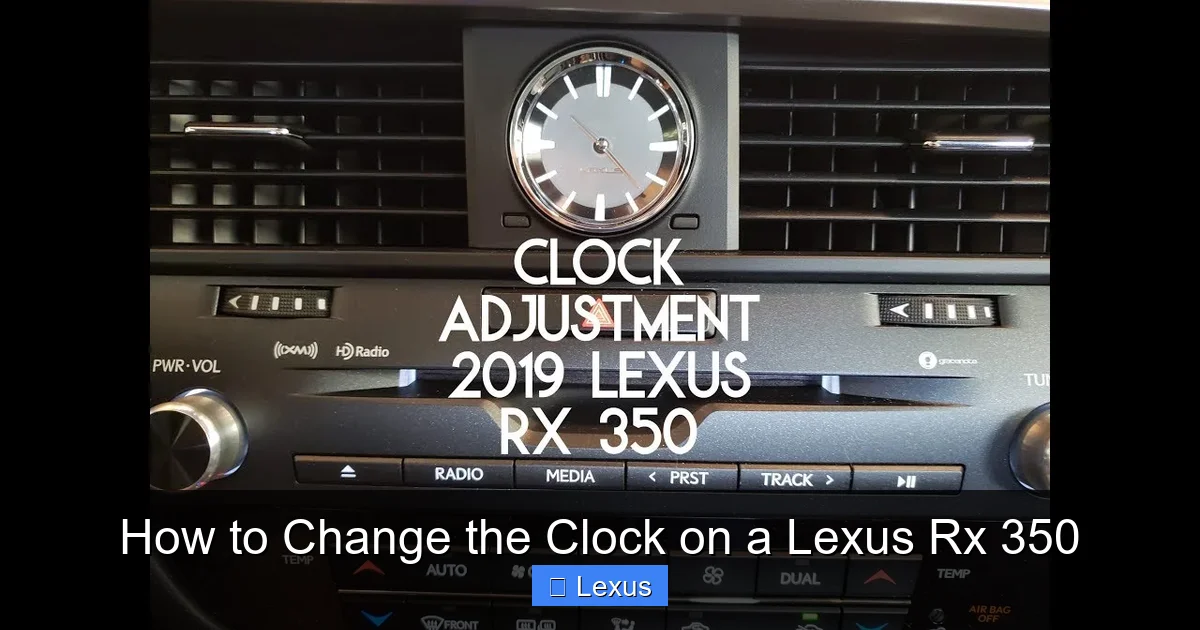
Visual guide about How to Change the Clock on a Lexus Rx 350
Image source: i2.wp.com
Now that you know how to set the clock manually, you might be wondering: should you switch to automatic? Let’s compare the two methods.
Manual Clock Setting
Pros:
- Full control over time and format
- Works on all model years
- No reliance on GPS or phone signal
Cons:
- Requires manual updates for daylight saving time
- Easy to forget after trips or battery changes
- Prone to human error
Automatic Clock Setting
Pros:
- Always accurate—syncs with GPS or network time
- Adjusts automatically for daylight saving time
- No user input needed after setup
Cons:
- Only available on 2016+ models with navigation
- May not work in areas with poor signal
- Requires initial setup
Our Recommendation
If your RX 350 supports automatic time sync, turn it on. It’s the most reliable way to keep your clock accurate. But if you drive an older model or frequently travel through remote areas, manual setting is perfectly fine—just remember to update it twice a year for daylight saving time.
Common Mistakes to Avoid When Changing the Clock
Even simple tasks can go wrong if you’re not careful. Here are the most common mistakes Lexus RX 350 owners make—and how to avoid them.
Forgetting to Save the Setting
You’ve adjusted the time, but it keeps reverting? You probably forgot to press “Save” or “OK.” Always confirm your entry before exiting the menu. On touchscreen models, look for a confirmation message.
Setting the Wrong Time Zone
If your clock is consistently off by an hour, check your time zone setting. This is especially important after long trips. Go to Settings > Clock > Time Zone and select the correct region.
Using 24-Hour Format by Accident
Some drivers accidentally switch to 24-hour time and get confused. If your clock shows “14:30” instead of “2:30 PM,” go back into the clock settings and change the format.
Ignoring Daylight Saving Time
Even with automatic sync, some systems don’t adjust for daylight saving unless enabled. Check your settings in spring and fall to ensure your clock “springs forward” and “falls back” correctly.
Not Checking After Battery Work
After a battery replacement, always verify the clock. It’s one of the first things to reset, and it’s easy to overlook.
How to Keep Your Clock Accurate Year-Round
Setting the clock once isn’t enough—you need a strategy to keep it accurate. Here’s how to stay on time, no matter what.
Create a Reminder
Set a phone reminder for the first Sunday in November (fall back) and the second Sunday in March (spring forward). When the alert pops up, take two minutes to check your car clock.
Use a Consistent Reference
Always set your car clock to match your phone or a trusted atomic clock (like time.gov). This ensures consistency across devices.
Enable Automatic Features
If your RX 350 has GPS or smartphone sync, turn it on. It’s the easiest way to stay accurate without thinking about it.
Check After Long Trips
If you drive across time zones, update your clock when you arrive. Even if your phone adjusts automatically, your car might not.
Keep Your Owner’s Manual Handy
The manual has model-specific instructions and troubleshooting tips. Store it in the glove box or download the PDF from Lexus.com.
When to Visit a Lexus Dealer
Most clock issues can be fixed at home, but sometimes you need professional help. Here’s when to book a service appointment.
The Clock Won’t Change at All
If you follow the steps and the time won’t update, there may be a software glitch or hardware issue. A dealer can run diagnostics and reset the system.
The Screen Is Frozen or Unresponsive
A frozen touchscreen might need a firmware update or replacement. Dealers have the tools to perform a full system reset.
Multiple Systems Are Malfunctioning
If the clock, radio, and navigation are all acting up, it could be a deeper electrical problem. A technician can check the fuse box, wiring, and control modules.
You’re Uncomfortable Doing It Yourself
No shame in that! If you’d rather have a professional handle it, schedule a quick service visit. Most dealers can adjust the clock in under 15 minutes.
Conclusion
Changing the clock on your Lexus RX 350 doesn’t have to be a headache. Whether you’re using physical buttons on a 2010 model or tapping through a touchscreen on a 2022, the process is quick and manageable with the right guidance. By understanding your model year, knowing where to find the settings, and enabling automatic features when possible, you can keep your clock accurate and stress-free.
Remember: a correct clock isn’t just about convenience—it’s about safety and punctuality. Whether you’re timing your commute, coordinating with family, or relying on scheduled maintenance alerts, that little digital display plays a big role in your daily routine. So take a few minutes today to check your time, adjust it if needed, and set a reminder for daylight saving changes. Your future self will thank you.
And if you ever get stuck? Don’t hesitate to consult your owner’s manual or visit a Lexus service center. With a little know-how and the right tools, you’ve got this.
Frequently Asked Questions
How do I change the clock on a 2010 Lexus RX 350?
Turn on the ignition, press and hold the “Menu” button on the audio system, navigate to “Clock Adjust” using the tune buttons, set the correct time, and press “Enter” to save. The process takes less than a minute.
Why does my Lexus RX 350 clock keep resetting?
This usually happens after a battery disconnection or replacement. The car’s memory resets, including the clock. Simply re-enter the correct time using the steps in this guide.
Can I set my Lexus RX 350 clock to update automatically?
Yes, if your model is 2016 or newer and has GPS navigation. Go to Settings > Clock > Automatic Time Adjustment and toggle it on. The system will sync with GPS signals.
How do I switch between 12-hour and 24-hour time on my RX 350?
On touchscreen models (2016+), go to Settings > Clock and select your preferred format. On older models, the format may be fixed or changed through the same menu used to set the time.
What if the clock menu doesn’t appear on my screen?
Try restarting the car or performing a soft reset by holding the volume and power buttons. If the issue persists, there may be a software glitch requiring a dealer update.
Do I need to change the clock for daylight saving time?
Only if your model doesn’t support automatic adjustment. Most 2016+ models with GPS will update automatically, but older models require manual changes in spring and fall.
