Why Does My Kia Say Service Required?

Contents
- 1 Key Takeaways
- 2 📑 Table of Contents
- 3 Why Does My Kia Say Service Required?
- 4 Understanding the “Service Required” Message
- 5 Common Causes of the “Service Required” Alert
- 6 What to Do When You See the Message
- 7 DIY Tips to Prevent False Alerts
- 8 When to See a Mechanic Immediately
- 9 Conclusion
- 10 Frequently Asked Questions


If your Kia displays a “Service Required” message, it’s not just a suggestion—it’s your car’s way of saying maintenance is overdue or a system needs attention. Ignoring it can lead to reduced performance, lower fuel efficiency, or even costly repairs down the road.
Key Takeaways
- Scheduled Maintenance Reminder: Most “Service Required” alerts are tied to mileage or time-based intervals, such as oil changes or tire rotations.
- Engine or System Issue: The message may indicate a problem with the engine, transmission, or emissions system that needs professional diagnosis.
- Battery or Electrical Fault: Weak batteries or faulty sensors can trigger false or premature service warnings.
- Software Glitches: Outdated infotainment or ECU software may cause incorrect alerts—updates can often resolve them.
- Reset After Service: The message won’t disappear until the maintenance is completed and the system is manually or professionally reset.
- Don’t Ignore It: Delaying service can void warranties, reduce resale value, or lead to breakdowns.
- Use Owner’s Manual: Always refer to your Kia’s manual for model-specific service schedules and reset procedures.
📑 Table of Contents
Why Does My Kia Say Service Required?
You’re driving along, enjoying your Kia’s smooth ride, when suddenly—a message pops up on the dashboard: “Service Required.” Your heart skips a beat. Is something seriously wrong? Should you pull over? Can you ignore it for a few more days?
Don’t panic. While the message might seem alarming, it’s actually a helpful feature built into your Kia to keep your vehicle running safely and efficiently. But understanding what it really means—and what you should do about it—can save you time, money, and stress.
In this guide, we’ll break down exactly why your Kia is showing a “Service Required” alert, what could be triggering it, and how to respond. Whether you drive a Kia Sportage, Sorento, Telluride, or Forte, the principles are similar across models. We’ll also cover common myths, DIY tips, and when it’s time to visit a certified technician.
Understanding the “Service Required” Message
Visual guide about Why Does My Kia Say Service Required?
Image source: i0.wp.com
The “Service Required” message is part of your Kia’s onboard diagnostic and maintenance reminder system. It’s designed to notify you when routine maintenance is due or when a potential issue needs attention. Think of it as your car’s way of saying, “Hey, I need some TLC.”
This alert isn’t random. It’s triggered by a combination of factors, including mileage, engine runtime, time since last service, and data from various sensors. Kia vehicles use sophisticated software to monitor everything from oil life to brake wear, and they’re programmed to alert you before small issues become big problems.
For example, if your Kia has driven 7,500 miles since its last oil change, the system may flag the need for service—even if the oil still looks clean. That’s because modern engines and oils degrade over time, not just from use. Heat, short trips, and stop-and-go traffic can all accelerate oil breakdown.
But it’s not just about oil. The “Service Required” message can also appear for tire rotations, brake inspections, cabin air filter replacements, or even software updates. In some cases, it may indicate a more serious issue, like a malfunctioning oxygen sensor or low transmission fluid.
How the System Works
Kia’s maintenance reminder system uses a combination of hard data and predictive algorithms. Sensors throughout the vehicle monitor engine performance, fluid levels, and component wear. This data is fed into the Engine Control Unit (ECU), which calculates when service is needed based on your driving habits and conditions.
For instance, if you frequently drive in dusty environments or make lots of short trips, your Kia may recommend more frequent air filter changes or oil services. The system adapts to your usage, making it smarter than a simple mileage counter.
Some newer Kia models also connect to Kia’s UVO telematics system, which can send service reminders directly to your smartphone or email. This integration helps ensure you never miss a maintenance window.
Types of Service Alerts
Not all “Service Required” messages are the same. Kia vehicles may display different variations, such as:
– “Service in 500 Miles”
– “Service Due Soon”
– “Service Required – See Dealer”
– “Check Engine” (which may appear alongside the service message)
The wording gives you a clue about urgency. A “Service in 500 Miles” alert is typically a gentle reminder for routine maintenance. But “Service Required – See Dealer” suggests a more serious issue that needs immediate attention.
It’s also worth noting that some alerts are tied to specific systems. For example, a “Brake System Service” message means your brake pads or fluid may need inspection. A “Transmission Service” alert could indicate low fluid or shifting problems.
Common Causes of the “Service Required” Alert

Visual guide about Why Does My Kia Say Service Required?
Image source: wallpapercave.com
Now that you understand how the system works, let’s look at the most common reasons your Kia is showing this message. While it’s often related to routine maintenance, it’s important to rule out underlying issues.
1. Overdue Routine Maintenance
This is the number one cause. Most Kia models recommend oil changes every 7,500 miles or 12 months, whichever comes first. Other services, like tire rotations, brake inspections, and cabin air filter replacements, follow similar schedules.
If you’ve missed a service interval—even by a few hundred miles—the system will trigger the alert. For example, if your Kia Rio was last serviced at 15,000 miles and you’re now at 22,600, the system may flag the need for an oil change and inspection.
Ignoring this can lead to sludge buildup in the engine, reduced fuel economy, and increased wear on internal components. Over time, this can shorten your engine’s lifespan.
2. Low or Degraded Engine Oil
Even if you’re within the recommended mileage, old or contaminated oil can trigger a service alert. Oil breaks down over time due to heat, moisture, and combustion byproducts. It also collects dirt and metal particles from engine wear.
Kia’s oil life monitoring system (OLMS) tracks oil condition based on driving patterns. If you frequently drive in stop-and-go traffic, tow heavy loads, or drive in extreme temperatures, your oil may degrade faster than average.
A common sign of degraded oil is a darker, thicker consistency or a burnt smell. If you check your dipstick and notice these signs, it’s time for a change—even if the mileage seems low.
3. Faulty or Dirty Sensors
Modern Kias rely on dozens of sensors to monitor performance. If a sensor—like the oil pressure sensor, oxygen sensor, or mass airflow sensor—is dirty, damaged, or malfunctioning, it can send incorrect data to the ECU.
For example, a faulty oil pressure sensor might report low pressure even when oil levels are fine. This can trigger a “Service Required” message or even a “Check Engine” light.
Similarly, a dirty mass airflow sensor can cause poor fuel economy and rough idling, prompting the system to recommend service. Cleaning or replacing these sensors often resolves the issue.
4. Battery or Electrical Issues
A weak or failing battery can cause erratic behavior in your Kia’s electronics, including false service alerts. When the battery voltage drops, sensors may send unreliable signals, and the ECU might misinterpret them as system faults.
This is especially common in older vehicles or those exposed to extreme temperatures. Cold weather reduces battery efficiency, while heat accelerates internal corrosion.
If your Kia shows a “Service Required” message after a jump start or battery replacement, it may simply need a reset. However, if the message persists, have the battery and alternator tested.
5. Software Glitches or Outdated Firmware
Like any computer, your Kia’s onboard systems can experience software bugs. These glitches may cause the “Service Required” message to appear even when no maintenance is needed.
For example, a bug in the infotainment system might incorrectly communicate with the ECU, triggering a false alert. In other cases, outdated firmware in the transmission control module (TCM) or body control module (BCM) can cause confusion.
Kia periodically releases software updates to fix these issues. Visiting a certified dealer for a diagnostic scan can identify and resolve software-related problems.
6. Transmission or Brake System Problems
In some cases, the “Service Required” message is tied to specific components. Low transmission fluid, worn brake pads, or a malfunctioning ABS sensor can all trigger the alert.
For instance, if your Kia Sorento shows a “Transmission Service” message, it may indicate low fluid levels or slipping gears. Ignoring this can lead to costly transmission damage.
Similarly, a “Brake System Service” alert could mean your brake pads are worn down or your brake fluid is contaminated. Both require immediate attention to ensure safety.
What to Do When You See the Message

Visual guide about Why Does My Kia Say Service Required?
Image source: scout.customerscout.net
So your Kia says “Service Required.” What now? Here’s a step-by-step guide to help you respond calmly and effectively.
Step 1: Don’t Panic—But Don’t Ignore It
First, stay calm. The message is a warning, not a breakdown. However, don’t treat it like a suggestion. Delaying service can lead to bigger problems down the road.
If the message appears while driving, pull over safely and check your dashboard for other warning lights (like the check engine light or oil pressure light). If multiple lights are on, it’s best to have your vehicle towed to a service center.
Step 2: Check Your Owner’s Manual
Your Kia’s owner’s manual is your best friend. It contains the official maintenance schedule, reset procedures, and troubleshooting tips for your specific model and year.
For example, the 2023 Kia Sportage manual recommends oil changes every 7,500 miles under normal driving conditions. But if you drive in severe conditions (like frequent short trips or dusty roads), it suggests every 5,000 miles.
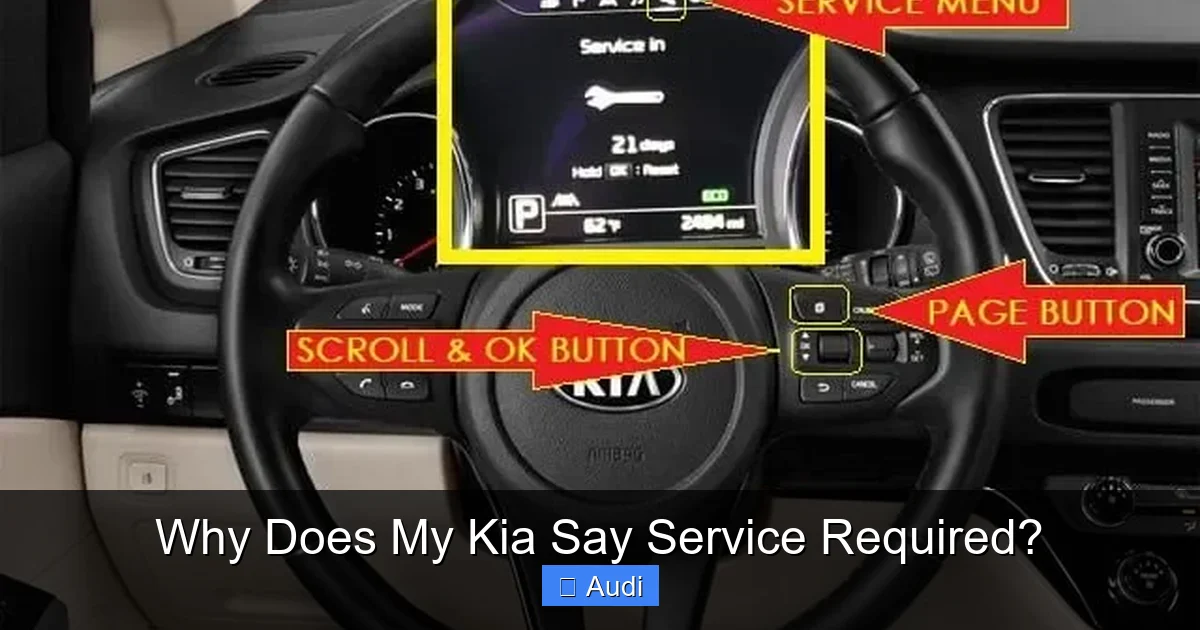
The manual will also tell you how to reset the service reminder after maintenance. Some models allow a DIY reset using the trip odometer button, while others require a dealer scan tool.
Step 3: Inspect Basic Fluids and Components
Before heading to the shop, do a quick visual check:
– **Engine Oil:** Use the dipstick to check level and condition. Oil should be amber and smooth, not dark or gritty.
– **Coolant:** Ensure the coolant reservoir is at the proper level and the liquid is clean.
– **Brake Fluid:** Check the reservoir—low fluid could indicate a leak or worn pads.
– **Tires:** Look for uneven wear, low pressure, or visible damage.
If you notice anything unusual—like a burnt smell, leaks, or grinding noises—schedule service immediately.
Step 4: Schedule Service with a Certified Technician
Even if you think it’s just a routine oil change, it’s wise to have a professional inspect your vehicle. Certified Kia technicians have the tools and expertise to diagnose hidden issues.
They’ll perform a full inspection, including:
– Oil and filter change
– Tire rotation and alignment check
– Brake inspection
– Fluid top-offs
– Diagnostic scan for error codes
They’ll also reset the service reminder system so the message disappears.
Step 5: Reset the Service Reminder (If Applicable)
After service, the “Service Required” message won’t go away on its own. You’ll need to reset it.
On many Kia models, you can do this yourself:
1. Turn the ignition to “ON” (don’t start the engine).
2. Press and hold the trip odometer button.
3. While holding, turn the ignition off and back on.
4. Continue holding until the service light blinks or resets.
Refer to your owner’s manual for exact steps, as they vary by model.
If the message persists after a reset, there may be an unresolved issue—return to the service center.
DIY Tips to Prevent False Alerts
While you can’t disable the service reminder system, you can reduce the chances of false or premature alerts.
Keep Up with Regular Maintenance
The best way to avoid surprise alerts is to stay ahead of the schedule. Set calendar reminders or use a maintenance app to track oil changes, tire rotations, and inspections.
For example, if your Kia recommends service every 7,500 miles, mark your calendar at 7,000 miles to schedule an appointment. This gives you a buffer and ensures you don’t miss the window.
Use High-Quality Fluids and Parts
Cheap oil or filters may not meet Kia’s specifications, leading to faster degradation or sensor issues. Always use Kia-approved or OEM-equivalent products.
For instance, Kia recommends synthetic oil for most modern engines. Using conventional oil in a turbocharged model can cause sludge and trigger service alerts.
Clean Sensors Periodically
Dirt and debris can clog sensors, especially the mass airflow sensor and oxygen sensors. You can clean these with specialized sprays (like MAF cleaner) and a soft cloth.
Be gentle—these components are delicate. If you’re unsure, leave it to a professional.
Check Battery Health
Have your battery tested annually, especially if your Kia is more than three years old. Most auto parts stores offer free battery checks.
A healthy battery ensures stable voltage, reducing the risk of electrical glitches.
Update Software When Available
Kia occasionally releases software updates for improved performance and bug fixes. Ask your dealer during service if any updates are available for your vehicle.
These updates can resolve false alerts and improve overall reliability.
When to See a Mechanic Immediately
While many “Service Required” alerts are routine, some require urgent attention. Seek professional help right away if you notice:
– The message appears with a “Check Engine” or “Oil Pressure” light
– Your Kia is running rough, stalling, or losing power
– You hear unusual noises (grinding, knocking, whining)
– There’s a burning smell or smoke
– Fluids are leaking under the vehicle
These signs could indicate serious problems like engine failure, transmission issues, or brake failure. Driving in these conditions can be dangerous and may cause irreversible damage.
Conclusion
Seeing a “Service Required” message on your Kia dashboard doesn’t have to be stressful. In most cases, it’s a helpful reminder to keep up with routine maintenance and ensure your vehicle stays in top condition.
By understanding what triggers the alert—whether it’s overdue oil changes, sensor issues, or software glitches—you can respond quickly and confidently. Regular inspections, quality parts, and timely service will keep your Kia running smoothly for years to come.
Remember: your car is more than just a machine. It’s a trusted companion on your daily commute, road trips, and family adventures. Taking care of it isn’t just about avoiding repairs—it’s about safety, reliability, and peace of mind.
So the next time your Kia says “Service Required,” don’t ignore it. Treat it as an invitation to care for your vehicle—and yourself.
Frequently Asked Questions
Can I drive my Kia if it says “Service Required”?
Yes, you can usually drive short distances if no other warning lights are on. However, it’s best to schedule service as soon as possible to avoid potential damage or safety issues.
How do I reset the “Service Required” message on my Kia?
Most Kia models allow a DIY reset using the trip odometer button. Turn the ignition on, hold the button, and follow the prompts until the light resets. Check your owner’s manual for exact steps.
Why does my Kia say “Service Required” after an oil change?
This usually means the service reminder wasn’t reset after the oil change. Visit the service center or follow the manual’s reset procedure to clear the message.
Can a bad battery cause a “Service Required” alert?
Yes, a weak or failing battery can cause electrical glitches that trigger false service alerts. Have your battery and charging system tested.
Is the “Service Required” message the same as “Check Engine”?
No. “Service Required” is typically a maintenance reminder, while “Check Engine” indicates a diagnostic trouble code. However, they can appear together if there’s an underlying issue.
How often should I service my Kia?
Most Kia models recommend service every 7,500 miles or 12 months. Severe driving conditions may require more frequent visits—check your owner’s manual for details.