
Why a Hyundai Beeps While Driving

Contents
- 1 Key Takeaways
- 2 📑 Table of Contents
- 3 Introduction: Decoding Your Hyundai’s Audible Language
- 4 Safety & Driver Assistance System Alerts
- 5 Convenience & Parking System Beeps
- 6 Mechanical & Critical System Warnings
- 7 Fuel & Tire Pressure Monitoring System (TPMS) Alerts
- 8 Hybrid & Electric Vehicle Specific Beeps
- 9 Troubleshooting: What To Do When Your Hyundai Beeps
- 10 Conclusion: Your Hyundai’s Soundtrack to Safety
- 11 Frequently Asked Questions

Car Dent Repair Kit

Anti Rust Spray

Car Interior LED Light

Dashboard Polish
Your Hyundai beeps while driving as a vital safety and system alert. These audible warnings are designed to catch your attention about everything from an unfastened seat belt to serious mechanical issues. Understanding the specific beep pattern and timing is key to diagnosing the problem quickly and safely. This guide breaks down the most common reasons for Hyundai beeping sounds to help you identify and address the issue.
Key Takeaways
- Beeps are your car’s voice: Hyundai uses distinct beep patterns to communicate different issues, from minor reminders to critical warnings.
- Safety features are common culprits: Systems like Blind Spot Monitoring, Forward Collision Avoidance, and Lane Keeping Assist frequently use beeps to alert you of potential hazards.
- Mechanical warnings are serious: Beeps indicating low oil pressure, engine overheating, or battery failure require immediate safe pull-over and professional diagnosis.
- Convenience features beep too: Parking sensors, trailer hitch connections, and even climate control systems have their own unique alert sounds.
- The driver’s door is a frequent trigger: A beep when exiting the vehicle often means the engine is still running or a door/trunk isn’t fully closed.
[FEATURED_IMAGE_PLACEHOLDER]
📑 Table of Contents
- Introduction: Decoding Your Hyundai’s Audible Language
- Safety & Driver Assistance System Alerts
- Convenience & Parking System Beeps
- Mechanical & Critical System Warnings
- Fuel & Tire Pressure Monitoring System (TPMS) Alerts
- Hybrid & Electric Vehicle Specific Beeps
- Troubleshooting: What To Do When Your Hyundai Beeps
- Conclusion: Your Hyundai’s Soundtrack to Safety
Introduction: Decoding Your Hyundai’s Audible Language
That unexpected beep, chime, or series of beeps from your Hyundai while driving isn’t just random noise—it’s your vehicle trying to tell you something important. Modern Hyundais are packed with sophisticated safety and convenience systems that communicate primarily through sound. While sometimes it might be a simple reminder you’ve forgotten, other times it’s a critical alert about a potential mechanical failure. Knowing how to interpret these sounds is a fundamental part of responsible car ownership, helping you ensure your safety and prevent costly damage. This comprehensive guide will walk you through the most common reasons your Hyundai beeps while driving, organized by system and urgency, so you can confidently diagnose and resolve the issue.
Safety & Driver Assistance System Alerts
Hyundai has invested heavily in safety technology, equipping most modern models with a suite of driver-assistance features under brands like Hyundai SmartSense. These systems are constantly monitoring the road and your driving, and their primary method of urgent communication is a beep.
Visual guide about Why a Hyundai Beeps While Driving
Image source: vacmasterguide.com
Blind Spot Monitoring (BSM) Beep
Perhaps the most common “driving” beep occurs when you activate your turn signal to change lanes. A rapid, repeating beep (often from the speaker near the driver’s side door pillar) indicates the BSM system has detected a vehicle in your blind spot. This is a preventive alert, not a system malfunction. The beep will stop once you cancel the turn signal or the vehicle leaves your blind spot. If this beep sounds without a turn signal on, it could indicate a radar sensor is obstructed by dirt, snow, or a bumper sticker, or the system has a fault requiring a diagnostic scan.
Forward Collision-Avoidance Assist (FCA) Warning
This is a more urgent, often louder and more continuous beep. FCA uses radar and camera systems to monitor traffic ahead. A beep (sometimes accompanied by a visual warning on the dashboard) means the system has detected a potential collision with a vehicle, pedestrian, or cyclist ahead that requires your immediate attention. It’s a pre-crash warning. If you do not react, some systems will automatically apply the brakes. A persistent beep here is a serious alert—you must assess the road situation immediately. A faulty FCA beep that sounds without a hazard ahead usually points to a dirty front grille emblem (where the radar is) or a misaligned camera behind the windshield.
Lane Departure Warning (LDW) & Lane Keeping Assist (LKA)
When your Hyundai unintentionally drifts across lane markings without a turn signal, you’ll hear a distinct “lane departure” beep. This is your cue to correct your steering. For Lane Keeping Assist, which actively provides gentle steering feedback to keep you centered, a beep may sound if it detects you are overriding the system’s assistance. The sound is your reminder that you are still in control. Both systems rely on clear lane markings; heavy rain, snow, or faded paint can confuse them and cause false beeps.
Driver Attention Warning (DAW) / Leading Vehicle Departure Alert
Some Hyundai models monitor driver behavior. If the system senses signs of driver fatigue or inattention (like prolonged lack of steering input on a highway), it will emit a series of beeps and often display a coffee cup icon. This is a critical safety alert suggesting you take a break. Similarly, when stopped at a traffic light, a beep may sound to alert you that the vehicle in front of you has started moving, preventing “zombie driving” when you’re momentarily distracted.
Convenience & Parking System Beeps
Not all beeps are about imminent danger. Many are designed to assist with low-speed maneuvers and daily convenience.

Visual guide about Why a Hyundai Beeps While Driving
Image source: kayswell.com
Parking Sensor System Beeps
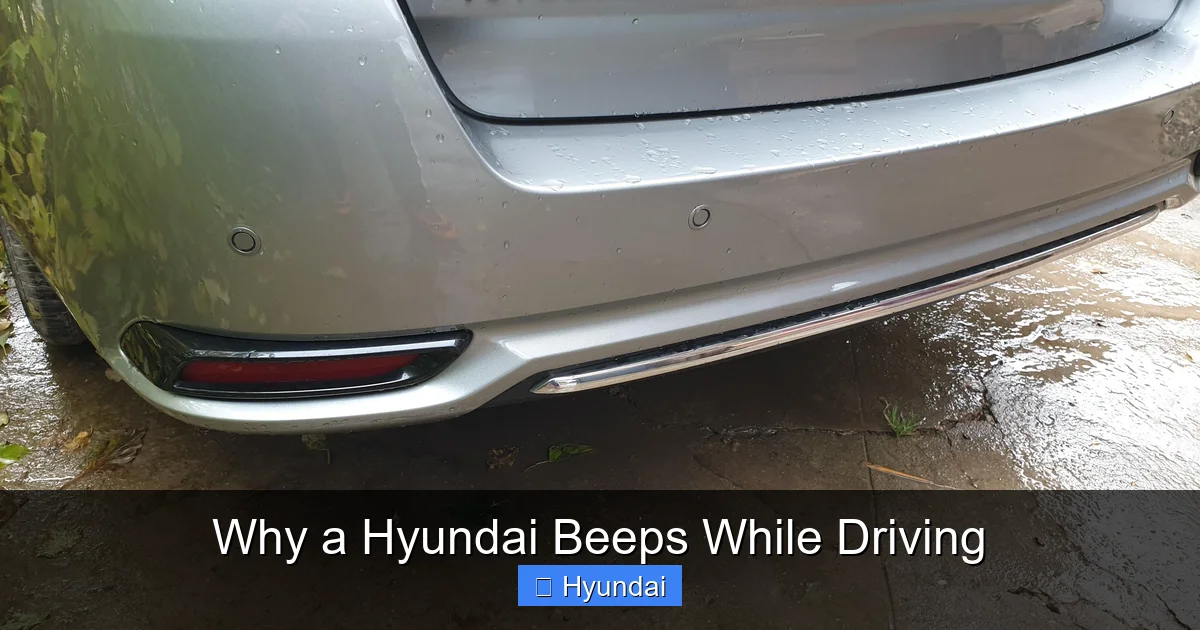
The familiar, increasing-beep-rate sound when reversing is your parking sensor system. As you get closer to an obstacle behind you, the beeps become faster, turning into a solid tone when you’re very close (typically 12 inches or less). The same applies to front parking sensors if equipped. If these beeps are erratic, sound only on one side, or don’t work at all, it’s usually due to dirty or damaged sensor heads (the small circles in the bumper). A visit to a car wash or carefully cleaning them with soapy water often resolves the issue.
Rear Cross-Traffic Alert (RCTA) Beep
When reversing out of a parking spot, this system uses radar to monitor traffic approaching from the sides. If a vehicle is detected, you’ll hear a rapid beep (often louder than the parking sensors) along with a visual warning in your side mirrors. This is invaluable for preventing collisions in crowded lots. Like BSM, RCTA radar sensors are in the rear bumper; dirt or damage can cause false or missed alerts.
Trailer Hitch & Wiring Beep
If you’ve just connected a trailer, a beeping sound might start immediately or when you shift into drive. This is often the Trailer Sway Control or a reminder that a trailer is connected. However, a continuous beep can also indicate an issue with the trailer wiring harness—specifically, that the lights are not functioning properly (a burnt-out bulb on the trailer causes a circuit fault). The beep is your car’s way of saying the safety connection isn’t complete. You should check all trailer lights immediately. For towing capacity specifics on models like the Hyundai Tucson, always consult your owner’s manual first.
Mechanical & Critical System Warnings
These beeps are non-negotiable. They signal conditions that, if ignored, can lead to severe engine damage or leave you stranded.
Visual guide about Why a Hyundai Beeps While Driving
Image source: toyotaownersclub.com
Low Oil Pressure Warning
This is a serious, usually two-tone beep that sounds once or twice and may repeat, accompanied by an oil pressure warning light (a red oil can icon). It means your engine’s oil pressure has dropped to a dangerously low level. Do not continue driving. Safely pull over as soon as possible, turn off the engine, and check the oil level with the dipstick. If the oil is low, add the correct type and amount (refer to resources like guides on Hyundai Elantra oil capacity for your specific model/year). If the level is fine, the beep indicates a failing oil pump, blocked oil passage, or major internal engine problem. Driving on low oil pressure will destroy an engine in minutes.
Engine Overheating Alert
A continuous, urgent beep paired with a red temperature gauge or a thermometer icon on the dash means your engine coolant temperature has exceeded safe limits. This can be caused by low coolant, a broken thermostat, a failed water pump, or a malfunctioning cooling fan. Pull over safely, turn off the engine, and do not open the radiator cap while hot. Wait for the engine to cool, then check coolant levels in the overflow reservoir. If it’s low, a top-up with the correct coolant/water mix is a temporary fix, but the underlying cause (a leak, for example) must be diagnosed by a professional.
Battery/Charging System Warning
A beep accompanied by a battery-shaped warning light (often red or yellow) indicates the alternator is not charging the battery properly. You might notice dimming headlights or slower power windows. This beep means you’re running on battery power alone, and the car will eventually shut off. Common causes are a worn alternator belt, a failed alternator, or corroded battery terminals. While you may be able to drive a short distance, you should head directly to a mechanic. A dead battery while driving can cause the car to stall and lose power steering/brakes, which is extremely dangerous. If you ever find yourself with a car battery dying while driving, this is likely the cause.
Door Ajar / Trunk Open Warning
This is a repetitive beep that starts when you begin driving and continues until the door or trunk is fully closed. It’s a safety reminder to prevent doors from flying open. Sometimes, a faulty door latch switch or a misaligned door can trigger this beep even when everything appears shut. Check all doors and the trunk manually. If the beep persists, the switch in the latch mechanism may need adjustment or replacement.
Fuel & Tire Pressure Monitoring System (TPMS) Alerts
These systems provide important maintenance reminders.
Low Fuel Warning Beep
A single beep (or a chime) that sounds when you have approximately 1-2 gallons of fuel left is your “time to refuel” reminder. The exact mileage remaining varies by model. It’s best practice to refuel within 30-50 miles of this warning to avoid running the fuel pump dry (which can cause premature failure) or sediment from the tank being sucked into the system. The fuel tank capacity for a Hyundai Elantra, for example, is around 12-14 gallons depending on the year.
Tire Pressure Monitoring System (TPMS) Beep
If your TPMS sensor detects a tire is significantly under-inflated (usually 25% below the recommended PSI), the system will emit a single beep and illuminate a TPMS warning light (an exclamation point inside a tire cross-section). This is crucial for safety, fuel efficiency, and tire wear. The beep is your signal to check all tires with a gauge and inflate them to the pressure listed on the driver’s side door jamb sticker. A beeping TPMS can also occur after rotating tires or changing a flat if the system isn’t reset. A continuous beep might indicate a failed sensor battery.
Hybrid & Electric Vehicle Specific Beeps
Hyundai’s eco-friendly lineup (like the Ioniq Hybrid/EV and Sonata Hybrid) has some unique auditory cues.
EV/Hybrid Charging & Status Beeps
When plugging in or unplugging your Hyundai EV or plug-in hybrid, you’ll hear a series of beeps confirming the connection or disconnection. A beep during driving might sound if the system detects an issue with the high-voltage battery or if the vehicle has switched to a reduced power “limp mode” due to a battery fault. These are critical warnings that require immediate attention from a dealer with high-voltage system expertise. For basic charging questions, you can refer to guides like how to unplug an electric car charger on a Hyundai.
Virtual Engine Sound System (VESS) Beep
In hybrid and electric models, a VESS generates an artificial sound at low speeds to alert pedestrians. You might hear a faint, futuristic hum or beep when starting from a stop. This is normal and cannot be disabled in many markets due to safety regulations. If this sound is excessively loud or distorted, it could indicate a speaker issue.
Troubleshooting: What To Do When Your Hyundai Beeps
Hearing a beep is the first step. Your response is the second. Follow this systematic approach:
- 1. Stay Calm and Observe: Don’t panic. Note exactly when the beep occurs (starting, accelerating, braking, constant?), its pattern (single chime, rapid beeps, solid tone?), and any dashboard warning lights that illuminate simultaneously.
- 2. Perform Immediate Safety Checks: If it’s a critical warning (oil pressure, temperature, battery), signal and pull over to a safe location as soon as possible. Turn off the engine. For non-critical beeps, you can often continue to your destination while diagnosing.
- 3. Consult Your Owner’s Manual: This is your definitive guide. It has a section dedicated to warning lights and chimes, with specific meanings for your exact model and year.
- 4. Conduct Basic Visual Inspections: Check for obvious issues: Are all doors and the trunk fully latched? Is the fuel door closed? Are the tires visibly flat? Is the area around the front grille and rear bumper clean?
- 5. Check Fluid Levels: If the beep is related to engine health, check engine oil and coolant levels when the engine is cool. Top up if low, but remember this is a temporary fix if there’s a leak.
- 6. Reset When Applicable: For TPMS, after adjusting tire pressure, you may need to drive for a few minutes for the system to reset, or use the reset button (see manual). For service reminders, a simple procedure might clear it.
- 7. Seek Professional Help: For any persistent beeps, especially those linked to safety systems (FCA, BSM) or critical mechanical warnings, schedule a diagnostic appointment with a Hyundai dealer or trusted mechanic. They have the scan tools to read the specific trouble codes stored in your car’s computer, pinpointing the exact faulty sensor or module.
Conclusion: Your Hyundai’s Soundtrack to Safety
The symphony of beeps in your Hyundai is not an annoyance; it’s a sophisticated communication network designed to keep you informed, safe, and on the road. From the gentle reminder to buckle your seat belt to the urgent cry of an overheating engine, each sound has a purpose. By learning to distinguish between a routine convenience chime and a critical danger signal, you empower yourself as a driver. Always treat unfamiliar or persistent beeping with serious attention. When in doubt, the safest course of action is to consult your owner’s manual and have the vehicle inspected by a professional. Listening to your car is the first step in maintaining its health and ensuring every journey is a safe one.
Frequently Asked Questions
Why does my Hyundai beep when I start driving?
This is most commonly a seat belt reminder chime if the driver’s belt is not fastened. It can also indicate a door or trunk is ajar, or that the parking brake is still engaged. Check these first, then consult your manual for any other startup alerts specific to your model.
Why does my Hyundai beep continuously while driving?
A continuous beep is usually a critical warning like low oil pressure, engine overheating, or a charging system failure. These require you to pull over safely and shut off the engine immediately to prevent severe damage. If no red warning lights are on, it could be a persistent door ajar warning or a faulty sensor.
Why does my Hyundai beep when I turn on the blinker?
This is your Blind Spot Monitoring (BSM) system alerting you that it has detected a vehicle in your blind spot on the side you’re signaling toward. The beep stops when you cancel the turn signal or the vehicle is no longer in your blind spot.
How can I stop the beeping for the parking sensors?
The beeping from parking sensors will automatically stop once you are no longer in reverse (or drive for front sensors) and move away from the obstacle. If the beeping is constant or faulty, clean the sensor heads in the bumper. You can also temporarily disable the system via the vehicle settings menu on the infotainment screen, if your model offers that option.
My Hyundai beeps but no warning light is on. What is it?
This often points to a convenience feature like the proximity key fob being left inside the running vehicle (a beep when you open the door to exit), a trailer connection reminder, or a service interval reminder. It can also be a pre-warning from a safety system like FCA that hasn’t yet illuminated a light. The owner’s manual is essential for identifying these specific chimes.
Is it safe to drive with a beeping Hyundai?
It depends entirely on the beep. You can usually drive safely with a single chime for a minor issue like a door ajar (though you should fix it). However, you must stop driving immediately for beeps accompanied by red warning lights for oil pressure, temperature, or battery, as continuing can cause catastrophic engine damage or leave you stranded in an unsafe location. When unsure, err on the side of caution and have the car checked.


