How to Use Winegard Air 360

Contents
- 1 Key Takeaways
- 2 📑 Table of Contents
- 3 Introduction: Why the Winegard Air 360 Is a Game-Changer for RVers
- 4 What Is the Winegard Air 360?
- 5 Unboxing and Initial Setup
- 6 How to Use the Winegard Air 360 for Optimal Performance
- 7 Maintenance and Troubleshooting
- 8 Tips for Travelers: Getting the Most Out of Your Air 360
- 9 Conclusion: The Winegard Air 360 Is a Must-Have for Modern RVers
- 10 Frequently Asked Questions

LED Indicator Light

Dash Cam

Microfiber Car Cleaning Cloth

Car Tool Kit Set
The Winegard Air 360 is a powerful omnidirectional antenna designed to deliver free over-the-air TV to your RV or mobile home. With its easy setup and 360-degree signal reception, it’s a must-have for travelers who want reliable entertainment on the road.
Key Takeaways
- Easy Installation: The Winegard Air 360 mounts quickly on your RV roof with minimal tools and no aiming required.
- 360-Degree Reception: Captures signals from all directions, making it ideal for changing locations without realignment.
- Supports HD and 4K: Delivers high-definition and ultra-high-definition broadcasts from major networks like ABC, CBS, NBC, and FOX.
- Weather-Resistant Design: Built to withstand rain, wind, and UV exposure for long-term outdoor use.
- Works with Any TV: Compatible with all modern TVs using a coaxial cable connection.
- Optional Amplification: Includes a built-in amplifier to boost weak signals in rural or remote areas.
- Low Maintenance: Requires little upkeep—just occasional cleaning and signal checks.
📑 Table of Contents
- Introduction: Why the Winegard Air 360 Is a Game-Changer for RVers
- What Is the Winegard Air 360?
- Unboxing and Initial Setup
- How to Use the Winegard Air 360 for Optimal Performance
- Maintenance and Troubleshooting
- Tips for Travelers: Getting the Most Out of Your Air 360
- Conclusion: The Winegard Air 360 Is a Must-Have for Modern RVers
Introduction: Why the Winegard Air 360 Is a Game-Changer for RVers
If you’re an RV enthusiast, you know how frustrating it can be to miss your favorite shows while traveling. Whether you’re parked at a scenic campground or boondocking in the middle of nowhere, staying connected to live TV shouldn’t mean relying on spotty campground Wi-Fi or expensive satellite subscriptions. That’s where the Winegard Air 360 comes in—a sleek, high-performance over-the-air (OTA) antenna that brings free HD TV directly to your rig.
Unlike traditional directional antennas that require constant aiming, the Winegard Air 360 uses omnidirectional technology to pull in signals from all directions. This means no more climbing on the roof to adjust the antenna every time you change campsites. Whether you’re watching the morning news, catching a live sports event, or enjoying a movie night under the stars, this antenna delivers reliable, crystal-clear reception with minimal effort.
In this comprehensive guide, we’ll walk you through everything you need to know about how to use the Winegard Air 360—from unboxing and installation to optimizing your signal and troubleshooting common issues. Whether you’re a full-time RVer or a weekend warrior, this antenna can transform your travel experience by giving you access to free, high-quality TV wherever the road takes you.
What Is the Winegard Air 360?
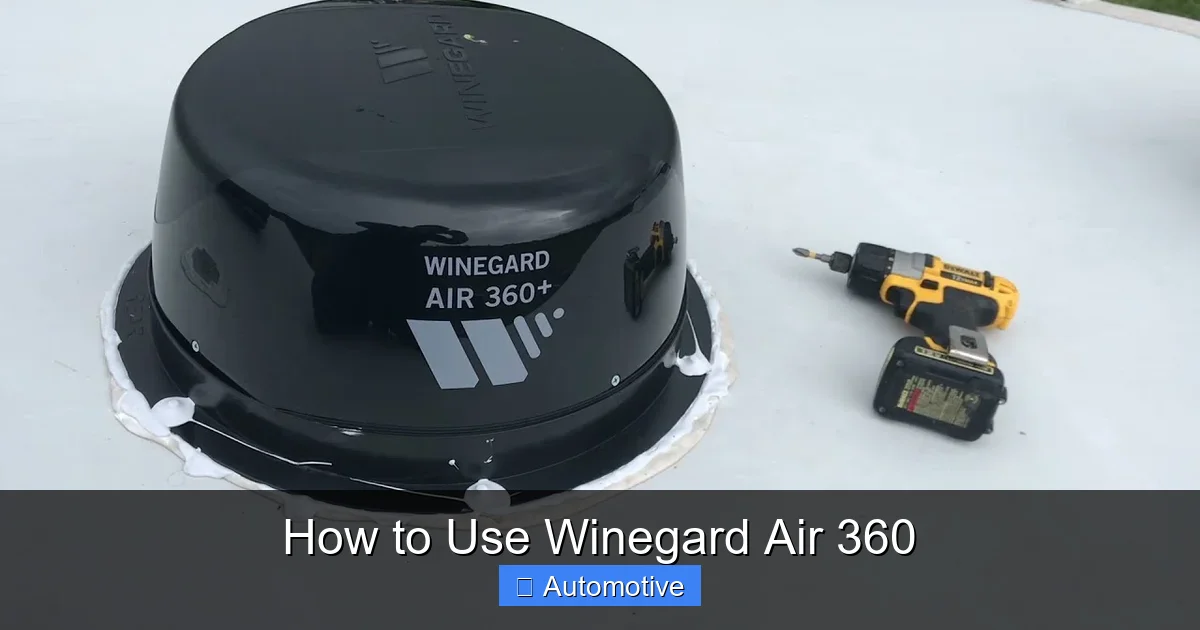
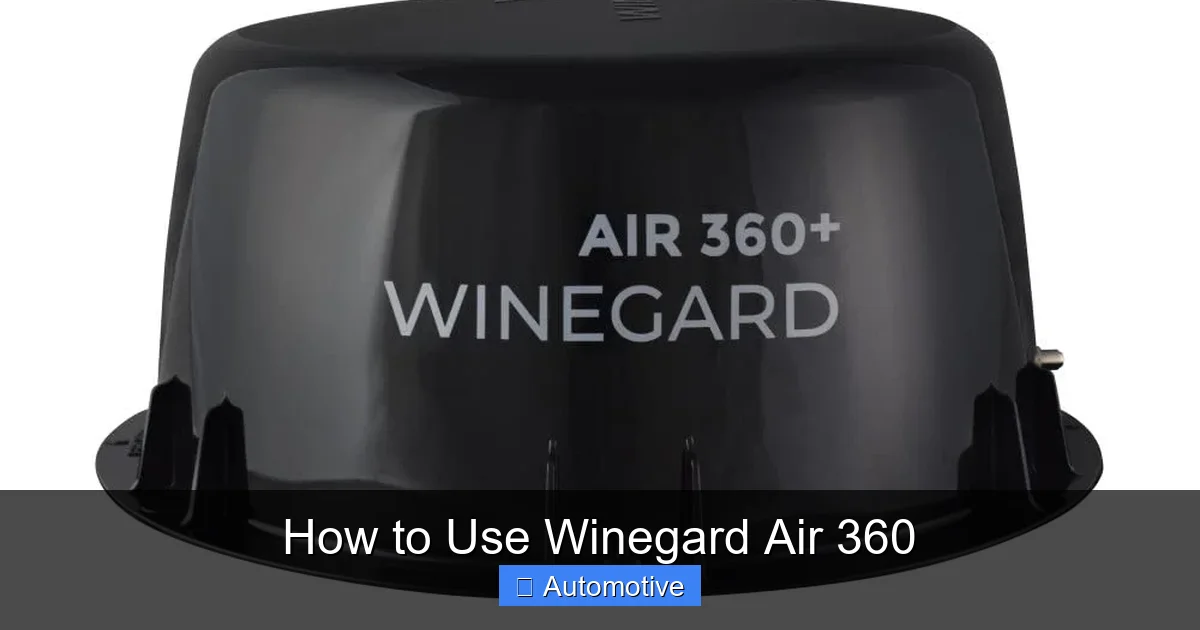
The Winegard Air 360 is a premium omnidirectional TV antenna specifically engineered for RVs, campers, and mobile homes. It’s designed to receive over-the-air broadcast signals from major networks such as ABC, CBS, NBC, FOX, PBS, and The CW, delivering them in stunning high definition—sometimes even in 4K resolution, depending on the broadcast and your TV’s capabilities.
Visual guide about How to Use Winegard Air 360
Image source: m.media-amazon.com
What sets the Air 360 apart from other antennas is its 360-degree reception pattern. Traditional antennas must be pointed toward broadcast towers, which can be a hassle when you’re constantly on the move. The Air 360 eliminates this problem by capturing signals from all directions simultaneously. This makes it perfect for travelers who don’t want to spend time aligning their antenna every time they stop.
The antenna is also built with durability in mind. Its weather-resistant housing protects internal components from rain, snow, and UV rays, ensuring long-term performance even in harsh outdoor conditions. Plus, it’s compact and low-profile, so it won’t interfere with your RV’s aerodynamics or attract unwanted attention.
Key Features of the Winegard Air 360
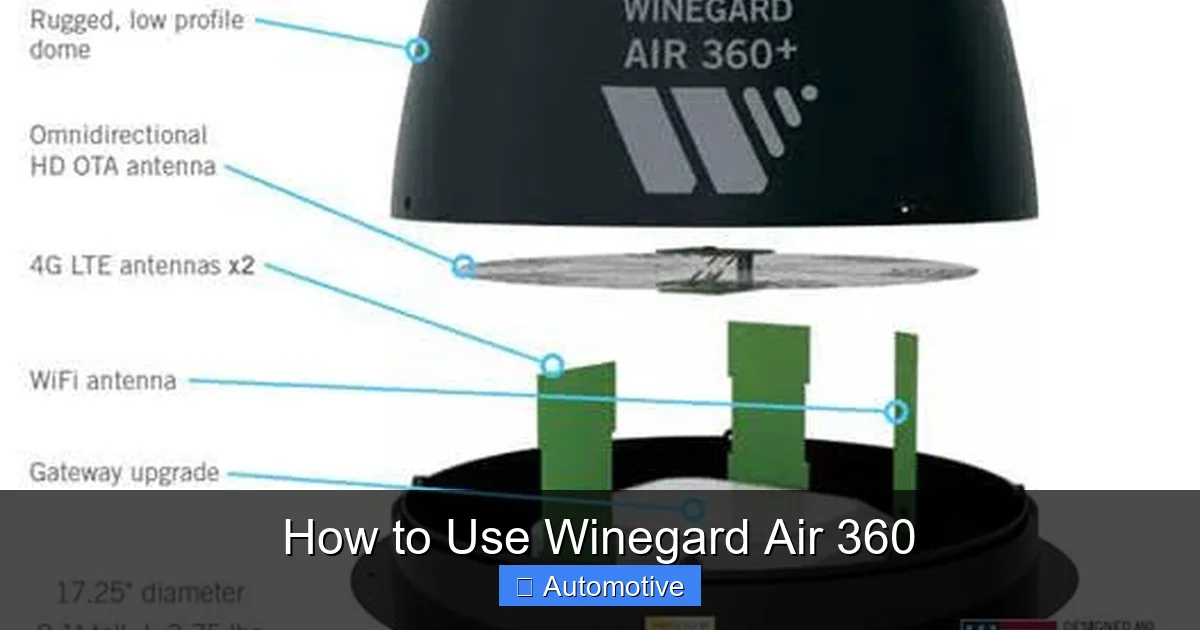
- Omnidirectional Reception: Picks up signals from all directions without needing to be aimed.
- Built-in Amplifier: Enhances weak signals, especially useful in rural or low-coverage areas.
- Supports HD and 4K: Delivers high-quality video from digital broadcasts.
- Easy Installation: Mounts directly to your RV roof with a simple bracket system.
- Low Profile Design: Sleek and unobtrusive, blending seamlessly with your RV’s exterior.
- Weatherproof Construction: Resists corrosion, moisture, and extreme temperatures.
- Coaxial Output: Connects directly to your TV or splitter using a standard coaxial cable.
Whether you’re watching the Super Bowl, catching up on local news, or enjoying a family movie night, the Winegard Air 360 ensures you never miss a moment—no matter where you park.
Unboxing and Initial Setup
Before you can start enjoying free TV on the road, you’ll need to properly set up your Winegard Air 360. The good news? It’s designed for quick and hassle-free installation, even if you’re not particularly handy. Let’s walk through the unboxing and initial setup process step by step.
Visual guide about How to Use Winegard Air 360
Image source: gocarlife.com
What’s in the Box?
When you open the Winegard Air 360 package, you’ll find the following components:
- The Air 360 antenna unit (housing the internal amplifier and reception elements)
- Roof mounting bracket with hardware (screws, washers, and rubber gaskets)
- 12-volt power inserter (for powering the built-in amplifier)
- Coaxial cable (typically 3 feet long)
- User manual and installation guide
Everything you need for a basic installation is included, though you may want to have a few extra tools on hand, such as a drill, screwdriver, and a ladder for roof access.
Choosing the Right Mounting Location
The first step in installation is selecting the best spot on your RV roof. Ideally, you want a flat, unobstructed area with a clear line of sight to the horizon. Avoid placing the antenna near large metal objects, air conditioners, or satellite dishes, as these can interfere with signal reception.
Most RVers mount the Air 360 near the front or center of the roof for optimal signal coverage. Make sure the location allows the coaxial cable to reach your TV inside the RV without excessive bending or tension.
Mounting the Antenna
Once you’ve chosen your mounting spot, follow these steps:
- Position the mounting bracket on the roof and mark the screw holes.
- Drill pilot holes (if necessary) and secure the bracket using the provided screws and rubber gaskets to prevent leaks.
- Attach the Air 360 antenna to the bracket and tighten the mounting bolt.
- Connect the coaxial cable from the antenna to the power inserter.
- Run the coaxial cable from the power inserter into your RV and connect it to your TV or a splitter.
Be sure to seal all roof penetrations with RV roof sealant to prevent water damage. This is a critical step that many beginners overlook.
Powering the Amplifier
The Winegard Air 360 includes a built-in amplifier that boosts weak signals. To power it, you’ll use the 12-volt power inserter. This device connects between the antenna and your TV, drawing power from your RV’s 12-volt system (usually via a cigarette lighter adapter or direct wiring).
Simply plug the power inserter into a 12-volt outlet, and the amplifier will activate automatically. You’ll know it’s working when the LED light on the inserter turns on. If you don’t see the light, double-check the connection and ensure your RV’s 12-volt system is active.
Connecting to Your TV
Once everything is mounted and powered, connect the coaxial cable from the power inserter to the “ANT IN” port on your TV. If you have multiple TVs, you can use a coaxial splitter to distribute the signal—just keep in mind that splitters can reduce signal strength, so use a powered splitter if needed.
Now, turn on your TV and perform a channel scan. Most modern TVs have an “Auto Program” or “Channel Scan” feature under the menu settings. This will search for all available over-the-air channels in your area. Depending on your location, you may find anywhere from 10 to 50+ channels.
Congratulations—you’ve successfully installed your Winegard Air 360!
How to Use the Winegard Air 360 for Optimal Performance
Now that your antenna is installed, it’s time to make the most of it. Using the Winegard Air 360 effectively involves more than just turning on your TV—it’s about understanding how to maximize signal strength, manage interference, and troubleshoot issues when they arise.
Visual guide about How to Use Winegard Air 360
Image source: cf-images.us-east-1.prod.boltdns.net
Performing a Channel Scan
The first step after installation is to scan for channels. This tells your TV which broadcast signals are available in your current location. Here’s how to do it:
- Turn on your TV and press the “Menu” or “Settings” button.
- Navigate to “Channels” or “Antenna Setup.”
- Select “Auto Program,” “Auto Scan,” or “Channel Search.”
- Wait while the TV searches for available signals (this can take 5–10 minutes).
- Once complete, your TV will display a list of found channels.
Tip: Always perform a new channel scan when you arrive at a new location. Broadcast towers vary by region, and you may discover new channels you didn’t have before.
Understanding Signal Strength and Quality
Not all channels will come in perfectly. Some may be crystal clear, while others appear pixelated or drop out entirely. This is due to signal strength and quality, which depend on several factors:
- Distance from broadcast towers: The farther you are, the weaker the signal.
- Obstructions: Mountains, trees, and buildings can block signals.
- Weather conditions: Heavy rain or snow can temporarily reduce reception.
- Antenna height: Higher mounting improves line-of-sight to towers.
Most TVs display a signal strength meter during the scan. Aim for channels with a strength of 70% or higher for the best viewing experience. If a channel is weak, try repositioning your RV slightly or using the built-in amplifier.
Using the Built-In Amplifier Effectively
The Winegard Air 360’s amplifier is a powerful tool, but it’s not always necessary. In areas with strong signals, the amplifier can actually cause overloading, leading to pixelation or signal distortion. This is known as “amplifier noise.”
To avoid this, only use the amplifier when needed—typically in rural areas or when signal strength is below 50%. If you’re in a city with strong broadcasts, you can disconnect the power inserter and run the antenna passively. This reduces the risk of interference and saves power.
Pro Tip: Use a signal meter app (available for smartphones) to test signal strength before and after enabling the amplifier. This helps you determine the optimal setup for your location.
Managing Multiple TVs
If you have more than one TV in your RV, you can share the antenna signal using a coaxial splitter. However, each split reduces signal strength by about 3.5 dB. For two TVs, a basic splitter works fine. For three or more, consider using a powered distribution amplifier to boost the signal.
Example: If you’re running the signal to a bedroom TV and a living room TV, connect the antenna to a 2-way splitter, then run separate coaxial cables to each TV. Perform a channel scan on each TV individually.
Dealing with Interference
Sometimes, electronic devices inside your RV can interfere with the antenna signal. Common culprits include LED lights, inverters, and Wi-Fi routers. If you notice signal dropouts or static, try turning off nearby electronics one by one to identify the source.
Also, ensure your coaxial cables are high-quality and properly shielded. Cheap or damaged cables can degrade signal quality, especially over long runs.
Seasonal and Location-Based Tips
Signal availability changes with the seasons and your travel route. In the summer, foliage can block signals, while winter storms may reduce reception. If you’re traveling through mountainous regions, consider using a signal booster or temporarily switching to a directional antenna for better range.
Use online tools like TV Fool or AntennaWeb to check broadcast tower locations and signal predictions for your destination. This helps you plan ahead and avoid areas with poor coverage.
Maintenance and Troubleshooting
Like any piece of equipment, the Winegard Air 360 requires occasional maintenance to keep it performing at its best. Fortunately, it’s designed to be low-maintenance, but a little care goes a long way.
Routine Cleaning
Dust, dirt, and bird droppings can accumulate on the antenna over time, potentially affecting reception. Clean the housing gently with a soft cloth and mild soap every few months. Avoid using abrasive cleaners or high-pressure water, which can damage the seals.
Also, inspect the coaxial cable and connections for signs of wear, corrosion, or loose fittings. Tighten any loose connections and replace damaged cables promptly.
Checking for Roof Leaks
Since the antenna is mounted on your roof, it’s important to check for leaks regularly. Look for water stains inside your RV near the mounting area. If you suspect a leak, remove the antenna, clean the area, and reapply roof sealant.
Tip: Use self-leveling lap sealant for a watertight seal that conforms to uneven surfaces.
Common Issues and Fixes
Even with proper care, you may encounter occasional problems. Here are some common issues and how to resolve them:
No Signal or Weak Reception: First, check that the power inserter is plugged in and the LED is on. If not, test the 12-volt outlet. Next, verify all coaxial connections are tight. If the signal is still weak, try repositioning your RV or using a signal booster.
Pixelation or Dropped Channels: This is often caused by amplifier overload or interference. Try disconnecting the amplifier or turning off nearby electronics. Also, ensure your coaxial cable isn’t damaged.
Channels Missing After Scan: Broadcast lineups change periodically. Re-scan your channels every few months or when traveling to new regions. Some channels may also be encrypted or require a specific tuner.
Antenna Not Rotating or Moving: The Air 360 is omnidirectional and does not rotate. If you’re used to motorized antennas, this may seem unusual—but it’s working as intended. No aiming is required.
When to Contact Winegard Support
If you’ve tried all troubleshooting steps and still have issues, it may be time to contact Winegard customer support. They offer excellent technical assistance and can help diagnose hardware problems or warranty claims.
Before calling, have your model number, purchase date, and a description of the issue ready. You can reach them via phone, email, or live chat on their website.
Tips for Travelers: Getting the Most Out of Your Air 360
The Winegard Air 360 shines when you’re on the move. Here are some expert tips to help you get the best TV experience no matter where your adventures take you.
Plan Your Route with Signal in Mind
Before hitting the road, research TV coverage along your route. Use tools like TV Fool to identify areas with strong broadcast signals. This helps you choose campgrounds with better reception and avoid “dead zones.”
Example: If you’re driving through the Appalachian Mountains, expect weaker signals in valleys. Plan stops in towns or higher elevations for better reception.
Use a Signal Meter App
Download a free signal meter app like “Signal GH” or “Antenna Point” to your smartphone. These apps use your phone’s GPS to show nearby broadcast towers and signal strength. Point your phone in different directions to find the best signal path.
Keep a Backup Antenna
While the Air 360 is reliable, it’s smart to carry a portable indoor antenna as a backup. This can be useful in areas with extremely weak signals or if your roof antenna is damaged.
Optimize Your RV’s Layout
Position your TV near a window or exterior wall to reduce signal loss through walls and insulation. Avoid placing TVs behind metal cabinets or appliances, which can block signals.
Stay Updated on Broadcast Changes
TV stations occasionally change frequencies or power levels. Stay informed by checking the FCC’s broadcast database or local news websites. Re-scanning your channels regularly ensures you don’t miss updates.
Share the Signal with Campground Neighbors
Some RVers use a splitter to share their antenna signal with nearby friends. While this is generous, be mindful of signal degradation. Use a powered splitter if sharing with multiple rigs.
Conclusion: The Winegard Air 360 Is a Must-Have for Modern RVers
The Winegard Air 360 isn’t just another antenna—it’s a complete entertainment solution for travelers who value convenience, quality, and freedom. With its easy installation, omnidirectional reception, and weather-resistant design, it delivers reliable over-the-air TV wherever you roam.
Whether you’re watching the sunrise with your morning coffee or enjoying a movie under the stars, this antenna ensures you stay connected to the shows and news that matter. By following the steps in this guide—from setup and optimization to maintenance and troubleshooting—you’ll get the most out of your Winegard Air 360 for years to come.
So pack your bags, hit the open road, and never miss your favorite programs again. With the Winegard Air 360, the best seat in the house is wherever you park.
Frequently Asked Questions
Do I need to aim the Winegard Air 360?
No, the Winegard Air 360 is omnidirectional, meaning it receives signals from all directions without needing to be pointed. This makes it ideal for RVs that frequently change locations.
Can the Winegard Air 360 receive 4K channels?
Yes, the antenna can receive 4K broadcasts if they are transmitted over-the-air and your TV supports 4K resolution. However, most 4K content is still streamed, not broadcast.
Does the antenna work in remote areas?
The built-in amplifier helps boost weak signals, making it usable in many rural areas. For extremely remote locations, a signal booster or directional antenna may be needed.
How often should I scan for channels?
Perform a channel scan whenever you arrive at a new location and every few months to catch any broadcast changes or new stations.
Can I use the Winegard Air 360 with multiple TVs?
Yes, you can use a coaxial splitter to connect multiple TVs. For three or more TVs, consider a powered splitter to maintain signal strength.
Is the Winegard Air 360 waterproof?
Yes, the antenna is weather-resistant and designed to withstand rain, snow, and UV exposure. However, always ensure roof seals are intact to prevent leaks.