
How to Turn on Rcta on a Toyota

Turning on RCTA (Rear Cross-Traffic Alert) on your Toyota is simple and enhances safety when backing up. This guide walks you through enabling RCTA across various models, explains how it works, and offers troubleshooting tips to keep it running smoothly.
Key Takeaways
- RCTA helps detect vehicles approaching from the sides when reversing. It uses radar sensors to alert you with visual and audio warnings, reducing the risk of collisions.
- Most Toyota models from 2016 onward include RCTA as part of Toyota Safety Sense (TSS). Check your owner’s manual or dashboard settings to confirm availability.
- Enable RCTA through the multi-information display (MID) or infotainment screen. The exact steps vary slightly by model and year.
- RCTA only works when the vehicle is in reverse and moving below 10 mph. It’s not active during forward driving or at higher speeds.
- Keep sensors clean and unobstructed for reliable performance. Dirt, snow, or mud on rear bumper sensors can disable the system.
- If RCTA won’t turn on, check fuse connections, sensor alignment, or software updates. A quick reset or dealer visit may be needed.
- RCTA complements other safety features like Blind Spot Monitor (BSM). Use it alongside mirrors and cameras for maximum awareness.
📑 Table of Contents
What Is RCTA and Why It Matters in Your Toyota
If you’ve ever backed out of a tight parking spot only to hear a sudden beep or see a flashing light on your dashboard, you’ve likely experienced Toyota’s Rear Cross-Traffic Alert (RCTA) in action. This smart safety feature is designed to help drivers detect vehicles, cyclists, or pedestrians approaching from the left or right while reversing. Think of it as an extra set of eyes in your blind spots—especially useful in busy parking lots, driveways, or narrow alleys.
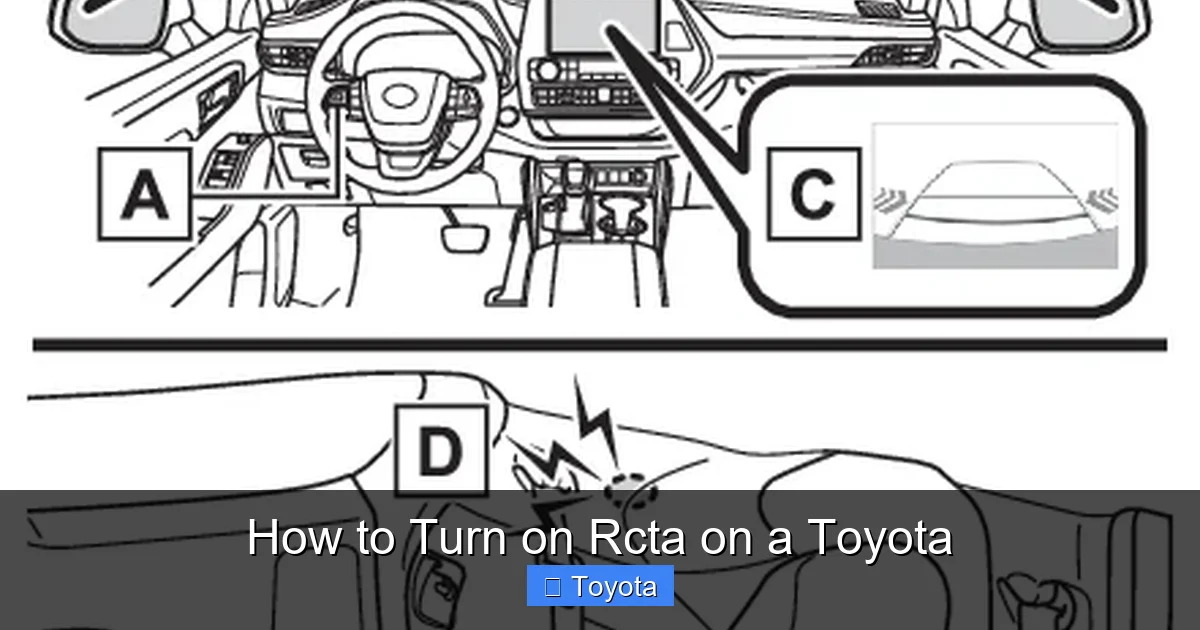
RCTA is part of Toyota’s broader suite of advanced driver-assistance systems (ADAS), often bundled under Toyota Safety Sense (TSS). Since its introduction around 2016, RCTA has become standard or available on most Toyota models, including the Camry, RAV4, Highlander, Corolla, and Prius. It uses radar sensors mounted in the rear bumper to monitor cross-traffic within a range of about 50 feet. When a potential hazard is detected, the system alerts you with audible beeps, visual icons on the dashboard or rearview camera screen, and sometimes even seat vibrations in newer models.
The real value of RCTA lies in its ability to prevent low-speed collisions—something that happens far more often than we’d like to admit. According to the National Highway Traffic Safety Administration (NHTSA), over 200 people are killed and thousands injured annually in backover crashes, many involving children or pets. RCTA significantly reduces these risks by giving drivers timely warnings, especially when visibility is limited due to pillars, parked cars, or poor lighting.
But here’s the catch: RCTA isn’t always turned on by default, and some drivers don’t even know it exists. That’s why understanding how to turn on RCTA on a Toyota is so important. Whether you’re a new owner or just unfamiliar with your vehicle’s settings, this guide will walk you through everything you need to know—from locating the controls to troubleshooting common issues.
How RCTA Works: The Technology Behind the Safety
Visual guide about How to Turn on Rcta on a Toyota
Image source: autocareaids.com
To truly appreciate how to turn on RCTA on a Toyota, it helps to understand how the system actually functions. RCTA relies on a network of radar sensors embedded in the rear bumper, typically near the corners. These sensors emit radio waves that bounce off nearby objects and return to the receiver. By analyzing the timing and direction of these signals, the system can determine if another vehicle is approaching from either side while you’re in reverse.
The radar technology used in RCTA is similar to that found in adaptive cruise control and blind spot monitoring systems. However, RCTA is specifically tuned for low-speed, short-range detection—perfect for parking scenarios. When the system detects an oncoming vehicle within its detection zone, it triggers a multi-stage alert system. First, you’ll usually see a yellow or red icon flash on your instrument cluster or infotainment screen. Then, if the threat gets closer, the system emits increasingly urgent beeps. In some high-end Toyotas, like the 2023 Highlander or Sequoia, the driver’s seat may even vibrate to grab your attention.
It’s important to note that RCTA only activates under specific conditions. The vehicle must be in reverse gear, moving at less than 10 mph, and the system must be enabled in the settings. It won’t work while driving forward or at highway speeds. Additionally, RCTA works best in clear weather and may be less effective in heavy rain, snow, or fog—conditions that can scatter radar signals.
Another key aspect of RCTA is its integration with other safety features. On many Toyota models, RCTA is paired with Blind Spot Monitor (BSM), which uses the same rear radar sensors but operates when driving forward. This dual functionality makes the system more efficient and cost-effective for manufacturers. However, it also means that if one feature fails, the other might be affected too.
Understanding these technical details not only helps you use RCTA more effectively but also prepares you for situations where it might not work as expected. For example, if your RCTA suddenly stops working, it could be due to a dirty sensor, a software glitch, or a blown fuse—all of which we’ll cover later in this guide.
Step-by-Step Guide: How to Turn On RCTA on a Toyota
Visual guide about How to Turn on Rcta on a Toyota
Image source: rxmechanic.com
Now that you know what RCTA is and how it works, let’s get into the practical part: how to turn on RCTA on a Toyota. The process is straightforward, but it varies slightly depending on your model year and infotainment system. Below, we’ll break it down into clear, easy-to-follow steps that apply to most Toyota vehicles from 2016 onward.
Step 1: Start Your Vehicle and Shift to Reverse
First, make sure your Toyota is turned on—either in accessory mode or with the engine running. Then, shift into reverse gear. RCTA is only active when the vehicle is in reverse, so this step is essential. You don’t need to start moving; simply selecting reverse will activate the rearview camera and related safety systems.
Step 2: Access the Multi-Information Display (MID)
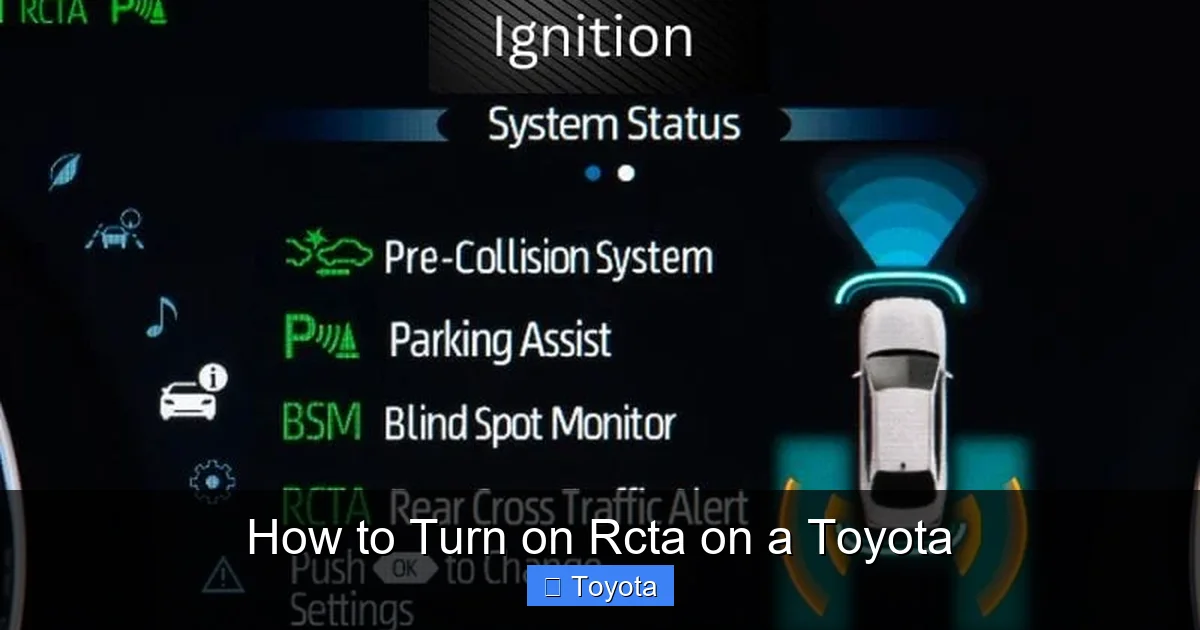
Next, look at your instrument cluster. Most Toyotas have a multi-information display (MID) located between the speedometer and tachometer. This screen shows trip data, fuel economy, and safety system status. To navigate the MID, use the steering wheel-mounted controls—usually a joystick or directional pad on the left side of the wheel.
Press the “Menu” or “Info” button to cycle through the display options until you find the “Settings” or “Vehicle Settings” menu. From there, look for an option labeled “Safety,” “Driver Assist,” or “Parking Assist.”
Step 3: Locate and Enable RCTA
Once inside the safety settings menu, scroll through the list until you find “Rear Cross-Traffic Alert” or “RCTA.” Select it, and you’ll see a toggle switch or checkbox. Simply tap or press to turn it on. You should see a confirmation message or icon indicating that RCTA is now active.
On some newer models with touchscreen infotainment systems—like the 2022+ Camry or RAV4—you may need to access RCTA through the main screen instead. Tap the “Settings” icon (usually a gear symbol), then go to “Vehicle,” “Safety,” or “Parking.” From there, find “RCTA” and enable it.
Step 4: Test the System
After enabling RCTA, it’s a good idea to test it. Find a safe, open area like an empty parking lot. Have a friend walk or drive slowly across your rear path while you’re in reverse. You should hear beeping and see warning lights on your dashboard or screen. This confirms that the system is working properly.
Model-Specific Examples
Let’s look at a few real-world examples:
– **Toyota RAV4 (2020):** Use the steering wheel controls to access the MID. Go to “Settings” > “Safety” > “RCTA” and toggle it on.
– **Toyota Camry (2021):** Tap the “Menu” button on the steering wheel, navigate to “Vehicle Settings,” then “Parking Assist,” and enable RCTA.
– **Toyota Highlander (2023):** Use the touchscreen. Go to “Settings” > “Vehicle” > “Safety” > “Rear Cross-Traffic Alert” and turn it on.
Remember, if you can’t find the option, consult your owner’s manual or search online using your exact model and year. Toyota’s website also offers digital manuals for most vehicles.
Common Issues and Troubleshooting RCTA Problems
Visual guide about How to Turn on Rcta on a Toyota
Image source: toyota.com
Even the best safety systems can run into issues. If you’ve followed the steps above and RCTA still won’t turn on, don’t panic. There are several common reasons why the system might not be working—and most are easy to fix.
Dirty or Obstructed Sensors
The most frequent cause of RCTA failure is dirty or blocked radar sensors. These sensors are located in the rear bumper and can get covered in mud, snow, ice, or road grime. Even a thin layer of dirt can interfere with radar signals.
**Solution:** Clean the rear bumper thoroughly, especially around the corners where the sensors are housed. Use a soft cloth and mild soap. Avoid high-pressure washers, which can damage the sensors. After cleaning, test RCTA again.
Frozen or Disabled System
Sometimes, RCTA may appear to be off even when it’s enabled. This can happen if the system was accidentally disabled or if the vehicle’s electronics need a reset.
**Solution:** Turn the vehicle off completely, wait 30 seconds, then restart it. This soft reset can reinitialize the safety systems. If that doesn’t work, check the fuse box. The RCTA system is usually powered by a fuse labeled “BSM,” “RCTA,” or “Radar.” Replace it if it’s blown.
Software Glitches or Outdated Firmware
Like any electronic system, RCTA relies on software. If your Toyota hasn’t had a software update in a while, bugs or compatibility issues might prevent RCTA from functioning.
**Solution:** Visit your local Toyota dealership or service center. They can check for available software updates and install them using specialized diagnostic tools. Many updates are free under warranty.
Sensor Misalignment or Damage
If your vehicle has been in a minor rear-end collision or had bumper repairs, the radar sensors might be misaligned or damaged.
**Solution:** Have a certified Toyota technician inspect the sensors. They can realign or replace them if necessary. Never attempt to adjust sensors yourself—improper alignment can render the system useless.
RCTA Not Available on Your Model
Not all Toyota models come with RCTA, especially older or base-trim versions. If you can’t find the option in your settings, your vehicle might not be equipped with it.
**Solution:** Check your owner’s manual or look up your VIN on Toyota’s official website to confirm which safety features are included. If RCTA isn’t available, consider upgrading to a higher trim or adding it as an aftermarket option (though this is rare and not recommended).
Tips for Getting the Most Out of RCTA
Once you’ve successfully turned on RCTA on your Toyota, there are a few best practices to ensure it works reliably and enhances your driving experience.
Keep Sensors Clean Year-Round
Make cleaning your rear bumper part of your regular car maintenance routine. In winter, check for ice buildup after snowstorms. In summer, remove bugs and dirt after long drives. A clean sensor is a working sensor.
Use RCTA Alongside Other Safety Tools
RCTA is powerful, but it’s not a replacement for good driving habits. Always check your mirrors, turn your head, and use your rearview camera. Combine RCTA with Blind Spot Monitor and parking sensors for full coverage.
Teach Family Members How to Use It
If others drive your Toyota—like a spouse, teen, or roommate—make sure they know how RCTA works and how to enable it. A quick demo can prevent confusion and improve safety for everyone.
Be Aware of Limitations
RCTA won’t detect stationary objects like poles, curbs, or shopping carts. It’s designed for moving vehicles. Also, it may not detect very small objects like bicycles or pets at longer distances. Stay alert and don’t rely solely on the system.
Update Your Vehicle Regularly
Toyota frequently releases software updates that improve safety system performance. Schedule regular maintenance visits to ensure your vehicle is running the latest firmware.
Conclusion: Safety Made Simple with RCTA
Learning how to turn on RCTA on a Toyota is a small step that makes a big difference in your daily driving safety. This intelligent feature acts as a vigilant co-pilot, alerting you to hidden dangers when backing up—a moment when accidents are all too common. Whether you drive a compact Corolla or a spacious Highlander, enabling RCTA takes just a few minutes and can prevent costly collisions and, more importantly, protect lives.
From understanding the radar technology behind it to navigating your vehicle’s settings and troubleshooting common issues, this guide has covered everything you need to know. Remember, RCTA works best when combined with clean sensors, regular maintenance, and attentive driving. It’s not a magic solution, but a powerful tool in your safety toolkit.
So the next time you hop into your Toyota, take a moment to check that RCTA is enabled. Test it in a safe environment, keep those sensors spotless, and share the knowledge with others. After all, safer driving starts with awareness—and a little help from your car’s built-in intelligence.
Frequently Asked Questions
How do I know if my Toyota has RCTA?
Check your owner’s manual or look for a “RCTA” or “BSM” indicator on your dashboard. Most Toyota models from 2016 onward with Toyota Safety Sense include RCTA, especially in higher trims.
Can I turn RCTA off permanently?
Yes, you can disable RCTA through the vehicle settings menu. However, it’s recommended to keep it on for safety. Some drivers turn it off temporarily in areas with frequent false alerts, like narrow alleys.
Why isn’t RCTA working even though it’s turned on?
Common causes include dirty sensors, a blown fuse, software glitches, or sensor misalignment. Try cleaning the rear bumper, restarting the vehicle, or visiting a Toyota service center.
Does RCTA work in the rain or snow?
RCTA uses radar, which generally works in light rain or snow. However, heavy precipitation or ice buildup on sensors can reduce effectiveness. Always clean sensors after winter storms.
Can RCTA detect pedestrians or animals?
RCTA is primarily designed for vehicles, but it may detect larger pedestrians or animals at close range. It’s not as reliable as camera-based systems for small or slow-moving objects.
Is RCTA the same as a backup camera?
No. A backup camera shows what’s directly behind you, while RCTA detects vehicles approaching from the sides. They work together to provide comprehensive rear visibility.
