
How to Check Oil Percentage in a Toyota Rav4

Checking the oil percentage in your Toyota RAV4 is essential for maintaining engine health and performance. This guide walks you through the simple process using the vehicle’s Multi-Information Display (MID), ensuring you stay on top of maintenance with confidence.
Keeping your Toyota RAV4 in peak condition starts with regular maintenance—and one of the most important aspects of that is monitoring your engine oil. While many drivers are familiar with checking oil levels using a dipstick, modern RAV4 models come equipped with advanced technology that lets you monitor oil life percentage directly from the dashboard. This digital feature takes the guesswork out of knowing when it’s time for an oil change, helping you avoid engine wear and costly repairs down the road.
Understanding how to check oil percentage in a Toyota RAV4 isn’t just about convenience—it’s about protecting your investment. The oil in your engine does more than just lubricate moving parts; it also helps cool the engine, clean internal components, and prevent corrosion. Over time, oil breaks down due to heat, contaminants, and mileage, reducing its effectiveness. That’s where the oil life monitoring system comes in. Instead of relying solely on mileage or time, this system uses real-time data from sensors and engine usage patterns to estimate how much life your oil has left.
In this guide, we’ll walk you through the entire process of checking your RAV4’s oil percentage, explain what the numbers mean, and share practical tips to keep your engine running smoothly. Whether you’re a first-time RAV4 owner or just need a refresher, this step-by-step breakdown will make oil maintenance simple and stress-free.
Key Takeaways
- Use the Multi-Information Display (MID): Most modern Toyota RAV4 models (2013 and newer) allow you to check oil life percentage directly through the dashboard screen.
- Check when the engine is warm: For accurate readings, check the oil percentage after the engine has been running and then turned off for a few minutes.
- Oil life vs. oil level: The oil percentage refers to oil life (degradation), not the physical oil level—don’t confuse the two.
- Reset after oil change: Always reset the oil maintenance reminder after servicing to ensure accurate future readings.
- Low oil life requires action: When the oil percentage drops below 15%, schedule an oil change soon to protect your engine.
- Manual dipstick still useful: Even with digital readings, keep an eye on the physical oil level using the dipstick during routine checks.
- Follow Toyota’s maintenance schedule: Refer to your owner’s manual for recommended oil change intervals based on driving conditions.
📑 Table of Contents
- Understanding Oil Life Percentage in the Toyota RAV4
- Step-by-Step Guide: How to Check Oil Percentage in a Toyota RAV4
- Resetting the Oil Life Monitor After an Oil Change
- Common Mistakes to Avoid When Checking Oil Percentage
- Tips for Maintaining Healthy Engine Oil
- When to See a Professional
- Conclusion
Understanding Oil Life Percentage in the Toyota RAV4
Before diving into the steps, it’s important to understand what “oil percentage” actually means. Unlike the physical oil level—which tells you how much oil is in the engine—oil life percentage refers to the estimated remaining effectiveness of the oil based on how it has degraded over time. Think of it like the battery life indicator on your phone: it doesn’t tell you how much charge is left in terms of voltage, but rather how much usable life remains before a recharge is needed.
Toyota’s oil life monitoring system uses a combination of factors to calculate this percentage. These include engine temperature, driving habits, mileage, idle time, and even ambient weather conditions. For example, frequent short trips in cold weather can degrade oil faster than long highway drives in moderate climates. The system continuously analyzes these variables and updates the oil life percentage accordingly.
It’s crucial to note that a low oil life percentage doesn’t necessarily mean your oil level is low. You could have a full oil pan but still need an oil change because the oil has lost its protective properties. That’s why relying solely on the dipstick for timing oil changes can be misleading. The digital oil life indicator gives you a more accurate, science-based recommendation tailored to your specific driving patterns.
Most Toyota RAV4 models from 2013 onward are equipped with this feature. If you drive a newer RAV4—especially those with the Entune or Toyota Safety Sense systems—you’ll likely have access to the oil life monitor through the Multi-Information Display (MID). This small screen, usually located between the speedometer and tachometer, provides real-time vehicle data, including fuel economy, tire pressure, and yes, oil life percentage.
Step-by-Step Guide: How to Check Oil Percentage in a Toyota RAV4
Visual guide about How to Check Oil Percentage in a Toyota Rav4
Image source: i.ytimg.com
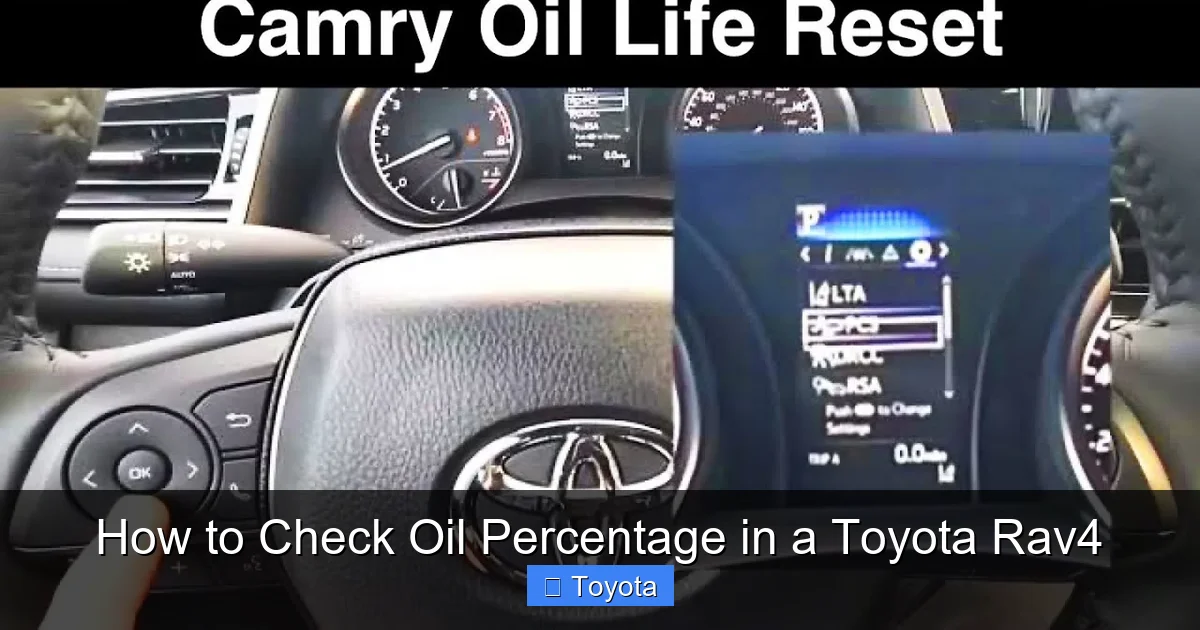
Now that you understand what oil life percentage means, let’s get into the practical steps. Checking your RAV4’s oil percentage is quick and easy—no tools or under-the-hood inspection required. Here’s how to do it:
Step 1: Start Your Vehicle and Let It Warm Up
Begin by starting your RAV4 and allowing the engine to run for a few minutes. This ensures the oil is circulating and the sensors have accurate data. Ideally, you should check the oil percentage after driving for at least 10–15 minutes, especially if you’ve been on a longer trip. However, even a short warm-up period will give you a reliable reading.
Avoid checking the oil percentage immediately after turning off the engine. The system needs a moment to process data, and checking too soon might result in an inaccurate percentage. A good rule of thumb: turn off the engine, wait about 2–3 minutes, then restart and check.
Step 2: Locate the Multi-Information Display (MID)
Once your engine is warm, locate the Multi-Information Display (MID) on your dashboard. This is typically a small LCD screen situated between the speedometer and tachometer. On some RAV4 models, it may be a larger display in the center console, especially if you have a higher trim level with advanced infotainment features.
The MID shows various vehicle stats, such as average fuel economy, trip distance, and maintenance reminders. Your oil life percentage will appear here as well.
Step 3: Navigate to the Maintenance Menu
To access the oil life percentage, you’ll need to navigate through the MID menu. Here’s how:
– Use the steering wheel controls (usually buttons on the left side of the steering wheel) to scroll through the display options.
– Look for a menu labeled “Maintenance,” “Vehicle Info,” or “Settings.” The exact wording may vary depending on your RAV4’s model year and trim.
– Once you’re in the maintenance section, select “Oil Life” or “Engine Oil.”
On some models, you may need to press and hold a button (like the “DISP” or “INFO” button) to cycle through the available screens until you find the oil life indicator.
Step 4: Read the Oil Life Percentage
Once you’ve accessed the oil life screen, you’ll see a percentage displayed—something like “Oil Life: 45%” or “Engine Oil: 20%.” This number represents the estimated remaining life of your current oil.
For example, if your display shows 60%, it means your oil is still 60% effective and doesn’t need changing yet. If it drops to 15% or below, Toyota recommends scheduling an oil change soon to prevent engine damage.
Keep in mind that this percentage decreases over time and with use. It’s normal for it to go down gradually, but a sudden drop could indicate an issue—such as oil contamination or a sensor malfunction.
Step 5: Take Action Based on the Reading
After checking the oil percentage, decide your next steps:
– **Above 30%:** No immediate action needed. Continue monitoring and check again in a few weeks.
– **Between 15% and 30%:** Start planning for an oil change. Schedule a service appointment within the next few weeks.
– **Below 15%:** Change your oil as soon as possible. Driving with degraded oil can lead to increased engine wear, reduced fuel efficiency, and potential overheating.
If your RAV4 displays a warning message like “Oil Change Required” or “Maintenance Required,” don’t ignore it. This is your vehicle’s way of saying it’s time for service.
Resetting the Oil Life Monitor After an Oil Change

Visual guide about How to Check Oil Percentage in a Toyota Rav4
Image source: automotiveex.com
After you’ve changed your oil—whether at a dealership, independent shop, or at home—it’s essential to reset the oil life monitor. If you don’t, the system will continue to show the old percentage, which can be confusing and lead to missed maintenance.
Resetting the oil life monitor is a simple process, but the exact steps may vary slightly depending on your RAV4’s model year. Here’s a general guide that works for most 2013–2023 RAV4 models:
Method 1: Using the Steering Wheel Controls
1. Turn the ignition to the “ON” position (do not start the engine).
2. Use the steering wheel buttons to navigate to the “Maintenance” or “Vehicle Info” menu on the MID.
3. Select “Oil Life” or “Engine Oil.”
4. Press and hold the “OK” or “Enter” button (usually in the center of the steering wheel controls) for about 5–10 seconds.
5. The display should show a message like “Reset Oil Life?” or “Press to Reset.”
6. Confirm by pressing the button again.
7. The oil life percentage should reset to 100%.
Method 2: Using the Trip Meter Button
On some older RAV4 models, you may need to use the trip meter button on the dashboard:
1. Turn the ignition to “ON.”
2. Press the trip meter button repeatedly until the trip odometer displays “Trip A” or “Trip B.”
3. Turn the ignition off.
4. Press and hold the trip meter button.
5. Turn the ignition back to “ON” while continuing to hold the button.
6. Keep holding until the oil life percentage resets to 100%.
Always consult your owner’s manual for model-specific instructions, as procedures can differ. If you’re unsure, your Toyota service technician can reset it for you during your oil change.
Common Mistakes to Avoid When Checking Oil Percentage

Visual guide about How to Check Oil Percentage in a Toyota Rav4
Image source: automotivewidgets.com
Even with advanced technology, drivers can still make mistakes when monitoring oil life. Here are some common pitfalls and how to avoid them:
Confusing Oil Life with Oil Level
One of the biggest misunderstandings is thinking that oil life percentage tells you how much oil is in the engine. It doesn’t. A 50% oil life reading doesn’t mean you’re half out of oil—it means the oil has lost half its effectiveness. Always check the physical oil level with the dipstick during routine maintenance, especially if you notice leaks or consume oil quickly.
Checking at the Wrong Time
Checking the oil percentage when the engine is cold or immediately after shutting it off can give inaccurate results. The system relies on warm oil and recent driving data. For the best reading, check after a short drive and let the engine rest for a few minutes.
Ignoring the Warning Lights
If your RAV4 displays a “Maintenance Required” light or an oil warning icon, don’t delay. These alerts are designed to prevent engine damage. Even if the oil percentage seems okay, a warning light could indicate a sensor issue or low oil pressure.
Not Resetting After an Oil Change
Failing to reset the oil life monitor is a common oversight. Without a reset, the system will keep counting down from the old percentage, leading to confusion and potentially missed oil changes.
Relying Solely on Mileage
While mileage is a factor, it’s not the only one. The oil life monitor considers driving conditions, so two RAV4s with the same mileage might have different oil life percentages. Trust the system—it’s smarter than a simple mileage counter.
Tips for Maintaining Healthy Engine Oil
Checking your oil percentage is just one part of engine care. To keep your RAV4 running smoothly, follow these best practices:
Use the Right Oil
Always use the oil grade recommended in your owner’s manual. Most RAV4 models require 0W-20 synthetic oil, but older models may use 5W-30. Using the wrong oil can affect performance and void your warranty.
Check the Dipstick Regularly
Even with digital monitoring, inspect the dipstick every few weeks. Look for proper oil level (between the “L” and “F” marks) and check the oil’s color and consistency. Dark, gritty, or milky oil indicates contamination and needs immediate attention.
Follow the Maintenance Schedule
Toyota recommends oil changes every 10,000 miles or 12 months under normal driving conditions. However, if you frequently drive in severe conditions—such as extreme temperatures, stop-and-go traffic, or towing—you may need to change oil more often, even if the percentage hasn’t dropped to zero.
Keep Records
Maintain a log of oil changes, including date, mileage, and oil type. This helps track patterns and ensures you’re staying on schedule.
Address Leaks Promptly
If you notice oil spots under your car or a burning smell, inspect for leaks. Low oil levels can damage the engine, even if the oil life percentage is still high.
When to See a Professional
While checking oil percentage is something you can do yourself, there are times when professional help is needed:
– If the oil life percentage drops unusually fast.
– If you see warning lights that don’t go away after an oil change.
– If the oil appears dirty, smells burnt, or has metal particles.
– If you’re unsure how to reset the monitor or interpret the readings.
A certified Toyota technician can run diagnostics, check for sensor issues, and ensure your engine is in top shape.
Conclusion
Learning how to check oil percentage in a Toyota RAV4 is a simple yet powerful way to protect your vehicle’s engine and extend its lifespan. With the built-in oil life monitoring system, you no longer have to guess when it’s time for an oil change. By following the steps outlined in this guide—warming up the engine, navigating the MID, reading the percentage, and resetting after service—you can stay on top of maintenance with confidence.
Remember, oil life percentage is about oil quality, not quantity. Always complement digital readings with physical checks using the dipstick, and don’t ignore warning lights or unusual engine behavior. Regular oil changes, using the correct oil type, and following Toyota’s maintenance schedule will keep your RAV4 running smoothly for years to come.
Taking care of your RAV4 doesn’t have to be complicated. With a little attention and the right habits, you’ll enjoy reliable performance, better fuel economy, and peace of mind on every drive.
Frequently Asked Questions
How often should I check the oil percentage in my Toyota RAV4?
You should check the oil percentage every few weeks or before long trips. It’s also a good idea to check it monthly as part of routine vehicle maintenance.
Can I check the oil percentage when the engine is cold?
For the most accurate reading, check the oil percentage after the engine has been running and then turned off for a few minutes. Cold engines may give less reliable results.
What does it mean if my oil percentage drops quickly?
A rapid drop in oil life percentage could indicate severe driving conditions, oil contamination, or a sensor issue. Have your vehicle inspected if this happens frequently.
Do I still need to check the dipstick if I have the oil life monitor?
Yes. The dipstick checks oil level and condition, while the monitor tracks oil life. Both are important for complete engine care.
What oil type should I use in my Toyota RAV4?
Most modern RAV4 models require 0W-20 synthetic oil. Check your owner’s manual for the exact specification for your year and engine type.
How do I reset the oil life monitor if I can’t find the option?
Refer to your owner’s manual for model-specific instructions. If you’re unable to reset it, visit a Toyota service center for assistance.