
How to Bypass an Audi Radio Code

If you’ve lost your Audi radio code or your radio is locked, don’t panic—there are several reliable ways to bypass it. From using the original code retrieval methods to exploring third-party tools and professional services, this guide walks you through safe, step-by-step solutions to get your audio system back online without damaging your vehicle.
Key Takeaways
- Understand why Audi radios require codes: The code protects your radio from theft by locking it when power is disconnected.
- Check for the code in common locations: Look in your owner’s manual, glove box, or on a sticker inside the trunk or side panel.
- Contact your dealership with proof of ownership: Audi dealers can retrieve your code using your VIN and radio serial number.
- Use online code retrieval services cautiously: Some websites offer code generation for a fee—verify legitimacy before paying.
- Avoid brute-force attempts: Repeated incorrect entries can permanently lock your radio, requiring professional repair.
- Consider professional unlocking services: Mobile auto locksmiths or specialized techs can often bypass codes safely.
- Prevent future lockouts: Record your code and store it securely after retrieval.
📑 Table of Contents
- Why Audi Radios Require a Security Code
- Where to Find Your Audi Radio Code
- How to Retrieve Your Radio Code from Audi
- Using Online Radio Code Services
- Professional Radio Unlocking Services
- DIY Bypass Methods (And Why They’re Risky)
- Preventing Future Radio Code Lockouts
- Final Thoughts: Getting Your Audi Radio Back Online
Why Audi Radios Require a Security Code
If you’ve ever disconnected your car battery or had a dead battery in your Audi, you may have been greeted with a frustrating message: “SAFE” or “Enter Code” on your radio display. This isn’t a malfunction—it’s a built-in anti-theft feature designed to protect your audio system from theft. When the radio loses power, it locks itself and requires a unique four- or five-digit code to reactivate. This security measure ensures that even if someone steals your radio, they can’t use it without the code.
Audi, like many premium automakers, takes vehicle security seriously. The radio code is tied to the specific unit installed in your car, and it’s programmed at the factory. Without the correct code, the radio remains non-functional, even if it’s powered on. While this system effectively deters theft, it can be a major inconvenience for legitimate owners who’ve simply forgotten their code or purchased a used Audi without the documentation.
The good news? You don’t need to replace the entire radio or spend hundreds at a dealership to fix this. There are several proven methods to bypass an Audi radio code, ranging from simple DIY steps to professional assistance. The key is knowing where to look, what tools to use, and how to avoid common pitfalls that could make the situation worse.
Where to Find Your Audi Radio Code
Visual guide about How to Bypass an Audi Radio Code
Image source: radiocodess.com
Before attempting any bypass method, the first and most reliable step is to locate your original radio code. Audi provides this code at the time of purchase, and it’s often stored in several places around your vehicle or documentation. Start by checking these common locations:
In the Owner’s Manual or Glove Box
Many Audi owners receive a small card or sticker with the radio code when they buy the car. This is typically included in the owner’s manual packet or tucked inside the glove box. Look for a label that says “Radio Code,” “Sicherheitscode,” or “Code de sécurité” (depending on your region). The code is usually four digits, though some newer models may use five.
Inside the Trunk or Side Panel
If you can’t find the code in the manual, check the trunk area. Open the trunk and look along the side panels, near the spare tire well, or behind the trim. Audi often places a sticker with the radio code in this hidden but accessible spot. Use a flashlight if needed—the sticker might be small and faded.
On the Radio Unit Itself
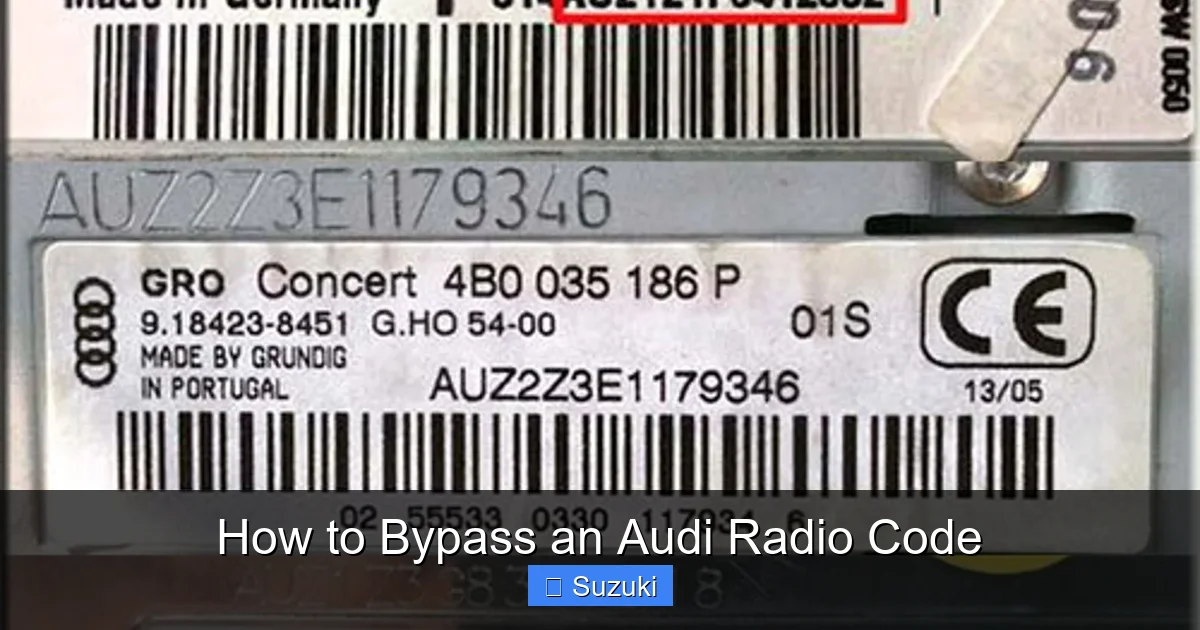
In some cases, especially with older Audi models, the code may be printed directly on the radio unit. To access it, you’ll need to remove the radio from the dashboard. This requires a set of radio removal keys (also called DIN tools), which are inexpensive and available online. Once the radio is out, check the back or side for a label with the serial number and code.
Through Audi’s Online Portal (If Available)
Audi has introduced digital services in recent years, and some newer models allow owners to retrieve their radio code through the MyAudi portal. If you’ve registered your vehicle online, log in and check under “Vehicle Services” or “Owner Resources.” Note that this feature isn’t available for all models or regions, and you’ll need your VIN and proof of ownership.
If none of these methods work, don’t worry—there are still ways to recover or bypass the code without the original documentation.
How to Retrieve Your Radio Code from Audi

Visual guide about How to Bypass an Audi Radio Code
Image source: autoradiocodes.com
If you can’t find your radio code in your car or paperwork, the next best step is to contact an authorized Audi dealership. They have access to Audi’s centralized database and can retrieve your code using your vehicle identification number (VIN) and radio serial number.
Step-by-Step Guide to Getting Your Code from Audi
1. Locate your VIN: This 17-character number is found on your dashboard (visible through the windshield), driver’s side door jamb, or registration documents.
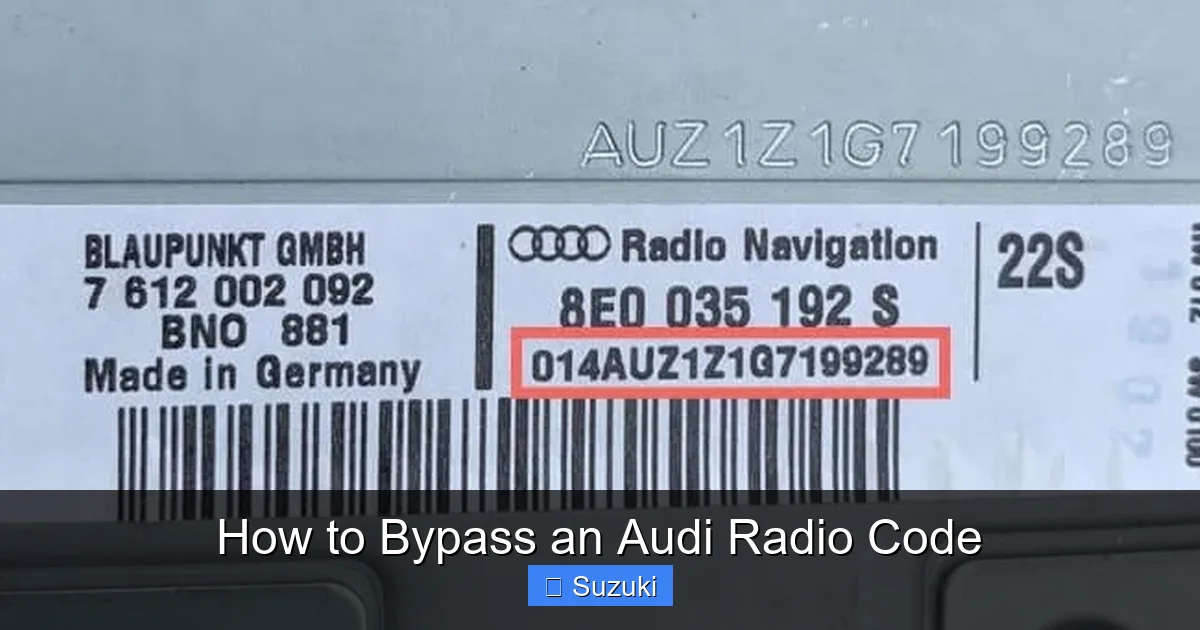
2. Find your radio serial number: This is usually printed on a label on the radio unit itself. You’ll need to remove the radio to see it. The serial number often starts with “AUZ” or “VW” and is followed by a string of numbers and letters.
3. Contact your local Audi dealership: Call or visit in person. Be prepared to provide proof of ownership, such as your registration, driver’s license, and VIN.
4. Request the radio code: The service department will verify your identity and look up the code in their system. This process is usually free or low-cost, though some dealers may charge a small fee.
What If the Dealership Can’t Help?
In rare cases, especially with older or imported vehicles, the dealership may not have access to the code. This can happen if the car was originally sold in a different country or if the database doesn’t have a record. In such situations, you may need to explore alternative methods, such as third-party code retrieval services or professional unlocking.
Using Online Radio Code Services
Visual guide about How to Bypass an Audi Radio Code
Image source: radiocodegenerator.com
When dealerships can’t help, many people turn to online services that claim to generate or retrieve Audi radio codes. These websites typically ask for your radio’s serial number and sometimes your VIN, then provide the code for a fee—usually between $10 and $30.
How These Services Work
Most online code generators use databases compiled from factory records, dealership submissions, or reverse-engineered algorithms. When you enter your radio’s serial number, the service cross-references it with known code patterns and returns the matching code. Some sites even offer instant delivery via email.
Are Online Code Services Safe?
While many of these services are legitimate, caution is essential. Avoid websites that:
– Ask for payment via untraceable methods (e.g., gift cards)
– Have poor reviews or no contact information
– Request sensitive personal data beyond the serial number
Stick to well-known, reviewed platforms like RadioCodeCalculator.net, AudiCodeService.com, or OEMRadioCodes.com. Always check Trustpilot or Reddit forums for user feedback before paying.
Example: Retrieving a Code Online
Let’s say you have an Audi A4 with a serial number “AUZ123456789.” You visit a trusted code service, enter the number, pay $15 via PayPal, and receive the code “4821” within 10 minutes. You then enter it into your radio using the preset buttons, and the system unlocks. It’s that simple—when it works.
However, be aware that not all codes can be retrieved this way. Some newer radios use encrypted systems that require specialized tools, making online services ineffective.
Professional Radio Unlocking Services
If DIY methods and online services fail, professional help may be your best option. Mobile auto locksmiths, car audio specialists, and independent Audi technicians often offer radio code bypass or reset services.
What Professionals Can Do
These experts use advanced diagnostic tools to communicate directly with your radio’s internal system. They can:
– Read the radio’s firmware and extract the code
– Reset the security lock without needing the original code
– Reprogram the radio to accept a new code
This process is typically done on-site with a laptop and OBD-II interface, and it takes 15–30 minutes.
Cost and Considerations
Professional services usually cost between $50 and $150, depending on location and complexity. While more expensive than online codes, they’re often more reliable, especially for newer Audi models with encrypted systems. Always ask for a quote upfront and ensure the technician has experience with Audi radios.
Finding a Reputable Technician
Look for certified auto electricians or mobile locksmiths with positive reviews. Ask if they’ve worked on Audi radios before and whether they guarantee their work. Some even offer a “no code, no fee” policy, which reduces your risk.
DIY Bypass Methods (And Why They’re Risky)
You may come across videos or forums suggesting DIY tricks to bypass the Audi radio code—like holding down buttons, disconnecting the battery for hours, or using a paperclip to short-circuit the radio. While these methods sound appealing, they’re often ineffective and can cause serious damage.
Common DIY Myths
– “Hold the power button for 30 seconds”: This doesn’t work on modern Audi radios. The code lock is firmware-based, not a simple reset.
– “Disconnect the battery for 24 hours”: This won’t bypass the code. The radio will still require the code after reconnecting.
– “Use a paperclip to reset the radio”: Tampering with internal components can fry the circuitry or void your warranty.
The Danger of Brute-Force Attempts
Repeatedly entering incorrect codes can trigger a permanent lock. Most Audi radios allow only 3–5 attempts before disabling further input for 30–60 minutes. After several lockouts, the radio may require a hard reset by a technician.
When DIY Might Work
In very rare cases, older Audi models (pre-2005) may respond to button combinations. For example, holding “TP” and “AS” while turning on the radio might display the code. But this is inconsistent and not recommended unless verified by a reliable source.
Preventing Future Radio Code Lockouts
Once you’ve successfully bypassed your Audi radio code, take steps to avoid the problem in the future. A little preparation can save you time, money, and frustration down the road.
Record and Store Your Code Safely
Write down your radio code and store it in multiple secure locations:
– Save it in your phone’s notes app (password-protected)
– Email it to yourself
– Keep a copy in your wallet or with your car documents
– Store it in a home safe or with a trusted family member
Use a Battery Maintainer
If you don’t drive your Audi regularly, consider using a battery maintainer or trickle charger. This keeps the battery charged and prevents power loss that triggers the code lock.
Document Radio Changes
If you ever replace or upgrade your radio, make sure to get the new code from the seller or installer. Used radios often come without codes, so verify this before purchase.
Register Your Vehicle Online
If available in your region, register your Audi with the MyAudi portal. This digital record can help you retrieve codes and access other owner services in the future.
Final Thoughts: Getting Your Audi Radio Back Online
Dealing with a locked Audi radio can be stressful, but it’s rarely a permanent problem. Whether you find the code in your glove box, retrieve it from a dealership, use an online service, or call a professional, there are multiple paths to getting your audio system working again. The key is to stay calm, avoid risky DIY hacks, and use trusted methods.
Remember, the radio code exists to protect your investment—not to punish you. With the right approach, you can bypass the code safely and enjoy your music, navigation, and connectivity without interruption. And once you’ve recovered your code, take a moment to store it securely. A few minutes of preparation now can save you hours of hassle later.
Your Audi is built for performance, comfort, and style—don’t let a simple code lock keep you from enjoying the full experience.
Frequently Asked Questions
What happens if I enter the wrong Audi radio code too many times?
After 3–5 incorrect attempts, your radio will lock for 30–60 minutes. Repeated lockouts can lead to a permanent disable, requiring professional reset or replacement.
Can I get my Audi radio code without the serial number?
No, the serial number is essential for retrieving the code. You’ll need to remove the radio to find it, as it’s not displayed on the screen.
Is it legal to use online services to get my radio code?
Yes, as long as you own the vehicle and provide accurate information. These services are legal and commonly used by car owners worldwide.
Will disconnecting the battery reset my Audi radio code?
No, disconnecting the battery triggers the code lock. It does not reset or bypass the code—your radio will still require the correct code to function.
Can I use a code from another Audi radio?
No, each radio has a unique code tied to its serial number. Using someone else’s code will not work and may trigger a lockout.
What if my Audi radio still doesn’t work after entering the correct code?
Double-check the code and ensure you’re entering it correctly. If it still fails, there may be a hardware issue—consult a technician for diagnosis.
