
Does Mazda Cx-30 Have Apple Carplay?

Yes, the 2026 Mazda CX-30 comes standard with Apple CarPlay. This integration is a core feature of Mazda’s latest infotainment system, available across all CX-30 trims for the 2026 model year. You can connect your iPhone via USB for wired functionality or, in most trims, enjoy a seamless wireless experience. The system is controlled via the intuitive touchscreen or the central commander knob, making it easy to access your apps, messages, and music while on the road.
Key Takeaways
- Standard Feature: Apple CarPlay is a standard, no-cost feature on every 2026 Mazda CX-30, from the base Sport trim to the top Premium Plus.
- Wireless Availability: While all models support wired CarPlay via USB, wireless Apple CarPlay is typically standard on mid-level trims (like the Preferred) and above for 2026.
- Easy Integration: Setup is straightforward—plug in your iPhone or enable wireless pairing, and the CarPlay interface appears on the CX-30’s 8.8-inch or larger display.
- Full Compatibility: It works with virtually all iPhone models running a reasonably recent version of iOS, ensuring broad usability for most users.
- Competitive Advantage: Mazda’s implementation, using the smooth Mazda Connect system, is often praised for its responsiveness and clean design, rivaling premium brands.
- Voice-First Control: Use Siri hands-free for messages, calls, and navigation, keeping your eyes on the road and hands on the wheel.
- Future-Proofed: The 2026 CX-30’s hardware is designed to support future over-the-air updates from Mazda, potentially adding new CarPlay features.
[FEATURED_IMAGE_PLACEHOLDER]
📑 Table of Contents
- Your Essential Guide to Apple CarPlay in the 2026 Mazda CX-30
- How It Works: Wired, Wireless, and the Mazda Connect Interface
- A Step-by-Step Guide to Getting Connected
- The Real-World Benefits: Why CX-30’s CarPlay Shines
- Troubleshooting Common Glitches: Stay Calm and Fix It
- The 2026 Outlook and How It Stacks Up
- Final Thoughts: No Anxiety, All Integration
Your Essential Guide to Apple CarPlay in the 2026 Mazda CX-30
Let’s be real: our smartphones are our co-pilots. We use them for music, podcasts, turn-by-turn navigation, and staying connected. So, when you’re shopping for a new car like the stylish and practical Mazda CX-30, one of the very first questions you likely ask is, “Does it have Apple CarPlay?” For 2026, the answer is a resounding and definitive yes. Apple CarPlay isn’t just an option; it’s a standard feature woven into the fabric of every single CX-30 that rolls off the line. This wasn’t always the case, so today we’re diving deep into exactly what that means for you. We’ll cover how it works, whether it’s wired or wireless, how to set it up, and why Mazda’s execution is considered one of the best in the business. By the end, you’ll know the CX-30’s infotainment system better than most salespeople.
The Evolution: From Optional Extra to Standard Expectation
To appreciate the 2026 CX-30’s tech, it helps to look back. In earlier model years, Mazda offered Apple CarPlay and Android Auto as part of an infotainment package, sometimes only on higher trims. This created a frustrating tiered system where buyers had to pay extra for what is now a fundamental need. Recognizing this, Mazda made a pivotal move: beginning with the 2022 model year, they made both Apple CarPlay and Android Auto standard across their entire lineup, including the CX-30. For 2026, this commitment is stronger than ever. The CX-30’s “Mazda Connect” infotainment system, now in its latest generation, is built from the ground up with seamless smartphone integration as a core pillar. You don’t have to hunt for the right package or check a window sticker with a fine-tooth comb. If it’s a 2026 CX-30, it has CarPlay.
How It Works: Wired, Wireless, and the Mazda Connect Interface
Knowing it’s there is one thing; understanding how it operates is another. The CX-30’s implementation is designed to be both powerful and unintimidating. The system revolves around the 8.8-inch center display (a larger 10.25-inch display is available on top trims). You interact with it in two primary ways: by touching the screen or by using the handy rotary commander knob and buttons located on the center console. This dual-control method is a Mazda hallmark. The knob is excellent for keeping your eyes on the road, while the touchscreen is great for when you’re parked or for quick selections.
Visual guide about Does Mazda Cx-30 Have Apple Carplay?
Image source: motorbiscuit.com
The All-Important Wired vs. Wireless Question
This is the most common follow-up question. For 2026, here’s the breakdown:
- Wired Apple CarPlay: This is universal. Every CX-30 has a USB-A port (usually in the center console) that you plug your iPhone’s Lightning cable into. Once connected, CarPlay launches automatically. This method is rock-solid, charges your phone, and is slightly more responsive in some scenarios.
- Wireless Apple CarPlay: Mazda has been rolling this out aggressively. For the 2026 model year, wireless CarPlay is standard on most trims, typically starting at the Preferred or Premium level. The base Sport trim may still only offer wired connectivity, so it’s always wise to confirm the specific trim’s window sticker. Setting up wireless is a one-time Bluetooth pairing process in the vehicle’s settings menu. After that, whenever you start the CX-30 with your iPhone nearby (Bluetooth on), CarPlay connects automatically—no cables needed. It’s incredibly convenient.
If wireless connectivity is a top priority for you, your focus should be on the mid-to-higher trims. You can often find this information clearly listed under the “Infotainment” or “Convenience” features on Mazda’s official build-and-price tool for the 2026 CX-30.
A Step-by-Step Guide to Getting Connected
Setting up Apple CarPlay in your CX-30 is designed to be a “get it done in under a minute” process. Here’s exactly what to do, whether you’re going wired or wireless.

Visual guide about Does Mazda Cx-30 Have Apple Carplay?
Image source: i.pinimg.com
For Wired Connection (Works on All Trims)
- Start your CX-30 and ensure the infotainment system is powered on.
- Locate the USB-A port. It’s typically inside the center armrest storage bin or on the dashboard near the shifter. A small CarPlay icon next to the port indicates it’s the correct one.
- Connect your iPhone using a certified Lightning to USB-A cable. Avoid cheap, no-name cables, as they can cause connection issues.
- Look at the screen. The Mazda Connect home screen should automatically switch to the Apple CarPlay interface. On first connection, your iPhone may prompt you to allow CarPlay on this car—tap “Allow.”
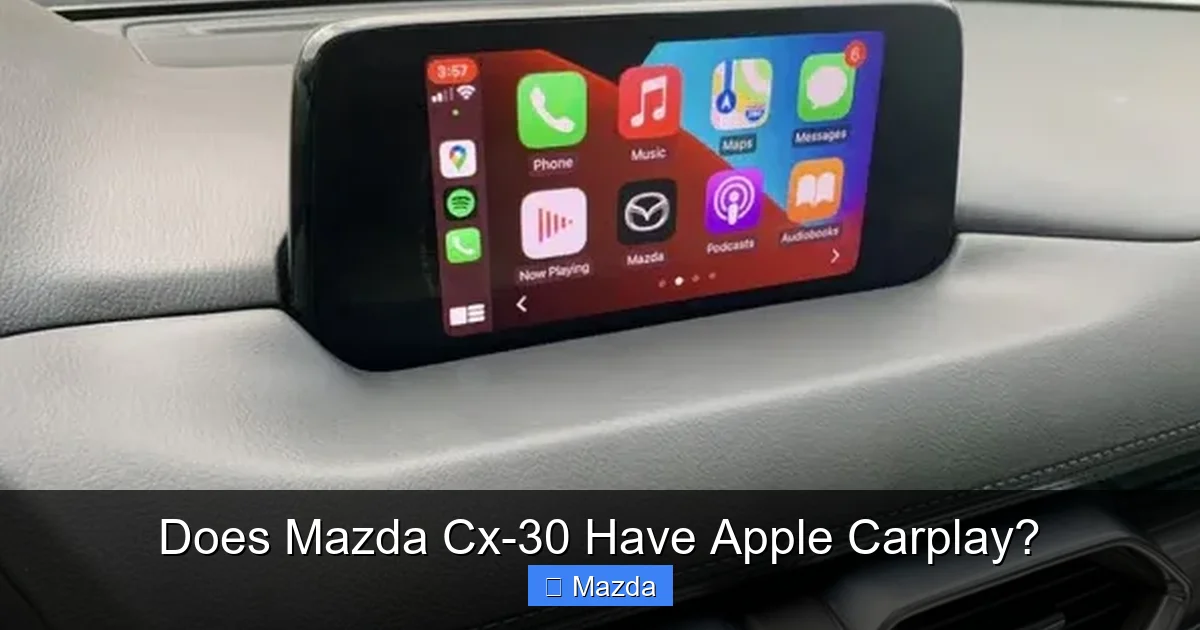
- You’re in! You’ll see the familiar grid of your iPhone apps: Phone, Messages, Apple Music, Maps, Podcasts, etc. The system is now ready to use.
For Wireless Connection (On Compatible Trims)
- Start in your CX-30 with your iPhone’s Bluetooth turned on and nearby.
- On the Mazda display, go to Settings > Connectivity > Apple CarPlay (Wireless).
- Select “Add New Device.” The system will generate a 6-digit PIN and broadcast a Wi-Fi network name.
- On your iPhone, go to Settings > General > CarPlay > Add Car. Your CX-30 should appear in the list. Tap it.
- Enter the 6-digit PIN shown on the Mazda screen into your iPhone when prompted.
- Confirm. Your iPhone will ask if you want to use CarPlay with this vehicle. Accept. The connection is saved. From now on, CarPlay will launch automatically whenever you start the car with your phone inside.
Pro Tip: If wireless CarPlay ever acts up, a simple “forget this vehicle” on your iPhone and re-pairing from scratch usually resolves 90% of hiccups. Also, ensure your iPhone’s iOS is updated to the latest version for best compatibility.
The Real-World Benefits: Why CX-30’s CarPlay Shines
Having CarPlay is one thing; having a good implementation is another. This is where the CX-30 impresses. The system feels integrated, not tacked on.
Visual guide about Does Mazda Cx-30 Have Apple Carplay?
Image source: carplay.fr
Intuitive Navigation & Crystal-Clear Audio
Using Apple Maps or Waze on the CX-30’s high-resolution display is a joy. The graphics are sharp, and the routing is responsive. You can use Siri to say, “Take me to the nearest coffee shop,” and the turn-by-turn directions appear instantly. For audio, whether you’re streaming Spotify, Apple Music, or a podcast, sound quality is excellent, integrating with the CX-30’s acclaimed Bose® premium sound system (on equipped trims). The commander knob makes scrubbing through a playlist or adjusting volume while driving effortless and safe.
Messaging and Calls Without Distraction
This is the safety win. When a text comes in, you hear a notification. You can press the voice command button on the steering wheel and say, “Read my new message,” and Siri will read it aloud. You can then reply with your voice: “Reply, I’ll be there in 10 minutes.” The entire interaction keeps your eyes on the road. The same goes for calls—dialing via Siri or selecting from your recent calls list is seamless.
A Clean, Uncluttered User Experience
Mazda’s philosophy is “less is more.” The CarPlay interface on the CX-30 screen follows this. It’s a simple, icon-based grid that’s instantly recognizable to any iPhone user. There’s no confusing submenu layering from Mazda’s native system when CarPlay is active. It’s just your iPhone’s apps, presented cleanly. This reduces cognitive load significantly compared to some other brands’ systems that try to blend CarPlay with their own clunky UI. For a deeper dive into how different automakers handle smartphone integration, you might enjoy reading our comparison of how to use Apple CarPlay on a Nissan Rogue, which highlights some key differences in approach.
Troubleshooting Common Glitches: Stay Calm and Fix It
Even the best systems have occasional quirks. Here’s what to do if your CX-30’s CarPlay misbehaves.
“CarPlay Won’t Connect” or “Keeps Disconnecting”
This is the most common issue. First, check your cable. If wired, use an Apple-certified or MFi-certified cable. Faulty cables are the #1 culprit. Second, restart your iPhone. A simple reboot clears temporary software glitches. Third, check the USB port. Make sure it’s clean and not loose. For wireless issues, ensure Bluetooth and Wi-Fi are on for your iPhone, and “CarPlay” is enabled in your iPhone’s Settings > General > CarPlay menu. “Forget this vehicle” and re-pair as described in the setup section.
Apps Not Showing Up or Grayed Out
CarPlay only shows a curated list of iPhone apps that are CarPlay-compatible. If your favorite podcast app isn’t there, it likely doesn’t have CarPlay support (though most major ones do). Go to your iPhone’s Settings > General > CarPlay > [Your CX-30] to customize which apps appear on the home screen. You can rearrange or hide apps here.
Sound Only Comes Through the Phone
This means the audio isn’t routing to the car’s speakers. With a wired connection, unplug and firmly replug the USB cable. Sometimes the phone defaults to its own speaker. For wireless, check your iPhone’s audio output settings during a call or music playback—tap the AirPlay icon and ensure your CX-30 is selected as the output.
The 2026 Outlook and How It Stacks Up
Looking ahead, the CX-30’s hardware is future-ready. Mazda regularly pushes over-the-air (OTA) updates to its infotainment system, which can improve CarPlay’s performance, add new features, or enhance stability. For 2026, we expect the standard to remain solid, with no major changes to the CarPlay experience itself, as Apple controls the core software. The focus will be on Mazda refining the native system around it.
How does it compare? In the compact SUV segment, standard Apple CarPlay is now almost ubiquitous. The CX-30’s strength lies in its execution. The combination of a responsive screen, the superb commander knob, and a clean interface makes it a leader. While some competitors might offer a larger screen or a fully digital gauge cluster as an option, the CX-30’s system just works, reliably and intuitively. Its integration feels thoughtful, not forced. If you’re also considering the CX-30’s practical side, its impressive towing capacity and available remote start features make it a well-rounded package where technology and utility meet.
Final Thoughts: No Anxiety, All Integration
So, does the 2026 Mazda CX-30 have Apple CarPlay? Absolutely. And it’s done right. It’s standard, it’s easy to use, and it’s implemented in a way that feels natural and enhances the driving experience without adding complexity. Whether you’re a tech-savvy user who wants wireless convenience or someone who just wants a simple way to get directions and listen to their music, the CX-30 delivers. You can walk into a dealership, test drive any trim, and confidently use your iPhone with the infotainment system. That peace of mind is exactly what modern car buyers deserve. The CX-30 proves that excellent, standard smartphone integration is no longer a luxury—it’s a given, and Mazda has mastered it.
Frequently Asked Questions
Is Apple CarPlay standard on every 2026 Mazda CX-30 trim?
Yes, Apple CarPlay is a standard feature on all 2026 CX-30 trims, including the base Sport model. However, the method of connection (wired only vs. wired and wireless) may vary slightly by trim level, with wireless typically becoming standard on mid-tier and higher trims.
Do I need a special cable or iPhone for wireless CarPlay?
No special cable is needed for wireless—just an iPhone 5 or newer with iOS 7.1 or later (all modern iPhones qualify). For wired use, you need a standard Lightning to USB-A cable. For the best, most reliable connection, use an Apple-certified or MFi-certified cable.
Can I use Apple CarPlay and the native Mazda navigation system at the same time?
No. When Apple CarPlay is active, it takes over the entire infotainment screen. You cannot have Mazda’s native navigation and Apple Maps running concurrently. You must exit CarPlay (usually by pressing the “Home” or “Menu” button on the commander knob) to access the vehicle’s built-in systems.
What if my Apple CarPlay isn’t working after a software update?
First, perform a simple restart of your iPhone. Then, “forget” your CX-30 in your iPhone’s CarPlay settings and re-pair it from scratch using the setup steps outlined above. If problems persist, check for a pending infotainment system update via Mazda’s Connected Services app or visit a dealer, as a system update may be needed.
Does using Apple CarPlay drain my iPhone’s battery, even when connected wirelessly?
Yes, using CarPlay, especially for navigation or audio streaming, consumes battery power. When connected via USB, the vehicle also charges your phone. With a wireless connection, your phone is not being charged by the car, so battery drain will occur over a long drive. It’s wise to keep a charger handy for wireless users on extended trips.
Can I control CarPlay functions using the steering wheel buttons?
Yes, absolutely. The steering wheel has dedicated buttons for voice control (to activate Siri), volume, and track skip/seek. These buttons work seamlessly with CarPlay, allowing you to manage music, podcasts, and accept/reject calls without ever taking your hands off the wheel.
