
How to Reset the Tire Pressure Light on a 2019 Toyota Camry

Resetting the tire pressure light on your 2019 Toyota Camry is a straightforward process you can often do yourself after ensuring all tires are properly inflated. The system uses a direct TPMS (Tire Pressure Monitoring System) that requires a specific driving cycle or a menu reset via the steering wheel controls. If the light persists after a reset, it signals a potential sensor issue or a slow leak that needs professional attention.
Key Takeaways
- Check Pressure First: Always manually verify and adjust all four tires to the manufacturer’s recommended PSI (found on the driver’s door jamb sticker) before attempting any reset.
- System Type Matters: Your 2019 Camry uses a Direct TPMS with sensors in each wheel, meaning the reset process is electronic and not just a drive cycle.
- Use the Menu: The primary reset method is through the “Tire Pressure” menu accessed via the “Menu” or “Info” button on your steering wheel.
- Drive Cycle Required: After a reset, you typically must drive at speeds above 25 mph for 10-30 minutes for the system to relearn and confirm sensor signals.
- Persistent Light = Problem: If the TPMS light returns immediately or won’t reset, it often indicates a faulty sensor, dead sensor battery, or a tire with a slow leak.
- Seasonal Changes: Cold weather can cause a temporary drop in tire pressure, triggering the light. Re-inflate tires to spec in the morning before resetting.
- Rotation & Sensors: After a tire rotation, the system may need a reset as sensor positions have changed. Some shops perform this automatically, but you may need to do it yourself.
[FEATURED_IMAGE_PLACEHOLDER]
📑 Table of Contents
- Understanding Your Camry’s Tire Pressure Light
- Essential Preparation Before You Reset
- The Standard Reset Procedure via the Steering Wheel Menu
- The Crucial Driving Cycle (Relearn Process)
- Troubleshooting: When the Light Won’t Stay Off
- Alternative Reset Methods and When to Seek Help
- Maintaining Your TPMS for Long-Term Health
- Conclusion: Safety First, Knowledge Second
Understanding Your Camry’s Tire Pressure Light
That small, yellow exclamation point inside a tire icon on your 2019 Toyota Camry’s dashboard isn’t just an annoyance—it’s your car’s way of talking to you. Officially called the Tire Pressure Monitoring System (TPMS) warning light, its primary job is to alert you when the air pressure in one or more tires falls significantly below the recommended level. Ignoring it isn’t an option. Driving on under-inflated tires is dangerous, leading to poor handling, increased stopping distances, uneven tire wear, and even a higher risk of a blowout. It also hurts your fuel economy. So, when that light glows, your first step is always to check your tire pressures with a good gauge. But what do you do when the pressures are perfect, yet the light stubbornly stays on? That’s where learning how to reset the tire pressure light on a 2019 Toyota Camry becomes essential knowledge for every owner.
The 2019 Camry is equipped with a Direct TPMS. This means each wheel has a small electronic sensor mounted inside the valve stem that constantly broadcasts a pressure and temperature reading to your car’s computer. This is more accurate than older indirect systems that used wheel speed sensors. Because it’s a direct system, simply driving for a while after adding air doesn’t always clear the light. The system needs a formal “reset” or “relearn” procedure to acknowledge that the new, correct pressure is now the baseline. This guide will walk you through every step, from preparation to the final drive cycle, ensuring you can confidently address this common issue.
Essential Preparation Before You Reset
Rushing into the reset process without proper preparation is the number one reason why the TPMS light comes back on. The reset tells the computer, “All tires are now at the correct pressure, please start monitoring from this new baseline.” If one tire is even a pound or two low, the system will detect the discrepancy during its initial check and immediately illuminate the light again. Patience here saves you time and frustration.
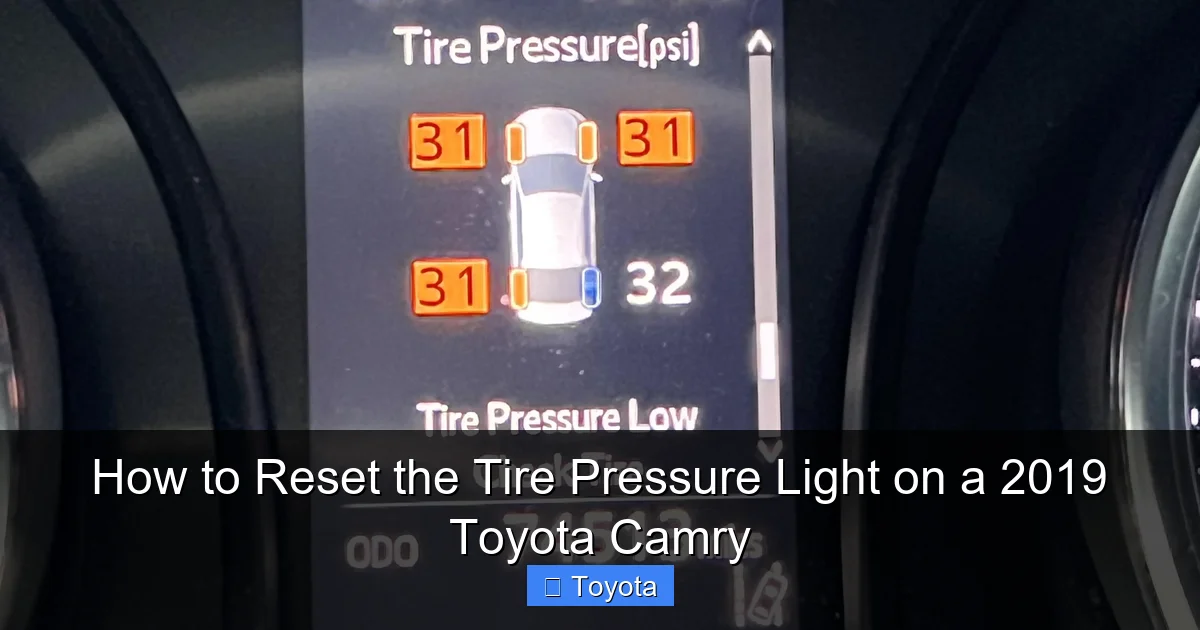
Visual guide about How to Reset the Tire Pressure Light on a 2019 Toyota Camry
Image source: i.redd.it
Gather Your Tools
You don’t need any special tools for the basic reset, but you will need:
- A reliable digital or dial tire pressure gauge (the pencil-style ones at gas stations are often inaccurate).
- An air compressor (a home unit, a portable one, or access to a station with a good air hose).
- Your Camry’s owner’s manual (for reference on exact pressure specs and menu locations).
Find the Correct Pressure Specifications
This is critical. Do not use the number on the tire sidewall. That is the maximum pressure the tire can hold. The correct pressure for your specific 2019 Camry is on a sticker located on the driver’s side door jamb, when you open the door. It will say something like “Tire Placard” and list pressures for the front and rear tires, often in PSI (pounds per square inch). For most 2019 Camry trims, it’s typically 32 PSI for all four tires, but always verify your sticker. Write this number down.
Perform a Cold Tire Check
Tire pressure is best checked when the tires are “cold,” meaning the car hasn’t been driven for at least three hours or has been driven less than a mile. Driving heats the tires and air inside, giving a falsely high reading. Check all four tires, including the spare if it’s a full-size one with a sensor (most Camry spares are temporary and don’t have a sensor). Add air to any tire that is below the spec on your door jamb sticker. If a tire is significantly over-inflated, let some air out by pressing the valve stem core. Ensure all valve stems are clean and free of dirt.
Internal Link Context: Proper tire inflation is part of broader vehicle maintenance. Just as you need to reset the maintenance light on a 2021 Toyota RAV4 after an oil change, the TPMS reset follows a similar principle of acknowledging a completed service or adjustment.
The Standard Reset Procedure via the Steering Wheel Menu
Once your tires are all set to the exact, correct pressure, it’s time to reset the system. For the 2019 Toyota Camry, the primary method is through the multi-information display (MID) controlled by buttons on your steering wheel. This process is sometimes called a “relearn” or “initialize.”
Step-by-Step Button Sequence
- Start the Car: Turn your Camry’s ignition to the “ON” position (the position right before starting the engine, where all dash lights come on) or start the engine. The vehicle does not need to be running, but the electrical system must be powered.
- Locate the Menu Buttons: On the left side of your steering wheel, you should find a button or a set of buttons. Look for one labeled “Menu,” “Info,” or with a display icon. You’ll also have arrow buttons (▲/▼) or a “Set” button.
- Navigate to Tire Pressure: Press the “Menu” or “Info” button repeatedly until you see the “Tire Pressure” screen on your instrument cluster’s digital display. This screen usually shows the individual pressures for each tire or a generic “Tire Pressure OK” message if the system is normal.
- Enter the Reset Mode: With the “Tire Pressure” screen active, press and hold the “Set” button (sometimes the “Enter” or a checkmark button) for about 3-5 seconds. You may hear a beep. The display should change to show a message like “Tire Pressure Reset” or “Set Pressure.” The exact wording can vary slightly by trim level.
- Confirm the Reset: Hold the button until you see a confirmation message such as “Setting Complete” or “Tire Pressure Set.” Release the button.
- Turn Off and Restart: For the reset to take full effect, it’s a good practice to turn the ignition completely off, wait about 10 seconds, and then turn it back to the “ON” position. The TPMS light should now be off. If it’s still on, double-check your tire pressures—one may have dropped slightly during the process.
If your Camry’s steering wheel controls don’t seem to have this option, consult your owner’s manual’s “Tire Pressure Monitoring System” section for the exact procedure for your specific trim (LE, SE, XLE, XSE). The button labels can differ.
The Crucial Driving Cycle (Relearn Process)
Here’s a key point many people miss: performing the button reset is only half the battle. After you’ve reset the system, your Camry’s computer needs to actively “listen” to all four tire sensors to confirm they are all sending signals and that their pressures are within the acceptable range. This is the “relearn” or driving cycle phase.
How to Complete the Relearn
After successfully completing the button reset and confirming the TPMS light is off:
- Start driving your Camry normally.
- Maintain a steady speed of at least 25 mph (40 km/h) for a continuous period of about 10 to 30 minutes.
- You do not need to drive aggressively. A simple highway or suburban road drive is perfect.
- The system is learning during this time. The TPMS light should remain off. If it comes back on during this drive, it means the system detected a problem—likely a pressure drop or a sensor communication error—and aborting the relearn.
Once you’ve completed this drive cycle and the light has stayed off, the reset is complete. The system is now actively monitoring your tires again with the new, correct pressure as its baseline.
Note: If you have a 2019 Camry with a premium audio system or a specific trim that has a larger central touchscreen, the tire pressure reset option might also be accessible through the vehicle settings menu on that screen, under “Vehicle” or “Tire Settings.” The steering wheel method is the most universal, however.
Troubleshooting: When the Light Won’t Stay Off
You’ve followed all the steps: checked and inflated all tires to 32 PSI, performed the button reset, and completed the driving cycle. But that annoying TPMS light is back on, or it never turned off in the first place. Now what? This is a clear signal that the problem is not simply a low-pressure alert that needs a reset, but an underlying fault in the system.
Common Causes for a Persistent TPMS Light
- Faulty or Dead Sensor: TPMS sensors are battery-powered, with a typical life of 7-10 years. Your 2019 Camry’s sensors could be reaching the end of their life. A dead sensor won’t transmit data, causing a fault code and a solid or flashing light.
- Damaged Sensor: Hitting a pothole or curb can damage the sensitive sensor inside the wheel or its valve stem. A physical break will cause immediate failure.
- Sensor Mismatch After Tire Service: If you recently had a tire repaired, rotated, or replaced, and the shop did not perform a TPMS relearn (either via the menu or with a scan tool), the system may not recognize the sensors in their new positions. Some basic tire rotations on a Camry require a reset.
- Slow Leak: You might have a puncture or a faulty valve stem core causing a very slow leak. The pressure drops gradually, and by the time you check it, it’s back to being low. The reset clears the light, but the leak continues, triggering it again minutes or hours later.
- Extreme Temperature Change: A rapid drop in ambient temperature (like a cold front) can reduce tire pressure by 1-3 PSI. If the drop is enough to cross the TPMS trigger threshold (usually 25% below spec), the light will come on. You inflate the tires, but if the temperature drops again overnight, the light may return.
Diagnostic Steps
If the light persists:
- Re-check pressures meticulously. Use your gauge on every tire, including the spare if equipped. Compare to the door jamb sticker. Adjust as needed.
- Inspect tires visually. Look for nails, screws, sidewall damage, or bulges. Check the valve stems for cracks or leaks (spray with soapy water; bubbles indicate a leak).
- Consider a professional scan. An auto repair shop or tire center can use a diagnostic scan tool to read the specific TPMS fault code. This will tell them if it’s a sensor issue, a communication problem, or a system fault. They can also test each sensor’s battery life and signal strength.
Internal Link Context: Dashboard warning lights can be tricky. A persistent TPMS light might feel similar to other issues, like needing to reset the airbag light on a Toyota Camry, which also often requires a professional scan tool if the problem isn’t a simple cleared fault.
Alternative Reset Methods and When to Seek Help
While the steering wheel menu is the standard DIY method, there are other scenarios and methods to be aware of.
Using a Scan Tool
Professional technicians and many tire shops use a specialized TPMS scan tool. This tool can:
- Read the exact fault codes from the TPMS control module.
- Test each sensor’s ID, pressure, and battery life.
- Perform the relearn procedure automatically, which is sometimes more reliable than the manual drive cycle.
- Program a new sensor’s ID into the vehicle’s computer if a sensor has been replaced.
If you’ve replaced a sensor yourself or are having persistent issues, a shop with this equipment is your best bet. They can ensure the new sensor is properly “paired” with your Camry’s computer.
After Tire Rotation or Replacement
This is a critical moment. When tires are rotated on a car with Direct TPMS, the sensor positions change relative to the wheel locations. The car’s computer still thinks the sensor that was on the front left is now on the rear left, etc. This mismatch can cause the light to come on or give incorrect location readings (if your Camry displays them). You must perform a reset/relearn after any tire rotation. Many reputable tire shops will do this for you as part of the service. If they don’t, you should perform the menu reset immediately after getting the car back. For a single tire replacement (like a flat repair), a reset is usually not needed unless the sensor was damaged and replaced.
When to Call a Professional
Do not hesitate to seek professional help if:
- The TPMS light is flashing (this often indicates a system fault, not just low pressure).
- You have completed the reset and drive cycle, and the light returns within a few miles.
- You have identified a slow leak or damaged tire/sensor.
- You are uncomfortable performing the steps or lack a reliable pressure gauge.
- Your car has aftermarket wheels or tires that may not be compatible with the OEM sensor system.
ATPMS sensor replacement involves removing the tire from the wheel, which requires specialized tools and knowledge to avoid damaging the sensor or the wheel’s TPMS valve stem seat. It’s not a typical DIY job for most people.
Maintaining Your TPMS for Long-Term Health
Preventing TPMS issues is easier than fixing them. A little proactive care goes a long way.
Monthly Pressure Checks
Don’t wait for the light to come on. Check your tire pressures at least once a month and before long trips. Use your own gauge for accuracy. This simple habit catches slow leaks early, prevents uneven wear, and maintains optimal fuel economy.
Be Mindful of Valve Stems
The TPMS sensor is integrated into the valve stem. When adding air, be gentle. Don’t use those high-pressure air hoses at gas stations at full blast for long periods, as it can damage the sensor. Also, when putting on tire valve caps, screw them on hand-tight only. Over-tightening can crack the sensor housing or strip the threads.
Know the Sensor Battery Life
As mentioned, TPMS sensor batteries are not serviceable. They are designed to last 7-10 years. Your 2019 Camry’s sensors are now getting into that age range (depending on production date). If you start experiencing multiple sensor failures or a persistent light with no other cause, budget for sensor replacement. They typically cost $50-$150 per sensor for the part, plus installation labor.
Winter vs. Summer Considerations
Cold weather is the prime culprit for TPMS lights. For every 10°F drop in temperature, tire pressure decreases by about 1-2 PSI. Check and adjust pressures more frequently in winter. Conversely, in hot summer months, over-inflation can also be an issue as air expands. Always set pressures when tires are cold, regardless of season.
Professional Service Notes
When you take your Camry for tire service, always remind the technician that it has a Direct TPMS. This alerts them to use proper TPMS-safe tools when removing/tightening wheels and to perform a relearn after rotation. If you replace wheels, you will need new, compatible TPMS sensors or valve stems for the new wheels.
Internal Link Context: Resetting dashboard warnings is a common theme across vehicles. The process for a Toyota Highlander’s maintenance light is different but follows a similar logic of using the odometer/trip meter buttons. Understanding these patterns helps you become more familiar with your vehicle’s computer interface.
Conclusion: Safety First, Knowledge Second
Resetting the tire pressure light on your 2019 Toyota Camry is a valuable skill that puts you in control of your vehicle’s safety systems. It’s a simple, five-minute process once your tires are properly inflated. Remember the golden rule: the reset is the final step, not the first. Always begin with a meticulous, cold-tire pressure check and adjustment using the specifications on your driver’s door jamb. Then, use the steering wheel menu to initialize the system, followed by a 10-30 minute drive cycle at moderate speeds.
If the light returns, don’t just keep resetting it. That’s your car telling you there’s a deeper problem—a failing sensor, a persistent leak, or damage. In these cases, diagnosis by a professional with the right scan tools is the safest and most cost-effective path. By combining regular manual pressure checks with knowing how to perform the electronic reset, you’ll keep your Camry’s tires—and your family—safe on the road, and you’ll avoid the frustration of a mysterious, glowing dashboard light.
Frequently Asked Questions
Why does my tire pressure light come on in cold weather even if the tires are fine?
Cold temperatures cause the air inside your tires to contract, lowering the pressure. If the drop is significant enough (usually 25% below the recommended PSI), the TPMS will trigger the light. The fix is to add air to bring the pressure back to the spec on your door jamb sticker when the tires are cold. The light should then turn off after a short drive or a manual reset.
Can I reset the TPMS light without driving the car afterward?
No, you cannot complete the reset without the driving cycle. The button reset merely tells the computer to start looking for sensor signals. The system must then verify that all four sensors are active and reporting pressures within the acceptable range while the vehicle is moving at speeds over 25 mph. Skipping the drive will cause the light to remain on or return immediately.
My TPMS light is flashing, not solid. What does that mean?
A flashing TPMS light (for several seconds when you start the car, then staying solid or flashing) typically indicates a system malfunction, not just low pressure. It often means the computer has lost communication with one or more sensors, there’s an internal fault in the TPMS control module, or a sensor battery is dead. This requires a diagnostic scan to identify the specific fault code.
Do I need to reset the TPMS after rotating my tires?
Yes, absolutely. On your 2019 Camry with Direct TPMS, rotating the tires changes the physical location of each sensor. The car’s computer stores the location of each sensor by its unique ID. After a rotation, it still thinks the sensors are in their old positions, which can cause a false warning or an incorrect location display. A manual reset via the steering wheel menu is required after any tire rotation.
How much does it cost to replace a faulty TPMS sensor on a Camry?
The total cost varies by location and shop, but you can expect to pay between $150 and $300 per sensor for parts and labor. The sensor itself usually costs $50-$150. The labor involves removing the tire from the wheel, replacing the sensor, and remounting/balancing the tire. Some shops may offer a lower price if you purchase a set of four sensors at once.
Is it safe to drive with the TPMS light on?
It depends on why it’s on. If it came on because of a sudden, significant pressure loss (like a blowout or large puncture), you should not drive. Pull over safely and inspect the tires. If it came on due to a gradual pressure drop (like a slow leak or cold weather) and you’ve confirmed all tires are properly inflated, a short drive to a safe location or a repair shop is generally okay, but you should address the cause promptly. Driving on under-inflated tires is dangerous and damages them. If the light is flashing, indicating a system fault, it’s best to have it checked soon, as you’ve lost the ability to monitor tire pressure.
