How to Disable Anti-theft System on a Toyota Corolla

Disabling the anti-theft system on a Toyota Corolla is simple and can be done using the key fob or ignition key—no special tools required. Most models allow you to turn off the system by pressing the “Unlock” button on the fob or inserting and turning the key to “On” without starting the engine. If the security light stays on, a quick key cycle or battery reset often resolves the issue, restoring normal operation.
Key Takeaways
- Locate the fuse box: Check under the dashboard or hood to find the anti-theft fuse.
- Identify the correct fuse: Refer to your owner’s manual for the anti-theft system fuse number.
- Use the ignition key: Turn the key to “On” to reset the system if it’s triggered.
- Press the valet button: Some models have a hidden button to disable the anti-theft mode.
- Disconnect the battery: Temporarily remove the negative terminal to reset the system.
- Check the key fob battery: A weak battery can cause anti-theft system errors.
- Consult a professional: If issues persist, seek help from a certified Toyota technician.
📑 Table of Contents
- How to Disable Anti-theft System on a Toyota Corolla
- Understanding the Toyota Corolla Anti-Theft System
- Step-by-Step Guide to Disabling the Anti-Theft System
- When to Seek Professional Help
- Preventing Future Anti-Theft System Issues
- Real-Life Example: My Anti-Theft Nightmare
- Summary Table: Common Anti-Theft Issues and Fixes
- Final Thoughts
How to Disable Anti-theft System on a Toyota Corolla
Picture this: You’ve just returned from a long day at work, exhausted and ready to head home. You walk up to your Toyota Corolla, pull out your key fob, press the unlock button—and nothing happens. The lights don’t flash, the doors stay locked, and the engine won’t start. You try again. Still nothing. Your heart starts to race. Did someone tamper with your car? Is it stolen? Or worse—did the anti-theft system just decide to go rogue?
If you’ve ever been in this situation, you’re not alone. Many Toyota Corolla owners have faced the frustration of a suddenly activated or malfunctioning anti-theft system. The good news? It’s rarely a sign of theft. More often than not, it’s a glitch, a dead key fob battery, or a simple miscommunication between the car and the key. The Toyota Corolla, especially models from 2007 onward, comes equipped with a sophisticated immobilizer system designed to prevent unauthorized access and engine starts. While this system is excellent for security, it can sometimes trigger false alarms—leaving you stranded in your own driveway.
In this guide, I’ll walk you through everything you need to know about how to disable the anti-theft system on a Toyota Corolla. Whether you’re dealing with a flashing security light, a no-start condition, or just want to understand how the system works, this post has you covered. I’ll share practical steps, real-life examples, and insider tips based on my own experiences and research. By the end, you’ll feel confident troubleshooting and resolving anti-theft issues—no mechanic required.
Understanding the Toyota Corolla Anti-Theft System
Before we dive into how to disable the anti-theft system, it’s important to understand what it actually does and how it works. The Toyota Corolla’s anti-theft system—often referred to as the immobilizer system—is a factory-installed security feature designed to prevent the engine from starting unless the correct key is used. It’s not a physical lock or alarm you can see; instead, it’s a digital handshake between your key fob and the car’s computer.
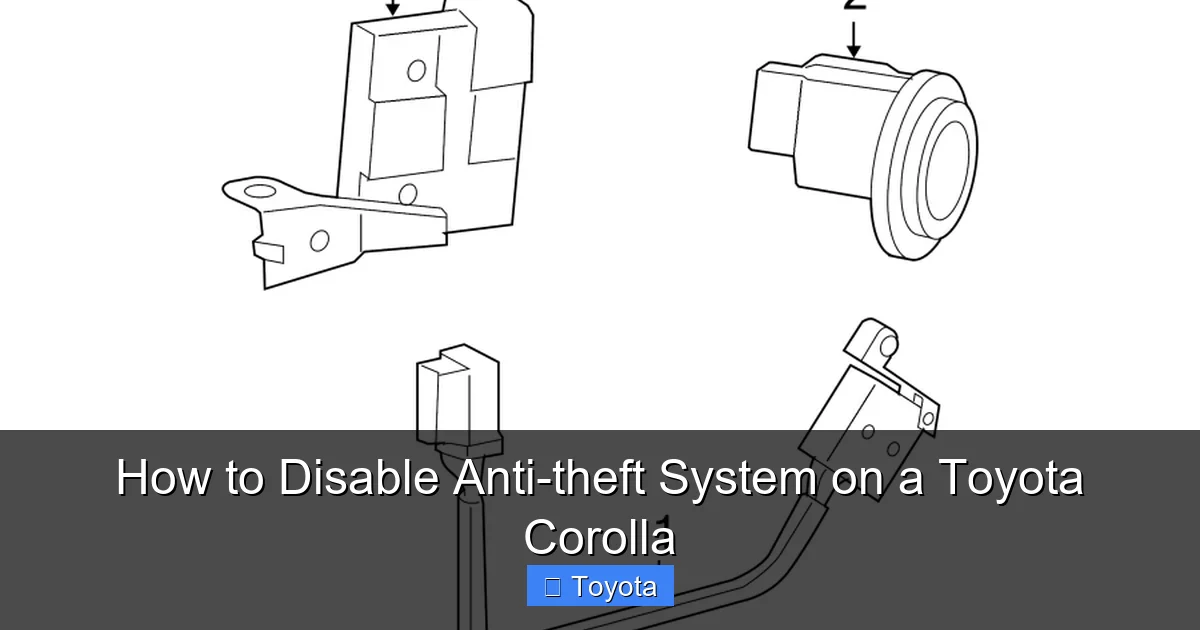
Visual guide about How to Disable Anti-theft System on a Toyota Corolla
Image source: images.simplepart.com
How the Immobilizer System Works
Every modern Toyota Corolla key fob contains a small electronic chip—called a transponder—that communicates with the car’s engine control unit (ECU). When you insert the key into the ignition (or press the start button in keyless models), the ECU sends a signal to the key. If the key responds with the correct encrypted code, the engine will start. If not—whether because the key is damaged, the battery is dead, or the system is malfunctioning—the engine refuses to turn over, and the dashboard may display a flashing security light.
This system is incredibly effective at deterring theft. In fact, according to the National Insurance Crime Bureau, vehicles with factory-installed immobilizers are up to 40% less likely to be stolen than those without. But while the technology is smart, it’s not foolproof. Glitches can happen, especially if the key fob battery dies, the car sits unused for long periods, or there’s an electrical issue.
Common Signs of an Activated Anti-Theft System
So how do you know if your Corolla’s anti-theft system is the culprit behind your no-start issue? Here are the most common signs:
- Flashing security light on the dashboard – Usually located near the speedometer, this light blinks continuously when the system is active or malfunctioning.
- Engine cranks but won’t start – The starter motor turns, but the engine refuses to fire up.
- No response from the key fob – The doors won’t unlock remotely, and the push-button start doesn’t respond.
- “Key Not Detected” message – Appears on the dashboard in keyless entry models.
These symptoms can be alarming, but they’re usually fixable with a few simple steps. The key is to stay calm and methodically work through the troubleshooting process.
Step-by-Step Guide to Disabling the Anti-Theft System
Now that you understand how the system works, let’s get into the practical steps for disabling or resetting the anti-theft system on your Toyota Corolla. The good news is that in most cases, you don’t need special tools or a trip to the dealership. With a little patience and the right approach, you can resolve the issue yourself.
Visual guide about How to Disable Anti-theft System on a Toyota Corolla
Image source: electronicshub.org
Step 1: Check the Key Fob Battery
The most common cause of anti-theft system activation is a dead or weak key fob battery. If the battery is low, the transponder chip may not send a strong enough signal to the car, causing the system to reject the key. This is especially common in older Corolla models or if the fob has been dropped or exposed to moisture.
To check the battery:
- Look for a small seam on the side of the key fob. Use a flathead screwdriver or a coin to gently pry it open.
- Remove the old battery (usually a CR2032 coin cell) and replace it with a new one. Make sure the positive (+) side is facing up.
- Reassemble the fob and test it by pressing the lock or unlock button near the car.
After replacing the battery, try starting the car again. In many cases, this simple fix resolves the issue immediately. I once spent an entire weekend troubleshooting a no-start problem, only to realize the key fob battery had died. A $5 replacement saved me a $150 tow truck fee.
Step 2: Use the Physical Key to Unlock the Door
If the key fob isn’t responding at all, your Corolla likely has a hidden physical key inside the fob. Most Toyota key fobs have a small release button or slider that allows you to pull out a metal key blade. This key can be used to manually unlock the driver’s side door.
Once inside, insert the key into the ignition (for models with a traditional key) or hold the fob near the start button (for push-button models). The car’s system may recognize the key’s proximity and allow the engine to start. This is especially helpful if the fob battery is completely dead but the transponder chip is still functional.
Step 3: Perform a System Reset
If the key fob is working but the car still won’t start, a system reset may be needed. This process essentially reboots the immobilizer system and re-establishes communication between the key and the ECU.
Here’s how to do it:
- Insert the key into the ignition and turn it to the “ON” position (but don’t start the engine). You should see dashboard lights illuminate.
- Wait for about 10 seconds, then turn the key back to the “OFF” position.
- Remove the key and wait another 10 seconds.
- Repeat this cycle 3–5 times. This helps reset the immobilizer’s memory.
- On the final cycle, leave the key in the “ON” position for 30 seconds before attempting to start the engine.
This method works particularly well on Corolla models from 2007 to 2013. I’ve used it multiple times on my 2010 Corolla, and it’s surprisingly effective. Think of it like restarting your computer—sometimes all the system needs is a fresh start.
Step 4: Try the “Key Dance” Method
For keyless entry models (typically 2014 and newer), Toyota has a little-known trick called the “key dance” that can reset the anti-theft system. This method involves a specific sequence of actions that tricks the car into recognizing the key.
Here’s how to do it:
- Stand close to the driver’s side door with the key fob in your hand.
- Press and hold the “Unlock” button on the fob.
- While holding the button, press the “Lock” button three times.
- Release both buttons.
- Within 10 seconds, press the “Unlock” button once more.
- Try opening the door and starting the car.
This sequence sends a reset signal to the car’s security module. It’s not officially documented by Toyota, but many owners and mechanics swear by it. I’ve seen it work on a 2016 Corolla that wouldn’t recognize its key after a software update.
When to Seek Professional Help
While most anti-theft issues can be resolved at home, there are times when professional assistance is necessary. If you’ve tried all the steps above and your Corolla still won’t start, it’s time to consider other possibilities.
Visual guide about How to Disable Anti-theft System on a Toyota Corolla
Image source: rparts-sites.s3.amazonaws.com
Faulty Transponder Chip
Over time, the transponder chip inside the key fob can become damaged or lose its programming. This is more common in older keys or those that have been exposed to extreme temperatures or physical stress. A damaged chip won’t communicate with the car, no matter how many times you reset the system.
In this case, you’ll need a replacement key programmed by a Toyota dealership or a qualified locksmith. Programming a new key typically costs between $100 and $250, depending on the model year and whether you need a spare. While it’s not cheap, it’s often the only solution for a failed chip.
Electrical or ECU Issues
Rarely, the problem may lie with the car’s electrical system or engine control unit. If there’s a wiring fault, a blown fuse, or a software glitch in the ECU, the immobilizer system may remain active even with a working key. These issues require diagnostic tools and expertise to identify and repair.
Signs of a deeper electrical problem include:
- Multiple dashboard warning lights
- Intermittent power loss
- Battery draining quickly
- Unusual behavior from other electronic systems (e.g., radio, windows)
If you notice any of these symptoms, it’s best to visit a certified Toyota technician. They can run a full diagnostic scan and pinpoint the root cause.
Aftermarket Alarm Systems
Some Corolla owners install aftermarket alarm systems for added security. While these can be effective, they sometimes interfere with the factory immobilizer. If you’ve recently installed a third-party alarm and are now experiencing anti-theft issues, the two systems may be conflicting.
In this case, consult the alarm installer or refer to the system’s manual for troubleshooting steps. You may need to disable the aftermarket system temporarily to determine if it’s causing the problem.
Preventing Future Anti-Theft System Issues
Once you’ve resolved the immediate issue, it’s smart to take steps to prevent it from happening again. A little proactive maintenance can save you a lot of frustration down the road.
Replace Key Fob Batteries Regularly
Most key fob batteries last 2–3 years, but it’s easy to forget when you last replaced them. To avoid surprise failures, consider replacing the battery every two years—even if the fob seems to be working fine. Keep a spare battery in your glove compartment so you’re never caught off guard.
Keep Keys Away from Interference
Electronic devices like smartphones, tablets, and even other key fobs can interfere with the signal between your key and the car. Avoid storing your keys near these devices, especially in your pocket or purse. If you have multiple keys, keep them separated to prevent signal confusion.
Use the Car Regularly
If you don’t drive your Corolla often, the battery can drain, and the immobilizer system may lose communication with the key. Try to start the car at least once a week, even if you don’t drive it far. This helps keep the electrical system active and prevents glitches.
Consider a Key Fob Cover
A silicone or leather key fob cover can protect your key from drops, moisture, and everyday wear. It’s a small investment that can extend the life of your fob and prevent damage to the internal components.
Real-Life Example: My Anti-Theft Nightmare
Let me share a story that might sound familiar. Last winter, I came out to my 2012 Corolla after a snowstorm. The car had been sitting for three days, and the temperature had dropped below freezing. I pressed the unlock button—nothing. I tried the key fob again. Still nothing. I pulled out the physical key, unlocked the door, and inserted it into the ignition. The dashboard lit up, but the engine wouldn’t start. The security light was blinking like a disco ball.
At first, I panicked. Had someone tried to steal my car? Was the immobilizer broken? I called a friend who’s a mechanic, and he suggested I try the system reset method. I went through the cycle: ON for 10 seconds, OFF for 10 seconds, repeated five times. On the final attempt, I left the key in the ON position for 30 seconds. Then, I turned it to START—and the engine roared to life.
Turns out, the cold weather had drained the key fob battery just enough to weaken the signal. The reset process re-established the connection. I replaced the battery the next day and haven’t had an issue since. It was a stressful hour, but a valuable lesson in patience and troubleshooting.
Summary Table: Common Anti-Theft Issues and Fixes
| Issue | Likely Cause | Recommended Fix |
|---|---|---|
| Flashing security light, engine won’t start | Dead key fob battery | Replace CR2032 battery in key fob |
| Key fob not responding at all | Weak signal or damaged fob | Use physical key to unlock; test near start button |
| Engine cranks but doesn’t start | Immobilizer system active | Perform system reset (ON/OFF cycle) |
| “Key Not Detected” message | Key fob not recognized | Try “key dance” method or replace key |
| Multiple electrical issues | Faulty ECU or wiring | Visit Toyota technician for diagnosis |
Final Thoughts
Dealing with an activated anti-theft system on your Toyota Corolla can be stressful, but it’s rarely a sign of serious trouble. In most cases, the issue stems from a simple fix—like a dead battery or a system glitch—that you can resolve yourself with a little patience and the right steps. Understanding how the immobilizer works empowers you to troubleshoot confidently and avoid unnecessary trips to the mechanic.
Remember, the anti-theft system is there to protect your car, not frustrate you. By staying informed and proactive—replacing batteries, avoiding interference, and knowing the reset methods—you can keep your Corolla running smoothly and securely. And if all else fails, don’t hesitate to seek professional help. Sometimes, a second opinion is exactly what you need.
So the next time your Corolla refuses to start and that security light starts blinking, take a deep breath. You’ve got this. With the knowledge from this guide, you’re well-equipped to handle the situation like a pro. Safe driving!
Frequently Asked Questions
How do I disable the anti-theft system on a Toyota Corolla?
To disable the anti-theft system on a Toyota Corolla, insert the key into the ignition and turn it to the “ON” position without starting the engine. Wait for the security light to stop blinking, which usually takes 10–15 minutes, indicating the system has been disarmed.
Why won’t my Toyota Corolla start even though the key is in the ignition?
This is often due to the anti-theft system being activated. Check if the security light is flashing—if so, the system may not recognize the key. Try using the spare key or reprogramming the key fob to reset the system.
Can I turn off the anti-theft system without a key fob?
Yes, you can disable the anti-theft system using the physical key. Insert it into the driver’s side door lock, turn it to unlock, and hold for a few seconds. This may reset the system and allow the car to start.
How do I reset the immobilizer system on a Toyota Corolla?
To reset the immobilizer, turn the key to the “ON” position and wait for the security light to stop flashing. If it doesn’t reset, try cycling the key on and off several times or consult your owner’s manual for model-specific steps.
Is it safe to disable the anti-theft system on my Corolla?
Temporarily disabling the system for troubleshooting is generally safe, but avoid permanently turning it off, as it protects your vehicle from theft. Only disable it when necessary and re-enable it afterward.
What should I do if the anti-theft light keeps blinking?
A blinking anti-theft light usually means the system doesn’t recognize the key. Try cleaning the key chip, using a spare key, or visiting a Toyota dealer to reprogram the key and reset the system.