
How to Sell Car on Carfax

Selling your car through Carfax can significantly increase buyer confidence and help you get top dollar. This guide walks you through the entire process—from preparing your vehicle history report to listing it effectively—so you can sell car on Carfax with ease and transparency.
So, you’ve decided it’s time to sell your car—but you want to do it the right way. Maybe you’ve heard that buyers love seeing a clean Carfax report, or perhaps you’ve seen ads that proudly say “Clean Carfax!” and wondered how to get that same advantage. The good news? You absolutely can. And it’s easier than you think.
Selling a car is more than just snapping a few photos and posting an ad. Today’s buyers are smarter, more cautious, and heavily rely on data to make decisions. That’s where Carfax comes in. Carfax is one of the most trusted sources for vehicle history in the U.S., compiling data from DMVs, insurance companies, repair shops, and law enforcement to create detailed reports on a car’s past. When you sell car on Carfax—or more accurately, use Carfax to sell your car—you’re giving buyers peace of mind. You’re showing them that your vehicle has been well cared for, hasn’t been in major accidents, and has a transparent ownership trail.
But here’s the thing: Carfax isn’t a marketplace where you list your car directly. Instead, it’s a tool you use to boost your listing’s credibility on other platforms. Think of it like a digital resume for your vehicle. When buyers see that you’ve gone the extra mile to provide a Carfax report, they’re more likely to trust you, respond to your ad, and even pay a premium price. In this guide, we’ll walk you through every step of the process—from ordering your report to closing the deal—so you can sell car on Carfax with confidence and ease.
Key Takeaways
- Carfax reports build trust: Buyers are more likely to purchase a vehicle with a clean, detailed Carfax report that shows no accidents, consistent maintenance, and accurate ownership history.
- You don’t sell directly on Carfax: Carfax is a data provider, not a marketplace. You use their reports to enhance listings on platforms like Autotrader, Cars.com, or Facebook Marketplace.
- Order your report early: Get your Carfax report before listing to verify accuracy, fix errors, and showcase transparency from day one.
- Highlight key report details: Emphasize low mileage, single ownership, service records, and no accidents in your ad to attract serious buyers.
- Use the report in negotiations: A strong Carfax report gives you leverage to justify your asking price and speed up the sale.
- Private sellers benefit most: While dealers use Carfax routinely, private sellers gain a major advantage by providing verified history upfront.
- Keep records organized: Maintain receipts, service logs, and repair invoices to support your Carfax report and answer buyer questions confidently.
📑 Table of Contents
Understanding What Carfax Is—And Isn’t
Before diving into the how-to, let’s clear up a common misconception: Carfax is not a car-selling platform like Carvana or Vroom. You can’t list your vehicle directly on Carfax and wait for buyers to contact you. Instead, Carfax is a vehicle history reporting service. It collects and organizes data about a car’s past—such as accidents, title issues, odometer readings, and service records—and presents it in an easy-to-read report.
This report is what buyers (and dealers) use to assess a vehicle’s condition and value. When you sell car on Carfax, you’re really using Carfax as a credibility booster in your private sale. You’re saying, “Here’s proof my car is in great shape,” and that proof comes in the form of a Carfax report.
How Carfax Collects Data
Carfax gathers information from over 100,000 data sources, including:
- State DMVs and titling agencies
- Insurance companies
- Auto repair and body shops
- Law enforcement agencies (for accident reports)
- Fleet and rental companies
- Recall databases
This means that if your car was ever in an accident, had a title branded (like “salvage” or “flood”), or received regular oil changes at a dealership, that information may appear on your Carfax report. The more complete the data, the more valuable the report becomes to potential buyers.
Why Buyers Trust Carfax
Buyers trust Carfax because it’s independent, widely recognized, and difficult to manipulate. Unlike a seller’s word alone, a Carfax report offers third-party verification. For example, if you say your car has never been in an accident, but the Carfax shows a minor fender bender, the report adds context. It might even help you explain that the damage was cosmetic and fully repaired.
In fact, studies show that vehicles with clean Carfax reports sell faster and for higher prices. A 2022 survey by Cox Automotive found that 78% of used car shoppers consider a vehicle history report “very important” when making a purchase decision. That’s why knowing how to sell car on Carfax—by leveraging the report effectively—can give you a serious edge.
Step 1: Order Your Carfax Report
Visual guide about How to Sell Car on Carfax
Image source: americanavto.com
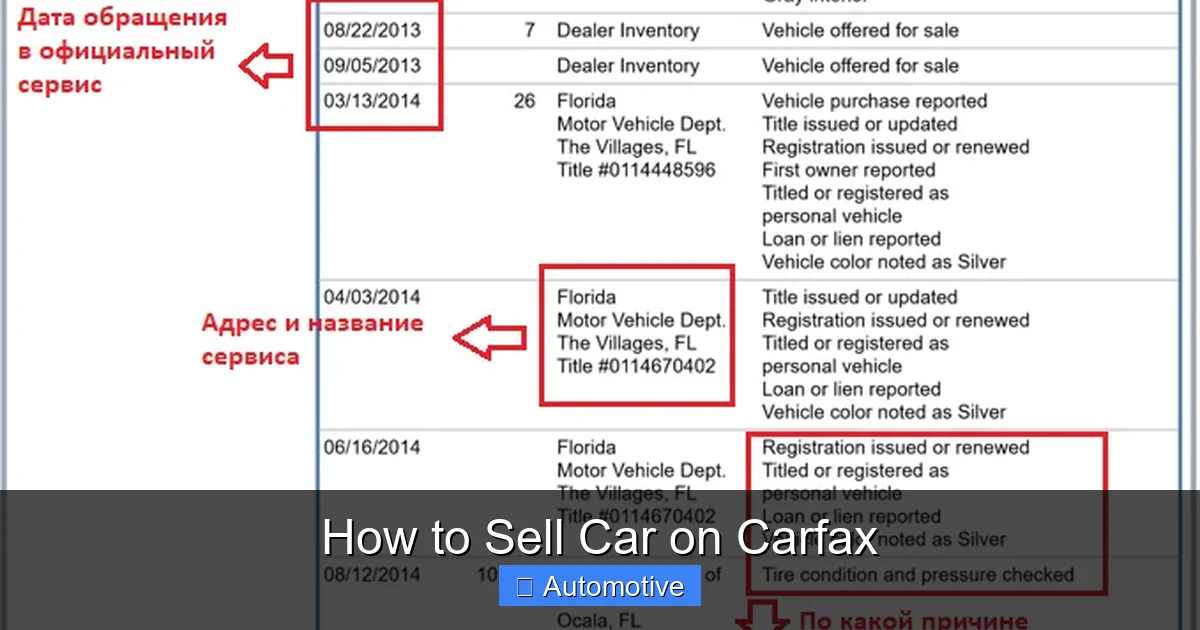
The first step in selling your car with Carfax is getting your vehicle’s report. You can’t assume it’s accurate or complete—so don’t skip this.
How to Get Your Carfax Report
You can order a Carfax report in two ways:
- Through the Carfax website: Visit carfax.com, enter your vehicle’s VIN (Vehicle Identification Number), and pay the fee (typically $39.99 for one report or $49.99 for two). You’ll receive the report instantly via email.
- Through a dealership or repair shop: Many service centers offer free Carfax reports when you bring your car in for maintenance. Ask if they can print one for you.
Pro tip: Always use the VIN, not the license plate, to ensure accuracy. The VIN is a 17-character code usually found on the driver’s side dashboard (visible through the windshield) or on the door jamb.
Review the Report Thoroughly
Once you have your report, don’t just glance at it—read it carefully. Look for:
- Accident history (even minor ones)
- Odometer readings over time
- Number of previous owners
- Service and maintenance records
- Title brands (like “salvage,” “flood,” or “lemon”)
- Recall information
If you spot any errors—like an incorrect mileage entry or a missing service record—contact Carfax immediately. They have a dispute process to correct mistakes. It’s worth the effort: an inaccurate report can scare off buyers or lower your car’s value.
Example: Fixing a Common Error
Imagine your Carfax shows your car had two owners, but you know you’re the only one. Maybe a family member co-signed the loan, or the car was briefly registered in a spouse’s name. This can confuse buyers. In this case, gather documentation (like a bill of sale or registration) and submit it to Carfax for correction. Once updated, your report will reflect the true ownership history—making your car more appealing.
Step 2: Prepare Your Vehicle for Sale
Visual guide about How to Sell Car on Carfax
Image source: s.ecrater.com
A clean Carfax report is powerful, but it’s only part of the equation. Buyers want to see a well-maintained car that matches the report’s story. That means you need to prep your vehicle inside and out.
Clean and Detail Your Car
First impressions matter. A dirty car—even with a clean Carfax—can make buyers怀疑 the vehicle’s condition. Invest in a professional detail or do it yourself:
- Wash and wax the exterior
- Vacuum and shampoo the interior
- Clean windows and mirrors
- Remove personal items and odors
- Touch up minor scratches or dings
A sparkling car signals care and attention—qualities that align with a positive Carfax report.
Gather Maintenance and Repair Records
While Carfax includes some service data, it’s not always complete. Many repair shops don’t report to Carfax, especially independent garages. That’s why you should collect your own records:
- Oil change receipts
- Brake or tire replacements
- Transmission or engine work
- Warranty information
- Recall repair confirmations
Organize these in a folder or digital file. When buyers ask, “Do you have service records?” you can confidently say yes—and even reference your Carfax report as backup.
Address Minor Issues
You don’t need to overhaul your car, but fixing small problems can boost its appeal:
- Replace burnt-out bulbs
- Top off fluids
- Inflate tires to proper pressure
- Repair cracked windshield wipers
- Reset the “check engine” light (if safe to do so)
These small touches show you’ve maintained the car well—reinforcing the story your Carfax report tells.
Step 3: Create a Compelling Listing
Visual guide about How to Sell Car on Carfax
Image source: s.ecrater.com
Now it’s time to sell your car—using your Carfax report as a key selling point. Whether you’re listing on Autotrader, Cars.com, Facebook Marketplace, or Craigslist, your ad should highlight the report.
Craft a Strong Headline
Your headline is the first thing buyers see. Make it count. Include key details like:
- Year, make, and model
- Low mileage (if applicable)
- Clean title
- “Clean Carfax” or “Accident-Free Carfax”
Example:
“2019 Honda Accord EX-L – 32k Miles – Clean Carfax – One Owner – Excellent Condition”
This headline checks all the boxes: it’s specific, highlights low mileage, mentions the Carfax, and emphasizes condition.
Write a Detailed Description
In the body of your ad, expand on the headline. Be honest, clear, and thorough. Mention:
- Why you’re selling
- Recent maintenance or upgrades
- Features (like sunroof, navigation, or heated seats)
- Fuel efficiency and driving experience
- Any known issues (transparency builds trust)
Then, bring in the Carfax report:
“This vehicle comes with a clean Carfax report showing no accidents, one previous owner, and consistent service records. I’ve attached the full report for your review—no surprises, just peace of mind.”
This statement reassures buyers and positions you as a trustworthy seller.
Include High-Quality Photos
Photos are just as important as words. Take pictures in good lighting, from multiple angles:
- Exterior (front, back, sides)
- Interior (dashboard, seats, trunk)
- Engine bay
- Tires and wheels
- Any special features
Avoid filters or heavy editing. Buyers want to see the real car—not a glamorized version.
Set a Competitive Price
Use tools like Kelley Blue Book (KBB) or Edmunds to determine your car’s fair market value. Then, consider your Carfax report as a value booster. A clean report can justify pricing your car at the higher end of the range—especially if it has low mileage or rare features.
Example:
A 2020 Toyota Camry with 40,000 miles might be worth $22,000 in “good” condition. But if it has a clean Carfax, one owner, and full service history, you could reasonably ask $23,500—and buyers may accept it.
Step 4: Use the Carfax Report During the Sale
Your Carfax report isn’t just for the listing—it’s a tool throughout the entire selling process.
Share the Report Early
When buyers inquire, send them the Carfax report right away. You can:
- Attach it to your email response
- Upload it to your listing (many platforms allow file attachments)
- Share a link to the online report (Carfax provides a shareable URL)
This shows you have nothing to hide and speeds up the decision-making process.
Highlight Key Report Features
Don’t just send the report—point out what makes it strong:
- “Notice the consistent oil changes every 5,000 miles.”
- “This car has never been in an accident—see the ‘No Accident’ badge.”
- “Only one owner, and I’m the second—meaning it was well cared for.”
These comments help buyers interpret the report and see the value.
Use It in Negotiations
If a buyer tries to lowball you, refer back to the Carfax:
“I understand you’re looking for a deal, but this car has a clean Carfax, low mileage, and full service history. Comparable vehicles without these benefits are priced lower. I’m confident in my asking price.”
The report gives you leverage. It’s hard to argue with documented proof of care and condition.
Be Ready for Questions
Buyers may ask:
- “Why does the report show two owners if you’re the only one?”
- “Is this minor accident on the report a big deal?”
- “Can I see the service records for the last oil change?”
Answer honestly and back up your responses with documentation. If you’ve done your prep work, you’ll be ready.
Step 5: Close the Sale with Confidence
Once you’ve found a serious buyer, it’s time to finalize the sale. Your Carfax report continues to play a role.
Meet in a Safe, Public Place
Always meet in a well-lit, public location—like a police station parking lot or a busy mall. Bring a friend if possible. Safety first.
Allow a Test Drive—With Conditions
Let the buyer test drive the car, but:
- Go with them (or have a friend accompany)
- Verify their driver’s license
- Set a time limit (e.g., 20 minutes)
- Stick to familiar roads
During the drive, point out features and mention how the Carfax report supports the car’s reliability.
Complete the Paperwork Correctly
When it’s time to sell, you’ll need:
- Signed title (check your state’s requirements)
- Bill of sale (available online or from your DMV)
- Odometer disclosure statement
- Release of liability form (to protect you after the sale)
Some states also require a smog check or safety inspection. Check your local DMV website.
Accept Secure Payment
Avoid cash for large amounts. Use:
- Cashier’s check (verify it’s real)
- Bank wire transfer
- Escrow service (for high-value cars)
Never release the car until payment is confirmed.
Transfer the Carfax Report (Optional)
While not required, you can offer to transfer the Carfax report to the buyer. Carfax allows report transfers for a small fee (usually $9.99). This adds a nice touch and shows you’re going the extra mile.
Common Mistakes to Avoid
Even with a great Carfax report, sellers make errors that can kill a deal. Avoid these pitfalls:
Overstating the Report
Don’t claim “perfect Carfax” if there’s a minor accident. Be honest. Buyers appreciate transparency, and exaggerating can backfire.
Ignoring the Report’s Weaknesses
If your report shows a salvage title or multiple owners, address it upfront. Explain the context (e.g., “The salvage title was due to hail damage, fully repaired”) and provide documentation.
Not Preparing the Car
A clean report means nothing if the car looks neglected. Match the report’s story with the car’s condition.
Pricing Too High
Even with a great Carfax, don’t overprice. Use market data and be realistic.
Skipping the Test Drive
Never refuse a test drive. It’s a red flag. Instead, make it safe and controlled.
Conclusion
Selling your car doesn’t have to be stressful or uncertain. By learning how to sell car on Carfax, you’re not just listing a vehicle—you’re offering buyers a transparent, trustworthy experience. The Carfax report acts as your car’s digital resume, proving its history, condition, and value. When combined with a clean car, honest communication, and smart pricing, it becomes a powerful tool that attracts serious buyers and helps you close the deal faster.
Remember, Carfax isn’t a magic bullet—but it’s one of the best tools available to private sellers. It levels the playing field between you and dealerships, giving you credibility and confidence. So take the time to order your report, review it carefully, and use it strategically in your listing and negotiations. The result? A smoother sale, a happier buyer, and more money in your pocket.
Whether you’re selling a sedan, SUV, or pickup truck, the process remains the same: be prepared, be honest, and let the Carfax report do the talking. When you sell car on Carfax the right way, everyone wins.
Frequently Asked Questions
Can I sell my car directly on Carfax?
No, Carfax is not a marketplace. It’s a vehicle history reporting service. You use Carfax reports to enhance listings on platforms like Autotrader, Cars.com, or Facebook Marketplace.
How much does a Carfax report cost?
A single Carfax report costs $39.99, or $49.99 for two. You can order it online at carfax.com using your vehicle’s VIN.
Will a clean Carfax report increase my car’s value?
Yes, a clean Carfax report can increase buyer confidence and justify a higher asking price, especially if it shows no accidents, low mileage, and consistent maintenance.
What if my Carfax report has errors?
Contact Carfax immediately to dispute inaccuracies. Provide documentation (like repair receipts or registration) to support your claim. Corrections can take a few days.
Do I need to provide service records if I have a Carfax report?
Yes. While Carfax includes some service data, it’s not always complete. Providing your own records strengthens your case and answers buyer questions.
Can I transfer my Carfax report to the buyer?
Yes, Carfax allows report transfers for a small fee (usually $9.99). It’s a nice gesture that adds value and transparency to your sale.
