
Vdiagtool Vd70s Scan Tool

The Vdiagtool Vd70s scan tool is a versatile, affordable diagnostic device designed for both car enthusiasts and professional mechanics. It offers full-system scanning, real-time data monitoring, and easy code clearing across a wide range of vehicle makes and models.
Key Takeaways
- Comprehensive Vehicle Coverage: The Vd70s supports OBD2 protocols and works with most gasoline and diesel vehicles made after 1996, including domestic, Asian, and European models.
- Full-System Diagnostics: Unlike basic code readers, it scans engine, transmission, ABS, airbags, and more—giving you a complete picture of your vehicle’s health.
- Live Data Streaming: View real-time sensor readings like RPM, coolant temperature, and fuel trim to diagnose intermittent issues before they become major problems.
- User-Friendly Interface: With a 4.3-inch color screen, intuitive menus, and multilingual support, it’s easy to use even for beginners.
- Regular Software Updates: Free lifetime updates ensure compatibility with newer vehicles and improved functionality over time.
- Compact and Durable Design: Lightweight yet rugged, it fits comfortably in your hand and withstands daily shop use.
- Great Value for Money: Packed with pro-level features at a fraction of the cost of high-end scanners, making it ideal for DIYers and small shops.
📑 Table of Contents
Introduction to the Vdiagtool Vd70s Scan Tool
Have you ever been stuck with a check engine light that just won’t go away? Or maybe you’re trying to figure out why your car is running rough, but you don’t want to spend $100+ at the mechanic just for a diagnosis? That’s where the Vdiagtool Vd70s scan tool comes in—a smart, reliable, and surprisingly affordable solution that puts professional-grade diagnostics in your hands.
Whether you’re a weekend warrior tinkering in your garage or a seasoned mechanic looking for a backup tool, the Vd70s delivers powerful features without the steep price tag. It’s not just another basic code reader. This device goes deeper, scanning multiple vehicle systems, showing live data, and helping you understand what’s really going on under the hood. And the best part? It’s designed to be simple enough for beginners but robust enough for daily professional use.
What Is the Vdiagtool Vd70s?
The Vdiagtool Vd70s is a full-featured OBD2 diagnostic scanner that connects directly to your vehicle’s onboard computer system. Once plugged into the OBD2 port—usually located under the dashboard near the steering wheel—it communicates with your car’s electronic control units (ECUs) to retrieve trouble codes, monitor performance, and even reset warning lights.
Unlike cheaper code readers that only show generic engine codes, the Vd70s dives into specific systems like the engine, transmission, ABS (anti-lock brakes), SRS (airbags), and more. This makes it a true all-in-one diagnostic tool. It supports all five standard OBD2 protocols: ISO9141, KWP2000, J1850 VPW, J1850 PWM, and CAN. That means it works with a huge range of vehicles, from a 1998 Honda Civic to a 2022 Ford F-150.
Who Is It For?
The Vd70s is perfect for:
- DIY Car Owners: If you like working on your own vehicle and want to avoid unnecessary trips to the shop, this tool helps you diagnose issues quickly and accurately.
- Small Auto Shops: Mechanics running independent garages can use it as a reliable secondary scanner or for quick customer diagnostics.
- Fleet Managers: Keep tabs on multiple vehicles and catch problems early to reduce downtime and repair costs.
- Automotive Students: Great for learning how vehicle systems interact and how diagnostics work in real-world scenarios.
Key Features of the Vdiagtool Vd70s
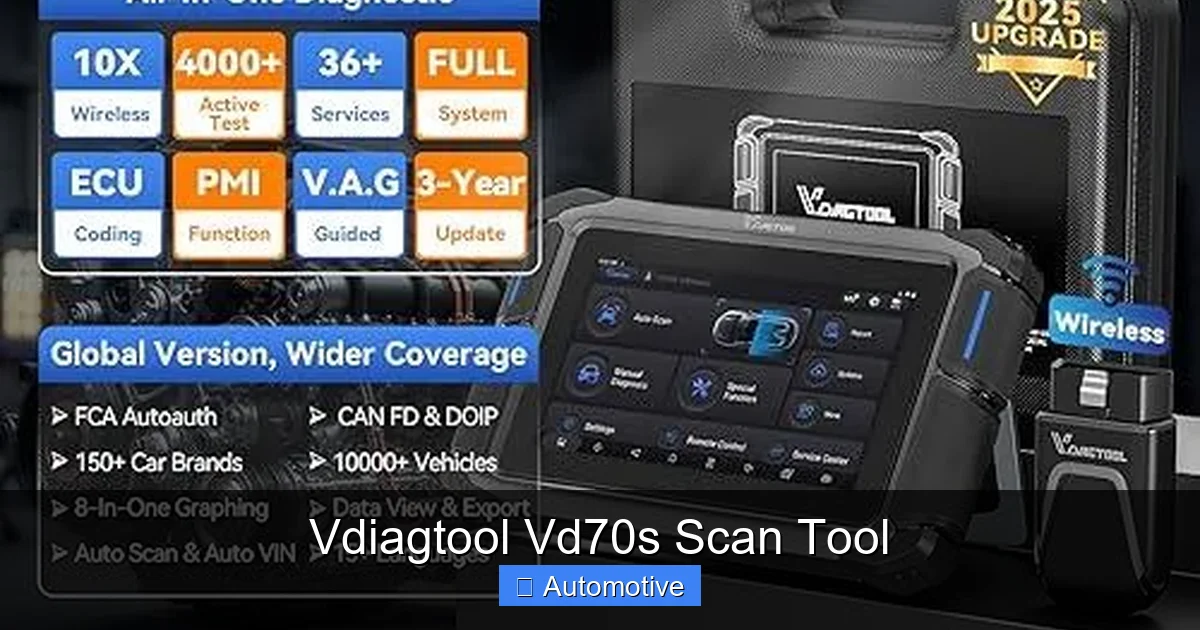
Let’s break down what makes the Vd70s stand out from the crowd. It’s not just about reading codes—it’s about understanding your vehicle at a deeper level.
Visual guide about Vdiagtool Vd70s Scan Tool
Image source: img.pacifiko.com
1. Full-System Diagnostics
One of the biggest advantages of the Vd70s is its ability to scan beyond just the engine. Most basic OBD2 tools only read powertrain (engine and transmission) codes. The Vd70s, however, can access multiple control modules, including:
- Engine (ECM)
- Transmission (TCM)
- Anti-lock Braking System (ABS)
- Supplemental Restraint System (SRS) – airbags
- Body Control Module (BCM)
- And more, depending on the vehicle
For example, if your ABS light is on, a basic code reader might not even detect it. But the Vd70s will pull the specific ABS trouble code, tell you what it means, and help you decide whether it’s a simple sensor issue or something more serious.
2. Live Data and Freeze Frame
Live data is where the Vd70s really shines. Once connected, you can view real-time sensor readings while the engine is running. This includes:
- RPM (revolutions per minute)
- Vehicle speed
- Coolant temperature
- Intake air temperature
- Throttle position
- Fuel trim (short-term and long-term)
- Oxygen sensor voltages
- And many more
This feature is incredibly useful for diagnosing intermittent problems. Say your car hesitates when accelerating—instead of guessing, you can watch the live data and see if the throttle position sensor is responding correctly or if fuel trims are going wild.
The freeze frame function captures a snapshot of the vehicle’s operating conditions at the moment a trouble code was set. This helps you understand what was happening when the issue occurred—like engine load, speed, and temperature—so you can replicate the conditions for testing.
3. Read and Clear Trouble Codes
Of course, the core function of any scan tool is reading and clearing diagnostic trouble codes (DTCs). The Vd70s does this with precision. It displays both generic (P0xxx) and manufacturer-specific (P1xxx) codes, along with plain-English descriptions so you don’t have to guess what “P0420” means.
After you’ve fixed the issue—say, replacing a faulty oxygen sensor—you can use the tool to clear the codes and turn off the check engine light. No need to visit the dealership or pay for a reset.
4. I/M Readiness Monitor
If you live in a state that requires emissions testing, the I/M (Inspection/Maintenance) readiness monitor is a lifesaver. The Vd70s shows you which monitors are “ready” or “not ready,” so you know if your vehicle will pass inspection.
For example, after clearing codes, some monitors take time to run. The tool tells you which ones are still pending, so you don’t waste time and money at the testing station.
5. Multilingual Support and Intuitive Interface
The Vd70s features a 4.3-inch color LCD screen with a clean, easy-to-navigate menu. It supports multiple languages, including English, Spanish, French, German, and more—making it accessible to a global audience.
Buttons are well-placed, and the interface uses icons and simple text. Even if you’ve never used a scan tool before, you’ll be up and running in minutes.
6. Compact and Durable Build
Measuring just about 7 x 4 x 1.5 inches and weighing under a pound, the Vd70s is lightweight and portable. It comes with a sturdy protective case and a 16-foot OBD2 cable, so you can work comfortably without crouching under the dashboard.
The housing is made of high-quality plastic that resists drops and scratches. It’s built to handle the wear and tear of daily use in a busy garage.
How to Use the Vdiagtool Vd70s
Using the Vd70s is straightforward, even for beginners. Here’s a step-by-step guide to get you started.
Visual guide about Vdiagtool Vd70s Scan Tool
Image source: i5.walmartimages.com
Step 1: Locate the OBD2 Port
The OBD2 port is usually found under the dashboard on the driver’s side. It’s a 16-pin connector that looks like a trapezoid. In most cars, it’s within arm’s reach—no tools required.
Step 2: Plug in the Scanner
Turn off the ignition, then plug the Vd70s into the OBD2 port. Make sure it’s fully seated. The device will power on automatically when you turn the key to the “ON” position (you don’t need to start the engine for most functions).
Step 3: Select Your Vehicle
The tool will prompt you to enter vehicle information like make, model, year, and engine type. This ensures accurate diagnostics. The Vd70s has a built-in database, so it recognizes most common vehicles.
Step 4: Choose a Function
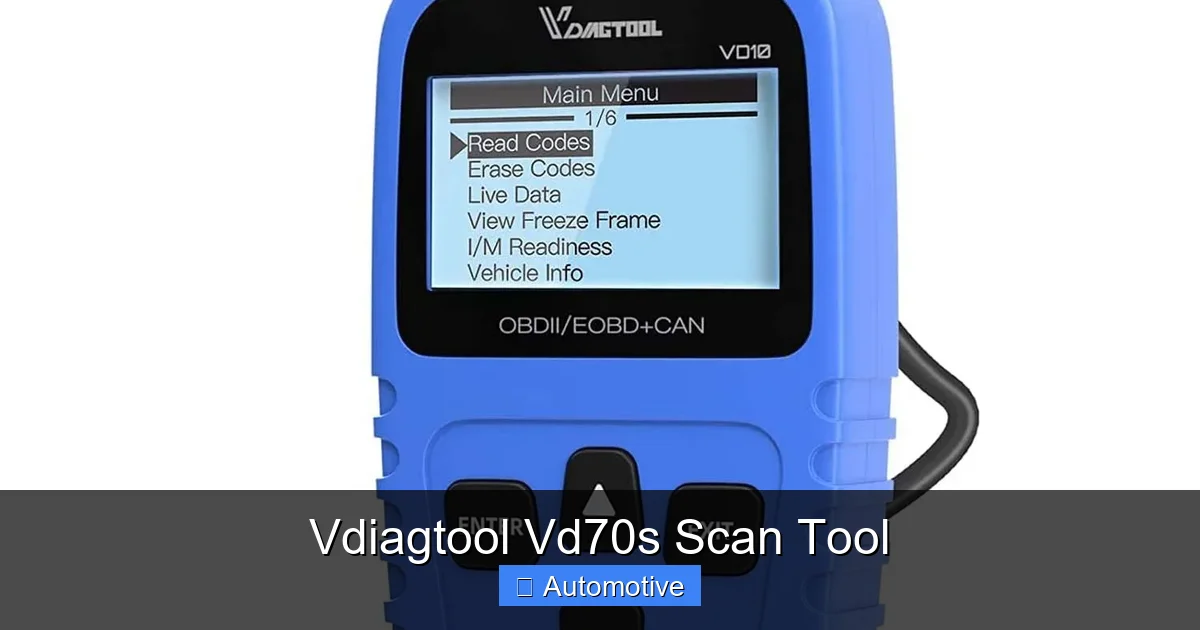
Once connected, you’ll see a main menu with options like:
- Read Codes
- Clear Codes
- Live Data
- Freeze Frame
- I/M Readiness
- System Tests
Select the function you need. For example, tap “Read Codes” to see if any trouble codes are stored.
Step 5: Interpret the Results
The Vd70s displays codes with descriptions. For instance, “P0171 – System Too Lean (Bank 1)” tells you the engine is running with too much air and not enough fuel. This could point to a vacuum leak, faulty MAF sensor, or fuel delivery issue.
Use the built-in help function or search online for more details. Many codes have common fixes, and the tool often suggests possible causes.
Step 6: Clear Codes (After Repair)
Once you’ve fixed the problem, go back to the menu and select “Clear Codes.” The tool will erase the stored DTCs and turn off the check engine light. If the issue is truly resolved, the light won’t come back—unless the problem reoccurs.
Pro Tip: Use Live Data for Diagnosis
Don’t just rely on codes. Use live data to confirm your suspicions. For example, if you suspect a bad coolant temperature sensor, watch the live reading. If it shows -40°F when the engine is warm, that’s a clear sign the sensor is faulty.
Vehicle Compatibility
The Vd70s is compatible with a wide range of vehicles, but it’s important to understand its limits.
Supported Vehicles
The tool works with most gasoline-powered cars, trucks, and SUVs made after 1996 and diesel vehicles made after 2004. It supports domestic brands like Ford, GM, and Chrysler, as well as Asian manufacturers like Toyota, Honda, Nissan, Hyundai, and Subaru. European brands such as Volkswagen, BMW, Mercedes-Benz, and Audi are also supported, though some advanced functions may require additional software or subscriptions on newer models.
OBD2 Protocols
As mentioned earlier, the Vd70s supports all five OBD2 communication protocols. This ensures compatibility across different vehicle types and years. Whether your car uses CAN (Controller Area Network) or an older protocol like ISO9141, the tool can communicate effectively.
Limitations
While the Vd70s is powerful, it’s not a factory-level scanner. It won’t perform advanced functions like programming keys, resetting service lights on all models, or accessing proprietary systems in very new or high-end vehicles. For those tasks, you’d need a more specialized tool like an Autel MaxiCOM or a dealership-grade scanner.
However, for 90% of common diagnostic needs—especially for vehicles up to 10–15 years old—the Vd70s is more than capable.
Software Updates and Support
One of the standout features of the Vd70s is its free lifetime software updates. Technology evolves quickly, and new vehicle models are released every year. Without updates, your scanner could become outdated in just a few years.
How Updates Work
Vdiagtool provides regular firmware and database updates via their official website. You download the update file to a USB drive, plug it into the scanner, and follow the on-screen instructions. The process takes just a few minutes and ensures your tool stays current.
Updates often include:
- New vehicle models and years
- Additional trouble code definitions
- Improved system coverage
- Bug fixes and performance enhancements
Customer Support
Vdiagtool offers email and online support. While they don’t have a 24/7 phone line, most users report quick responses to technical questions. The user manual is clear and includes troubleshooting tips, and there’s a growing community of users sharing tips on forums and YouTube.
Pros and Cons of the Vd70s
No tool is perfect, so let’s look at the strengths and weaknesses of the Vd70s.
Pros
- Affordable Price: Typically under $200, it offers exceptional value compared to scanners with similar features.
- Wide Vehicle Coverage: Works with most cars, trucks, and SUVs from the last 25+ years.
- Full-System Scanning: Accesses engine, ABS, airbags, and more—not just basic OBD2 codes.
- Live Data and Freeze Frame: Helps diagnose complex issues with real-time feedback.
- Easy to Use: Intuitive interface with multilingual support.
- Free Updates: Keeps the tool relevant for years.
- Portable and Durable: Compact design with a long cable and protective case.
Cons
- Not for Advanced Programming: Can’t perform key programming, ECU flashing, or advanced resets on all vehicles.
- Screen Size: The 4.3-inch display is functional but smaller than some competitors’ 7-inch screens.
- No Built-in Battery: Powered by the vehicle’s OBD2 port, so it won’t work if the car battery is dead.
- Limited European Support on Newer Models: Some 2020+ European vehicles may have restricted access.
Real-World Examples and Tips
Let’s look at a few real scenarios where the Vd70s can save you time and money.
Example 1: Diagnosing a Rough Idle
Your car idles roughly, especially when cold. You plug in the Vd70s and find code P0171 (System Too Lean). You check live data and notice the long-term fuel trim is at +25%, indicating the engine is adding extra fuel to compensate for a lean condition. You inspect the intake system and find a cracked vacuum hose. Replace it, clear the code, and the idle smooths out. Total cost: $5 for a hose. Without the scanner, you might have paid $150 for a mechanic to diagnose it.
Example 2: ABS Light On
The ABS light is on, and you’re worried about brake safety. The Vd70s reads an ABS code: C1234 – Right Front Wheel Speed Sensor. You inspect the sensor and wiring, find corrosion, clean it, and clear the code. The light goes off, and your brakes work normally. No need for expensive ABS module replacement.
Example 3: Pre-Purchase Inspection
You’re buying a used car and want to check its health. Plug in the Vd70s, scan all systems, and find a stored code for a faulty catalytic converter (P0420). The seller claims it’s “just a sensor,” but live data shows low oxygen sensor activity, confirming the cat is failing. You negotiate a lower price or walk away. The $150 scanner just saved you thousands.
Pro Tips for Best Results
- Always clear codes after a repair and test-drive the vehicle to ensure the issue is fixed.
- Use live data to compare sensor readings to specifications (found in repair manuals or online).
- Keep the scanner updated—check for new firmware every 6 months.
- Store the tool in its case to protect the screen and buttons.
- For intermittent issues, use the freeze frame to understand the conditions when the code was set.
Conclusion
The Vdiagtool Vd70s scan tool is a smart investment for anyone who wants to take control of their vehicle’s maintenance. It combines professional-level diagnostics with user-friendly design and an affordable price point. Whether you’re fixing your own car, running a small shop, or just want peace of mind, this tool delivers reliable performance and valuable insights.
It’s not the most advanced scanner on the market, but for the price, it’s hard to beat. With full-system scanning, live data, code clearing, and free updates, the Vd70s gives you the power to diagnose and fix problems quickly—without relying on a mechanic for every little issue. If you’re serious about car care, this is one tool you won’t regret owning.
Frequently Asked Questions
What vehicles are compatible with the Vdiagtool Vd70s?
The Vd70s works with most gasoline vehicles made after 1996 and diesel vehicles made after 2004. It supports domestic, Asian, and European brands, including Ford, Toyota, Honda, VW, and BMW.
Can the Vd70s read ABS and airbag codes?
Yes, unlike basic code readers, the Vd70s can scan ABS, SRS (airbags), transmission, and other systems, giving you a complete diagnostic picture.
Does the Vd70s require a subscription or paid updates?
No, the Vd70s comes with free lifetime software updates. You can download new firmware and vehicle data from the manufacturer’s website at no cost.
Can I use the Vd70s to reset the check engine light?
Yes, after fixing the underlying issue, you can use the tool to clear trouble codes and turn off the check engine light.
Is the Vd70s easy to use for beginners?
Absolutely. It features a simple menu, color screen, and plain-English code descriptions. Most users can start diagnosing within minutes of unboxing.
Will the Vd70s work on a 2023 vehicle?
It may work for basic OBD2 functions on some 2023 models, but advanced features could be limited. Always check compatibility before purchasing, especially for newer European vehicles.
